
Fingertip grip puts most of the control on your fingertips, so shape, weight, and click feel matter more than bulk. The right mouse can make fast aim, quick edits, and long desktop sessions feel far less fussy, especially on a crowded desk or during late-night work. This roundup focuses on compact wireless designs, vertical options for relaxed hand posture, and grip accessories that change how a mouse feels without replacing it. You’ll also see which picks suit gaming, office use, and a lighter touch.
Quick Shortlist For Fingertip Grip

ATTACK SHARK X3 49g Ultra-Lightweight Wireless Gaming Mouse

MOJO Master Grip Rechargeable Silent Vertical Mouse
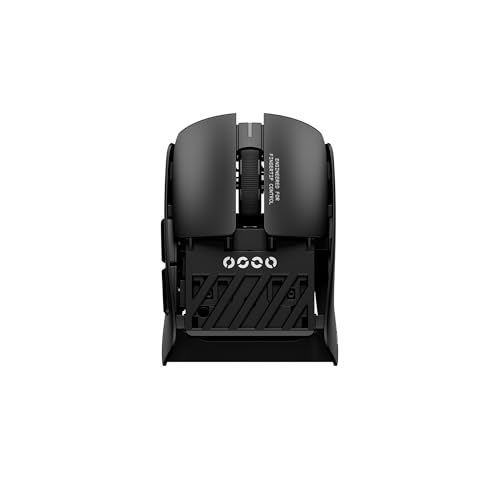
Pulsar Gaming Gears Pulsar Lab X2F Wireless Gaming Mouse Mini

Ergonomic Vertical Mouse Silent Wireless Bluetooth Mouse

Gaming Mouse Three Dimensional Grips Auxiliary Patch

GWolves HTR Lightweight Wireless Fingertip Grip Gaming Mouse

Mouse Grip DIY Cut Sheet for Gaming Mouse

Logitech M185 Compact Ambidextrous Wireless Mouse Black
More Details On Our Top Picks
A 49 g shell keeps this ATTACK SHARK model aimed squarely at fingertip control, so the mouse stays out of the way while your fingers do the work. Bluetooth 5.2, 2.4G wireless, and wired use give you flexibility across a desktop, laptop bag, or a setup that swaps between work and play.
The PAW3395 sensor and 26K DPI ceiling matter most for quick aim changes and fine cursor movement, while the programmable buttons let you shape the layout around your habits. The trade-off is simple, very light mice can feel too sparse for larger hands, so this one suits a more precise touch than a palm-heavy grip.
Strong Points
- Very light body helps fingertip movements feel fast and low effort.
- Three connection modes give you more flexibility than a single wireless setup.
- Programmable buttons let you tailor shortcuts for gaming or desk work.
- The sensor spec points to crisp cursor control for aim-sensitive tasks.
- White and tape styling keeps the look clean without adding visual clutter.
Things To Consider
- Ultra-light mice can feel less planted in larger hands.
- Wireless, wired, and software features add setup choices you may need to sort out first.
- Very light finishes tend to show wear sooner on high-contact spots.
Feature Snapshot
Who It Suits Best
You’ll get the most from this one if you favor a light fingertip grip and want a mouse that can move from gaming to general computer use without much fuss.
Where A Sibling Pick Shines
GWolves HTR Lightweight Wireless Fingertip Grip Gaming Mouse suits you better if you want a more extreme lightweight build and a deeper competitive control focus.
This MOJO-HOME mouse takes a vertical posture, which changes the hand angle more than a standard fingertip shell. That shape can feel calm and natural during long spreadsheet sessions, quiet office hours, or a home desk where mouse clicks carry farther than you’d like.
Quiet buttons and adjustable sensitivity add to the comfort-first setup, and the wireless plus Bluetooth options make it easier to move between a laptop and a desktop. The honest read is that vertical mice are a fit-based choice, so fingertip purists may need a short adjustment period before the shape feels routine.
What We Like
- Vertical angle encourages a more relaxed hand position than flat mice.
- Quiet clicking suits shared spaces and late work sessions.
- Bluetooth and wireless support make device switching simpler.
- Adjustable sensitivity helps you tune cursor speed to the task.
Room For Improvement
- Vertical shaping is less natural for classic fingertip-only control.
- Quiet-button designs can feel softer than clicky gaming mice.
- Custom software adds setup time for anyone who likes plug-and-go gear.
Core Details
Built With In Mind
You’ll appreciate this most in a home office, shared workspace, or any setup where a calmer wrist angle matters more than rapid flicks.
Swap It Out When
ATTACK SHARK X3 49g Ultra-Lightweight Wireless Gaming Mouse is the better fit for gamers who want a flatter shape and faster fingertip response.
The Pulsar Lab X2F pushes hard into fingertip territory with a 38 g body, a mini shape, and a flat-side design that gives your fingers plenty of control room. That kind of layout tends to suit rapid aim correction and low-effort lifts, especially in games where the mouse leaves the pad often.
Its symmetrical shell and center hump make the shape more balanced than the name might suggest, while the HUANO switch spec and 32K DPI ceiling point to a mouse built for sharper input habits. The catch is that a miniature mouse can feel cramped for longer work sessions, so this one makes the most sense for a compact grip style rather than all-day office comfort.
Highlights
- 38 g weight keeps the mouse extremely easy to reposition.
- Mini shape works naturally with fingertip control.
- Symmetrical body helps the mouse feel centered in hand.
- 32K DPI support gives you plenty of sensitivity range.
- Flat side and center hump help create a stable grip zone.
Points To Note
- Small dimensions may feel tight for larger hands.
- Very light shells can feel less relaxed during long desk work.
- High-spec parts can add setup decisions for casual users.
Details At A Glance
Who Should Grab It
You’ll like this most if your hand stays light on the shell and your play style depends on tiny, fast adjustments.
A Better Fit Elsewhere
Logitech M185 Compact Ambidextrous Wireless Mouse Black suits you better if you want a simpler everyday mouse instead of an esports-first shape.
FOPATO’s vertical mouse is built around a 57° angle, which shifts your hand into a handshake posture rather than the usual flat grip. That setup can feel gentler over a long workday, especially in home offices where you move from email to web browsing to document edits without much break.
The silent clicks and Bluetooth 5.0 plus 2.4G support make it easy to keep the desk calmer and the connection options flexible. Three DPI levels add some control over pointer speed, although the simple layout means fingertip gamers will likely want a more specialized shape for sharper in-game movement.
Upsides
- 57° vertical shape supports a more natural hand angle.
- Silent clicks suit shared rooms and quiet evenings.
- Bluetooth and 2.4G support widen compatibility across setups.
- Three DPI levels cover basic speed adjustment needs.
Softer Spots
- Vertical design is more about comfort than fast fingertip control.
- Three DPI steps are useful, though not very granular.
- White finishes can ask for more regular cleaning in busy spaces.
Feature Rundown
Perfect Match For
You’ll get the most from this pick in everyday office work, especially on a desk where comfort matters more than speed tricks.
Another Choice May Suit
Pulsar Gaming Gears Pulsar Lab X2F Wireless Gaming Mouse Mini is a better fit for fingertip-heavy gaming and much lighter movement.
This Hokeyio grip patch changes the feel of your current mouse instead of replacing it, which can be useful when the shell shape is close but not quite right. The self-adhesive layout and the skin-like material aim to give your fingers more traction, and that matters most in fast play where tiny slips get annoying.
Because the modules are meant to be placed where your palm and fingers need support, you can tune the layout to your hand rather than settling for a fixed shell. The trade-off is that accessories like this depend on your existing mouse shape, so the result is only as good as the base mouse underneath it.
Positives
- Lets you adjust grip feel without replacing the mouse.
- Self-adhesive format makes placement straightforward.
- Skin-like material adds traction and a softer touch.
- Moveable modules help you place support where your hand wants it.
- Useful for gamers who want more hold with less slip.
Minor Gripes
- Fit depends on the mouse you already own.
- Adhesive pieces can require careful placement to stay tidy.
- Accessory users may need to replace patches over time as edges wear.
Core Details
Whose Shelf It Belongs On
You’ll appreciate this most if your current mouse is almost right and you just want more traction or better thumb and finger support.
Where Another Pick Suits Better
ATTACK SHARK X3 49g Ultra-Lightweight Wireless Gaming Mouse is the better path when you want a fully new mouse shape rather than add-on grips.
The HTR leans even harder into the fingertip brief than the ATTACK SHARK X3, with a near 28 g weight and a honeycomb shell that strips the mouse down to the essentials. That kind of build feels almost weightless on the pad, which is exactly what many competitive players want during rapid repositioning.
Six programmable buttons, on-board memory, and the nRF52840 CPU give it a more serious control set than the minimalist shape suggests. The honest trade-off is that a mouse this stripped back can feel picky about grip style, so you’ll want a very deliberate fingertip hold before calling it the right fit.
Reasons To Buy
- Extremely low weight helps quick motion feel effortless.
- Honeycomb shell keeps the design light and focused.
- On-board memory stores settings on the mouse itself.
- Six programmable buttons give you useful control options.
- Low-latency, 8K-report design suits high-speed play.
Areas To Watch
- Very light builds can feel too stripped down for relaxed desktop work.
- Honeycomb shells may collect dust more easily than closed shells.
- Grip style needs to be intentional for the shape to pay off.
Technical Sheet
Best Suited To
You’ll benefit most if you want a stripped-down, ultra-light fingertip mouse for fast aim and precise lifts.
Look Elsewhere When
MOJO Master Grip Rechargeable Silent Vertical Mouse is the calmer choice for office work and a more relaxed hand angle.
BT.L takes a very different route here, since this is a cut-to-fit grip sheet rather than a mouse itself. That makes it useful for fingertip grip fans who like their current mouse shape but want a bit more texture, a bit more hold, and less sliding under quick finger movement.
The 12 x 12 cm sheet and 0.5 mm thickness keep the add-on slim enough not to overwhelm the shell, which matters when you only want a subtle change. The trade-off is obvious, too, because the final result depends on your cutting skill and patience during installation.
Best Bits
- Trim-to-fit format works across many mouse shapes.
- Thin 0.5 mm profile keeps bulk low.
- Polymer material aims for a grippy, comfortable feel.
- Good option for dialing in a mouse you already like.
Small Caveats
- Requires careful cutting for a neat result.
- Installation takes patience, especially on curved shells.
- Accessory fit depends on your own shaping choices.
Feature Card
Who Will Love This
You’ll like this most if your current mouse is close to right and you only need a custom grip surface to refine the feel.
Where A Sibling Pick Shines
Gaming Mouse Three Dimensional Grips Auxiliary Patch suits you better when you want pre-shaped support instead of trimming your own layout.
This Logitech M185 keeps things basic in a way that can suit casual desk use, because the compact ambidextrous shell stays familiar and easy to share between left and right hand use. The rubber grips add a little extra hold, while the 2.4 GHz USB-A nano receiver keeps the connection simple for laptops and desktops with a spare USB port.
Optical tracking and the 12-month battery claim make it a practical everyday mouse for work notes, web browsing, and travel bags, not a performance toy. The honest trade-off is that it lacks the focused shape and aggressive lightness of the Pulsar or G-Wolves options, so fingertip specialists will likely want something more specialized.
Bright Spots
- Compact size keeps the mouse easy to carry.
- Ambidextrous shape works for either hand.
- Rubber grips improve hold without adding much bulk.
- USB-A nano receiver keeps setup straightforward on many PCs.
- Optical tracking suits routine browsing and office tasks.
Trade Offs
- More basic shape offers less fingertip precision than gaming-focused picks.
- Not built around high-speed competitive play.
- USB-A receiver use may mean keeping track of the dongle.
Quick Facts
The Right Fit
You’ll get the most from this mouse if you want a plain, compact wireless option for everyday computing rather than a dedicated fingertip gaming shape.
Not Your Match When
Pulsar Gaming Gears Pulsar Lab X2F Wireless Gaming Mouse Mini is the better route for competitive players who want a much lighter and more aggressive grip profile.
How To Choose The Right Mouses For Fingertip Grip
Shape First, Then Weight
Fingertip grip works best with a mouse that disappears into the hand rather than one that fills it. Shorter shells, flatter sides, and a lighter body make quick lifts easier, which matters during aim-heavy games or fast editing work.
A heavier mouse can still work, but it usually asks for more effort from the fingers and wrist. That’s why the 38 g Pulsar and the near 28 g G-Wolves sit closer to the pure fingertip end of the spectrum than the more general-purpose Logitech M185.
Button Feel And Sensor Behavior
Click feel sounds small until you’re using the mouse all day, because soft buttons, crisp buttons, and quiet buttons all change the pace of your hand. A precise sensor, like the PAW3395 in the ATTACK SHARK X3 and G-Wolves HTR, matters for smooth cursor movement on smaller motions.
For gaming, high DPI numbers can help with sensitivity tuning, but they do not replace a shape that matches your grip. For work, the better question is how comfortably you can hold the mouse after an hour, not how dramatic the spec sheet looks.
Wireless, Wired, And Desk Setup
Wireless freedom helps on crowded desks and laptop setups, but it also adds a little more to think about in pairing and charging. Bluetooth, 2.4G receivers, and wired fallback all solve slightly different problems, so your best match depends on how often you switch devices.
Very simple office use often favors easy pairing and long battery life, while gaming setups usually care more about consistency and lower latency. The MOJO vertical mouse, for example, leans toward calmer everyday use, while the ATTACK SHARK and Pulsar models lean toward faster movement.
A Quick Reality Check Before You Choose
Mistakes Worth Dodging
A common mistake is chasing the lightest mouse without checking shape. A shell that’s too small or too stripped down can feel twitchy in normal desktop work, even if it looks perfect for fingertip play.
Another miss is buying an accessory grip patch for a mouse that already feels wrong in the hand. Add-ons can improve traction, but they rarely fix a shape mismatch on their own.
The Upgrade Payoff
Higher-tier fingertip mice usually cost more because of lighter materials, stronger sensors, better switches, and more refined internal tuning. Those details matter most when you move the mouse constantly and want every movement to feel controlled rather than vague.
The upgrade makes sense for competitive gaming, precise creative work, or any setup where you feel the mouse’s weight in every lift. For everyday office use, a simple compact mouse can be plenty, and the extra money may not buy you much that you’ll notice.
Final Thoughts
Your best fingertip mouse depends less on brand names and more on how much control you want from the shell itself. The Pulsar and G-Wolves options push hardest toward pure fingertip performance, while the ATTACK SHARK X3 gives you a more flexible middle ground. For office comfort, the vertical picks make a stronger case, and the grip accessories are useful when your current mouse is close but not quite right. Choose the shape that matches how your hand actually moves, and the rest gets easier.
