
You know the feeling, a mouse looks fine on the page, then your palm hangs off the back and your wrist starts doing extra work. That’s the problem this roundup solves: finding shapes, button layouts, and grip styles that suit larger hands without turning desk time into a fussy adjustment. Some of these picks favor office comfort, some lean hard into gaming control, and a few sit in the middle with quiet clicks and easy wireless setup. You can use this list to narrow the field fast, then match the shape to your hand size, work style, and desk routine.
The Shortlist At A Glance

Acer Wireless Mouse for Laptop 2.4GHz Computer Mouse 5 Adjustable 4000 DPI Office Cordless USB Mice with USBA Receive
Evoluent VMDL Ergonomic Vertical Mouse Right Hand Large Wired USB

Logitech Signature Plus M750 L Wireless Mouse

Corsair IRONCLAW Wireless SE Gaming Mouse Black

Redragon Large Wireless Gaming Mouse for Big Hands

Logitech Signature Comfort Plus M850 L Wireless Mouse Bluetooth Graphite
SANWA Wireless Ergonomic Mouse for Large Hands with Wrist Rest Black

WL300 Bluetooth Mouse Silent Wireless Mice Cordless Computer Mouse Grey
Acer’s cordless shape keeps the focus on straightforward desk use, which suits commutes, shared offices, and home setups where you want less clutter. The five DPI steps give you some room to tune cursor speed, and the six-button layout adds a little extra control without feeling fussy. For medium to large hands, the appeal is plain: you get a roomy-feeling office mouse instead of a tiny travel pebble.
The trade-off is that this style usually lives in the comfort-first lane rather than the luxury lane. You may also find the USB-A receiver more convenient on older laptops and desktops than on ultra-thin machines with fewer ports, so the fit depends on your hardware mix.
Strong Points
- Five DPI settings help you match pointer speed to spreadsheets, browsing, or lighter design work.
- Six buttons give you extra shortcuts without pushing the shape into gaming territory.
- The wireless receiver setup keeps a desk cleaner than a corded mouse.
- Its medium-to-large hand fit should feel more natural than compact office models.
Things To Consider
- USB-A only connectivity may be less convenient on newer laptops that lean on USB-C.
- It’s built more for general comfort than long-haul gaming or advanced macro use.
- Button placement and shape are simple, so advanced hand-support features are limited.
Feature Snapshot
Who It Suits Best
Office workers and students who want a roomy wireless mouse with uncomplicated controls will get the most out of it.
A Better Fit Elsewhere
Logitech Signature Plus M750 L Wireless Mouse fits better for you want quieter clicks and Bluetooth convenience across several devices.
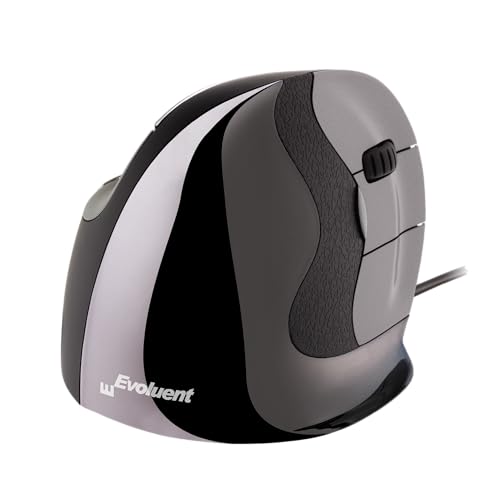
This one takes a very different route from the Acer, since the shell stands upright instead of spreading flat across the desk. That vertical stance is meant to keep your hand in a more natural handshake position, and the taller body makes more sense for larger hands than a shallow office mouse. It’s a wired USB model, so there’s nothing to charge or pair, which is reassuring in a busy workday.
The honest read is that vertical mice feel unusual at first, so the payoff depends on how patient you are with the shape. Windows users also get the most from the customizable buttons, while Mac and other setups won’t benefit from the same level of tailoring.
What We Like
- The vertical form keeps your hand upright rather than flattened over the mouse.
- The larger shell gives bigger hands more room to settle in.
- Wired USB use avoids pairing hassles and charging routines.
- Four pointer speeds let you shift between careful and quicker navigation.
- Six customizable buttons in Windows add useful shortcuts for busy desk work.
Room For Improvement
- The shape can take a little getting used to, especially after years on standard mice.
- Windows-focused customization leaves other platforms with less flexibility.
- The cord keeps movement more anchored than a wireless option like the Logitech M750 L.
Core Details
Built With In Mind
Right-handed office users with larger hands and a strong interest in vertical comfort will feel the design intent most clearly.
Swap It Out When
Logitech Signature Comfort Plus M850 L Wireless Mouse fits better for you want a softer palm rest feel and Bluetooth use across a wider set of devices.
The M750 L lands in a sweet middle ground for you want a mouse that feels settled without looking oversized or aggressive. SmartWheel is Logitech’s name for a scrolling system that shifts between precise steps and faster movement, and that matters during long documents or fast web browsing. The contoured shape and silent clicks make it a calm desk companion, especially in shared rooms.
Compared with the Evoluent vertical model, this one keeps a more familiar low-profile stance, so the adjustment curve is gentler. It also works better than the basic Acer when you need Bluetooth and multi-device flexibility, though it won’t give you the same tall-handed posture support as the vertical picks.
Highlights
- The large-hand size target is clear, and the contour supports a relaxed grip.
- Bluetooth and multi-device support help you move between workstations with less friction.
- Silent clicks suit libraries, meetings, and late-night desk sessions.
- The 24-month battery claim means less attention spent on maintenance.
- Customizable side buttons add practical shortcuts for navigation and app work.
Minor Gripes
- It stays closer to a traditional mouse shape, so it won’t satisfy everyone who wants a vertical posture.
- Side-button use depends on whether you like extra thumb controls or prefer a simpler body.
- The Graphite finish is understated, which suits work setups but won’t feel flashy.
Details At A Glance
Right Fit For
Hybrid workers who want a quiet, familiar wireless mouse with enough size to feel steady in larger hands will appreciate it most.
Consider Something Else When
Evoluent VMDL Ergonomic Vertical Mouse Right Hand Large Wired USB suits you better if you want a more dramatic posture shift and a taller shell.
The IRONCLAW Wireless SE is built for large hands that want gaming precision rather than office politeness. Its 26,000 DPI sensor range gives you a huge speed ceiling, and the ten programmable buttons make sense for MOBA, FPS, and MMO play where shortcuts matter. The ergonomic body should feel steadier than a compact gaming shell, especially during long sessions.
Compared with the Logitech M750 L, this Corsair model is far more aggressive in both control and customization. The trade-off is obvious, though, since the feature set is aimed at gaming first and general desk simplicity second.
Upsides
- The large-handed ergonomic body offers a fuller grip than most standard gaming mice.
- 26,000 DPI gives you a very wide adjustment range for fast play and careful aiming.
- Ten programmable buttons help you keep common commands close at hand.
- Wireless use keeps mouse drag out of your way on a crowded desk.
Softer Spots
- The gaming-first layout may feel like more mouse than you need for office work.
- Programmable controls usually mean some setup time before everything feels natural.
- For lighter desktop use, the Redragon or Logitech office models can feel simpler.
Technical Sheet
Who Should Grab It
Large-handed gamers who want a wireless mouse with lots of programmable control will appreciate this shape and layout.
Look Elsewhere When
Logitech Signature Plus M750 L Wireless Mouse makes more sense for you want quieter desk use and less setup overhead.
Redragon goes broad on connection choice, which helps a lot in a desk setup that changes from day to day. You get 2.4G wireless, Bluetooth, and wired use in one shell, so the mouse can move between a laptop, desktop, and charging cable without fuss. The full-size build, finger rests, and rubber side grips are the parts that matter most for larger hands, because they keep your palm from feeling perched on top of a small body.
That flexibility makes it appealing for mixed use, though the extra modes also mean more decision points than a simpler office mouse. Compared with the Corsair IRONCLAW, this Redragon leans more toward adaptable everyday gaming instead of a single-minded performance feel.
Reasons To Buy
- Tri-mode connectivity gives you more setup flexibility than a single-connection mouse.
- The contoured shell and dual finger rests help larger hands settle in.
- Rubber side grips add steadier handling during longer sessions.
- Two side buttons and macro support suit lighter gaming and productivity shortcuts.
- The recharge-friendly design is practical for desks that rotate between work and play.
Worth Noting
- The richer feature list means more setup choices than a plain office mouse.
- RGB lighting and gaming styling won’t suit every desk.
- You may need to spend time matching connection mode to the device in front of you.
Quick Facts
Made For
Desk gamers who also move between laptop and desktop use will get the most out of the flexible connection options.
Where A Sibling Pick Shines
Acer Wireless Mouse for Laptop 2.4GHz Computer Mouse 5 Adjustable 4000 DPI Office Cordless USB Mice with USBA Receive suits you better for simpler office work and fewer setup choices.
Logitech’s M850 L aims straight at comfort, and the palm cushion is the detail that stands out most for long work sessions. Bluetooth support keeps the desk uncluttered, while the customizable buttons and large-hand sizing make the mouse feel built for routine office movement rather than fast-paced play. On a laptop, iPad, or desktop, it feels like the kind of mouse you can forget about in a good way.
Compared with the M750 L, this one pushes harder toward cushioning and palm support. The trade-off is that it stays in the productivity lane, so gamers or heavy shortcut users may want the more aggressive shapes from Corsair or Redragon instead.
Positives
- The palm cushion helps larger hands rest more naturally during long sessions.
- Bluetooth pairing suits modern laptop and tablet setups.
- Customizable buttons make recurring tasks a little faster.
- The 24-month battery target lowers day-to-day maintenance attention.
- Its shape feels better suited to office use than small travel mice.
Areas To Watch
- It’s more comfort-focused than feature-packed for gaming or deep shortcut work.
- The soft office styling may feel plain beside the RGB-heavy Redragon.
- Some shoppers will still prefer the stronger hand-angle change of a vertical mouse.
Core Details
Whose Shelf It Belongs On
Hybrid office users who want a larger wireless mouse with a cushioned feel and broad device support will find it easy to settle into.
Reach For A Different Pick When
SANWA Wireless Ergonomic Mouse for Large Hands with Wrist Rest Black makes more sense for you want a vertical angle and a detachable wrist rest.
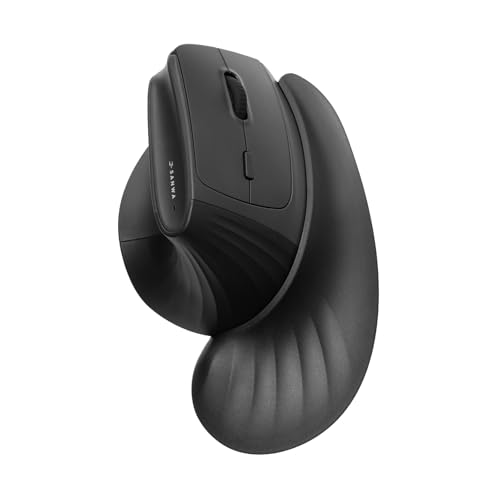
SANWA leans into posture support with a 46 degree vertical angle and a detachable magnetic wrist rest. The wrist rest includes a finger rest and arm pad, so the hand has more contact points than on a plain office mouse. For long days at a workstation, that extra support can feel steadier than the flatter Acer or Logitech shapes.
It also handles mixed-device use well, thanks to Bluetooth 5.4 plus 2.4G and a three-device switching setup. The vertical angle will not suit every grip style, though, and the mouse asks for a little more desk space than a compact option.
Best Bits
- The 46 degree tilt encourages a more upright hand position.
- The magnetic wrist rest adds support without making the whole setup permanent.
- Three-device switching helps you move between laptop, PC, and other gear.
- Silent clicks are useful in shared spaces and quiet offices.
- The 1000 to 4000 DPI range gives you useful control over pointer speed.
Small Caveats
- Vertical mice often feel unfamiliar during the first stretch of use.
- The wrist rest adds support, but it also adds another part to store or move around.
- Its footprint will feel larger than slimmer travel-style mice.
Feature Rundown
The Right Fit
Workstation users who want a vertical shape with extra wrist support and multi-device switching will see the most value here.
Another Choice May Suit
Logitech Signature Comfort Plus M850 L Wireless Mouse Bluetooth Graphite suits you better for a softer, less upright feel at the desk.
The WL300 is the most travel-friendly shape in this group, with quiet clicks and a sculpted grip that keeps the body easy to hold in transit. Tri-mode connectivity means wired, 2.4G wireless, and Bluetooth are all on the table, so you can match it to a laptop at a café, a desktop at home, or a tablet on the road. For larger hands, the sculpted grip helps it feel more planted than a flat mini mouse.
Compared with the more desk-focused Logitech models, this one aims at flexibility first. The trade-off is that it will not feel as substantial or cushioned as the M850 L, so your preference depends on whether portability or palm support matters more.
What We Like
- Quiet clicks suit shared workspaces, libraries, and hotel desks.
- Tri-mode connectivity makes the mouse easy to move between devices.
- The sculpted grip gives larger hands a steadier place to rest.
- An 18-month battery target keeps upkeep fairly light.
- Six buttons provide more control than very basic travel mice.
Points To Note
- The travel-first shape may feel smaller than the best office-focused choices.
- Portability comes with less palm cushioning than the Logitech comfort model.
- Connection mode switching adds a small bit of routine for frequent device changes.
At A Glance
Perfect Match For
Frequent travelers and hybrid workers who need a quiet, compact mouse with several connection paths will find it easy to slot into daily life.
Skip It When
Logitech Signature Comfort Plus M850 L Wireless Mouse Bluetooth Graphite fits better for you want a fuller palm-rest feel at a fixed desk.
How To Choose The Right Mouses For Large Hands
Shape Matters More Than Style
Hand size alone does not tell the whole story. A large-hand mouse should give your palm enough length, enough width, and enough curve that your fingers are not hanging awkwardly over the edges.
Vertical mice change the angle of the hand, while contoured mice keep the familiar low profile. The right choice depends on whether you want a more neutral wrist position or a shape that feels natural right away.
Connection Type Changes Daily Use
Wireless models clean up a desk and help on the move, but they can add pairing steps or battery upkeep. Wired mice avoid that routine and work well on a fixed workstation where the cable does not get in the way.
Bluetooth is handy for modern laptops and tablets, while 2.4G receivers can feel more plug-and-play on older machines. A mouse with multiple connection modes gives you more flexibility, though the extra options can make setup feel less simple.
Buttons, Scrolling, and DPI Should Match Your Work
DPI, or dots per inch, describes pointer sensitivity, so higher numbers usually mean faster cursor movement. That matters in spreadsheets, design software, and games, because the wrong setting can make a mouse feel twitchy or sluggish.
Extra buttons help with shortcuts, but only when your routine justifies them. A quiet office user often benefits more from a smooth scroll wheel and sensible button placement than from a crowded gaming layout.
Things Worth Knowing First
Common Shopping Slip Ups
Many shoppers focus on hand size and ignore grip style, which is where fit problems usually start. A large mouse can still feel awkward when the hump is too high or the thumb channel sits in the wrong spot.
It also helps to match the mouse to the device stack on your desk. USB-A receivers, Bluetooth pairing, and wired connections all solve different problems, so the wrong choice can add friction instead of removing it.
The Case For Spending Up
Higher-tier mice usually cost more because they add shape work, extra buttons, better scroll systems, and broader device support. Materials and internal switches also tend to feel more refined, which matters during long days at a desk.
The upgrade makes the most sense for heavy office use, gaming, or anyone who spends hours in one grip pattern. For lighter email-and-browse routines, a simpler large-hand mouse often covers the need without the extra complexity.
Final Thoughts
You have plenty of workable paths here, but the best choice depends on how your hand sits on the mouse and how you spend the day. For simple office work, the Acer and Logitech options keep things easy, while the Evoluent and SANWA picks lean into posture support. Gaming-focused hands will get more from the Corsair or Redragon, and travel-minded setups should look hard at the WL300. Pick the shape that feels steady for your routine, and the rest gets easier.
