
Big hands need more than a roomy shell. You want a mouse that lets your palm settle naturally, keeps your wrist from working too hard, and still feels steady during long desk sessions, busy office days, or late-night gaming. That balance matters even more for palm grip, where the back of your hand stays in contact with the mouse most of the time. The picks below focus on shape, support, button layout, and practical use across work and play.
The Shortlist At A Glance
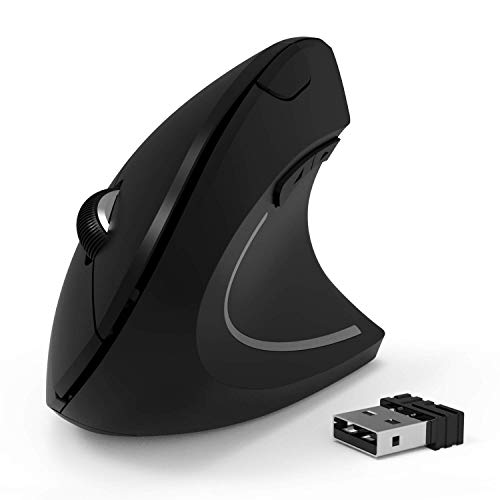
shoplease Wireless Vertical Mouse 2.4G

Corsair IRONCLAW Wireless SE Gaming Mouse Black

Redragon Large Wireless Gaming Mouse for Big Hands

SHARE SUNSHINE Wireless Adjustable Vertical Mouse 3600 DPI

SHARE SUNSHINE Wireless Vertical Mouse 3600DPI

abc.mat Ergonomic Mouse Pad Wrist Rest Support

Logitech Signature Comfort Plus M850 L Wireless Mouse Bluetooth Graphite
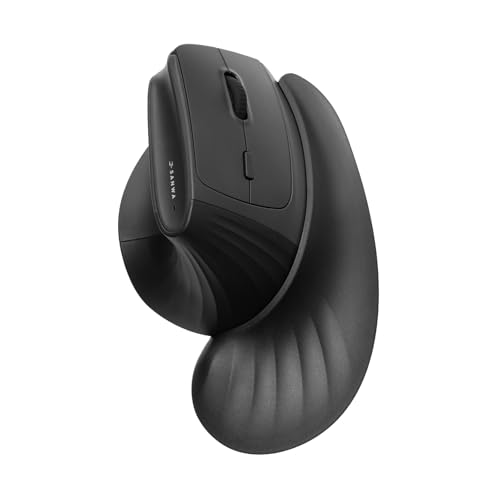
SANWA Wireless Ergonomic Mouse for Large Hands Black
More Details On Our Top Picks
The vertical shape is the main reason this one earns a place here. Your hand stays in a handshake-style position, which can feel easier on long office stretches than a flatter shell, especially for bigger hands that usually crowd compact mice.
The three DPI steps, 800, 1200, and 1600, keep it straightforward rather than fussy. That makes it a sensible match for everyday work, though you will give up the extra finesse and extra buttons that gaming-focused models like the Corsair and Redragon bring.
Strong Points
- Vertical body encourages a more natural wrist angle.
- Three DPI levels keep pointer speed easy to tune.
- Wireless 2.4G setup keeps the desk uncluttered.
- Large-hand users get more room than with slim travel mice.
Things To Consider
- Side-to-side movement can feel different at first.
- The simpler button layout leaves less room for shortcuts.
- Owners who want multi-device switching may prefer another pick.
Feature Snapshot
Who It Suits Best
Office users with larger palms who want an easy transition into a vertical mouse will get the most from it.
A Better Fit Elsewhere
Logitech Signature Comfort Plus M850 L Wireless Mouse Bluetooth Graphite suits you better when you want a more traditional feel for mixed work across Windows, Mac, and iPad.
For larger hands that also spend time in games, this one leans hard into control. The 26,000 DPI ceiling gives you wide sensitivity range, and the ten programmable buttons make it useful for MOBA, FPS, or MMO play where quick commands matter.
Compared with the simpler shoplease vertical mouse, the Corsair is far more layered and less about wrist-angle correction. That trade-off makes sense for desk users who want a gaming shell with more grip points, though the extra features can feel like more mouse than a casual office setup needs.
What We Like
- Large-hand ergonomic shape has a fuller, more planted feel.
- Ten buttons support shortcuts and in-game commands.
- High DPI range suits fast cursor changes and gaming use.
- Wireless setup keeps movement free during long sessions.
- Strong fit for action-heavy game styles and busy workdays.
Worth Noting
- Gamers usually benefit more than pure office users.
- Extra buttons take a little time to map well.
- A bulkier body may feel excessive on smaller desks.
Core Details
Who Will Love This
Gamers with big hands and a need for many side controls will appreciate the extra command space.
Swap It Out When
Redragon Large Wireless Gaming Mouse for Big Hands is the better call when you want tri-mode connection options alongside a similarly roomy shape.
This Redragon leans into flexibility more than the first two picks. You get 2.4G wireless, Bluetooth, and wired operation, so it suits a desk that shifts between a laptop, a desktop, and a backup cable without much fuss.
The contoured body, finger rests on both sides, and rubber side grips point it toward long sessions, especially for medium to larger hands. The RGB lighting and two side buttons give it a gamer edge, though people wanting a cleaner office look may find the styling a bit busy.
Upsides
- Tri-mode connection adds real desk flexibility.
- Contoured shell helps your palm settle in naturally.
- Finger rests and rubber grips support steadier handling.
- Rechargeable design suits frequent daily use.
- Two side buttons help with common shortcuts.
Small Caveats
- RGB styling may feel louder than some office setups need.
- Multi-mode switching can add a little setup attention.
- Macro use depends on software comfort, so that matters for some.
Details At A Glance
Best Suited To
Multi-device gamers and hybrid desk users who want one mouse for several connection styles will get the most value from it.
Look Elsewhere When
Corsair IRONCLAW Wireless SE Gaming Mouse Black suits you better when you want a more button-heavy gaming setup with a stronger focus on high-sensitivity control.
The adjustable vertical angle is the big story here. That feature lets you move beyond a fixed upright stance, which can be useful for right-handed users who want a more tailored feel across long workdays.
The removable palm rest adds another layer of support, and the six-button layout gives you more control than a bare-bones office mouse. The honest read is that all those parts can feel a bit more involved to clean and set up than a simpler shell, but the payoff is a more customizable fit.
Bright Spots
- Adjustable angle helps you dial in a preferred hand position.
- Removable palm rest gives extra support for larger hands.
- Six buttons allow more shortcuts than basic models.
- 3600 DPI offers plenty of cursor speed range for desk work.
- Vertical posture can feel gentler during long sessions.
Areas To Watch
- Right-hand use only, so left-handed shoppers need a different style.
- More moving parts mean more to wipe down occasionally.
- RGB styling may not suit every office desk.
Core Details
Right Fit For
Right-handed desk users who want a customizable vertical stance will benefit most from this model.
Where A Sibling Pick Shines
shoplease Wireless Vertical Mouse 2.4G is the better fit when you want the simpler vertical setup and fewer moving parts.
Quiet clicks and a vertical body make this one feel aimed at long office hours. The rechargeable design keeps it from becoming a constant battery chore, which is a real plus for home desks that stay busy all week.
It sits close to the simpler shoplease model in spirit, but the 3600 DPI ceiling gives it more room for faster pointer movement. That extra range helps on larger monitors, though the blue LED styling may be more visible than some people want in a dark room.
Positives
- Vertical profile supports a more relaxed hand angle.
- Quiet click behavior suits shared spaces and late work sessions.
- Rechargeable design reduces the need to swap batteries often.
- 3600 DPI gives the pointer plenty of speed headroom.
- Large-hand shape offers more usable room than compact mice.
Minor Gripes
- Blue LED lighting may feel a little bright in dim rooms.
- Vertical mice take a short adjustment period for some people.
- Those wanting side buttons will need a different pick.
Feature Rundown
Whose Shelf It Belongs On
Home and office users who want a calm, upright mouse with a larger hand fit will feel at home here.
Another Choice May Suit
Logitech Signature Comfort Plus M850 L Wireless Mouse Bluetooth Graphite suits you better when you want a more familiar shape and cross-platform flexibility.
This is the one support accessory in a mouse roundup, and that matters. A wrist-rest mouse pad can change the feel of a palm-grip setup by giving your hand a softer landing zone, especially at a desk where the mouse itself is already a good shape.
The memory foam and non-slip PU base point it toward everyday desk use, not gadget flair. That makes it useful for office setups or home workstations, although it will not replace the ergonomic shape of a true vertical mouse like the SANWA or SHAPE SUNSHINE picks.
Reasons To Buy
- Memory foam adds a softer resting surface for the wrist.
- Non-slip base helps the pad stay put on a desk.
- Massage-style surface can feel more forgiving during long sessions.
- Small footprint makes it easy to pair with other mice here.
Room For Improvement
- It supports the mouse, but does not replace a mouse shape.
- Desk mats like this can pick up dust and crumbs over time.
- People wanting a full ergonomic redesign should choose a vertical mouse instead.
Core Details
The Right Fit
Desk workers who already have a mouse they like, but want better wrist support, will get the most from it.
Reach For A Different Pick When
SANWA Wireless Ergonomic Mouse for Large Hands Black suits you better when you want the support built into the mouse itself.
The comfort cushion built into the body is what makes this Logitech feel easy to live with. For mixed office work, that softer palm support can matter more than flashy extras, especially during long stretches of spreadsheets, writing, or video calls.
The Bluetooth connection and button customization broaden its usefulness across Windows, Mac, and iPad. Compared with the more upright models in this list, it stays closer to a classic mouse shape, so the transition feels gentler for users who want comfort without going fully vertical.
Highlights
- Palm cushion helps the hand settle more naturally.
- Bluetooth support reduces dependence on a receiver.
- Custom buttons can speed up common desktop tasks.
- Cross-platform support fits mixed-device workstations.
- 24-month battery claim points to low-maintenance use.
Softer Spots
- Those who want a full vertical posture may want more tilt.
- Battery performance still depends on how often you use it.
- Classic shape means less dramatic ergonomic change than upright mice.
Spec Overview
Made For
Office multitaskers who split time between several devices and want a gentler palm feel will appreciate it.
Consider Something Else When
SANWA Wireless Ergonomic Mouse for Large Hands Black suits you better when a 46° vertical tilt and wrist rest matter more than a familiar shape.
The SANWA makes a strong case for people who want the most support-forward shape in this roundup. The 46° vertical angle, magnetic wrist rest, and finger rest work together to create a setup that feels deliberately built for long desk sessions.
Its 3-device switching and twin Bluetooth plus 2.4G connection options make it more adaptable than the fixed vertical shoplease mouse. That flexibility helps in a laptop-plus-desktop routine, though the detachable wrist rest may feel like one more piece to keep track of in a crowded bag.
Best Bits
- 46° tilt gives the hand a more relaxed upright angle.
- Magnetic wrist rest adds support without feeling permanent.
- Finger rest and arm pad help spread contact more evenly.
- Three-device switching suits busy workstations.
- Silent click behavior works well in shared spaces.
Honest Caveats
- Detachable parts need a little care during storage or travel.
- Vertical shape still asks for a short adjustment period.
- Those who want a classic mouse stance may prefer Logitech instead.
Feature Card
Built With In Mind
Multi-device desk users with large hands who want strong wrist support and a more upright grip will get the most out of it.
Where Another Pick Suits Better
Logitech Signature Comfort Plus M850 L Wireless Mouse Bluetooth Graphite suits you better when you want a softer transition from a normal mouse shape.
How To Choose The Right Mouses For Palm Grip Big Hands
Shape Comes First
Palm grip works best with a mouse that lets the whole hand rest across the top and back, not just the fingertips. Bigger hands usually need a fuller hump, a longer body, or a vertical shell that leaves room for the knuckles to relax instead of curling inward.
That is where the difference between the SHOPLEASE vertical mouse and the Logitech M850 L matters. The former pushes you toward a neutral handshake angle, while the Logitech keeps a familiar stance with more cushioning under the palm.
Connection Style Should Match Your Desk
Wireless is convenient, but the right kind of wireless depends on how you work. A 2.4G receiver keeps latency low for general desktop use, Bluetooth helps with tablets and laptop bags, and tri-mode options make sense for people who move between multiple systems.
Redragon stands out here because it covers 2.4G, Bluetooth, and wired use in one shell. That flexibility feels especially useful in a shared office or a home setup that changes often, though it also adds a little more to manage.
Buttons And Sensitivity Need To Fit Your Routine
DPI, which means dots per inch, is the mouse sensitivity setting. Lower settings feel slower and steadier for detailed office work, while higher settings suit larger screens and quicker movement, such as in games or fast multitasking.
Corsair’s 26,000 DPI range sits at the high end of this group, while the simpler vertical picks stay in a more conservative range. More buttons can help with shortcuts, but they also bring a short learning curve, so extra controls make sense only when you’ll use them often.
A Quick Reality Check
Wrong Turns To Avoid
Many shoppers focus only on size and forget the grip shape, which leaves the mouse roomy but still awkward. Another common miss is choosing a heavy gaming model for plain office work, where a calmer shape and fewer controls often feel better.
Wrist support accessories can help, but they do not replace a mouse that fits your hand properly. That’s why the abc.mat pad works best as a companion piece, not as a stand-in for a vertical design.
The Case For Spending Up
Higher-tier mice usually cost more because they add multi-device switching, stronger materials, more buttons, and better shape tuning. You are paying for comfort that holds up over longer sessions, not just for a fancier shell.
That upgrade is worth it for daily desk users, gamers with big hands, or anyone who already knows a flat mouse leaves the wrist tired. SANWA and Corsair make the strongest case for that step up because they add support, flexibility, and control in different ways.
Final Thoughts
For palm grip and big hands, the right mouse should feel like it belongs under your hand, not like you are adapting to it all day. The best choices here split cleanly by use case: SANWA for support-heavy comfort, Corsair for serious gaming control, Logitech for balanced office work, and Redragon for connection flexibility. The vertical options make the strongest ergonomic statement, while the wrist-rest pad works best as a helpful companion. Pick the shape that matches your routine, and the rest gets easier.
