
Choosing a mouse for work sounds simple until your wrist starts reminding you otherwise. The right shape, button layout, and scrolling feel can save time on a long spreadsheet session, a packed inbox, or a commute-day setup at a café table. This roundup focuses on picks that suit desktop work, laptop carry, and multi-device switching without leaning on fluff.
You’ll see a mix of ergonomic models, quieter clicks, and feature-heavy options with higher-resolution tracking. That gives you room to match the mouse to your desk habits instead of forcing your routine around the hardware.
Quick Look At Our Shortlist
PHILIPS Ergonomic Wireless Mouse, Multi-Device Bluetooth (USB-A/C)

Logitech MX Master 3S Wireless Performance Mouse
Acer Wireless Mouse for Laptop, Ergonomic for 4 Devices

Logitech MX Master 3S Bluetooth Wireless Mouse No Receiver
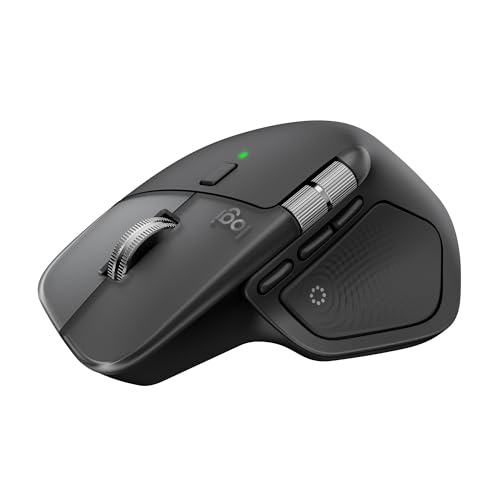
Logitech MX Master 4 for Mac, Ergonomic Bluetooth Mouse

Logitech MX Master 3S Performance Wireless Mouse

WL300 Bluetooth Mouse Silent Wireless Mice, Grey

Logitech Productivity Plus Wireless Mouse
More Details On Our Top Picks
The PHILIPS model makes sense for a desk that keeps changing shape, because its multi-device Bluetooth setup and USB-A/C support reduce the fuss of swapping gear. Right-handed comfort matters more than it sounds, especially during long admin sessions or mixed laptop-and-monitor work.
The side scroll control should appeal to spreadsheet users and anyone moving across wide timelines, though the trade-off is that this style is less familiar than a plain wheel. Quiet-click design also helps in shared spaces, where you want less noise without giving up a full-size feel.
What We Like
- Bluetooth and USB receiver support give you more connection options across laptops and desktops.
- Side scrolling helps with wide sheets, design timelines, and long browser tabs.
- Silent click behavior suits open offices and late-night work without drawing attention.
- The rechargeable design cuts down on battery swaps, which is handy for daily use.
- Ergonomic shaping favors right-handed comfort during longer stretches at the keyboard.
Things To Consider
- Right-handed shaping means left-handed users will want to skip this one.
- Side scroll controls can feel unusual at first, especially on a tight schedule.
- Because it leans into comfort, it is not the most compact travel mouse here.
Feature Snapshot
Who It Suits Best
You benefit most from this mouse if your day moves between a laptop, a desktop, and a lot of window management. It suits right-handed office users who want comfort first and travel size second.
Where A Sibling Pick Shines
Logitech MX Master 3S Wireless Performance Mouse suits power users who want a denser feature set and a more established premium control feel.
This version of the MX Master 3S pushes hard into premium desk work, with ultra-fast scrolling, 8K DPI tracking, and quiet clicks in a single package. In a busy home office, that combination feels built for people who jump between long documents, browser stacks, and design tools all day.
Compared with the PHILIPS mouse, it gives you a more performance-focused feature set and a stronger sense of polish. The catch is simple: the extra controls and larger body make more sense on a main workstation than in a slim travel pouch.
Highlights
- MagSpeed scrolling suits large sheets, long feeds, and fast navigation through heavy work.
- 8K DPI tracking gives you fine cursor control for precise on-screen work.
- Quiet clicks make shared offices or evening sessions less distracting.
- The ergonomic shell supports a relaxed hand position during long stretches.
- Track-on-glass support broadens the kinds of desks and surfaces you can use.
Softer Spots
- The feature depth adds complexity you may not need for simple office tasks.
- It feels more like a desk anchor than a compact carry option.
- The extra surface sensitivity can be overkill for casual browsing.
Core Details
Made For
You get the most from this mouse if your day revolves around dense work, multiple windows, and heavy scrolling. It suits professionals who want a premium desktop tool instead of a general-purpose pointer.
A Better Fit Elsewhere
WL300 Bluetooth Mouse Silent Wireless Mice is the easier carry for frequent hotel stays or lighter laptop bags.
The Acer stands out because it tries to cover a lot of devices without demanding much setup attention. With 2.4GHz wireless, Bluetooth 5.2, and wired use in the mix, it’s built for desks where your laptop, tablet, and main computer all need attention at different times.
The OLED screen is the detail that makes this one feel different from the earlier picks, since you can read status information at a glance instead of guessing. That said, the design is more feature-packed than elegant, so it suits a practical workstation better than a minimalist desk.
Plus Points
- Connection flexibility helps you move among laptop, tablet, phone, and desktop work.
- The OLED screen gives status feedback without extra guesswork.
- Five programmable buttons can speed up routine shortcuts in busy workflows.
- 4000 DPI sensitivity gives you enough control for office work and light creative tasks.
- USB-A and USB-C receiver support improves compatibility across newer gear.
Small Caveats
- The tri-mode layout can feel more involved than a simple single-connection mouse.
- Using both USB receiver types at once is not supported, so planning matters.
- The feature load may be more than you need for plain email and browsing.
Feature Rundown
Who Should Grab It
You’ll like this mouse most if your workday crosses several devices and you want fewer cable changes. It also fits home offices where status visibility and shortcut buttons matter.
Swap It Out When
Logitech Productivity Plus Wireless Mouse makes more sense for someone who wants a simpler, lower-fuss shape with fewer control layers.
This Bluetooth-only version keeps the same premium control language as the MX Master family, but it removes the receiver from the package. For a Mac desk or a tidy laptop setup, that makes the whole thing feel cleaner, though it does mean your device needs to suit Bluetooth use from the start.
The 8K DPI sensor and quiet clicks are still the main draw, and the glass-tracking note matters for glossy desks or shared tables. Compared with the receiver-based MX Master 3S, this one is more about a streamlined connection path than a broader accessory bundle.
Bright Spots
- Bluetooth-only setup keeps the desk free of an extra receiver.
- 8K DPI tracking supports precise motion on a wide range of surfaces.
- Quiet clicks help keep office noise under control.
- Programmable buttons are useful for shortcuts in document and app work.
Points To Note
- No receiver or adapter comes in the box, so your setup needs to match.
- The Bluetooth-only format may feel less flexible for mixed hardware desks.
- The premium body is comfortable, yet it takes up more bag space than compact travel mice.
At A Glance
The Right Fit
You suit this mouse best if you want a polished Bluetooth desktop tool and already live in that connection ecosystem. It also makes sense for Mac and office users who value a tidy setup more than bundle extras.
Another Choice May Suit
PHILIPS Ergonomic Wireless Mouse, Multi-Device Bluetooth (USB-A/C) is more forgiving for mixed-device desks that still need USB receiver flexibility.
The MX Master 4 for Mac is aimed at people who spend a lot of time inside Apple-centric workflows and want a more advanced control feel. Haptic feedback, which means tactile vibration cues, adds a different layer of interaction, and that can make repeated actions feel more deliberate on a crowded desktop.
USB-C charging and support for MacOS, iPadOS, and Windows widen its usefulness, even though the product clearly leans toward Mac-first work. Compared with the MX Master 3S models, this one feels like the more current, more specialized pick for users who already live in that ecosystem.
Reasons To Buy
- Haptic feedback adds tactile confirmation for frequent interactions.
- Ultra-fast scrolling suits heavy navigation and long files.
- USB-C charging matches modern desk and laptop setups.
- MacOS, iPadOS, and Windows support broadens the use case.
Areas To Watch
- The Mac-first focus means some shoppers will prefer a more general-purpose option.
- Advanced feedback is not essential for simple browsing or email work.
- The fuller ergonomic build is better on a desk than in a slim carry sleeve.
Details At A Glance
Perfect Match For
You benefit most from this mouse if your work is Mac-centered and you appreciate tactile control cues. It also suits people who want premium desk hardware with a more modern feature mix.
Look Elsewhere When
Logitech MX Master 3S Performance Wireless Mouse makes more sense for someone who wants a broader cross-platform desk mouse with fewer ecosystem leanings.
This MX Master 3S lands in the sweet spot for people who want a premium work mouse without tying themselves to a special setup. The ergonomic shell, thumb controls, and quiet clicks make sense in a home office where your mouse stays under your hand for hours, not minutes.
Compared with the Bluetooth-only MX Master 3S, it feels more broadly useful for mixed-device work because the product line is positioned for general productivity use rather than a stripped-down connection style. The honest read is that it still asks for desk space, so it rewards a committed workstation more than a toss-in-your-bag routine.
Best Bits
- 8K DPI tracking supports precise motion on a wide range of desk surfaces.
- Quiet clicks keep shared spaces calmer during long work blocks.
- MagSpeed scrolling is useful for long documents, sheets, and feeds.
- Ergonomic shaping and thumb controls help reduce hand strain during desk sessions.
Room For Improvement
- The larger body suits a workstation more than a compact carry case.
- The feature set can feel like more mouse than a casual user needs.
- Owners with very small hands may want a more compact shape.
Quick Facts
Built With In Mind
You get the most from this mouse if your workday leans on long sessions, repeated scrolling, and careful pointer movement. It suits desk users who value comfort and control more than compact size.
Reach For A Different Pick When
WL300 Bluetooth Mouse Silent Wireless Mice is the better travel companion for lighter bags and less desk permanence.
The WL300 keeps things lighter and simpler than the Logitech MX Master line, which matters on commutes, client visits, or shared desks. Tri-mode connectivity, meaning wired, 2.4G wireless, and Bluetooth, gives you practical flexibility without needing extra software.
The sculpted grip and six-button layout add a bit more control than the most basic travel mouse, while the silent click behavior keeps office noise down. One thing worth considering is that its value depends heavily on whether you actually need that triple connection mix, because simple desk-only users may not need the extra modes.
Standout Traits
- Tri-mode connectivity works across wired and wireless desk setups.
- Six buttons give you more direct control than a bare-bones mouse.
- The sculpted grip supports a steadier hand position on long days.
- Silent clicks suit shared offices and hotel rooms.
- Its portable footprint makes packing and storage easier than larger ergonomic mice.
Minor Gripes
- The connection options are useful, but they also add decision points.
- Travel-focused gear like this can feel less plush than a full desktop mouse.
- Battery claims matter most for people who plan to use it on the road, not just at a home desk.
Core Details
Whose Shelf It Belongs On
You’ll appreciate this mouse most if you move between work locations and want one device that can keep up. It also suits commuters who value quiet clicks and a more compact shape.
Skip It When
Logitech MX Master 3S Wireless Performance Mouse is the better match for a permanent desk and heavier spreadsheet or app use.
This is the cleanest no-drama option in the group, and that can be a good thing for people who just want a steady office mouse. It skips the premium extras of the MX Master line and the multi-mode complexity of the Acer and WL300 picks, which keeps the focus on everyday pointing and clicking.
The trade-off is obvious: you give up the tactile tricks and deeper customization that power users enjoy. For a simple desk setup, though, that restraint can be exactly what keeps the workflow calm.
Positives
- Straightforward design keeps setup and daily use uncomplicated.
- It suits basic office tasks without asking you to learn extra controls.
- The restrained shape makes it easy to share across different desks.
Worth Noting
- You do not get the advanced control stack found on the MX Master models.
- Feature-light mice like this are best for simple workloads, not heavy customization.
Key Specs
Best Suited To
You fit this mouse well if you want a simple, dependable office tool and prefer to keep extras out of the way. It makes sense for schools, shared desks, and routine home office use.
Another Choice May Suit
Logitech MX Master 3S Performance Wireless Mouse is the better step-up for people who want scrolling depth, more controls, and a more sculpted ergonomic shell.
How To Choose The Right Mouses For Productivity
Start With Shape, Not Just Sensor Numbers
The best productivity mouse is the one that disappears under your hand during a long work block. Ergonomic shaping, thumb rests, and button placement matter more than a spec sheet for anyone who spends hours in documents, email, or spreadsheets.
Larger sculpted models like the MX Master family suit desk setups, while lighter picks such as the WL300 make more sense for commuters. A compact body can be easier to carry, but it usually gives up some comfort during all-day use.
Match Connectivity To Your Devices
Bluetooth is clean and convenient, especially on modern laptops and Mac setups. A USB receiver can still be useful on desktops that stay in one place, and tri-mode designs help when you move between several machines.
Acer’s four-device support shows the value of flexibility, while the PHILIPS mouse makes a strong case for USB-A and USB-C compatibility in one package. The trade-off is that more connection options usually bring more setup choices, so simple desk users may not need all of them.
Scroll Style Changes Daily Comfort
Regular wheels work fine, but high-end productivity mice often add faster, smoother scrolling for long pages and wide spreadsheets. MagSpeed-style wheels and side scroll controls can save a lot of hand motion during heavy work.
That extra speed helps most when you move through large files or long browser sessions. The downside is that specialized scroll systems feel unfamiliar at first, so they reward patience more than casual browsing.
Pay Attention To Noise And Button Layout
Quiet clicks matter in shared offices, libraries, and late-night home setups. They do not make a mouse better on paper, but they can make the workday feel less intrusive.
Programmable buttons help power users speed up repeated actions, though they also add a little learning curve. For basic work, a simpler layout is often easier to live with and easier to keep clean.
Things Worth Knowing First
Common Shopping Slip Ups
Many people focus on DPI alone and miss the shape, button feel, and scrolling style. A high number on the box does not fix a hand position that feels awkward after an hour.
Another common miss is buying a mouse with connection modes you never plan to use. That extra complexity can be useful, but only when your devices actually need it.
The Case For Spending Up
Higher-tier mice usually cost more because they pack in better materials, more precise tracking, quieter switches, and deeper controls. Those extras matter most on a daily workstation where you spend real time with the mouse every day.
Spending up makes the most sense for spreadsheet-heavy work, design apps, or anyone who wants less hand strain over long sessions. For lighter email and browsing, a simpler model often does enough without the extra layer of features.
Closing Thoughts
The right mouse depends on how you work more than how flashy the spec sheet looks. For desk-heavy productivity, the MX Master models bring the most depth, while the PHILIPS, Acer, and WL300 options cover more mixed-use setups with less fuss. Choose the one that fits your desk, your devices, and the way your hand actually moves through a normal workday. That’s the part that matters most.
