
Programming work asks a lot from a mouse. You want precise cursor control, enough buttons to trim repetitive moves, and a shape that stays comfortable through long stretches at a desk or on a laptop stand.
This roundup focuses on compact travel options, ergonomic office mice, and a wired pick for heavier desktop use. You’ll see clear trade-offs too, because the right match for a commute-heavy setup is rarely the same as the right match for a home workstation.
Quick Look At The Strongest Picks

Logitech MX Anywhere 2S Bluetooth Edition Compact Wireless Mouse

Logitech MX Master 3S Bluetooth Wireless Mouse – Graphite

Logitech MX Master 4 for Mac – White Silver

Logitech MX Master 3S Performance Wireless Mouse – Black

Logitech Signature Comfort Plus M850 L Wireless Mouse – Graphite

WL300 Bluetooth Mouse Silent Wireless Mice – Grey
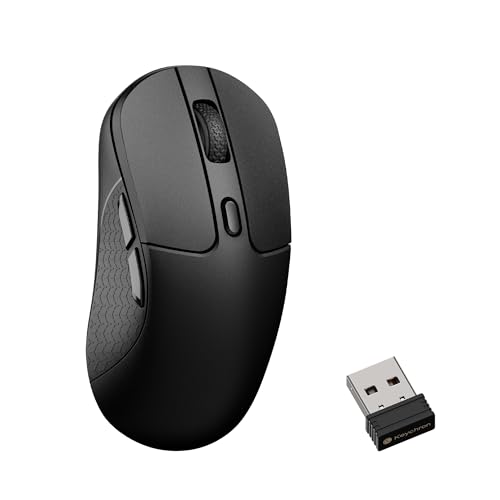
Keychron M3 8K Wireless Mouse – Black

Logitech G502 Hero Wired Gaming Mouse – Black
More Details On Our Top Picks
The small shell makes sense for commuters, laptop stands, and side tables that never feel roomy enough. Bluetooth support keeps the desk cleaner, and the multi-device control matters most for people who split time between a MacBook and a Windows notebook.
Compared with the bulkier MX Master line below, this one leans portable rather than luxurious. The trade-off is plain: less hand support, but a much easier shape to carry in a bag or sleeve.
What We Like
- Compact body slips easily into a laptop bag.
- Bluetooth-only setup keeps the desk free of a receiver.
- Works across multiple computers, which helps during mixed-platform workdays.
- 4K DPI tracking gives you fine cursor movement for code edits and spreadsheet work.
- The surface tracking is a practical plus for cafes, conference tables, and shared spaces.
Things To Consider
- The smaller shape gives up palm support during long desk sessions.
- No USB receiver means you need Bluetooth-ready devices.
- Owners often favor it for travel, not for a fixed all-day workstation.
Feature Snapshot
Who It Suits Best
You’ll get the most from this one if you move between workspaces and want a compact mouse that still feels serious enough for coding.
Where A Sibling Pick Shines
Logitech MX Master 3S Performance Wireless Mouse fits better for a stationary desk setup that needs more hand support and a fuller grip.
This model leans into quiet, refined desk work, and that matters in shared offices or late-night coding sessions. The 8K DPI sensor, meaning the pointer can resolve very small movements with high sensitivity, gives you more control when you’re lining up text, icons, or narrow interface targets.
Compared with the smaller MX Anywhere 2S, it gives you a fuller hand rest and a more anchored feel. The catch is simple, it’s better when your mouse stays on the desk than when you want something pocketable.
Bright Spots
- Quiet clicks suit open offices and shared workrooms.
- MagSpeed scrolling helps you move through long documents and code files quickly.
- Bluetooth-only design keeps the setup uncluttered.
- Eight thousand DPI tracking supports careful pointer placement.
- The broader body feels more settled during long sessions than compact travel mice.
Worth Noting
- No USB receiver is included, so Bluetooth compatibility matters.
- The fuller shape takes more bag space than the Anywhere model.
- Quiet switches soften the click sound, which some people may prefer, but others miss the sharper feel.
Core Details
Right Fit For
You’ll appreciate this most in a fixed workspace where quiet operation and a more substantial grip matter day after day.
Another Choice May Suit
Logitech MX Anywhere 2S Bluetooth Edition Compact Wireless Mouse fits better for frequent travelers and desk-hoppers who want a smaller body.
Mac-focused setups get a different kind of attention here, starting with the ergonomic shape and the haptic feedback, which means the mouse gives a subtle physical response instead of only relying on cursor motion. That extra feedback can make repeated actions feel more deliberate during editing, design, or app work.
Compared with the MX Master 3S models, this one leans harder into Mac pairing and current-generation comfort cues. You may find it especially useful on a desk where the mouse stays put and the keyboard shortcuts already carry most of the workload.
Reasons To Buy
- Mac-oriented compatibility suits MacBook, iPad, and desktop use.
- Haptic feedback gives a more tactile feel for routine actions.
- Ultra-fast scrolling helps with long timelines and source files.
- USB-C charging aligns with newer desk gear.
- The ergonomic shape supports longer work sessions with less hand strain.
Points To Note
- The Mac-first focus makes it less universal than the more platform-agnostic MX Master 3S.
- White Silver will show grime sooner than darker finishes on busy desks.
- Advanced features add value only when your workflow actually uses them.
At A Glance
Whose Shelf It Belongs On
This suits Mac users who want a more polished desktop mouse and plan to keep it in one main work spot.
Swap It Out When
Logitech MX Anywhere 2S Bluetooth Edition Compact Wireless Mouse is the better call for frequent travel and smaller laptop bags.
This one reads like the steady desk companion in the group. The ergonomic shell, thumb controls, and quiet clicks suit long code sessions, especially on a desk where you keep the mouse in the same spot most of the day.
It shares the same 8K DPI tracking and MagSpeed wheel idea as the Graphite version above, so the real difference here is the overall fit and finish of a familiar MX Master shape. The honest read is that this is less about novelty and more about everyday comfort done with care.
Plus Points
- Quiet clicks keep desk noise down in shared work areas.
- 8K DPI tracking helps with detailed pointer placement.
- MagSpeed scrolling moves quickly through long projects.
- The thumb controls are handy for repeated shortcuts and navigation.
- The ergonomic silhouette supports a more natural wrist position during long sessions.
Softer Spots
- It is a desk-first mouse, not a pocket-friendly one.
- Bluetooth dependence matters for laptops without built-in support.
- The feature set makes sense most clearly for people who use it every workday.
Quick Facts
Made For
You’ll like this most if your mouse stays tethered to a workstation and comfort matters more than portability.
Look Elsewhere When
Logitech MX Anywhere 2S Bluetooth Edition Compact Wireless Mouse makes more sense for bag carry and cramped travel setups.
For long, ordinary workdays, this is the kind of mouse that stays out of the way and still feels kinder to your hand than a flat travel shell. The palm cushion is the key idea here, and that matters when your desk time stretches past email into debugging and document editing.
Compared with the MX Master family, it looks simpler and asks less of you. That makes it a sensible fit for someone who wants comfort without paying for a lot of advanced desk tricks.
Highlights
- Palm cushion adds a softer landing for longer sessions.
- Customizable buttons help trim repetitive actions.
- Two-year battery life reduces charging attention.
- Works with Windows, Mac, and iPad, which broadens setup options.
- The shape favors straightforward comfort over flashy extras.
Small Caveats
- It does not have the advanced control feel of the MX Master models.
- The simpler feature set may feel plain to power users.
- Light-colored desks may not matter here, but the graphite finish still needs routine wiping.
Details At A Glance
The Right Fit
This suits you best when comfort and simplicity matter more than advanced navigation features.
Reach For A Different Pick When
Logitech MX Master 3S Performance Wireless Mouse fits better for heavier multitasking and finer control across long coding days.
The WL300 takes a more flexible route than the Logitech office mice above, because it supports wired use, 2.4G wireless, and dual Bluetooth. That tri-mode setup helps a lot on mixed-device desks, especially when one laptop is old, one tablet is new, and you just want the pointer to cooperate.
Six buttons and a sculpted grip give it a more work-focused shape than a plain compact shell. For travel, that flexibility is handy; for a permanent workstation, the feel may seem practical rather than polished.
Best Bits
- Three connection modes give you plenty of setup flexibility.
- Silent clicking suits late-night work and shared rooms.
- Six buttons help with shortcuts and navigation.
- The sculpted grip is useful during longer laptop sessions.
- Adjustable DPI lets you tune pointer speed for different screens.
Areas To Watch
- The broad feature set can feel less refined than the Logitech MX line.
- More connection options also mean more setup choices to manage.
- The source does not give battery details, so daily runtime planning is harder.
Feature Rundown
Best Suited To
You’ll benefit most from this if you bounce between devices and want a mouse that can adapt without much drama.
Where A Sibling Pick Shines
Logitech Signature Comfort Plus M850 L Wireless Mouse fits better for a simpler, more comfort-first desk setup.
This one shifts the focus toward precision and speed, backed by the PixArt 3950 sensor and the 30K DPI ceiling. That makes it a strong match for power users who want very fine pointer tuning, whether they’re editing large codebases or moving fast across multiple displays.
At 79g, it should feel lighter in hand than the bulkier office shapes above, and the 2.4 GHz plus Bluetooth 5.3 pairing widens the ways you can connect. One thing worth considering, though, is that a performance-first shell makes the most sense when you care about input feel more than cushy palm support.
Standout Traits
- High sensor ceiling supports very fine cursor control.
- 79g design helps keep the mouse feeling quick in hand.
- Dual wireless modes add setup flexibility.
- Up to 140 hours of use lowers charging attention.
- Launcher support gives it a more advanced workflow angle.
Points To Note
- Lightweight performance tuning may feel less plush than the MX Master line.
- Advanced capability matters most for people who actually use speed tuning and custom controls.
- Black finishes tend to show fingerprints and dust more quickly on a busy desk.
Spec Overview
Built With In Mind
This fits programmers who want a lighter mouse with serious tracking headroom and more tuning room than a basic office pick.
Where A Sibling Pick Shines
Logitech MX Master 3S Performance Wireless Mouse is the calmer choice for people who want a more contoured, hand-filling shape.
The wired G502 Hero is the most setup-heavy option in this list, and that can be a strength for a desk that never moves. With 11 programmable buttons, adjustable weights, and on-board memory, it gives you the sort of control that suits keyboard shortcuts, macros, and repeated desktop routines.
Compared with the Logitech MX mice, it feels more technical and less polished for all-day office comfort. For a programming desk that doubles as a gaming or power-work station, though, that extra control can be exactly the point.
Positives
- Wired connection avoids battery management.
- 11 programmable buttons support shortcut-heavy workflows.
- Adjustable weights let you tune the feel in hand.
- On-board memory helps preserve settings across systems.
- 25,600 DPI ceiling gives you wide sensitivity range.
Minor Gripes
- The gaming shape can feel busier than a clean office mouse.
- It is less travel-friendly than the wireless picks above.
- More buttons mean more setup time before the mouse feels natural.
- Wired use keeps things reliable, but cable routing matters on cramped desks.
Core Details
Who Should Grab It
You’ll get the most out of this on a permanent desktop where custom controls matter more than a clean wireless setup.
Another Choice May Suit
Keychron M3 8K Wireless Mouse is a better match for programmers who want a lighter body and wireless flexibility.
How To Choose The Right Mouses For Programming
Shape, Grip, And Desk Time
Programming sessions tend to stretch longer than most people expect, so shape matters more than flashy specs. A flatter travel mouse works for trains, libraries, and coffee shops, while a fuller body usually feels better once you settle into a desk for hours. Palm support, thumb rests, and button placement all affect how much your hand has to work between lines of code.
You should pay attention to grip style before sensor numbers. A contoured mouse like the MX Master models helps reduce reaching, while a compact pick like the MX Anywhere line saves space and pack weight. The right choice depends less on status and more on where your hand spends its day.
Connectivity And Workflow Fit
Bluetooth keeps the desk cleaner, and it also helps with thin laptops that have limited ports. A 2.4 GHz wireless link, by contrast, can suit people who want a receiver-based setup on a dedicated workstation. Wired mice still matter for desks that stay fixed, especially when you want to skip charging altogether.
Multi-device control pays off for programmers who jump between a work laptop, a personal machine, and a tablet. The practical win is not glamour, it’s fewer small interruptions while you move between projects. That’s why a mouse with simple pairing can feel better than one with a longer feature list you never use.
Sensitivity, Buttons, And Shortcuts
DPI, meaning dots per inch, is a sensitivity measure for cursor movement. Higher numbers can help on large monitors or multi-display setups, but the sweet spot depends on your hand and screen layout. A very high ceiling sounds impressive, yet a modest but well-tuned sensor often feels easier to live with.
Programmable buttons matter most when your work includes repeated actions, editor shortcuts, and browser navigation. A mouse with three extra buttons can save more time than a faster sensor if your day involves constant copy, paste, undo, and tab switching. The best balance comes from choosing the control layout you’ll actually memorize.
Things Worth Knowing First
Common Shopping Slip Ups
Many programmers focus on DPI and ignore comfort, then spend long afternoons with a mouse that never quite settles in the hand. Another common miss is buying Bluetooth-only gear for an older desktop that needs a receiver-based setup. Storage and portability matter too, especially for people who move between home and office.
Look at your real desk habits before you commit. A travel mouse may feel neat for a week, then too small for everyday editing. A larger ergonomic model can be the better long-term call even when it takes up more space in a bag.
What The Higher Tier Buys
Higher-priced mice usually spend the extra money on better shells, more refined scroll wheels, extra buttons, and smoother sensor tuning. You also tend to get quieter switches, more careful ergonomics, and broader software control. Those upgrades matter most when the mouse is part of your full workday, not just an occasional accessory.
Paying more makes sense for desk-heavy coding, multi-monitor layouts, and people who keep the same mouse for years. Spending up is less useful for casual laptop work or short sessions away from a main workstation. In that case, a simpler model can be the smarter fit.
Final Thoughts
The best mouse for programming is the one that matches your desk, your bag, and your hand before it matches a spec sheet. The MX Master family gives you the most comfort and control, the MX Anywhere 2S favors portability, and the Keychron M3 brings a more performance-focused feel. For simpler desk work, the Signature Comfort Plus M850 L keeps things easy. Pick the shape that fits your day, and the rest tends to fall into place.
