
You’re usually looking for one of two things here: a mouse that stops your hand from feeling cramped, or one that fits neatly into a bag without adding bulk. The right shape matters more than flashy extras, especially on long work sessions, quick campus days, or travel-heavy weeks.
This roundup focuses on compact wireless options, vertical designs, and a few ultra-portable picks that suit smaller palms. You’ll also see where each one asks for a trade-off, because comfort, portability, and button layout rarely show up in the same package.
Quick Look At The Shortlist
Logitech M187 Wireless Mini Mouse

J-Tech Digital Wireless Ergonomic Vertical Mouse V628M

SABLUTE Wireless Mouse for Laptop M41

SANWA 2.4G Wireless Ergonomic Mouse
Uiosmuph Mini Wireless Bluetooth Mouse Black

SABLUTE MAM3 Ergonomic Mouse

hunart H6 49g Wireless Mouse Green
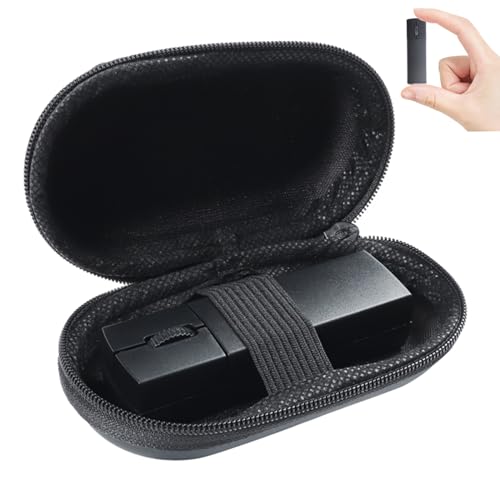
elec Space Wireless Mini Finger Mouse
More Details On Our Top Picks
A tiny mouse like this makes sense for commuters and laptop users who keep moving between desks, couches, and cafés. The pocket-sized body keeps the footprint low, while the wireless layout cuts one more cable from your bag.
The trade-off is obvious, though, because a mini shell usually asks your fingers to stay tucked in more tightly than they would on a larger shape. For small hands, that can still feel natural, and the familiar Logitech approach should suit anyone who wants simple control without extra learning time.
What We Like
- Compact shape slips easily into a laptop sleeve or small pouch.
- Wireless setup keeps your desk clearer, which helps in shared work areas.
- The click feel is tuned for a more settled, less flimsy feel.
- Simple form suits everyday email, browsing, and document work.
Things To Consider
- The very small shell may feel tight during long editing sessions.
- Mini mice can be easier to misplace in a crowded bag.
- You get convenience first, not extra ergonomic shaping.
Feature Snapshot
Who It Suits Best
Small-handed laptop users who want a straightforward, compact pointer without extra bulk will feel at home here.
Where A Sibling Pick Shines
J-Tech Digital Wireless Ergonomic Vertical Mouse for Small Hands suits desk users who want a more upright grip than the Logitech M187 Wireless Mini Mouse.
This one leans into a vertical stance, so your hand rests in more of a handshake position instead of flattening over the mouse. That can feel especially welcome during desk-heavy days, and the small-hand focus helps it avoid the oversized feel that some upright models bring.
You also get a 2.4G USB transceiver, which is the little wireless dongle that plugs into your computer for the connection. The AA battery setup keeps charging out of the picture, but it also means battery swaps are part of ownership, so it suits someone who prefers simple replace-and-go convenience.
Strong Points
- Vertical shape supports a more natural hand angle.
- Small-hand sizing keeps the body from feeling oversized.
- USB transceiver gives you a direct wireless connection for a work laptop.
- Three DPI steps let you tune pointer speed to the task.
- Mac and PC compatibility broadens where you can use it.
Worth Noting
- Vertical mice take a short adjustment period.
- AA battery upkeep adds one more thing to remember.
- The shape is best suited to a desk, not a tiny travel pouch.
Technical Sheet
Who Will Love This
You’ll appreciate this most in a desk setup where your hand position matters more than total portability.
Skip It When
SABLUTE Wireless Mouse for Laptop M41 is the easier carry for commuters who want something slimmer than the J-Tech Digital Wireless Ergonomic Vertical Mouse V628M.
Slim mice earn their place when your bag is already crowded with a charger, notebook, and laptop. The M41 keeps the profile low, and the USB-C adapter helps it fit into newer device setups without much fuss.
The quiet click design is useful in libraries, study rooms, and shared offices where noisy buttons get old fast. It does ask you to accept a smaller grip and a simpler shape, but that’s the trade you usually make for this much portability.
Positives
- Thin body makes it easy to carry day after day.
- USB-C adapter fits modern laptops and travel kits well.
- Quiet clicking helps in shared spaces.
- Three DPI levels give you basic pointer control.
Softer Spots
- Small dimensions can feel minimal during longer desk sessions.
- The slim shell leaves less room for a full palm grip.
- Compact travel gear can be easier to misplace in a backpack.
Core Details
Made For
Students, commuters, and office workers who move between rooms or buildings will get the most from this compact shape.
Another Choice May Suit
hunart H6 49g Wireless Mouse Green is the better pick for a little more comfort during longer laptop sessions.
SANWA goes harder on ergonomic shape than the flatter picks above, and that matters for anyone who feels a traditional mouse flattening out the hand. The handshake angle is the main story, and the rounded body looks built for small hands that still want something substantial enough to hold with confidence.
Its 2.4G wireless setup keeps the desk tidy, while the 800, 1200, and 1600 DPI steps give you three straightforward speed settings. You may find the vertical posture a bit unfamiliar at first, but that’s normal with this style and usually settles once the hand learns the angle.
Highlights
- Vertical form supports a more relaxed wrist position.
- Three DPI settings give you practical pointer control.
- Five buttons add extra function without making the body bulky.
- Small-hand fit keeps the shell from feeling too tall or wide.
Areas To Watch
- Vertical mice feel unusual at first, especially for casual users.
- The shape works best on a desk, not in a tight travel pocket.
- Button placement may take a little adjustment during the first few days.
At A Glance
Best Suited To
Small-handed desk users who want a more upright feel than a flat travel mouse will get the most out of this shape.
A Better Fit Elsewhere
Logitech M187 Wireless Mini Mouse is easier to toss in a bag for anyone who prioritizes portability over posture support.
Some compact mice only solve one problem, but this one adds connection flexibility on top of the tiny body. Bluetooth 5.1, Bluetooth 5.0, and 2.4G coverage give you a few ways to pair, which is useful when you move between a laptop, tablet, or mixed-device setup.
The 3.07 x 1.89 x 1.06 inch size keeps it genuinely pocket-friendly, so it suits travel kits better than bulkier desk mice. The honest read is that a mouse this small favors portability first, although small hands usually handle that trade more comfortably than larger ones.
Reasons To Buy
- Tri-mode connectivity gives you useful pairing flexibility.
- Very small dimensions help it disappear into a laptop bag.
- USB-C charging is practical for modern travel setups.
- Silent clicking fits libraries, trains, and shared workspaces.
Small Caveats
- Ultra-compact mice can feel cramped in long desk sessions.
- Travel-friendly gear is easier to set down and forget.
- The tiny body puts portability ahead of palm support.
Feature Rundown
The Right Fit
Frequent travelers and tablet users who want a tiny, quiet mouse with flexible pairing will get the most value here.
Swap It Out When
hunart H6 49g Wireless Mouse Green is a better match for longer laptop sessions where a lighter, more sculpted hold matters more than pocket size.
The MAM3 feels aimed at mixed-device users first, then ergonomics second, which is a useful combination for modern desks. Three-device Bluetooth support means you can move between a laptop, desktop, and tablet without treating the mouse like a one-device accessory.
Its vertical shape still matters, especially for small and medium hands that want a less flattened wrist angle. Four DPI settings add useful control, though the broader feature set also means this pick asks for a bit more attention than the simplest mini-mouse options.
Upsides
- Three-device Bluetooth is handy in mixed setups.
- Rechargeable power keeps you off disposable batteries.
- Vertical shape brings a more relaxed hand posture.
- Four DPI choices help you match speed to your task.
Points To Note
- Feature-dense mice usually take a little longer to get familiar with.
- The vertical shape still has an adjustment period.
- More functions can mean more to manage on a cluttered desk.
Core Details
Built With In Mind
Anyone who splits time between several devices and still wants an ergonomic shape should find this one especially useful.
Look Elsewhere When
Logitech M187 Wireless Mini Mouse is a simpler fit for shoppers who want the fewest setup steps and the tiniest carry size.
At 49g, this mouse leans into a very light carry feel, which helps it disappear in a bag and stay easy to move around a desk. The right-handed ergonomic shape gives it a more settled hand position than the pure travel-first options above, so you don’t have to give up comfort to keep things light.
Bluetooth and 2.4GHz support make it flexible for laptops and quick desk swaps, and USB-C charging fits the rest of a modern carry kit. One thing worth considering is that a lighter mouse can feel a little less anchored than heavier models, although that rarely matters once you settle into normal work tasks.
Best Bits
- 49g body keeps the mouse very light in daily carry.
- Right-hand ergonomic shape improves comfort over flat travel mice.
- Bluetooth and 2.4GHz give you useful connection flexibility.
- Silent clicks suit shared spaces and late-night use.
- USB-C charging matches many current laptop accessories.
Honest Caveats
- Lightweight mice can feel less planted than fuller designs.
- Right-hand shaping narrows the fit a bit.
- Light travel gear can be easy to misplace in a packed case.
Details At A Glance
Whose Shelf It Belongs On
Laptop users who want a light, quiet mouse with some ergonomic shaping will get the most from it.
Reach For A Different Pick When
Uiosmuph Mini Wireless Bluetooth Mouse Black makes more sense for travelers who want the smallest possible body.
The finger-mouse format sets this one apart from the rest of the list, because it aims for portability in a very different way. Instead of a conventional palm grip, it keeps the body tiny and unusual, which can work well on cramped trays, in case-limited bags, or alongside other compact gear.
Bluetooth plus 2.4GHz gives you the same broad connection idea as some of the more conventional picks, and the included case adds some practical carry protection. The catch is that this shape won’t suit everyone, so it’s best viewed as a specialized option rather than a default choice.
Standout Traits
- Finger-style design saves space in a travel setup.
- Dual-mode wireless support keeps connection options flexible.
- Case adds helpful protection during carry.
- Compact form can work well in very tight spaces.
Room For Improvement
- Finger-mouse styling takes more adaptation than a normal shape.
- The unusual hold will not suit every hand position.
- Specialized gear is harder to share across different users.
Feature Card
Perfect Match For
Travelers who want a very compact, unusual mouse for tight carry situations will get the most value here.
Where Shoppers Go Wrong
Logitech M187 Wireless Mini Mouse is the safer all-round pick for anyone who wants a more familiar shape than the elec Space Wireless Mini Finger Mouse.
How To Choose The Right Mouses For Small Hands
Shape Matters More Than Most Specs
The first thing to weigh is how your hand actually rests on the mouse. Small-handed users usually do better with shorter bodies, lower backs, or vertical shells that keep fingers from stretching too far forward.
Mini mice suit travel first, while vertical mice suit desk comfort first. That split explains why a Logitech M187 Wireless Mini Mouse and a SANWA 2.4G Wireless Ergonomic Mouse solve different problems even though both fit the small-hand category.
Connection Style Should Match Your Routine
2.4G wireless mice use a small USB receiver, which is convenient for laptops with enough ports and for people who want a simple plug-in setup. Bluetooth helps more when you move between a notebook, tablet, or a port-light machine.
Some models offer both, which feels flexible, but that extra versatility also adds a little setup complexity. For a single-device desk, a simpler wireless mouse may feel calmer and easier to live with.
Buttons, DPI, And Portability Need Balance
DPI means dots per inch, a quick way to describe pointer sensitivity. Lower DPI can feel steadier for detailed work, while higher settings move the cursor faster across wide screens.
Don’t treat more buttons as automatically better. Extra controls help on a long workday, but for casual browsing or travel, a cleaner two-button body often keeps the mouse lighter and easier to carry.
Think About Your Real Carry Setup
A mouse that fits small hands still needs to fit your bag, charger, and daily routine. Slim and pocket-sized models make the most sense for commuters, while slightly larger ergonomic shapes usually stay put better on a desk.
Charging, battery swaps, and receiver storage also matter more than they look on the product page. The smoothest pick is the one that matches how you work on ordinary Tuesdays, not just the one with the longest feature list.
What To Weigh Before You Click
Wrong Turns To Avoid
The most common mistake is chasing the smallest shell without checking whether your fingers can rest naturally on it. A tiny mouse can still feel awkward during long sessions, even when the size sounds right on paper.
Another miss is choosing a vertical model without expecting the adjustment period. That posture often feels better later, but the first day can feel unusual, so the fit matters more than the headline alone.
When Paying More Pays Off
Higher-tier mice usually spend the extra money on better shaping, multi-device support, rechargeable power, and more refined button behavior. Those details matter most for daily desk use, especially when your hand stays on the mouse for hours.
That upgrade makes the most sense for hybrid workers, frequent travelers, and anyone who wants fewer compromises in shape and connectivity. For very light occasional use, a simpler mini mouse often covers the basics just fine.
Final Thoughts
For small hands, the right mouse is the one that matches both your grip and your routine. A compact travel pick, a vertical comfort shape, and a multi-device ergonomic model each solve a different problem, so your best match depends on where you use it most. For a straightforward default, Logitech M187 Wireless Mini Mouse is an easy place to start. For more posture support, the SANWA and J-Tech Digital options deserve a closer look.
