
Travel mice live in a narrow lane, they need to be small enough for a crowded bag, steady enough for a laptop tray, and calm enough for a hotel room or open office. You also want a shape that won’t feel awkward after a long layover or a full workday on the road.
The eight picks below focus on portability, click noise, connection style, and everyday comfort. Some fold flat, some skip the receiver, and some keep things simple with a wired cord that never needs charging.
Quick Look At The Shortlist
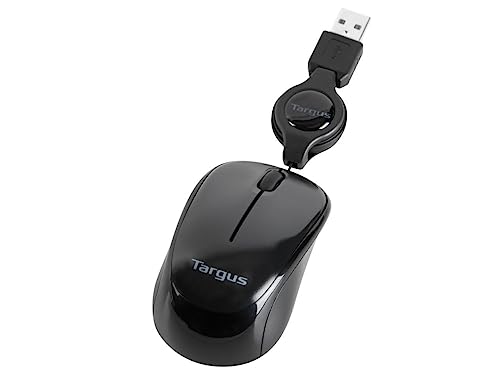
Targus Compact Mouse AMU75US

Logitech Mobi Fold Foldable Wireless Mouse, Graphite

WL300 Bluetooth Mouse, Grey

DELUX Wireless Bluetooth Pocket Mouse MF20, Black

Logitech Mobi Fold Foldable Wireless Mouse, Off-White

Logitech M240 Compact Silent Bluetooth Wireless Mouse, Graphite
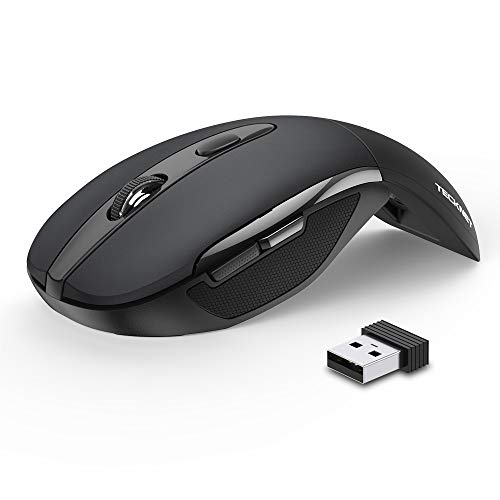
TECKNET Folding Wireless Mouse 2.4G

Logitech M350s Pebble 2 Bluetooth Wireless Mouse, Black
More Details On Our Top Picks
The Targus AMU75US keeps things old-school in a good way, with a retractable 2.5-foot USB cord that never asks you to remember a charger or pair a device. Blue Trace tracking also matters in real travel life, because it gives you a more forgiving cursor on mixed surfaces than a plain optical sensor often does.
That wired setup suits hotel desks, airline tray tables, and short work sessions where simplicity beats extra features. The trade-off is obvious, you’re tethered to the port, so this one makes the most sense for laptop users who value certainty over total freedom.
Strong Points
- Retractable cable helps reduce bag clutter.
- Blue Trace tracking is a practical fit for uneven surfaces.
- No pairing steps, so setup stays quick on the road.
- Its compact body suits slim sleeve storage.
Things To Consider
- The corded design keeps you close to the laptop.
- It suits simple work better than desk-heavy multitasking.
- The finish is plain, so the appeal is function first.
Core Details
Who It Suits Best
Notebook users who want a compact corded mouse for steady laptop work will get the most from it.
A Better Fit Elsewhere
Logitech M240 Compact Silent Bluetooth Wireless Mouse, Graphite suits you better for cable-free travel and cleaner desk setups.
The Mobi Fold leans into travel-friendly design, and the folding body is the feature that changes the ownership feel most. Quiet clicks and Bluetooth pairing make it well suited to shared spaces, especially the kind of gate-area or café work that turns loud peripherals into a nuisance.
Its 4K DPI sensor gives you fine cursor movement for spreadsheets, slide decks, and small UI targets, though that level of sensitivity can feel a touch brisk on a cramped tray table. Compared with the wired Targus, this one gives you a cleaner setup and a more modern carry profile.
What We Like
- Foldable body saves bag space without feeling flimsy on paper.
- Bluetooth connection avoids a receiver to misplace.
- Quiet clicks suit meetings and late-night hotel work.
- 4K DPI helps with precise cursor placement.
- Fast Pair support should make first connection easier on compatible systems.
Minor Gripes
- The folding hinge is the part you’ll handle most often.
- Higher pointer sensitivity may feel fast in tight spaces.
- Foldable hardware always asks for a little care in a packed bag.
Feature Snapshot
Made For
Frequent travelers who value a tidy bag and quiet button feel will get the most from this one.
Where A Sibling Pick Shines
Logitech M350s Pebble 2 Bluetooth Wireless Mouse, Black suits you better for a slimmer profile and a simpler everyday carry shape.
The WL300 stands out because it gives you three connection paths, wired, 2.4G wireless, and Bluetooth, which is a lot of flexibility for one compact travel mouse. That matters most for commuters and consultants who bounce between a laptop, tablet, and desktop in a single week.
The sculpted grip and six-button layout add real usefulness beyond the basics, especially for work that leans on browser shortcuts or repeated navigation. The honest read is that this style suits people who want function first, since the extra controls add value only when you’ll actually use them.
Upsides
- Tri-mode connection support covers more travel setups.
- Six buttons can speed up routine navigation.
- Sculpted shape gives your hand a more guided resting point.
- Adjustable DPI lets you tune pointer speed for different tasks.
- Listed battery life helps reduce charging anxiety on longer trips.
Points To Note
- More controls mean a slightly busier learning curve.
- The extra modes matter most for mixed-device work, not casual browsing.
- A feature-heavy shell can feel like more mouse than a minimalist packer needs.
Details At A Glance
Right Fit For
Road warriors who switch between devices and want more controls in one compact shell will appreciate it.
Another Choice May Suit
Logitech M240 Compact Silent Bluetooth Wireless Mouse, Graphite is the cleaner match for you if a simpler two-button style feels easier to live with.
The MF20 is built around a sliding, pocket-size body, so it makes sense for small sleeves, cross-body bags, and backpacks already packed to the edge. Its quiet clicks and dual-mode connection help it fit both shared work areas and simple office setups.
USB-C charging is the part that most clearly serves travel life, because the port is common and the mouse can be charged without much fuss. The trade-off is that a pocket form usually means less hand room, so longer desktop sessions may feel snug compared with the more sculpted WL300.
Highlights
- Sliding design packs very small.
- USB-C charging is convenient for shared cable kits.
- Quiet clicks suit libraries, planes, and co-working spaces.
- Dual wireless modes add flexibility.
- 300mAh battery capacity supports use between charges.
Areas To Watch
- The tiny shape can feel tight for larger hands.
- Sliding parts deserve a little care in crowded bags.
- The pocket-first design favors portability over all-day palm support.
Technical Sheet
The Right Fit
Minimal packers who want a very small mouse for short work sessions will get the most from this design.
Skip It When
Logitech M350s Pebble 2 Bluetooth Wireless Mouse, Black makes more sense for you if you want a flatter shape with a simpler carry feel.
The off-white Mobi Fold carries the same foldable travel logic as the graphite version, but the lighter finish gives it a softer desk presence. In a hotel room or client office, that can feel a bit more polished than a darker shell, especially beside a slim laptop and a tidy notebook.
Quiet clicks and Bluetooth keep the day-to-day experience easy, while 4K DPI brings the same precise cursor behavior you want for spreadsheet work or design tweaks. One thing worth considering, the pale finish may show grime sooner than graphite, so a small pouch makes sense for longer trips.
Reasons To Buy
- Foldable design helps it disappear into smaller bags.
- Bluetooth keeps the desk surface free of a receiver.
- Quiet clicks fit public spaces and shared offices.
- 4K DPI gives you precise pointer control.
- The lighter color feels more refined on a clean workstation.
Softer Spots
- Light finishes usually need a little more upkeep.
- The folding mechanism adds one more moving part to mind.
- Its shape still favors travel over long, stationary desktop sessions.
Core Details
Whose Shelf It Belongs On
Style-conscious commuters who still want real travel utility will appreciate this finish and foldable build.
Reach For A Different Pick When
Logitech M240 Compact Silent Bluetooth Wireless Mouse, Graphite is the better fit for you if you want a less fussy shape and darker finish.
The M240 keeps the brief simple, Bluetooth only, no USB receiver, and quiet clicks for shared spaces. That makes it a strong travel companion for ultrabook owners and anyone who already carries too many tiny accessories in one pouch.
Its three non-customizable buttons make it straightforward rather than flashy, which is exactly the point for a mouse you want to forget about until it’s needed. Compared with the more feature-loaded WL300, this one trades flexibility for a cleaner, calmer ownership feel.
Bright Spots
- No receiver means one less item to lose in transit.
- Quiet clicks are a good fit for libraries and conference rooms.
- Simple controls keep the learning curve low.
- Long battery claim supports reduced upkeep on the road.
Room For Improvement
- Three fixed buttons limit customization.
- The shape is built for simplicity, not rich shortcuts.
- It fits best for users who do not need many extras.
Feature Rundown
Who Will Love This
Minimalist laptop users who want a quiet, low-fuss mouse for travel will find it easy to live with.
A Better Fit Elsewhere
Logitech M350s Pebble 2 Bluetooth Wireless Mouse, Black suits you better if you want a flatter body and more modern multi-device ease.
The TECKNET folding mouse leans hard into travel practicality, with a hinge-led shape and a USB nano receiver stored inside the back of the mouse. That storage detail is useful in real life, because tiny receivers are exactly the kind of thing that disappear into the bottom of a bag.
Three DPI steps give you a simple way to adjust cursor speed, and plug-and-play setup keeps it approachable for occasional travelers. The shape is clearly tuned for portability first, so heavy desktop users may want something with a fuller palm feel.
Best Bits
- Foldable shell makes packing easier.
- Internal receiver storage helps prevent tiny-part loss.
- Three DPI levels add simple control over cursor speed.
- Plug-and-play setup is easy for quick trips.
- Auto sleep mode should help reduce battery drain between uses.
Small Caveats
- The folding mechanism adds another moving joint to maintain.
- Compact travel shape can feel less substantial than a full-size mouse.
- 2.4G use means the receiver still has to stay in your kit.
Key Specs
Built With In Mind
Travelers who want a folding wireless mouse with basic speed control will get strong day-to-day utility from it.
Look Elsewhere When
Logitech M240 Compact Silent Bluetooth Wireless Mouse, Graphite is the cleaner match for you if you want to skip the receiver entirely.
The Pebble 2 keeps a very slim profile, and that’s exactly why it belongs in a travel roundup. It disappears into a laptop sleeve with little complaint, while the quiet clicks and Easy-Switch support make it feel useful across a laptop, tablet, or phone-friendly setup.
Compared with the foldable Logitech Mobi Fold, this one feels more like a smooth pebble in the bag than a device that hinges into shape, and that simpler construction will appeal to people who prefer fewer moving parts. The trade-off is plain enough, the low-slung form is easy to carry, but some hands may want a little more height for all-day comfort.
Positives
- Very slim body packs neatly beside a laptop.
- Lightweight build helps keep your kit easy to carry.
- Quiet clicks suit shared spaces and late work sessions.
- Easy-Switch support helps across multiple operating systems.
Trade Offs
- Low profile can feel flatter than some hands prefer.
- Single-button customization keeps things simple, not expansive.
- Minimal shape favors portability over fuller palm support.
Spec Overview
Best Suited To
Tablet-and-laptop commuters who want a slim, light mouse with broad device support will appreciate it most.
Swap It Out When
Logitech M240 Compact Silent Bluetooth Wireless Mouse, Graphite suits you better if you want a simpler, more conventional shape.
How To Choose The Right Mouses For Travel
Shape, Size, And How You Pack
Travel mice live or die by physical fit. A folding shell like the Logitech Mobi Fold helps in tight carry-ons, while a flatter shape like the Logitech M350s Pebble 2 slides into a sleeve with almost no bulk.
Hand size matters too, especially on long workdays in airports or hotel rooms. Pocket mice save space, but a sculpted body such as the WL300 usually feels calmer during longer sessions.
Connection Style And Device Mix
Bluetooth keeps your port free and cuts one more tiny accessory from the bag. That matters for ultrabooks and tablets, while a 2.4G receiver still makes sense for laptops that behave better with a dongle.
Wired models like the Targus AMU75US remove pairing friction completely. They suit people who want dependable, no-drama setup more than wireless freedom.
Click Noise, Buttons, And Daily Workflow
Quiet clicks are worth paying attention to in shared spaces, because a noisy mouse can wear thin fast on a flight or in a coworking room. The Logitech M240, Logitech Mobi Fold, and Pebble 2 all lean into that calmer feel.
Extra buttons matter only when your work justifies them. The WL300’s six-button layout helps shortcut-heavy users, while simpler mice are easier to live with for basic browsing and document work.
Battery Life And Charging Habits
Battery claims tell you how much upkeep the mouse wants from you, not just how long it sits on a shelf. An 18-month claim like the M240 or WL300 fits frequent travelers who dislike routine charging, while USB-C charging on the DELUX MF20 suits people already carrying modern cables.
Rechargeable models often feel easier for short trips, but they also ask for more attention if your week is packed with meetings. A longer battery promise usually means one less thing to think about before a trip.
Things Worth Knowing First
Hidden Buying Traps
Don’t let tiny size trick you into overlooking hand comfort. A mouse that looks perfect in a listing can feel cramped after two hours on a train, especially with ultra-low shells and folding designs.
Also pay attention to connection type before you decide. Bluetooth is tidy, but a receiver-based mouse can be the safer route for older laptops or a setup that already behaves well with USB accessories.
The Upgrade Payoff
Higher-tier travel mice usually cost more because of better finishing, smarter folding hardware, quieter button mechanisms, and broader compatibility. That extra money often goes into convenience first, not just styling.
Spending up makes sense for frequent flyers, consultants, and anyone who moves between devices all week. For occasional use, a simpler mouse with quiet clicks and a clean connection path usually covers the job without extra complexity.
Final Thoughts
For travel work, the right mouse is the one that stays out of your way. The Targus AMU75US keeps setup simple, the Logitech Mobi Fold family adds portability with a more polished feel, and the Logitech M240 stays calm and uncomplicated. The best match comes down to how much room you have in the bag, how often you switch devices, and whether you value folding hardware or plain reliability more. Pick the shape that fits your routine, and the road feels a lot less fiddly.
