
Valorant rewards a mouse that feels quick, controlled, and comfortable over a long session. You want a shape that matches your grip, a sensor that tracks cleanly, and a weight that does not drag your aim around. The picks below lean toward competitive play, but they also account for daily desk use, travel, and mixed PC setups. That mix matters more than flashy numbers on the box.
The Shortlist At A Glance

Logitech G PRO X Superlight 2 DEX Wireless Gaming Mouse (Black)

Redragon M725 Honeycomb Shell Gaming Mouse Wireless (Black)

TMKB Falcon M1 Wireless Gaming Mouse (White)

Redragon M916AK Wireless Ultra-Light Mouse

MELOGAGA Wireless Gaming Mouse (Black)

GravaStar Mercury X Wireless Gaming Mouse

Glass Gaming Mouse Pad, Professional Esport Tempered Glass Mouse Pad (Black)
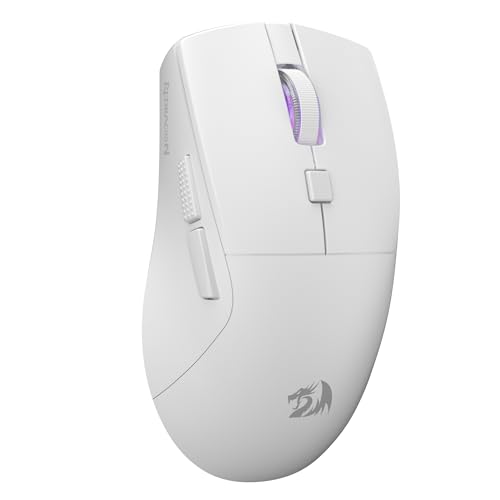
Redragon M618 LIT Wireless Gaming Mouse
More Details On Our Top Picks
The right-handed ergonomic shell gives this Logitech a more guided feel than the flatter, more universal shapes in the list. That matters in Valorant, where a steadier palm contact can help your hand settle into the same landing point every round.
The 60 g weight keeps it very easy to reposition, and the USB-C connection plus PowerPlay support adds a clean ownership path for a tidy desk. The trade-off is simple, it asks for a more specific hand fit, so ambidextrous preference or very small hands may want a different shape.
Strong Points
- Light 60 g build keeps flicks easy without feeling floaty.
- Ergo right-hand shape helps the palm sit naturally during long matches.
- USB-C support keeps charging and setup straightforward.
- PowerPlay compatibility suits desks that already use the charging mat.
- Five-button layout stays simple, which helps keep accidental presses down.
Things To Consider
- The right-hand contour limits how universal it feels.
- High polling support sounds impressive, but your results still depend on system setup and personal sensitivity.
- Five buttons suit pure FPS play, though macro-heavy work gets less flexibility than some rivals here.
Feature Snapshot
Who It Suits Best
You want this one for competitive play on a right-handed grip, especially in a setup where low drag and a clean desk matter more than extra side controls.
Where A Sibling Pick Shines
Redragon M916AK Wireless Ultra-Light Mouse suits you better when raw featherweight movement matters more than ergonomic contour.
The honeycomb shell gives this Redragon a lighter feel and a little more airflow in hand, which can be welcome during long ranked sessions. Compared with the Logitech above, it leans harder into flexibility, so you get wired, Bluetooth, and 2.4 GHz use instead of a single-minded tournament shape.
That mix is handy for a desk that also handles work laptops or a living-room setup. The trade-off is that a multi-mode mouse usually asks for more thought during pairing and mode switching, so it suits a patient setup better than a plug-and-forget routine.
Highlights
- Three connection modes make it easy to move between devices.
- 8000 DPI ceiling gives a wide range for sensitivity tuning.
- Five programmable buttons help you map useful shortcuts.
- Honeycomb shell keeps the body light and visually open.
Small Caveats
- Tri-mode switching can feel more involved than a plain wireless setup.
- Honeycomb shells can collect dust, so the body may need regular wiping.
- The side-button count stays modest for users who lean on many macros.
- The 10-meter connection claim is useful, though your desk layout still shapes real placement.
Feature Rundown
Right Fit For
You fit this mouse best if you split time between a gaming PC, a laptop, and a Bluetooth-capable tablet or work machine.
Another Choice May Suit
MELOGAGA Wireless Gaming Mouse makes more sense for mixed-device users who want a newer Bluetooth version and a longer quoted battery window.
The Falcon M1 sits in a practical middle ground, with a 90 g honeycomb body, a 24,000 DPI sensor, and a long quoted battery life. Compared with the lighter Logitech and Redragon options above, it gives up some featherweight appeal, but it answers with a bigger feature spread for people who keep one mouse tied to long use sessions.
The RGB strip adds visual flair without changing the grip story, and the three-way connection mix covers wireless, Bluetooth 5.2, and wired USB-C use. The honest read is that it feels more like a flexible all-round desk mouse than a stripped-down competition shell.
Upsides
- 180-hour battery claim reduces how often you need to think about charging.
- Three connection options give you room to match different devices.
- Six programmable buttons suit common game and desktop shortcuts.
- The 90 g body feels more planted than ultra-featherweight designs.
- USB-C wired use keeps it usable while charging.
Worth Noting
- 90 g is still light, but not as quick-feeling as the 42 g and 49 g picks in this list.
- The honeycomb shell can feel less sealed in the hand than a closed body.
- RGB is a visual extra, so it matters more to style-conscious desks than pure aim work.
Technical Sheet
Made For
You get the most from this mouse in a mixed-use setup where one device handles gaming, school work, and general desktop time.
Where Another Pick Suits Better
GravaStar Mercury X Wireless Gaming Mouse fits you better when you want a more premium shell and a lighter overall frame.
At 42 g, this Redragon goes straight for speed, and that weight puts it in a very different lane from the steadier TMKB Falcon M1. For Valorant, that kind of low mass can make small corrections feel almost effortless, especially on a cloth pad with a smooth glide.
The 26K DPI rating and remapping support round out a very FPS-focused package. The catch is that ultra-light mice can feel twitchy during long desktop sessions, so you may prefer it most when your main goal is quick in-game movement rather than all-day general use.
Bright Spots
- 42 g weight keeps movement extremely easy to start and stop.
- Remapping support lets you tune buttons around your preferred layout.
- The grip body is shaped with FPS comfort in mind.
- Wireless connection suits a clean desk and low-cable setup.
Points To Note
- Very light mice are personal, and some hands prefer a little more planted feel.
- Wireless performance still depends on receiver placement and desk clutter.
- The feature set leans game-first, so office-heavy use may feel less versatile than the multi-mode picks.
Core Details
Built With In Mind
You should look here for competitive FPS sessions where every gram matters and you want fast repositioning more than desk versatility.
Swap It Out When
Logitech G PRO X Superlight 2 DEX Wireless Gaming Mouse fits you better when you want a more sculpted right-handed shape instead of pure featherweight speed.
This MELOGAGA is the most obviously cross-platform pick in the group, with Bluetooth 5.4, 2.4 GHz, and USB-C wired support. That matters for a desk that switches between a PC, a Mac, a tablet, or a console-like setup, and it makes the mouse feel less tied to one machine than the more game-specialized Redragon models.
The 71 g body and ergonomic shell give it a more relaxed feel than the ultra-light 42 g and 49 g options above. You may find that helpful during long study sessions or after-work games, though the shape still leans toward people who like a mouse that fills the hand a bit more.
Positives
- Three connection modes make device hopping simple.
- 800 to 6400 DPI range gives practical sensitivity steps.
- 1000 Hz polling supports smooth cursor updates.
- 71 g weight keeps it light without going extreme.
- Up to 120 hours of use helps stretch time between charges.
- USB-C play-and-charge support keeps the mouse usable during a low-battery moment.
Areas To Watch
- The ergonomic shell will suit some grips more than others.
- Triple-mode hardware can add a bit of setup thinking compared with a single-mode mouse.
- The broad compatibility is useful, though it still helps to confirm your preferred device connection type.
Details At A Glance
Whose Shelf It Belongs On
You get the most from this mouse in a multi-device home office or dorm setup where one device needs to cover both Valorant and everyday work.
Look Elsewhere When
Redragon M916AK Wireless Ultra-Light Mouse makes more sense for pure FPS focus, since it trims weight much further.
The Mercury X is the showpiece in this list, with a magnesium alloy hollow frame that looks and feels more premium than the plastic shells around it. At 49 g, it still keeps pace with the lighter competition, so the design flair does not come at the cost of a heavy body.
The PAW 3950 sensor, 32,000 DPI ceiling, RGB lighting, and five programmable buttons make it a strong fit for a desk that wants both style and function. The honest read is that the hollow construction may not suit everyone’s hand feel, but for style-conscious FPS players it lands in a very interesting place.
Best Bits
- Magnesium alloy frame gives it a distinctive, premium feel.
- 49 g weight keeps movement easy and quick.
- PAW 3950 sensor and 32,000 DPI support a high-performance spec sheet.
- RGB lighting adds a visible desk presence.
- Five programmable buttons keep the layout focused.
Softer Spots
- The hollow frame style will not suit every hand preference.
- Style-forward hardware can draw more attention than a simpler tournament mouse.
- As with most lightweight mice, your pad choice influences how planted it feels.
Feature Card
The Right Fit
You’ll get the most from this mouse if your setup leans toward premium styling and you still want a very light wireless shell for competitive play.
A Better Fit Elsewhere
Logitech G PRO X Superlight 2 DEX Wireless Gaming Mouse suits you better when you want a more conventional ergonomic body over a showier alloy frame.
A glass pad changes the feel of the whole setup, and this WIYIXI model leans into that slippery, consistent glide. The 15.7 by 11.8 inch size gives you a broad work area, which matters for Valorant players who use low sensitivity and want room for wide arm movement.
Compared with cloth or hybrid surfaces, tempered glass usually asks for a little more care on the desk, but it rewards you with a very smooth tracking plane. That trade-off works best for controlled environments, not a crowded desk with drinks, crumbs, and loose cables everywhere.
Reasons To Buy
- Tempered glass surface gives a very smooth glide feel.
- Micro-etched finish adds a more controlled tracking surface than plain glass.
- Large 15.7 by 11.8 inch size gives room for low-sensitivity play.
- Black finish keeps the look understated.
Trade Offs
- Glass surfaces need more careful cleaning than cloth pads.
- The hard feel will not suit everyone’s wrist or desk preference.
- It makes more sense for a stable gaming corner than a highly mobile setup.
Core Details
Best Suited To
You want this pad if your Valorant setup uses a low-sensitivity mouse and you prefer a hard, even glide over a softer cloth surface.
Another Choice May Suit
Logitech G PRO X Superlight 2 DEX Wireless Gaming Mouse makes more sense if you want the mouse itself to do the heavy lifting without changing your pad material.
The M618 LIT goes after the compact end of the category, with a 70 g body and a portable footprint that can work well in tighter setups. That makes it feel more approachable for smaller hands or travel bags than the larger, more sculpted competition above.
Its BT and 2.4 GHz connectivity, six programmable buttons, and 10K DPI ceiling give it enough flexibility for gaming and general work. The trade-off is that the more compact body may not feel as anchored as the larger ergonomic options during very long sessions.
Best Bits
- 70 g weight keeps it easy to carry and use.
- BT and 2.4 GHz support cover two common wireless routes.
- Six programmable buttons add useful shortcut space.
- Five DPI stages make sensitivity switching straightforward.
- Compact build suits smaller desks and travel bags.
Areas To Watch
- A smaller body can feel less anchored for larger hands.
- Wireless gear still benefits from good receiver placement and fresh batteries or charging habits.
- The portable shape is practical, though not as shape-specific as the Logitech ergonomic model.
At A Glance
Who Should Grab It
You’ll like this mouse most if you want a compact wireless option that still handles Valorant, school work, and travel-friendly use.
Reach For A Different Pick When
TMKB Falcon M1 Wireless Gaming Mouse fits you better when you want a larger battery claim and a fuller ergonomic body.
How To Choose The Right Mouses For Valorant
Shape And Grip Come First
Grip style shapes the whole feel of a Valorant mouse. Fingertip players usually want a short, light shell that lets the fingers steer directly, while claw and palm users often prefer a body with some side support and a more settled hump.
That’s why the Logitech G PRO X Superlight 2 DEX Wireless Gaming Mouse and the Redragon M916AK serve different hands so well. The Logitech leans into a right-handed ergonomic curve, while the Redragon strips weight down hard for faster micro-movement.
Weight, Glide, And Pad Pairing
Weight matters, but so does what sits under it. A 42 g mouse feels very different on a glass surface than it does on a slower cloth pad, and a 70 g model can still feel quick when the skates and pad match well.
The WIYIXI tempered glass pad shows why the surface matters as much as the mouse itself. Smooth glass can make low-sensitivity aim feel crisp, while a softer pad can calm a very light shell and keep stop-start motion from feeling slippery.
Connection Choice And Desk Habits
Wireless is excellent for a clean desk, though wired still has a place for people who never want to think about pairing or battery status. Multi-mode mice such as the Redragon M725 and MELOGAGA are useful on mixed-device desks, but they ask for a little more setup discipline.
USB-C charging is the practical middle ground for most setups. It keeps the mouse usable during charging and cuts down on cable clutter, which helps more than it sounds during a long evening of ranked play.
Sensor Range And Button Layout
Very high DPI figures are easy to chase, yet in real use they matter most as headroom, not a goal in themselves. What you actually feel is tracking stability, how easy the mouse is to stop, and whether the button layout gets in your way.
Five buttons are enough for pure aim work, but six or more can help you map utility or desktop shortcuts. That’s where the TMKB Falcon M1 and Redragon M618 LIT stand out for people who want some extra control without turning the mouse into a control panel.
Things Worth Knowing First
Hidden Buying Traps
Shoppers often fixate on DPI and miss shape, weight, and pad match. A mouse that looks fast on paper can still feel awkward in your hand, especially in a tense round where small movements repeat over and over.
Another common miss is buying a wireless model without thinking about how many devices it needs to serve. A simple single-mode mouse suits a pure gaming station, while tri-mode designs make more sense on a desk that also handles work and travel.
What The Higher Tier Buys
Higher-end models usually spend money on lighter shells, better materials, and cleaner sensor tuning. In this group, that shows up in the Logitech’s very low weight, the GravaStar’s magnesium alloy frame, and the Redragon M916AK’s stripped-back speed focus.
You also tend to pay for comfort details that matter after the novelty wears off. Better shape work, more reliable button feel, and a charging path that fits your routine all help justify the step up more than a giant DPI number ever will.
Closing Thoughts
Your best match depends less on hype and more on how you hold the mouse and how you actually play. The Logitech G PRO X Superlight 2 DEX suits a serious right-handed grip, the Redragon M916AK suits pure speed, and the MELOGAGA or TMKB picks make more sense for mixed-device desks. A good Valorant mouse should feel like an easy extension of your hand, not a piece of gear you have to fight. Start with shape, then narrow by weight and connection, and the right choice becomes much clearer.
