
Work laptop mice live in the small gap between comfort and convenience. You want something that slips into a bag, feels steady during long spreadsheet stretches, and does not become a nuisance on a crowded desk or airplane tray.
This roundup focuses on everyday office use, travel, and home setups, with an eye on button count, hand fit, connection style, and battery life. You’ll also see where a full-size shape makes sense, where a silent click helps, and where a simple USB receiver still feels like the easier path.
The Shortlist At A Glance

wegear USB Wireless Mouse for Laptop PC Mac 2.4GHz Cordless Mouse Black
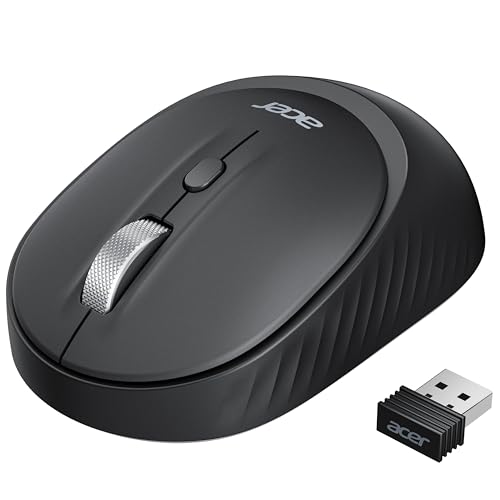
Acer Bluetooth Wireless Mouse for Laptop Small Hands Office Cordless Mouse BT5.2 plus 2.4GHz

WL300 Bluetooth Mouse Silent Wireless Mice Cordless Computer Mouse Grey

WL300 Bluetooth Mouse Silent Wireless Mice Cordless Computer Mouse Grey

Logitech M185 Compact Ambidextrous 2.4 GHz Wireless Mouse Swift Grey

Logitech M240 Compact Silent Bluetooth Wireless Mouse Rose

Acer Wireless Mouse for Laptop 2.4GHz Computer Mouse 3 Adjustable 1600 DPI

Logitech M510 Full Size Ambidextrous 2.4 GHz Wireless Mouse
More Details On Our Top Picks
That 6-button layout gives you more control than a plain office mouse, which helps during long days in sheets, docs, and browser tabs. The 4000 DPI ceiling, meaning cursor sensitivity, also gives you room to slow things down for detail work or speed them up for a larger display.
For a commuter bag or a shared desk, the black shell keeps things simple and the cordless 2.4GHz link avoids cable clutter. The trade-off is that this shape leans practical rather than plush, so very large hands may want something roomier like the Logitech M510.
What We Like
- Six-button control suits everyday multitasking.
- Five DPI steps help you tune pointer pace.
- 2.4GHz wireless keeps the desk clean.
- Portable shape fits laptop sleeves well.
- Long battery life cuts down on upkeep.
Things To Consider
- Very large hands may want a fuller shell.
- 2.4GHz use needs the USB receiver stored safely.
- The simple finish is more workmanlike than premium.
Feature Snapshot
Who It Suits Best
Desk workers who want a straightforward wireless mouse with extra buttons and flexible pointer speed will get the most from it.
Where A Sibling Pick Shines
Logitech M510 suits you better for fuller hand support and a more substantial full-size feel during all-day use.
The triple-device setup is the draw here, and that matters a lot in a desk-to-laptop-to-tablet workflow. Two Bluetooth slots plus one 2.4GHz path make it easy to keep a work machine and a personal device ready without swapping hardware.
Small hands should appreciate the intended fit, while left-handed and right-handed users both get a workable shape. The catch is simple, Bluetooth and 2.4GHz modes cannot run at the same time, so this is about switching, not blending connections.
Highlights
- Supports two Bluetooth connections plus one 2.4GHz link.
- Simple toggle suits multi-device workdays.
- Small-hand fit can feel easier to control.
- Left and right handed use is supported.
Worth Noting
- Wireless modes work one at a time, not together.
- The extra connection flexibility adds a little setup thinking.
- Shoppers wanting a simpler path may prefer the Logitech M185.
Core Details
Who Will Love This
You’ll get the most from it in a multi-device setup where quick switching matters more than a minimalist button layout.
A Better Fit Elsewhere
Logitech M240 suits people who want a cleaner Bluetooth-only path and fewer connection choices to manage.
Quiet clicks change the feel of a mouse more than most spec sheets suggest, especially in shared offices or late-night home sessions. This WL300 also adds a sculpted grip and six buttons, so it feels a little more composed than the simpler Logitech M185.
The adjustable DPI helps you slow the pointer for detail work or speed it up for broader desktop movement. The honest read is that the shape should suit travel and daily desk work well, while the quieter buttons may matter most to people sharing a room.
Reasons To Buy
- Quiet clicking helps in shared spaces.
- Sculpted grip adds a steadier hand position.
- Six buttons support more workflow shortcuts.
- Adjustable DPI fits different screen sizes.
- 18-month battery life keeps upkeep modest.
Softer Spots
- The added buttons may feel unnecessary for simple browsing.
- Some hands may prefer a fuller body like the M510.
- Travel users should still keep the receiver or pairing path organized.
Quick Facts
Built With In Mind
Office workers, commuters, and anyone who shares a room while working will notice the quiet feel most.
Another Choice May Suit
Logitech M240 is the cleaner match for people who want Bluetooth convenience with fewer controls to manage.
This version of the WL300 leans into flexibility, because it can move between wired use, 2.4GHz wireless, and Bluetooth modes. That makes it a strong fit for someone who bounces between a laptop at work, a desktop at home, and maybe a tablet in between.
Unlike the Bluetooth-only Logitech M240, it gives you more connection routes to work with, though that also means a little more setup complexity. For most desk setups, the extra versatility is worth the trade, especially when you want one mouse to cover several machines.
Standout Traits
- Tri-mode connectivity broadens device compatibility.
- Wired backup removes battery concerns during charging.
- Bluetooth plus 2.4GHz covers mixed work setups.
- No driver setup keeps the process simple.
Minor Gripes
- More modes can mean more steps during setup.
- People who want a single-link mouse may find it more than needed.
- The added flexibility matters less for a basic one-laptop desk.
Details At A Glance
Whose Shelf It Belongs On
People who move between several devices during a typical week will appreciate the broader connection mix.
Look Elsewhere When
Logitech M185 is the simpler fit for anyone who wants one receiver and very little setup thinking.
The M185 keeps things plain in a good way, with a compact ambidextrous shape that suits quick office moves and laptop carry. The optical tracking and 2.4GHz receiver setup are familiar, which makes it easy to live with on a work desk or in a café.
Compared with the more feature-heavy Acer and wegear models above, this one asks less of you and returns a simpler routine. That simplicity suits people who want a dependable mouse for documents, web work, and travel days without extra controls getting in the way.
Upsides
- Compact body slips easily into a laptop bag.
- Ambidextrous shape works for either hand.
- USB-A nano receiver keeps setup familiar.
- Optical tracking covers normal office tasks well.
- 12-month battery life helps reduce maintenance.
Room For Improvement
- Three-button simplicity leaves out extra shortcuts.
- The small shell may feel plain for larger hands.
- USB-A receiver use still needs a port or adapter.
Feature Rundown
Perfect Match For
Students, office staff, and travelers who want a simple wireless mouse with minimal learning curve will feel right at home.
Not Your Match When
Logitech M510 suits you better once you want a larger hand rest and more navigation features.
The M240 is the cleanest path in the group for Bluetooth-first work, especially since it skips a USB receiver entirely. That keeps ports open on newer laptops and makes the setup feel almost invisible once paired.
Quiet clicks help in libraries, shared offices, and late-night sessions where every tap carries farther than you’d like. The trade-off is the three-button layout, which is fine for straightforward work but less flexible than the WL300 or the Acer multi-device model.
Bright Spots
- Bluetooth connection frees up USB-A ports.
- Quiet button action suits shared work areas.
- Compact size travels well in small bags.
- 18-month battery life keeps maintenance light.
Small Caveats
- No receiver means Bluetooth setup has to be available on your laptop.
- Three buttons keep the layout very simple.
- People who want more controls may prefer the WL300.
Core Details
The Right Fit
Bluetooth laptop users who want a quiet, pocketable mouse for daily work will get the most from it.
Reach For A Different Pick When
Acer Bluetooth Wireless Mouse for Laptop Small Hands suits you better when you need extra device pairing options.
This Acer keeps the shape simple but gives you a useful middle ground for office work, especially with the three DPI settings. That matters on a work laptop because pointer speed often needs to change between a small screen, a large monitor, and a cramped tray table.
Its six-button layout and medium-to-large hand compatibility make it feel more substantial than the Logitech M185, though still easy to carry. The honest read is that it should suit people who want a straightforward mouse with a little more hand room and control.
Best Bits
- Three DPI steps cover common work speeds.
- Six buttons give extra control without clutter.
- Medium to large hands get a better fit.
- 2.4GHz wireless keeps the desk tidy.
Areas To Watch
- USB-A receiver use still depends on a port.
- The shell may feel larger than pocket-size options.
- People who travel very light may prefer the M240.
Technical Sheet
Made For
People who like a compact wireless mouse but still want a fuller grip and a few extra controls will find it useful.
Swap It Out When
Logitech M185 makes more sense for a smaller, more stripped-back carry item.
The M510 is the most desk-friendly shape in this group, and that shows up fastest in long work sessions. The full-size body, tilt-to-scroll function, and ambidextrous shape give you more room and more control than the compact M185 or M240.
For people who spend hours in spreadsheets or long web documents, the tilt scroll can feel like a small but useful relief. The trade-off is plain enough, it takes more space in a bag and on a narrow desk, so this is less about travel and more about comfort at a fixed workstation.
Plus Points
- Full-size body supports a more relaxed hand position.
- Tilt-to-scroll helps with wide spreadsheets and timelines.
- Two-year battery life keeps upkeep infrequent.
- Works across Windows, Mac, and Linux setups.
- Ambidextrous shape helps left-handed and right-handed use.
Points To Note
- Full-size shape takes up more bag space.
- Desk-first design feels less suited to frequent travel.
- The extra comfort comes with a larger footprint.
Feature Card
Who Should Grab It
People who work long hours at one desk and want more palm support will get the most value from this design.
Where Shoppers Go Wrong
Logitech M240 is the better match when you care more about pocketable size and a Bluetooth-only setup.
How To Choose The Right Mouses For Work Laptop
Connection Style Comes First
Bluetooth keeps USB ports open, which helps newer laptops and frequent travelers. A 2.4GHz USB receiver still feels easier for many office setups because pairing is simple and stable, especially on a machine that stays at one desk.
Tri-mode mice like the WL300 add flexibility, but that freedom only matters when you regularly switch between laptop, desktop, and tablet. A one-device workstation usually does better with a simpler connection path.
Shape Matters More Than Most Specs
Small, compact bodies suit bags, café tables, and short commutes. Full-size shells like the Logitech M510 matter more during long document sessions, because your hand has room to relax instead of curling around a tiny frame.
Ambidextrous designs work well in shared homes and offices. Sculpted grips, on the other hand, can feel steadier for long use, especially on models like the WL300.
Buttons And DPI Change The Feel
Extra buttons help with back, forward, and other routine actions, though they add little for someone who mostly opens email and writes. DPI, or dots per inch, is the cursor sensitivity setting, and lower steps can help on small laptop screens while higher settings suit large monitors.
Think in terms of daily motion, not just a spec line. Spreadsheet work, photo cleanup, and wide browser windows all benefit from a mouse that gives you the right speed without constant wrist correction.
Battery Life And Maintenance
Long battery life matters more than it sounds because nobody enjoys midweek power swaps. A 12-month or 18-month rating usually feels easy to live with, and the 2-year figure on the M510 makes the mouse even lower effort over time.
Simple finishes and fewer moving parts also reduce cleaning and care. For travel kits, a mouse with a compact body and one clear connection method tends to stay less fussy in a pouch or sleeve.
Things Worth Knowing First
Hidden Buying Traps
People often focus on wireless alone and miss the fit. A mouse that feels fine for five minutes can still feel cramped after a long workday, which is why size and grip deserve as much attention as connection type.
Another common miss is buying more controls than you use. Extra buttons help some workflows, but a basic office routine may never touch them.
What The Higher Tier Buys
More expensive work mice usually bring a fuller shape, broader compatibility, or a more refined scroll system. That extra spend also tends to cover convenience, such as Bluetooth flexibility, multi-device switching, or more comfortable support for long desk sessions.
The upgrade makes sense when you work at one desk for hours or move among several devices each day. For light spreadsheet work or occasional travel, a simpler model often covers the job without the extra bulk.
Final Thoughts
You do not need a complicated mouse to improve a work laptop setup, just one that matches how you actually work. For light travel and basic office tasks, the Logitech M185 and Logitech M240 keep things simple, while the Logitech M510 makes more sense for long desk days. Multi-device workers should look hard at the Acer Bluetooth model or the tri-mode WL300, since both bring more flexibility. Pick the shape and connection style that fit your routine, and the rest gets easier fast.
