
Long spreadsheet sessions, daily commutes with a laptop, and back-to-back meetings all expose the same problem, a mouse that feels fine for ten minutes but tiring by lunch. This roundup focuses on palm-friendly shapes, vertical designs, and trackball control so your hand can stay calmer through ordinary work. You’ll see clear trade-offs too, because comfort often comes with a learning curve, a larger shape, or fewer portability perks.
The Shortlist At A Glance

Nulea Wireless Trackball Mouse Ergonomic 21.7 Tilt Stand

PHILIPS SPK7628 Ergonomic Mouse Wireless 3 Adjustable DPI

Logitech Signature Comfort Plus M850 L Wireless Mouse Bluetooth

Incase Bluetooth Ergonomic Mouse Designed by Microsoft
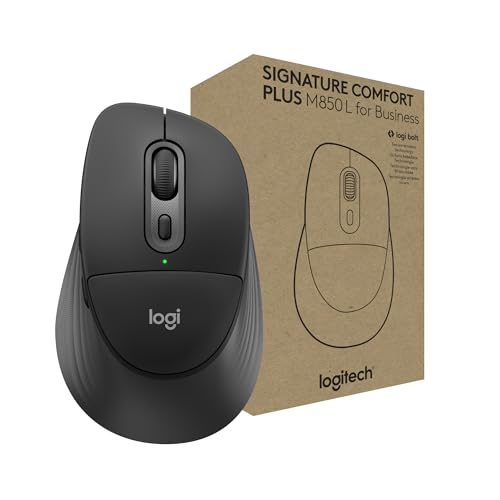
Logitech Signature Comfort Plus M850 L for Business Wireless Mouse

Anker 2.4G Wireless Ergonomic Mouse Right Hand Vertical

Logitech Lift Vertical Ergonomic Wireless Mouse Graphite

ProtoArc EM11 NL Wireless Ergonomic Vertical Mouse Rechargeable
More Details On Our Top Picks
The trackball layout changes the whole experience, because your hand stays put while your thumb does the moving. That can feel especially good on a crowded desk or beside a laptop stand, where constant mouse travel gets annoying fast.
The 21.7-degree tilt stand gives your hand a more angled posture than a flat shell, and the rechargeable design keeps battery swaps out of the routine. The trade-off is obvious, trackballs ask for a short adjustment period, so this suits you best when comfort matters more than instant muscle-memory.
What We Like
- Thumb control keeps movement confined to one spot, which helps on tight desks.
- The tilted body supports a more relaxed hand angle than a standard flat mouse.
- Bluetooth and 2.4G wireless give you a little flexibility across devices.
- Three-device switching suits a work setup with a laptop, desktop, and tablet.
- Four DPI levels let you tune pointer speed for detailed work or quick navigation.
Things To Consider
- Trackball control feels different at first, so the first few days may be slower.
- The shape makes more sense for desk use than for constant on-the-go carry.
- Thumb-based operation can take a bit of cleaning to keep the ball smooth.
Feature Rundown
Who It Suits Best
Desk-focused commuters, spreadsheet workers, and anyone who wants less wrist movement from a compact control style tend to get the most from it.
Where A Sibling Pick Shines
Logitech Lift Vertical Ergonomic Wireless Mouse is the better match for you if you want a more familiar vertical shape with quieter clicks and easier onboarding.
For a first vertical mouse, this one keeps the idea simple, wireless connection, adjustable pointer speed, and a body shaped for smaller or medium right hands. The six-button layout adds useful control without pushing the design into fussy territory.
The quiet-button approach matters in shared offices and late-night work spaces, and the auto-sleep behavior helps stretch battery life between uses. The honest read is that this is more practical than polished, but that’s exactly why it fits budget-conscious upgrades so well.
Highlights
- The vertical posture can feel gentler than a flat mouse during long desk sessions.
- Three DPI steps let you soften or speed up pointer movement as needed.
- Silent buttons suit shared rooms, calls, and after-hours work.
- Its lightweight build should feel easy to carry in a laptop bag.
Small Caveats
- Right-hand fit and smaller-size focus make the shape less universal.
- The lighter build may not feel as substantial as pricier ergonomics.
- Auto-sleep can mean a brief wake-up pause after idle stretches.
At A Glance
Made For
You’ll get the most from it in a home office, dorm room, or shared desk where quiet clicks and a lower-cost ergonomic shape matter more than premium finish work.
Another Choice May Suit
Nulea Wireless Trackball Mouse Ergonomic 21.7 Tilt Stand makes more sense for you if your desk stays crowded and you’d rather keep the mouse in one place.
This model leans into familiar comfort instead of a dramatic ergonomic shape, and that makes it easy to settle into during daily office work. The palm cushion is the key detail here, since it softens the contact point without changing your whole hand posture.
Bluetooth support and customizable buttons give it useful flexibility for a laptop, tablet, or a mixed desk setup. Compared with the Nulea trackball, this one asks less of your habits, though it also gives you less posture change in return.
Bright Spots
- The palm cushion should feel welcoming for long typing and browsing stretches.
- Bluetooth keeps the setup cleaner for laptops with limited ports.
- Customizable buttons add shortcuts that can trim small daily tasks.
- The 24-month battery claim suggests fewer interruptions for power management.
- Its shape looks easier to adopt than a vertical mouse for first-time ergonomic shoppers.
Areas To Watch
- The comfort focus is softer than a full vertical or trackball design.
- Users chasing the strongest wrist-angle change may want a more upright shape.
- Graphite styling is understated, which suits some desks better than others.
Details At A Glance
Whose Shelf It Belongs On
You’re the best fit here if you want an easygoing, cushioned mouse for everyday work and don’t want the learning curve of a vertical or trackball model.
Look Elsewhere When
Logitech Lift Vertical Ergonomic Wireless Mouse is a smarter match for you if your priority is a more upright hand angle and quieter clicks.
The selling point here is the shape, not extra features. A contoured body and thumb rest work together to keep the hand in a natural position, which can matter a lot during long stretches of document work or home-office admin.
Because it keeps the design focused, it slides neatly into a desk setup that values a clean look and simple daily use. The trade-off is that you are mostly paying for ergonomics, so it suits you best when comfort is the priority and feature clutter is not.
Positives
- The thumb rest gives the hand a steadier resting point.
- Its contoured body supports a relaxed grip during routine tasks.
- The Bluetooth approach keeps pairing simple for many laptop setups.
- It fits home, office, and travel use without feeling overbuilt.
Softer Spots
- Feature details are sparse, so you’re mainly choosing shape and comfort.
- Users who want extra buttons or sensor tuning may want more control.
- The design focus may feel a bit minimal for power users.
Core Details
Who Should Grab It
You fit this mouse best if you want a simple Bluetooth ergonomic option for office paperwork, travel days, or a clean desk with minimal fuss.
Skip It When
Logitech Signature Comfort Plus M850 L Wireless Mouse Bluetooth is a better match for you if you want a softer palm cushion and more customization.
The business-focused version keeps the same comfort idea but adds a more work-ready setup for mixed operating systems and office fleets. Its sculpted shell and palm cushion matter most in places where the mouse is used all day and handed from one workstation to another.
Secure receiver support and Bluetooth give you more deployment flexibility than the simpler designs above. That flexibility has a trade-off, though, because this model makes the most sense in structured work setups rather than casual couch use.
Standout Traits
- The sculpted body supports a comfortable palm rest during long office sessions.
- Bluetooth and secure receiver support make it adaptable across desk setups.
- Cross-platform compatibility helps in mixed device environments.
- The business angle suits shared workspaces and IT-managed rollouts.
- It feels more polished than basic budget ergonomic mice.
Points To Note
- The business emphasis adds value mainly for office use, not casual single-device setups.
- It still keeps the same comfort-first shape, so size fit matters.
- Not much about the design is flashy, which is fine for work, less so for style chasers.
Feature Snapshot
Built With In Mind
You’re the right fit here if you manage a home office, small team, or mixed-device work station and want comfort with a more professional setup.
Swap It Out When
Incase Bluetooth Ergonomic Mouse Designed by Microsoft fits you better if you want the simplest possible ergonomic shape and do not need business-oriented connection flexibility.
This is the straightforward vertical option in the group, shaped for right-hand use and built around a USB receiver rather than more complex pairing choices. The three DPI levels make it easy to settle into a speed that feels right for office work, basic creative tasks, or general browsing.
Because it uses batteries and keeps the control layout simple, it feels like a no-drama ergonomic starter. The compromise shows up in portability and polish, but that’s fair for a mouse that focuses on clear handling and familiar basics.
Best Bits
- The vertical shape helps your hand rest in a more upright position.
- Three DPI settings make pointer control easier to tune.
- Five buttons offer more utility than a bare-bones mouse.
- The USB receiver keeps setup simple on many laptops and desktops.
Trade Offs
- Batteries are required, so you’ll need to keep spares on hand.
- Right-hand shaping narrows the fit for left-handed use.
- The older style of design feels more functional than refined.
Technical Sheet
Whose Shelf It Belongs On
You’re the best match here if you want an uncomplicated vertical mouse for a standard desk and don’t mind swapping batteries now and then.
Reach For A Different Pick When
Logitech Lift Vertical Ergonomic Wireless Mouse is a better fit for you if you want quieter clicks and a more premium-feeling vertical design.
The Lift takes the vertical idea and refines it with a quieter click feel and more button customization than the basic upright options. For desk workers who spend long afternoons in email, browser tabs, and docs, that combination can feel a lot easier to live with.
Bluetooth and the included Logi Bolt USB-A receiver give you a choice between cable-free convenience and a more receiver-based setup. Compared with the Anker vertical mouse, this one looks better suited to people who want a more polished daily driver rather than a strictly utilitarian shape.
Reasons To Buy
- The upright stance helps keep the hand in a more natural angle.
- Quiet clicks suit shared offices, calls, and late work hours.
- Four customizable buttons out of six add useful shortcut control.
- Bluetooth and Logi Bolt support give you two connection routes.
- The overall feel is more refined than many entry-level vertical mice.
Worth Noting
- The vertical learning curve still applies for anyone new to this shape.
- Left-handed use is not the focus, so fit matters here too.
- The more polished design can make it a stronger spend than basic alternatives.
Core Details
The Right Fit
You’re the match here if you spend most of your day at a desk and want a vertical mouse that feels calmer, quieter, and a bit more polished than starter models.
Where A Sibling Pick Shines
ProtoArc EM11 NL Wireless Ergonomic Vertical Mouse is worth a look for you if rechargeable power and a slightly more compact ergonomic setup matter more than Logitech’s refinements.
The 58-degree angle gives this mouse a more moderate vertical stance than the steeper upright designs above, which can make the transition feel easier for some hands. Add in three-device support and USB-C recharging, and you get a travel-friendly ergonomic shape that still behaves like a modern desk mouse.
That mix works well for hybrid workers who move between home, office, and laptop use. The trade-off is that compact ergonomic mice can feel smaller in the palm than full-size office models, so hand fit deserves attention.
Upsides
- The 58-degree angle sits between flat and fully upright, which may feel easier to adapt to.
- Three-device support helps you hop across work gear without re-pairing every time.
- Bluetooth and 2.4G USB-A cover both cable-free and receiver-based setups.
- USB-C recharging keeps power management cleaner than battery-only designs.
Minor Gripes
- The smaller vertical shell may feel snug for larger hands.
- Some users will prefer a more cushioned palm rest for all-day office duty.
- Portable ergonomic mice can be less filling in the hand than full-size shapes.
Key Specs
Built With In Mind
You’re a strong match here if you split time between laptop carry, shared desks, and home workstations and want comfort without a bulky shell.
Not Your Match When
Logitech Signature Comfort Plus M850 L Wireless Mouse Bluetooth fits you better if you want a fuller palm cushion and a more familiar, flatter feel.
What To Weigh Before You Choose
Wrong Turns To Avoid
A common miss is chasing shape alone and forgetting hand size. A vertical mouse that feels calm for one person can feel cramped or too tall for another, especially during long office days.
Another trap is overlooking connection style. Bluetooth suits cleaner laptop setups, while a USB receiver can feel simpler on a desktop, and trackball control only makes sense once you’re ready for the learning curve.
The Upgrade Payoff
Higher-tier ergonomic mice usually cost more because the shell shaping is more refined, the buttons tend to feel quieter or more customizable, and the materials are usually tuned for longer desk sessions. That matters most for you if the mouse is part of a full workday, not just a quick home check-in.
Spending up makes sense when hand comfort affects your focus, especially in office work, creative browsing, or spreadsheet-heavy routines. For light use, a simpler vertical mouse can be enough, but steady daily use often justifies the more polished feel.
Closing Thoughts
Your best choice depends on how you hold a mouse and how often you use it. Trackball comfort, vertical posture, and soft palm support each solve a different kind of strain, so the right answer is the one that matches your desk habits rather than the flashiest shape. For most people, the safest starting points here are the Logitech Signature Comfort Plus M850 L Wireless Mouse Bluetooth and the Logitech Lift Vertical Ergonomic Wireless Mouse. Pick the shape you’ll happily reach for every morning, and the rest gets easier.
