
Office setups run smoother when the keyboard feels comfortable and the mouse matches the way you work. Some desks need quiet keys for shared space, while others need a full-size layout, a slim profile, or a shape that eases long typing sessions. This roundup focuses on wireless combo sets that make everyday work less fussy, whether you split time between a home office, a team workspace, or a laptop at the kitchen table.
You’ll see clear differences in typing feel, mouse shape, connectivity, and layout size, so you can match the set to your routine instead of guessing from a product page. A few picks lean modern and compact, while others favor a more traditional full-size setup. That mix matters more than flashy extras.
The Shortlist At A Glance
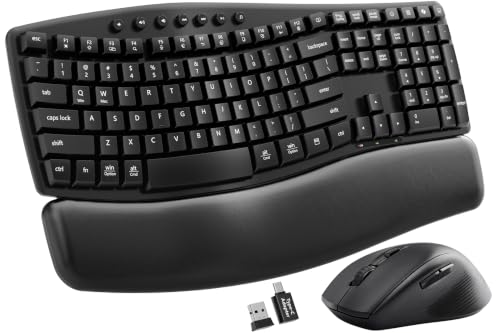
SABLUTE MA41 Wireless Keyboard and Mouse Combo

Logitech MK955 Signature Slim Wireless Keyboard Mouse Combo

SABLUTE Backlit Typewriter Wireless Keyboard and Mouse

Logitech MK345 Full Size Wireless Keyboard and Mouse Combo Black

Logitech MK345 Full Size Wireless Keyboard and Mouse Combo Black

Logitech MK270 Full Size Wireless Keyboard and Mouse Combo Black

RECCAZR Silent Wireless Keyboard and Mouse Combo Avocado Green

Logitech MK270 Full Size Wireless Keyboard and Mouse Combo Rose
More Details On Our Top Picks
The MA41 leans into comfort first, with a wave-shaped keyboard, a soft leather palm rest, and a memory-foam wrist rest that help longer desk sessions feel less stiff. Dual-system switching for Windows and Mac keeps it useful across mixed work setups, and the 2.4GHz wireless link suits a desk where you want fewer cables in the way.
Compared with the slimmer Logitech MK955, this SABLUTE set feels more cushioned and less spare, which suits a home office or a team desk that sees daily typing. You may find the included adapter support handy on laptops with different ports, though the bundle still works best where you want a more traditional full-size feel.
What We Like
- The wave keyboard shape supports a more relaxed hand position during long email and document sessions.
- Soft leather and memory foam at the wrist area add comfort for people who type for hours at a stretch.
- Windows and Mac switching makes the set easier to move between work devices without much fuss.
- 2.4GHz wireless keeps the desk cleaner than a wired setup, which helps in small offices and shared tables.
Small Caveats
- The comfort-first design takes up more visual and physical space than a very slim combo.
- That softer wrist surface may need more regular wiping than a plain hard shell.
- The set suits desk work better than constant travel, since the fuller layout is less packable.
Feature Snapshot
Who It Suits Best
You’re the best match for this set if you spend long stretches at a desk and want a softer typing posture with easy cross-platform switching.
Where A Sibling Pick Shines
Logitech MK955 Signature Slim Wireless Keyboard Mouse Combo suits you better when a slimmer profile and three-device switching matter more than extra wrist comfort.
MK955 takes a cleaner, slimmer route than the SABLUTE MA41, and that’s exactly why it stands out for larger hands that still want a low-profile setup. Quiet typing and clicking keep it unobtrusive in an open office or a shared living space, while Bluetooth and multi-OS support make it easier to shift between machines.
The three-device switching matters most when your day jumps from desktop to laptop to tablet without much pause. It may feel a bit more restrained than a cushioned wrist-rest combo, but for people who like a neat desk and a modern shape, the trade-off makes sense.
Strengths
- Low-profile keys and mouse input suit workspaces where you want a tidy, modern look.
- Quiet typing and clicking help keep noise down during calls or late-night work.
- Switching across three devices supports people who move between work hardware during the day.
- Bluetooth broadens compatibility and cuts down on receiver clutter.
- The larger-hand focus gives the keyboard a more spacious feel than some compact office combos.
Worth Noting
- The slim profile gives up some of the plush support you get from the MA41’s palm rest.
- People who prefer a tall, traditional keyboard may need a short adjustment period.
Core Details
Who Should Grab It
You’re the right fit for this combo if your desk setup changes through the day and you want a slimmer layout that still feels practical.
Swap It Out When
SABLUTE MA41 Wireless Keyboard and Mouse Combo is the better call when wrist comfort matters more than a minimal shape.
This SABLUTE combo is for people who want their desk to feel a little more styled without giving up practical office features. The round keycaps, backlighting, magnetic wrist rest, and phone holder create a setup that looks distinct next to the more conservative Logitech sets above.
It also feels well suited to evening work, shared rooms, or a laptop desk that doubles as a casual workspace. The trade-off is simple, since the bolder design may appeal less to people who want a plain office look, but the extra touches are useful rather than decorative.
Upsides
- Backlit keys help make the keyboard easier to see in dim rooms.
- The magnetic wrist rest adds comfort and can be removed or repositioned more easily than a fixed pad.
- Round keycaps give the board a distinct feel that stands apart from standard office layouts.
- A built-in phone holder keeps a phone visible during calls, timers, or quick checks.
- 2.4GHz cordless use helps keep the desk uncluttered.
Areas To Watch
- The style-forward layout may not suit a very formal workstation.
- More visual features usually mean more surface areas to dust and wipe.
- People who prefer a plain key shape may need a short adjustment period.
Feature Rundown
Built With In Mind
You’ll appreciate this set most in a home office or a hybrid workspace where style matters almost as much as function.
Look Elsewhere When
Logitech MK955 Signature Slim Wireless Keyboard Mouse Combo fits better for a quieter, more understated desk with multi-device switching.
The MK345 takes the dependable route, with a full-size keyboard, an integrated palm rest, and a compact right-handed mouse that keep the setup familiar. Compared with the sleeker MK955 and the style-heavy SABLUTE options, this one is about predictable desk use rather than flair.
That makes it easy to place in a busy office, a back room workstation, or a home desk that stays put most of the week. The single USB-A nano receiver also keeps connection management simple, though the right-handed mouse shape naturally narrows the fit.
Bright Spots
- Full-size key layout suits spreadsheets, office writing, and number-heavy tasks.
- The built-in palm rest gives the keyboard a more relaxed feel for long sessions.
- The compact mouse keeps the bundle from feeling bulky on a standard desk.
- Single-receiver use makes setup straightforward for people who want one plug and go.
Minor Gripes
- The right-handed mouse shape limits flexibility for left-handed use.
- Full-size footprints ask for more desk room than a slim combo.
Details At A Glance
Right Fit For
You’re a good match for this set if you want a full-size layout that feels familiar right away and you keep the keyboard in one main workspace.
A Better Fit Elsewhere
Logitech MK270 Full Size Wireless Keyboard and Mouse Combo Black makes more sense for a simpler, less padded setup that still covers everyday office tasks.
This MK345 listing lands in the same comfort-minded lane as the other black MK345 above, but the reading here is simple: it suits people who want a full-size wireless combo that doesn’t feel fussy. The integrated palm rest and compact right-handed mouse make it feel familiar in a home office or a standard office cubicle.
Where the MA41 leans softer and the MK955 leans slimmer, this one sits in the middle with a practical shape and no extra drama. The honest read is that it works best as a steady desk companion rather than a gadget you move around often.
Reasons To Buy
- Full-size keyboard spacing helps keep typing comfortable for longer documents.
- The palm rest supports a more natural hand position during desk work.
- A compact mouse keeps the bundle usable without taking over the desk.
- Wireless connection reduces cable clutter around monitors and notebooks.
Softer Spots
- The mouse still leans right-handed, so it is not the broadest-fit choice.
- Its larger footprint is less friendly to very tight desks.
Core Details
Whose Shelf It Belongs On
You’ll get the most from this combo if your desk stays in one place and you like a familiar, full-size layout for day-to-day work.
Reach For A Different Pick When
Logitech MK955 Signature Slim Wireless Keyboard Mouse Combo is the smarter fit for people who want slimmer hardware and multi-device switching.
MK270 keeps the formula simple, which is useful in office setups that don’t need a lot of extras. Compared with the MK345 line, it feels like the more stripped-back sibling, and that can be exactly right for a spare desk, a secondary PC, or a small work corner.
The real appeal is ease: a full-size layout, a standard black finish, and a wireless pairing that stays out of the way. You may find it especially sensible for routine spreadsheet work or basic admin tasks where comfort features matter less than predictability.
Highlights
- Full-size keyboard support suits routine office input and navigation.
- The simple wireless setup keeps the desk free of a cable tangle.
- Black finish blends easily into most office and home workspaces.
Things To Consider
- The design is plain by nature, so it does not add extra comfort features.
- People who want wrist support may prefer one of the MK345 variants or the SABLUTE MA41.
Quick Facts
The Right Fit
You’re likely to like this most if you want a basic wireless office set that does its job without adding extra visual noise.
Another Choice May Suit
RECCAZR Silent Wireless Keyboard and Mouse Combo Avocado Green fits better for you if quieter keys and a more distinctive look matter more.
This RECCAZR set stands out because the avocado green finish gives a home office a little personality without turning the desk loud. The full-size keyboard, tilt legs, and quiet mouse with three DPI levels make it more functional than decorative, which is the right balance for many shared rooms.
Compared with the black Logitech sets, this one feels more expressive and a touch more tailored to a personal workstation. In most home offices, that combination of color, quiet input, and adjustable mouse speed is enough to make it an easy daily companion.
Best Bits
- Silent keyboard behavior keeps noise down in shared spaces.
- Tilt legs give the keyboard a more angled typing stance.
- The mouse offers three DPI levels, which helps you tune pointer speed to your desk habits.
- The avocado green finish adds a softer visual style than standard black sets.
Room For Improvement
- The bright finish may be a little bold for very formal offices.
- Color-forward hardware can show dust a bit more visibly than matte black.
Feature Card
Made For
You’re the best fit for this combo if you work from home and want quieter input with a bit more personality on the desk.
Skip It When
Logitech MK270 Full Size Wireless Keyboard and Mouse Combo Black is the safer fit for a more understated office look.
The rose finish gives this MK270 a softer presence than the black version, but the real story is still the full-size keyboard and spill-resistant design. That makes it a sensible fit for shared desks, family workstations, or a home office where the keyboard might see the occasional coffee mistake.
Its compact ambidextrous mouse broadens the fit compared with the right-handed MK345 mouse, so it can suit more hands without changing the overall simple formula. The look is friendlier, the layout is familiar, and the setup stays straightforward, which is often enough for daily office work.
Positives
- The spill-resistant keyboard body adds a practical layer of everyday protection around drinks and desk clutter.
- An ambidextrous mouse gives you a more flexible grip than right-handed-only shapes.
- The rose color softens the desk look without changing the work-focused layout.
- Full-size keys keep it useful for routine office writing and spreadsheet work.
Points To Note
- The softer color may not suit a very formal corporate setup.
- Like most full-size sets, it asks for more desk space than a slim combo.
Core Details
Best Suited To
You’ll like this most if you want a familiar full-size office combo with a softer color and a more flexible mouse shape.
A Better Fit Elsewhere
Logitech MK345 Full Size Wireless Keyboard and Mouse Combo Black fits better for people who want palm support and a more traditional right-handed mouse.
How To Choose The Right Office Mouse And Keyboards
Layout, Comfort, And Desk Size
Start with the shape of your workday, not the color. A full-size combo like the Logitech MK270 or MK345 fits number entry, shortcuts, and a stable mouse zone, while slim sets such as the MK955 save room on tighter desks.
Wrist support matters more than many people expect during long typing stretches. A palm rest or wrist rest can soften pressure, but it also adds footprint and can collect dust, so a minimal setup often suits light daily use better.
Connection Style And Device Switching
Wireless here is mostly about simplicity, but the connection method changes the experience. A USB-A nano receiver keeps things easy for a desktop or older laptop, while Bluetooth helps when you move between newer machines and want fewer dongles.
Multi-device switching becomes valuable in mixed setups, especially for people who juggle a work laptop and a personal computer. The Logitech MK955 handles that neatly, while single-receiver combos stay more straightforward for one-desk routines.
Noise, Key Feel, And Shared Spaces
Quiet typing matters in open offices, late-night study corners, and homes where someone is on a call nearby. The MK955 and the SABLUTE MA41 lean softer and quieter than louder mechanical-style boards, which helps the desk feel calmer.
Still, quiet doesn’t mean identical. Round keycaps, wave-shaped rows, and tilt legs change how the board feels under your hands, so the right choice depends on whether you want a softer touch, a flatter profile, or a more traditional key spread.
What To Weigh Before You Decide
Common Shopping Slip Ups
A frequent mistake is choosing on looks alone and ignoring hand feel. A compact mouse can work well for some desks, but a right-handed design may feel awkward for left-handed use, and a full-size board can crowd a small table faster than expected.
Another miss is overlooking connection needs. A USB-A receiver is simple, yet a Bluetooth-heavy setup may suit modern laptops better, especially when you keep moving between rooms or machines.
When Paying More Pays Off
Higher-tier combos usually spend the extra money on comfort shaping, quieter switches, multi-device support, or more flexible wireless options. That’s why the MK955 feels more refined than basic office sets, and why the SABLUTE MA41 adds wrist support and adapter flexibility.
The upgrade makes sense when your desk is a long-term workspace, not a temporary stop. For occasional email and light admin, a simpler MK270 can be enough, but daily typing, shared rooms, and mixed-device work justify more thoughtful hardware.
Closing Thoughts
Your best choice depends on how your desk actually feels at the end of the day. A comfort-first set like the SABLUTE MA41 helps long sessions, the Logitech MK955 suits multi-device work, and the MK270 line keeps things plain and dependable. For a workspace that needs less friction and more routine, any of these can fit, but the right one will match your hands, your space, and how often you switch devices.
