
Choosing a desktop processor starts with your workload, not a spec sheet. You may need a compact office machine for email and spreadsheets, a full-size tower for heavier multitasking, or an all-in-one that keeps your desk tidy. This shortlist covers all three situations, with attention to memory, storage, display setup, operating system, and everyday ownership. You’ll also see where older hardware still makes sense and where newer processor platforms give you more room to grow.
The Shortlist At A Glance
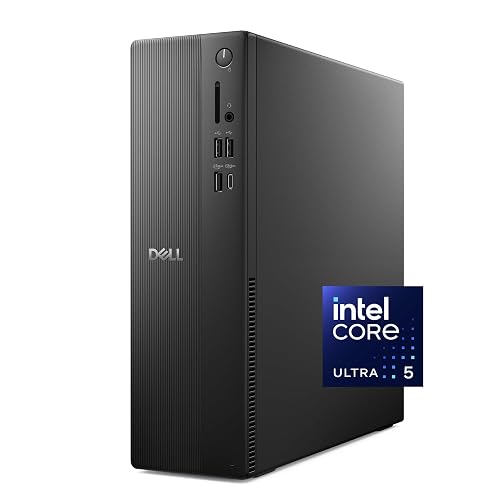
Dell Slim Desktop, Intel Core Ultra 5-225, 512GB SSD

Lenovo IdeaCentre All-in-One Desktop Computer, 8GB RAM 512GB SSD
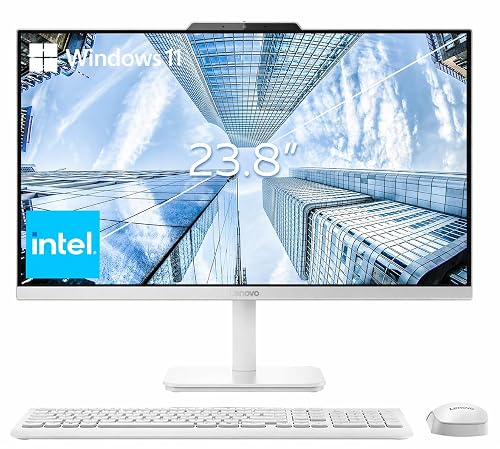
Lenovo 24″ FHD All-in-One Desktop Computer, 16GB RAM
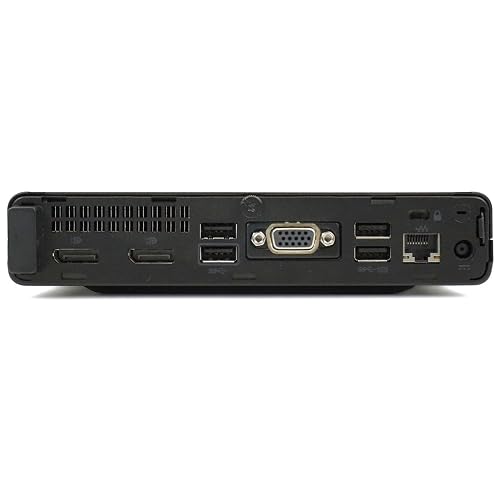
HP ProDesk Business Mini PC, Intel Core i5, 16GB RAM

Lenovo IdeaCentre 24″ FHD All-in-One Desktop, 16GB RAM

Dell Tower Desktop PC, Intel Core i7-7700, 16GB RAM
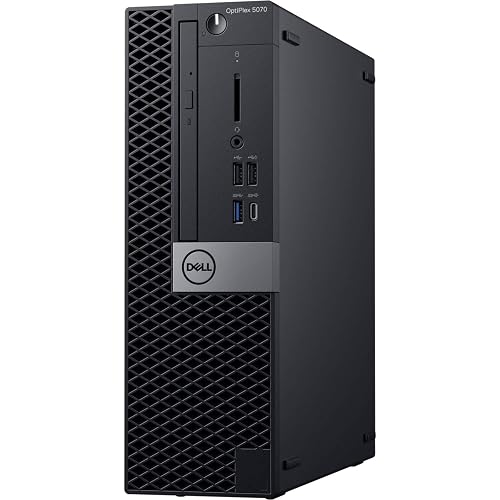
Dell Pro Tower Desktop Computer, Intel Core i3-14100
More Details On Your Top Picks
A slim chassis makes sense for a crowded desk, especially beside a monitor, printer, and work phone. The Intel Core Ultra 5-225 gives you a newer desktop platform, while 16GB of DDR5 memory, a fast type of system memory, keeps document work, browser tabs, and video calls moving comfortably.
You also get a 512GB solid-state drive, which stores files without the moving parts found in older hard drives. Daily office work should feel responsive, though the slim enclosure leaves less room for future hardware changes than a tower.
Strong Points
- 16GB DDR5 memory suits multitasking across office software and browser tabs.
- The 512GB SSD gives you useful space for documents, applications, and personal files.
- Wi-Fi 6 and Bluetooth support tidy desk setups with fewer cables.
- The supplied wired keyboard lets you get started without adding a separate input set.
- DisplayPort support can suit multi-screen work, depending on compatible display equipment.
Things To Consider
- The slim case may make upgrades and internal cleaning less convenient than on a tower.
- Integrated Intel UHD Graphics suits everyday visuals, not demanding graphics workloads.
Key Specs
Who It Suits Best
You’ll appreciate this compact Dell for a home office, study corner, or daily productivity desk where newer processing matters.
Consider Something Else When
Choose the HP ProDesk Business Mini PC for heavier business multitasking and a six-core Core i5 platform.
For a student bedroom or kitchen desk, an all-in-one keeps the computer behind the display instead of adding a separate case. Lenovo pairs a 24-inch Full HD anti-glare IPS screen with an Intel four-core processor, so web research, writing, streaming, and video calls stay within its intended lane.
The 512GB SSD is generous for schoolwork and household files, but 8GB of RAM, meaning short-term working memory, gives you less headroom than the 16GB choices above. You may find the fixed-screen design wonderfully tidy, yet it offers less flexibility for replacing the display later.
What We Like
- The 24-inch IPS panel gives you a comfortable workspace for documents and online classes.
- Anti-glare treatment can make desk lighting easier to manage during daytime work.
- The all-in-one format reduces cable clutter and installation steps.
Worth Noting
- 8GB memory is adequate for basic tasks but less comfortable with many heavy browser tabs.
- Cleaning around the screen and rear computer housing requires more care than cleaning a separate tower.
- The display and computer are tied together, limiting future screen changes.
At A Glance
Made For
This Lenovo fits students, casual home users, and anyone who wants a straightforward workstation with minimal desk wiring.
Not Your Match When
The Lenovo 24″ FHD All-in-One Desktop Computer with 16GB RAM suits heavier multitasking and larger local workloads.
The extra memory separates this Lenovo from the 8GB IdeaCentre. Its Intel processor remains aimed at everyday work, but 16GB DDR4 RAM gives you a smoother feel across spreadsheets, email, research tabs, and video meetings at a small business desk.
A 24-inch Full HD IPS anti-glare panel keeps the workstation self-contained, while HDMI provides a path to an additional display. The 256GB PCIe SSD, a compact high-speed storage format, starts quickly but leaves less room for large media libraries.
Highlights
- 16GB RAM provides useful breathing room for office multitasking.
- The IPS display offers a broad, clear work surface for side-by-side windows.
- Wireless keyboard and mouse reduce setup clutter.
- Windows 11 Pro suits users who prefer a business-oriented operating system.
Trade Offs
- 256GB storage can fill quickly with photos, videos, and large project folders.
- The all-in-one format makes internal servicing less accessible than a mini PC or tower.
Technical Sheet
Right Fit For
You’ll get the most from this configuration in a home office or small business setting where memory matters more than large storage.
Another Choice May Suit
The Lenovo IdeaCentre 24″ FHD All-in-One Desktop with 512GB SSD is a better match for families storing more local files.
A six-core Intel Core i5 gives this mini PC a more business-ready profile than the four-core all-in-ones. You can place the compact case behind a monitor or under a desk, then connect the dual DisplayPort outputs for a two-screen spreadsheet or communication setup.
Its 16GB RAM and 512GB PCIe SSD balance active multitasking with useful storage. The catch is that you supply the monitor, keyboard, and mouse, so the total setup takes more planning than Lenovo’s integrated choices.
Upsides
- Six processor cores suit heavier office multitasking and frequent video conferences.
- Dual DisplayPort connections support a practical two-monitor workstation.
- 16GB RAM and a 512GB PCIe SSD form a balanced business configuration.
- The mini enclosure saves desk space without tying you to a built-in screen.
- Owners commonly value mini PCs for easier monitor replacement and desk rearrangement.
Minor Gripes
- You need separate display and input accessories, adding setup decisions.
- Compact cases can collect dust around vents, so accessible placement helps routine cleaning.
- Legacy display compatibility may require checking your monitor inputs before setup.
Feature Snapshot
Best Suited To
This HP suits office professionals who need a small case, two displays, and more multitasking capacity than an entry-level all-in-one.
Look Elsewhere When
The Dell Slim Desktop with Core Ultra 5-225 makes more sense for a ready-to-use compact setup with a supplied keyboard.
Families often need a computer that can handle homework in the afternoon, budgeting at night, and streaming between those tasks. This Lenovo combines a four-core Intel processor with 16GB RAM and a 512GB SSD, giving you a more forgiving everyday setup than the 8GB IdeaCentre.
The 24-inch Full HD anti-glare screen keeps the workspace contained, which helps in shared rooms and smaller desks. You may prefer its tidy presentation, although the all-in-one design means a future screen upgrade also means changing the computer display combination.
Bright Spots
- 16GB memory handles family accounts, office tools, and browser-heavy work comfortably.
- 512GB SSD provides useful room for documents, photos, and school projects.
- The 24-inch Full HD screen gives children and adults a shared work area.
- Wi-Fi 6 and Bluetooth 5.2 simplify connection to current networks and accessories.
Points To Note
- Integrated Intel Graphics targets everyday visuals rather than advanced graphics work.
- All-in-one servicing and screen replacement are less flexible than with a separate desktop.
Quick Facts
Who Will Love This
You’ll find this Lenovo well suited to families, online learners, and home offices that value a clean desk and generous everyday memory.
Swap It Out When
The HP ProDesk Business Mini PC is better for dual-monitor work and stronger six-core multitasking.
An older Core i7-7700 still gives you four cores and eight threads for routine office work, browsing, and light multitasking. The full tower provides more physical space than the slim Dell or mini HP, which can make cable access and basic internal maintenance less awkward.
With 16GB DDR4 RAM, a 512GB SSD, Windows 11 Pro, and included keyboard and mouse, the setup is straightforward. The honest trade-off is platform age: newer picks such as the Dell Pro Tower offer more current memory technology and a longer-looking upgrade path.
Plus Points
- 16GB DDR4 memory remains suitable for office applications and everyday multitasking.
- The 512GB SSD supports quick startup and practical document storage.
- A full tower can make cable management and component access easier.
- Keyboard, mouse, Wi-Fi, and Windows 11 Pro create a ready desktop package.
Room For Improvement
- The seventh-generation processor is older than every newer platform in this shortlist.
- Renewed hardware can show cosmetic variation, so inspect the listing details carefully.
- Older DDR4 memory is less current than the DDR5 configurations above.
Details At A Glance
Whose Shelf It Belongs On
This Dell suits home offices and basic business desks where a full tower and established i7 platform matter more than newer components.
Reach For A Different Pick When
The Dell Pro Tower Desktop with Core i3-14100 is a stronger fit for shoppers prioritizing current DDR5 memory and a newer platform.
Four cores and speeds reaching 4.7GHz give this Dell Pro Tower a responsive profile for office applications, web services, and student work. Compared with the older Dell Core i7 tower, its Core i3-14100 belongs to a newer generation and uses 16GB DDR5 memory, a useful advantage for a fresh desktop setup.
The 512GB SSD keeps boot and file access brisk in ordinary use, while the tower format leaves more room around the hardware than the slim Dell. You may prefer the HP ProDesk for stronger multi-core office loads, but this Dell offers a sensible newer-platform balance for everyday computing.
Best Bits
- The Core i3-14100 reaches up to 4.7GHz for responsive routine computing.
- 16GB DDR5 memory gives current-generation multitasking capacity.
- A 512GB SSD provides useful space for work and personal files.
- The tower design generally gives you more placement and service access than an all-in-one.
Small Caveats
- The four-core processor is less suited to sustained heavy workloads than the HP’s six-core Core i5.
- The larger case needs more floor or desk space than a mini PC.
- Integrated graphics keep the focus on office and everyday visual tasks.
Core Details
The Right Fit
This Dell suits students, office users, and home workers who want a newer tower platform without moving to a higher-core business system.
Where A Sibling Pick Shines
The HP ProDesk Business Mini PC is a better match for compact dual-monitor work and heavier simultaneous applications.
How To Choose The Right Processors For Desktop Computer
Match Core Count To Your Workload
A processor’s cores are individual processing units that handle tasks. Four cores work well for documents, browsing, streaming, and routine calls, while six cores give you more room for simultaneous business applications, larger spreadsheets, and frequent video meetings. The HP ProDesk’s six-core Core i5 is the sensible step up for heavier office multitasking.
Clock speed matters too, but it isn’t the whole story. A newer four-core chip such as the Core i3-14100 can feel more appropriate for a fresh general-purpose desktop than an older i7 platform, especially alongside DDR5 memory.
Treat Memory And Storage As Separate Decisions
RAM holds active tasks, so 8GB suits lighter use while 16GB gives you more breathing room for browser tabs and productivity software. Families sharing a computer, students researching with several windows, and office staff switching between applications will usually find 16GB more comfortable.
An SSD stores your operating system and files, with solid-state storage generally providing quicker access than older spinning drives. A 256GB SSD works for focused office use, but 512GB gives you more practical room for photos, downloads, and applications.
Choose The Right Physical Format
An all-in-one combines the computer and display, saving space and reducing cable clutter. That convenience suits bedrooms, kitchens, and shared study areas, though future screen replacement becomes less flexible.
Mini PCs keep the case small while letting you choose your display, keyboard, and mouse. Towers need more room but generally offer easier access, better cable routing, and more flexibility for a growing desk setup.
Check The Connections And Software
DisplayPort and HDMI are video connections, and the connector on your monitor must match the computer or use a suitable adapter. Dual-screen users should confirm the listed outputs before choosing, especially with the HP ProDesk and Lenovo business all-in-one.
Windows 11 Home suits ordinary personal use, while Windows 11 Pro appears on the Lenovo business all-in-one and both Dell tower-oriented choices here. Select the edition based on your work environment rather than assuming the more business-focused version will change everyday speed.
Things Worth Knowing First
Mistakes Worth Dodging
Matching an impressive processor name to the wrong memory or storage configuration can leave you disappointed. An older i7 with 16GB RAM may handle office work well, but the newer Dell Pro Tower brings a more current memory platform.
You also need to account for the format. A mini PC usually requires a separate screen and input devices, while an all-in-one limits future display changes. Measure your desk, check your monitor connections, and decide whether easy installation or hardware flexibility matters more.
Where The Extra Money Goes
Higher-tier desktop choices tend to combine newer processor architecture, more cores, faster memory, larger SSD capacity, or better display connectivity. Those changes matter most for long work sessions, multitasking, and software that keeps several tasks active.
For email, documents, and streaming, the Lenovo 8GB all-in-one may cover your needs. Spending more makes sense for a home office shared by several people, a business desk running multiple applications, or anyone who wants more capacity before the next replacement.
Closing Remarks
Your right choice depends on the desk, workload, and amount of future flexibility you want. The Dell Slim Desktop brings newer processing to a compact setup, Lenovo’s all-in-ones keep home computing tidy, and the HP ProDesk gives business multitasking more room. The Dell Pro Tower offers a current tower platform, while the renewed Dell remains a practical route for basic work on an older foundation. Start with your daily applications, then choose the memory, storage, and format that fit your space.
