
Messy wiring can make a solid PC feel unfinished, and the right PSU cable choice changes that fast. You get cleaner routing, better visual consistency, and fewer headaches the next time you swap hardware or rework a case layout. This roundup focuses on extension kits, brand-specific sleeved sets, and an ARGB controller for builders who care about both function and presentation.
That mix matters because not every setup needs the same answer. Some builds need universal extension flexibility, some need exact PSU compatibility, and some need lighting control to finish the look. You’ll see the trade-offs clearly, so you can match the pick to your case, your power supply, and how much cable management patience you actually have.
Quick Look At The Shortlist

AsiaHorse Hydrus-24PIN PC PSU Extension Cable ARGB LED

SMEOZZ 16AWG PSU Cable Extension Kit with Cable Combs

CORSAIR Premium Individually Sleeved PSU Cables Starter Kit Red/Black

Thsion PCIe Cable for Corsair, 25 Inch 8 Pin PSU Male to 6+2 Pin GPU Male

Corsair Elite Premium Type 4 Individual Sleeved PSU Cable Pro Kit White

Corsair Elite Premium Type 5 Individual Sleeved PSU Cable Pro Kit White
JEYI 18AWG PSU Extension Cable Kit, PVC Fabric Texture, 30cm White
Airgoo Magnetic 16-Port ARGB Controller 5V 3-Pin
More Details On Our Top Picks
That 24-pin focus makes this AsiaHorse set feel built for showcase cases, not just plain utility. The ARGB lighting gives your board-side cable run a more finished look, while the copper-wire construction is the sort of detail that matters when clean routing and steady contact both matter. It suits builders who want one visible run to look intentional rather than accidental.
The trade-off is simple: this is more about presentation than broad compatibility tricks. In a compact tower, the integrated lighting can look great, though it also adds another part to keep organized behind the tray. Compared with the more utilitarian SMEOZZ kit, this one leans harder into visual polish.
What We Like
- ARGB lighting gives the 24-pin run a cleaner finished look.
- Copper wire construction suits a visible motherboard power route.
- Integrated styling keeps the front of the build cohesive.
- Useful for cases where cable management is part of the display.
Points To Note
- The lighting focus adds visual emphasis, which is not for every build.
- Best results depend on having room to show the cable path.
- It does less for users who only want a plain hidden extension.
Feature Rundown
Who Should Grab It
Custom PC builders who care about the look of the motherboard side panel will get the most from it.
Where A Sibling Pick Shines
SMEOZZ 16AWG PSU Cable Extension Kit with Cable Combs suits you better for a full bundle that covers motherboard, CPU, and GPU extensions in a more utilitarian white finish.
SMEOZZ goes wider than the AsiaHorse pick because it covers the main motherboard, CPU, and GPU lines in one kit. The nylon-braided, soft-to-bend build makes it friendlier for a case with tight corners or a first custom cable setup, and the included cable combs help keep the runs aligned instead of drifting apart like loose ribbon in a drawer.
You’ll probably appreciate it most in a mid-tower or a build that needs a tidy first pass without chasing brand-specific styling. The flip side is that this kit is about broad usefulness, not flashy presentation. For a cleaner, more polished look with a premium brand match, the CORSAIR sleeved kits make a stronger style statement.
Reasons To Buy
- Includes motherboard, CPU, and two GPU extension runs.
- Nylon braid gives the cables a softer bend path.
- Cable combs help the visible runs stay aligned.
- Works well for a full first cleanup of a busy case.
Small Caveats
- The look is practical rather than showy.
- Soft cabling still needs patient routing behind the tray.
- White sleeving may show dust sooner in open cases.
Core Details
Built With In Mind
Anyone assembling a tidy gaming PC from scratch will get strong mileage from this kit.
Another Choice May Suit
AsiaHorse Hydrus-24PIN PC PSU Extension Cable ARGB LED is the better visual match for a showcase build that wants the motherboard cable to stand out.
This CORSAIR kit is for builders who want the cable set to look like it belongs with the rest of a Corsair-based system. The triple-layer mesh paracord finish gives the wires a more dressed-up feel, and the heatshrink-free connectors help the cable ends stay visually tidy. In a glass-sided case, that matters more than most people expect.
The seven color and pattern options give you room to match the rest of the build, though the exact style still depends on your own case theme. Compared with the SMEOZZ kit, this one leans harder into brand alignment and a cleaner premium appearance. The honest read is that it makes more sense for a polished all-Corsair setup than for a one-off budget refresh.
Best Bits
- Individually sleeved cables look orderly in open-view builds.
- Triple-layer mesh paracord gives the set a richer texture.
- Heatshrink-free connectors keep the ends less busy visually.
- Seven style choices help match different case themes.
- Strong fit for anyone already deep in a Corsair setup.
Honest Caveats
- It pays off most when the rest of the system is already Corsair-based.
- The style focus matters more than raw utility here.
Details At A Glance
Whose Shelf It Belongs On
Corsair system owners who want the wiring to match the rest of the hardware are the natural fit.
Look Elsewhere When
SMEOZZ 16AWG PSU Cable Extension Kit with Cable Combs suits you better when you want a broader universal extension bundle instead of a brand-matched sleeved set.
This Thsion cable is a narrow-tool answer for a very specific job, replacing or extending the PCIe path from a PSU to a GPU. The 25-inch length gives you room to route across a larger case, and the black finish keeps it visually quiet beside other components. That makes it useful for builders who want one dependable graphics-card run without replacing a whole loom.
Compared with the full SMEOZZ kit, this is the focused option, not the all-in bundle. That narrow scope can be a plus in a system where only the GPU lead needs attention, though you do need to match compatibility carefully. For a complete refresh, the CORSAIR or JEYI kits make more sense.
Plus Points
- Single-cable focus helps with targeted GPU wiring work.
- 25-inch length offers generous routing room in bigger cases.
- Black finish blends into darker builds without drawing attention.
- Useful when only one PCIe cable needs replacement or rerouting.
Softer Spots
- It only solves one cable path, so it is not a full kit.
- Compatibility needs a careful check before you install it.
- Owners who want a matching bundle will likely want more than this.
Feature Card
Right Fit For
Users replacing a single graphics-card lead in a Corsair-compatible modular setup will get the clearest use from it.
Swap It Out When
JEYI 18AWG PSU Extension Cable Kit is a better fit for a full white extension refresh that includes the motherboard, CPU, and GPU runs.
Type 4 is the key detail here, because that compatibility makes this kit feel tailored rather than generic. The low-profile combs help the individual sleeved lines stay orderly, and the triple-mesh paracord finish gives the set a denser, more deliberate look than a basic extension kit. In a white-themed tower, the effect is tidy without looking sterile.
Compared with the red-and-black CORSAIR starter set, this one leans into a cleaner white aesthetic and a more premium presentation. The trade-off is that the fit is narrower, so the payoff is strongest when your PSU and case theme line up. For a broader extension bundle, the SMEOZZ kit is easier to drop into a mixed setup.
Upsides
- Type 4 compatibility gives the set a clear use case.
- Low-profile combs help the cable runs stay neat.
- Triple-mesh paracord adds a richer visual texture.
- White finish works well in light-colored builds.
Areas To Watch
- The value shows most clearly in a matching Corsair setup.
- Showcase appeal matters more here than broad compatibility.
Spec Overview
The Right Fit
Type 4 Corsair system owners who want a clean white cable set will get the most from this kit.
Reach For A Different Pick When
CORSAIR Premium Individually Sleeved PSU Cables Starter Kit Red/Black makes more sense for a colorful Corsair build that wants broader pattern choices.
Type 5 compatibility is the whole story here, and that makes this kit the more precise match for newer Corsair power supplies built around that standard. The same triple-mesh paracord and low-profile comb setup returns, so you get the same clean cable geometry that makes the Type 4 kit look so composed. In a white case, that consistency can matter more than novelty.
Compared with the Type 4 version, this one is for a different PSU family, not a different visual philosophy. That’s useful because the styling stays premium while the compatibility shifts to the right hardware family. The catch is that the exact fit matters a lot, so this is not the casual grab for mixed systems.
Standout Traits
- Type 5 support keeps the fit focused and specific.
- Triple-mesh paracord gives the kit a polished look.
- Low-profile combs help the cable lines stay uniform.
- White color suits bright or minimal builds.
Minor Gripes
- The value depends on owning the matching PSU family.
- It makes the most sense in a tidy showcase build.
Core Details
Who Will Love This
Corsair owners using a Type 5 PSU and chasing a clean white interior will feel right at home with it.
Skip It When
JEYI 18AWG PSU Extension Cable Kit is the better path for anyone who wants a simpler universal extension bundle instead of a PSU-family-specific set.
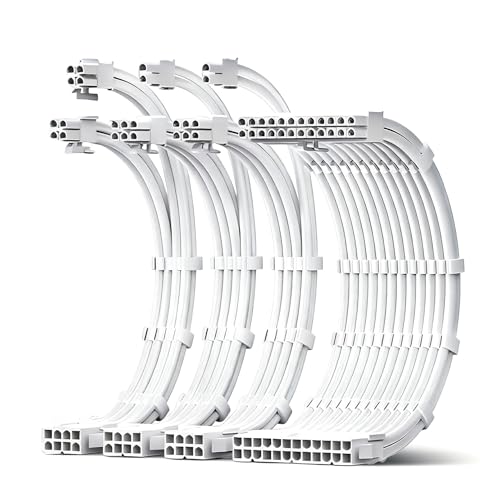
JEYI lands in the sweet spot for a clean white extension set that covers the main power paths without leaning into extra branding. The 18AWG tinned copper wire is the technical detail that stands out, because thicker wire and tinned copper are both aimed at keeping the connection path steady in day-to-day use. In a white build, the PVC fabric texture also gives the cables a more finished look than plain glossy sleeving.
Compared with SMEOZZ, this feels a touch more focused on the cable material story than on broad all-purpose presentation. The included combs help the runs stay lined up, though the real-world benefit depends on how much room your case gives you behind the tray. For a Corsair-specific upgrade, the Type 4 or Type 5 kits are more exact matches.
Bright Spots
- Covers the main motherboard, CPU, and GPU extension lines.
- 18AWG tinned copper is a reassuring material choice.
- PVC fabric texture gives the white set a cleaner finish.
- Included combs help the visible runs stay aligned.
Room For Improvement
- Compatibility needs a check against your exact hardware list.
- White surfaces can show dust sooner in open-window cases.
Feature Snapshot
Perfect Match For
Builders who want a white all-around extension kit for a standard desktop tower will find this one easy to place.
Another Choice May Suit
Thsion PCIe Cable for Corsair, 25 Inch 8 Pin PSU Male to 6+2 Pin GPU Male makes more sense when your only task is a single graphics-card cable run.
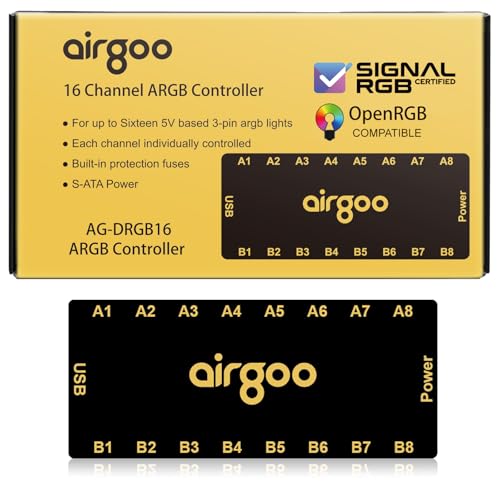
This Airgoo hub sits a little differently from the cable kits above, because it solves the lighting side of a build instead of the power path itself. The 16-port layout is useful in cases with several ARGB devices, and the magnetic body should make placement easier in mid or full towers where you want the controller tucked away but still accessible. For an RGB-heavy PC, that kind of central control can save a lot of clutter.
The catch is plain: you need the right software installed before the controller setup becomes useful, so this is less plug-and-forget than a passive cable extension. Compared with the JEYI or SMEOZZ kits, it serves a different job entirely, which is why it fits best beside a cable cleanup rather than instead of one. The honest read is that lighting-obsessed builders will get more value here than minimalist ones.
Standout Traits
- Sixteen ports give you plenty of room for ARGB connections.
- Magnetic mounting helps the hub fit neatly inside a larger case.
- SATA power keeps the setup tied into the system’s power layout.
- Support for SignalRGB and OpenRGB broadens software flexibility.
Worth Noting
- Software setup comes before the controller’s full usefulness.
- It serves lighting control, not PSU cable routing.
- Minimal builds may not need this much port capacity.
Feature Card
Built For In Mind
PC builders managing several ARGB fans, strips, or accessories will get the most from this controller.
Where Another Pick Fits Better
AsiaHorse Hydrus-24PIN PC PSU Extension Cable ARGB LED is the better fit when you want the cable itself to carry the visual focus instead of adding a lighting hub.
How To Choose The Right Psu Cables
Match The Cable Type To The Job
Extension cables and replacement cables solve different problems. Extensions sit between your PSU and the device cable, which makes them easier for general tidy-ups, while PSU-specific replacement sets need exact compatibility with the power supply family.
That’s why the CORSAIR Type 4 and Type 5 kits make sense only for the right Corsair units. A universal kit such as SMEOZZ or JEYI gives you more flexibility in mixed builds, especially in a case where the original cables are usable but ugly.
Check Wire Gauge And Length
Wire gauge, such as 16AWG or 18AWG, tells you how thick the conductors are. Thicker wire usually means a sturdier feel and a better match for longer extension runs, while shorter 30 cm sets are easier to tuck into common mid-tower layouts.
You should also look at the route your case forces you to take. A 25-inch PCIe lead helps in larger enclosures, while a shorter extension can keep extra slack from piling up behind the tray.
Think About Sleeve, Comb, And Finish
Paracord, nylon braid, and PVC fabric texture all change how the cable looks and bends. Individually sleeved designs look cleaner in glass-sided cases, while softer braided sets are easier to shape around tight corners.
Cable combs matter too, because they keep the lines parallel instead of twisting into a loose bundle. Builders who value a neat front-facing layout usually notice that detail more than they expect.
Plan For Your Actual Hardware Mix
GPU-heavy systems need the right PCIe count, and some modern cards have their own fit quirks. The JEYI and SMEOZZ kits cover motherboard, CPU, and graphics-card extensions together, which helps when your whole power run needs a reset rather than one isolated cable.
Lighting hardware adds another layer. The Airgoo controller is the right kind of extra only for cases that already run ARGB fans, strips, or accessories, because it solves organization on the lighting side rather than the PSU side.
What To Weigh Before You Choose
Wrong Turns To Avoid
One common mistake is treating every PSU cable as interchangeable. PSU-side compatibility matters, especially with Corsair Type 4 and Type 5 gear, and the wrong family match can leave you with a cable that simply does not belong in the system.
Another easy miss is underestimating slack. A cable that looks fine on a desk can feel cramped once it has to cross a large case, pass behind the motherboard tray, and still reach the target header without strain.
The Upgrade Payoff
Higher-tier cable sets usually cost more because the sleeve work, comb design, and compatibility targeting take more care. That extra spend also tends to buy a better finish in open-view cases, where each line is visible and every bend matters.
The upgrade makes the most sense for showcase PCs, custom loops, or systems that already use premium components. For a tucked-away office tower, a simpler extension kit often does the job with less fuss.
Frequently Asked Questions
Are PSU extension cables the same as replacement cables?
No, extension cables sit on top of your existing cables, while replacement cables connect directly to the PSU design they were made for. That difference matters a lot for compatibility and cable routing.
Why do some kits use 16AWG and others use 18AWG?
Those numbers describe wire thickness, with 16AWG being thicker than 18AWG. Thicker wire is often chosen for a sturdier feel in longer extension runs.
Do cable combs actually help?
Yes, cable combs help the individual wires stay aligned instead of drifting apart. That makes a build look cleaner, especially through a side panel.
Do sleeved cables matter in a closed case?
They still matter if you care about organization and easier routing. The visual payoff is smaller behind a solid panel, but the neatness can still help during upgrades.
Can an ARGB controller replace PSU cable upgrades?
No, it handles lighting control, not power cable routing. It’s a separate add-on for builds that already use ARGB hardware.
Closing Thoughts
The right PSU cables can change a build from functional to finished without forcing a full hardware swap. For a clean universal setup, JEYI and SMEOZZ are easy places to start, while Corsair owners get a better match from the Type 4 and Type 5 kits. If your case has a window, the sleeving, combs, and color choice matter more than they first seem. Pick the cable set that fits your hardware path first, then let the style follow from there.
