
You want an RGB mouse that fits the way you actually work and game, not just one that flashes under a desk. Some of these picks are light and quick for FPS use, others lean into extra buttons, quiet clicks, or cordless flexibility for laptop travel and mixed desk setups.
The list below separates those jobs clearly, so you can match sensor, weight, grip shape, and connection type to your space. The trade-offs matter, especially if you switch between long work sessions, late-night gaming, and portable use.
Quick Look At The Shortlist

MELOGAGA Wireless Bluetooth Gaming Mouse, RGB Rechargeable, Silent, Black
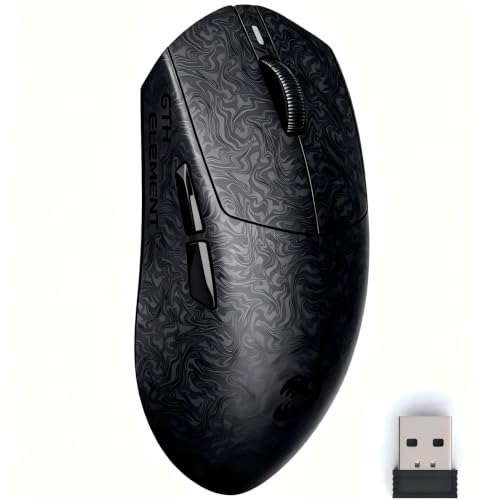
ZORNHER X Mloong MX301 PRO Lightweight Gaming Mouse

Redragon M612 Wired RGB Optical Gaming Mouse 8000 DPI

Razer Basilisk V3 Customizable RGB Wired Ergonomic Gaming Mouse, Black

BENGOO Gaming Mouse Wired with RGB Backlit, Ergonomic PC Computer Mice

Logitech G502 Hero Wired Gaming Mouse – Black

Uiosmuph LED Wireless Mouse, G12 Slim Rechargeable Silent Mouse Matte Black
More Details On Our Top Picks
The MELOGAGA leans toward quiet, flexible daily use, not flashy spec chasing. Dual-mode support means you can pair it over Bluetooth or use the 2.4G receiver, which helps on a laptop desk, at a small office station, or beside a tablet setup.
The sleep mode after 10 minutes is practical for battery use, though it does mean a wake click before moving again. Silent buttons and RGB lighting make it a calmer fit than the louder wired picks in this list, but the three DPI levels keep it firmly in basic gaming territory rather than precision-heavy play.
What We Like
- Bluetooth and 2.4G support give you more setup options.
- Silent clicks suit shared spaces and late work sessions.
- Rechargeable power cuts down on disposable batteries.
- RGB lighting adds visual flair without changing the form factor.
Things To Consider
- Sleep mode after inactivity means you may need an extra click to wake it.
- Three DPI levels keep control simple, but not highly granular.
- Battery status matters here, since low charge can affect responsiveness.
Feature Snapshot
Who It Suits Best
You get the most from this model as a commuter or student who moves between rooms, laptops, and compact desks.
Swap It Out When
ZORNHER X Mloong MX301 PRO suits FPS-focused users better, since it puts speed, low weight, and a more performance-led sensor package ahead of quiet convenience.
The MX301 PRO is built around speed and control, with a 60g shell that should feel nimble for FPS movement and fast desk repositioning. Compared with the quieter MELOGAGA, this one pushes harder into precision play, especially with the PAW3315 optical sensor and TTC click response.
The carbon fiber-inspired finish matters more than it sounds, because grip texture can make a lightweight mouse feel steadier in tense matches or long work sessions. The honest read is that the smaller shape and low mass suit claw or fingertip users more than palm grippers, so hand size and grip style matter here.
Highlights
- 60g weight supports quick, low-effort movement.
- PAW3315 sensor gives it a serious tracking base for gaming and daily use.
- Carbon fiber-style texture improves grip feel in hand.
- Wired, Bluetooth, and 2.4GHz support widen compatibility.
- Web-based driver keeps setup lighter than bulky desktop software.
Minor Gripes
- Very light mice can feel too nimble for some hands, especially in slower productivity work.
- Small sizing is a better match for compact grips than full palm contact.
- Textured finishes can collect visible wear over time, depending on use and storage.
Core Details
Who Will Love This
You should look here first for FPS gamers and smaller-hand users who want speed without a bulky shell.
Where A Sibling Pick Shines
Logitech G502 Hero Wired Gaming Mouse – Black suits users who want more buttons, onboard memory, and a heavier, more tunable feel.
Redragon’s M612 is the first straightforward wired control option in this group, and that makes it easy to place on a desk and forget about battery upkeep. Its 8000 DPI ceiling, remapping support, and macro focus give it a more configurable feel than the basic MELOGAGA or BENGOO picks.
The ergonomic body should suit long sessions in a gaming chair or office setup, though wired cable management is the trade-off. For most people who want a lot of function without paying for a premium sensor stack, this lands in a very practical middle ground.
Best Bits
- 8000 DPI gives a wider sensitivity range than entry-level mice.
- Remapping and macro support help in games and productivity shortcuts.
- Wired connection avoids charging downtime.
- Ergonomic shell supports longer desk sessions.
Softer Spots
- Wired use adds cable clutter to a tight desk.
- RGB styling is more about appearance than function.
- Higher feature count takes a little setup discipline to make the most of it.
At A Glance
Best Suited To
You’ll like this most as a budget-conscious desk gamer who wants extra control and a steady wired connection.
Another Choice May Suit
Razer Basilisk V3 fits users who want a deeper button set and more advanced scroll behavior, especially for heavier customization.
The Basilisk V3 is for users who want a mouse that behaves like a control center, not just a pointing device. With 11 programmable buttons, a 26K DPI optical sensor, and a HyperScroll tilt wheel, it clearly sits above simpler options like the Redragon M612 in customization depth.
The shape is ergonomic, which matters during long work blocks or long sessions where hand posture starts to matter more than pure speed. The scroll wheel gives you a lot of flexibility, though the feature stack can feel like too much for anyone who only needs a basic RGB mouse.
Reasons To Buy
- 11 programmable buttons support dense shortcut setups.
- 26K DPI leaves plenty of headroom for sensitivity tuning.
- HyperScroll tilt wheel adds more navigation control.
- Ergonomic shape suits extended use at a desk.
Points To Note
- The feature set is richer than many casual users need.
- Wired use may matter to you if cable freedom is a priority.
- Programming the buttons takes a little setup time.
Details At A Glance
Built With In Mind
This suits power users, MMO players, and multitaskers who want more commands under the fingertips.
Look Elsewhere When
MELOGAGA Wireless Bluetooth Gaming Mouse makes more sense for quiet laptop use and simpler connection switching.
BENGOO keeps the formula simple: wired plug-and-play use, RGB styling, six buttons, and four DPI settings. That makes it a sensible entry point for casual gaming on a basic laptop or desktop, especially since you do not need to install software just to get started.
Compared with the Redragon and Basilisk, the limitation is clear, there’s less depth here for macros and fine-grained control. Still, for a first setup or a secondary computer, the direct layout and familiar shape keep it easy to live with.
Positives
- Plug-and-play setup keeps things simple.
- Four DPI steps make sensitivity changes easy.
- Six buttons cover common gaming and browsing actions.
- Wired power avoids battery management.
Areas To Watch
- The control set is basic beside more advanced RGB mice.
- Lower sensitivity ceiling may feel limiting for demanding play.
- RGB and shell styling are straightforward rather than refined.
Feature Rundown
Who Should Grab It
This fits casual gamers, students, and first-time desktop setups that need a simple wired mouse with RGB styling.
Skip It When
Logitech G502 Hero Wired Gaming Mouse – Black is the stronger step-up for shoppers who want broader customization and onboard memory.
The G502 Hero is the most control-heavy option in this list, and that starts with the adjustable weights, 11 programmable buttons, and onboard memory. On a crowded desk or in a game library that leans on keybinds, that kind of tuning can matter more than RGB flash alone.
It also carries a 25,600 DPI sensor, so you get a wide range for sensitivity adjustment rather than a fixed-feel mouse. The catch is that this is still a wired mouse with a more involved setup, which suits serious desk use better than grab-and-go portability.
Strong Points
- Adjustable weights help you tune the feel in hand.
- 11 programmable buttons support dense shortcut layouts.
- Onboard memory keeps your settings with the mouse.
- 25,600 DPI gives you broad sensitivity control.
Worth Noting
- The cable and tuning features make it less travel-friendly than wireless picks.
- Setup can take longer than with simpler mice.
- The shape is best appreciated at a desk, not on the move.
Technical Sheet
Perfect Match For
This belongs on the desk of a power user who likes custom button maps and a more tunable feel.
A Better Fit Elsewhere
Uiosmuph LED Wireless Mouse, G12 Slim Rechargeable Silent Mouse Matte Black suits travelers and light laptop use more comfortably.
The Uiosmuph G12 is the slimmest-feeling mouse here, and that slim body is exactly why it works well in a backpack or beside a laptop. USB-C charging adds convenience for modern portable setups, while the silent click design keeps it from sounding busy in a café, library, or shared office.
Compared with the MELOGAGA, it keeps the wireless idea even simpler, with 2.4GHz operation and a 1600 DPI ceiling. The honest trade-off is clear, you gain portability and quiet use, but you give up the deeper gaming control found in the Basilisk or G502.
Bright Spots
- Slim body slips easily into travel bags.
- USB-C charging suits newer laptop accessories.
- Silent clicks work well in shared spaces.
- 2.4GHz wireless keeps setup straightforward.
Small Caveats
- 1600 DPI keeps it in lighter everyday territory.
- The slim shape may feel small in larger hands.
- Portable mice can show scuffs sooner with heavy bag use.
Details At A Glance
Right Fit For
You get the best match here as a student, commuter, or light laptop user who wants a slim cordless mouse.
Where A Sibling Pick Shines
MELOGAGA Wireless Bluetooth Gaming Mouse gives you more connection flexibility and a better fit for mixed-device desks.
How To Choose The Right Rgb Mouses
Match The Connection To Your Desk
Wired RGB mice suit fixed stations, competitive play, and desks where charging is a nuisance. Wireless models help more on laptop setups, coffee-shop work, and small desks where a cable feels like clutter. Dual-mode mice split the difference, but you still need to think about battery management.
Weight And Shape Change Everything
Weight influences how fast the mouse moves and how much effort your hand spends correcting movement. Lightweight shells such as the ZORNHER X Mloong MX301 PRO favor rapid flicks, while heavier, more tunable designs like the Logitech G502 Hero feel steadier for long sessions. Grip style matters too, because palm, claw, and fingertip users tend to prefer very different shapes.
Buttons, DPI, And Scroll Behavior
DPI, or dots per inch, controls pointer sensitivity, and a higher number is not automatically better. Extra programmable buttons help in MMOs, editing, and heavy multitasking, while simpler layouts suit casual gaming and normal browsing. A tilting or multi-mode scroll wheel matters most when you spend a lot of time in spreadsheets, long documents, or crowded game menus.
Quiet Use And Charging Habits
Silent switches are useful in shared offices and late-night home setups, but they can feel less tactile than louder mechanical clicks. Rechargeable models need a bit more attention, especially on travel days or during longer work weeks. A simple charging routine keeps them ready without much fuss.
What To Weigh Before You Choose
Wrong Turns To Avoid
Do not chase DPI numbers alone, because a high ceiling does not fix a shape that fights your grip. Skip oversized mice for small hands, and avoid ultra-light shells if you prefer a planted feel for everyday desk work.
Also watch connection type closely. A wireless mouse makes no sense for someone who hates charging, while a wired mouse can be annoying on a laptop tray or travel table.
Where The Extra Money Goes
Higher-tier RGB mice usually pay for better sensors, more buttons, better wheels, memory storage, and stronger shell materials or finishes. That matters most in games that use many commands, creative work with shortcuts, or long sessions where comfort and tuning start to matter.
Spending up makes sense when you know exactly what shape, button count, or sensor behavior you want. For casual use, a simpler mouse often delivers enough control without extra complexity.
Frequently Asked Questions
What Does DPI Mean On An RGB Mouse?
DPI is a sensitivity setting that changes how far the cursor moves for hand motion. Lower settings feel slower and steadier, while higher settings move faster across the screen.
Are Wireless RGB Mice Good For Gaming?
Wireless RGB mice can work very well for gaming, especially when the connection is stable and the sensor is solid. The main trade-off is battery management instead of cable management.
How Many Buttons Do You Really Need?
Basic use only needs a left button, right button, scroll wheel, and maybe a DPI switch. MMO players, editors, and heavy shortcut users usually benefit from more programmable buttons.
Does RGB Lighting Affect Performance?
RGB lighting changes the look, not the core tracking ability. It matters most for style, desk ambiance, and matching the rest of your setup.
What Size Mouse Works Best For Small Hands?
Smaller hands often do better with compact or lightweight mice that are easy to pivot quickly. Large ergonomic shells can feel tiring or awkward if the grip does not match the shape.
Closing Thoughts
You have seven very different takes on RGB mice here, and the right one depends on whether you value portability, button depth, quiet clicks, or a more anchored feel. The MELOGAGA and Uiosmuph models make sense for mixed laptop use, while the Razer Basilisk V3 and Logitech G502 Hero lean hard into customization. For a simple path, BENGOO and Redragon keep the learning curve low. Pick the shape that fits your hand first, then let lighting and extras come second.
