
Adding SATA ports is a practical fix for cramped desktops, small media servers, and workstations that keep running out of room for drives. The right card helps you add SSDs or hard drives without turning cable routing into a mess, and the differences between two-port, four-port, six-port, and eight-port boards matter more than the marketing language suggests. You’ll also want to think about bracket height, slot fit, cable count, and whether boot support matters for your setup.
The Shortlist At A Glance

Ziyituod SATA Card PCIE 3.0 4 Port with 4 Cables

ACTIMED PCIe 8-Port SATA Controller Card

ACTIMED PCI-E X1 to SATA 3.0 Controller Card 4-Port

ACTIMED PCI-E X1 to SATA 3.0 Controller Card 6-Port
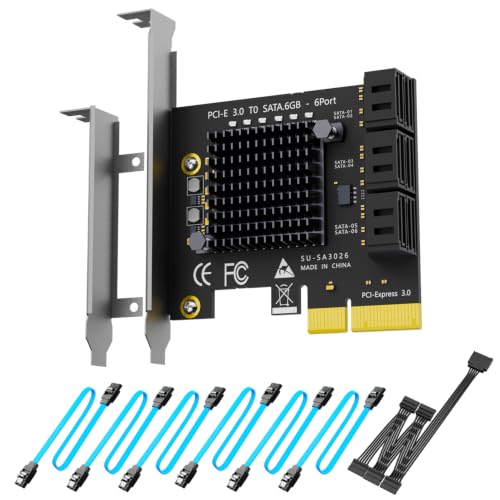
GLOTRENDS SA3026C 6-Port SATA Expansion Card

Ziyituod SATA Card 6Gbps 4 Port with 4 Cables
ELUTENG PCIE SATA Expansion Card 2 Ports

Moonqkuses PCIe SATA Card 4 Port Expansion
More Details On Our Top Picks
This four-port Ziyituod card keeps the setup straightforward, which matters in a desktop that just needs more SATA room without a major rebuild. The low-profile bracket helps in slimmer cases, and the included cables reduce the usual hunt for matching leads.
The non-RAID design suits everyday storage additions, and boot-as-system-disk support gives it broader usefulness than a basic add-in board. The honest trade-off is that four ports can fill up quickly in a media box or backup tower, so it fits best where you want simplicity first.
Strong Points
- Four-port layout fits a modest storage upgrade.
- Included cables save you extra accessory matching.
- Low-profile bracket helps in compact desktop cases.
- Boot support expands what the card can handle.
Points To Note
- Four ports may feel tight for larger drive arrays.
- Non-RAID design keeps it simple, but also plain.
- Accessory cables add convenience, yet cable routing still takes planning.
Feature Snapshot
Who Should Grab It
It suits desktop owners who want a tidy, practical port upgrade for a few drives and care about bracket height.
Where A Sibling Pick Shines
ACTIMED PCIe 8-Port SATA Controller Card fits storage-heavy setups better, especially for a home server that needs more room to grow.
Eight ports change the conversation entirely, because you’re no longer planning around a couple of spare drives. This ACTIMED card makes more sense for a media archive, backup station, or a tower that keeps expanding one drive at a time.
The low-profile bracket and eight included cables are the kind of practical touches that matter once the box is open. The trade-off is simple, more ports usually mean more planning for power, airflow, and cable management, so it fits organized builds better than casual add-ons.
Upsides
- Eight SATA ports give you real expansion headroom.
- Included cables make a full install easier to start.
- Low-profile bracket helps in shorter cases.
- Windows, Mac, and Linux support broadens compatibility.
- 6 Gbps design suits modern SATA drives well.
Areas To Watch
- Eight ports can be overkill for light desktop use.
- Large drive counts also mean more cable planning.
- Power and cooling deserve attention in busy cases.
Core Details
Built With In Mind
It suits power users, home server builders, and anyone who wants one board to anchor a larger drive stack.
Swap It Out When
Ziyituod SATA Card PCIE 3.0 4 Port with 4 Cables fits a simpler desktop better, especially when you only need a few extra bays.
This one is aimed at small to mid-size desktop upgrades where slot compatibility matters as much as port count. The PCIe x1 connector is the important detail here, because it can make installation easier in cases where you want to preserve larger expansion slots for something else.
It also accepts SSDs and hard drives, so the card works for mixed storage duties in a family PC or a home office tower. Compared with the eight-port ACTIMED model, this version keeps the footprint saner, which helps when you want enough room without building a cable maze.
What We Like
- PCIe x1 fit helps with slot flexibility.
- Four ports cover a solid midrange upgrade.
- Support for SSDs and hard drives broadens use.
- Works with several PCIe slot sizes.
- Good fit for mixed-purpose desktop storage.
Minor Gripes
- Four ports suit moderate needs better than large arrays.
- The card is practical, not especially feature-heavy.
- Cable routing still takes a little care in tight cases.
Details At A Glance
Perfect Match For
It suits desktop owners who want a compact SATA expansion card and need the flexibility of a PCIe x1 connection.
Look Elsewhere When
ACTIMED PCIe 8-Port SATA Controller Card makes more sense for storage-heavy systems that need room to grow beyond four drives.
Six ports hit a useful middle ground, and that’s the real appeal here. Compared with the four-port ACTIMED board, this version gives you more breathing room for a photo archive, work files, or a home backup stack without jumping all the way to eight ports.
The same PCIe slot flexibility is still in play, so the card can suit a desktop that has to preserve other expansion options. The honest read is that six ports often feel just right in a busy tower, though the setup still asks for tidy power and cable planning.
Standout Traits
- Six SATA ports strike a useful middle size.
- PCIe x1-style flexibility helps installation planning.
- Works with SSDs and hard drives.
- Good fit for a growing storage stack.
Small Caveats
- More ports mean more cables to manage.
- It can be more card than a simple desktop needs.
- Case airflow deserves attention in denser builds.
Feature Rundown
Whose Shelf It Belongs On
It suits a storage-conscious desktop owner who wants more room than a four-port card can offer but doesn’t need the bulk of an eight-port build.
A Better Fit Elsewhere
GLOTRENDS SA3026C 6-Port SATA Expansion Card fits builds that benefit from a PCIe x4 interface and a more storage-focused expansion path.
The GLOTRENDS card stands out because the PCIe x4 interface gives the build a different profile from the x1-based ACTIMED options. That matters in a drive-heavy machine, where you want the card itself to feel less like the weak link in a larger storage plan.
Six ports still keep the layout manageable, and that makes it a sensible middle path for a workstation or home server. One thing worth considering is that the more serious interface can appeal to tinkerers, while casual desktop upgraders may be happier with the simpler four-port cards above.
Bright Spots
- PCIe x4 interface suits more storage-focused builds.
- Six ports provide useful expansion without going oversized.
- Good middle ground for home server projects.
- Works well as a single-card storage hub.
Things To Consider
- The x4 interface is useful, but not necessary for every desktop.
- No included cable bundle is noted in the source data.
- Best results still depend on clean case organization.
Technical Sheet
Right Fit For
It suits desktop builders and home server hobbyists who want a six-port card with a more serious PCIe connection.
Consider Something Else When
ACTIMED PCI-E X1 to SATA 3.0 Controller Card 4-Port suits lighter desktop upgrades better, especially when slot simplicity matters more than port density.
This Ziyituod board looks like the more polished sibling to the earlier four-port option, mainly because it pairs the same practical shape with boot-capable support and 6 Gbps SATA 3.0 handling. That combination works well in a desktop or workstation that needs dependable extra drives without becoming a science project.
The included cables and low-profile bracket are especially useful in a case that’s already crowded. The trade-off is familiar, four ports keep things neat, but they also cap how far the setup can grow, so the fit is best for people who know their storage needs are moderate.
Best Bits
- Boot-capable support adds useful flexibility.
- Four included cables reduce accessory chasing.
- Low-profile bracket helps in compact cases.
- 6 Gbps design suits SATA 3.0 drives.
- Good balance for everyday desktop expansion.
Room For Improvement
- Four ports are enough for many setups, not large ones.
- Non-RAID design keeps it simple rather than advanced.
- Like most add-in cards, neat cable routing still helps reliability of the build.
Feature Card
The Right Fit
It suits someone building a neat desktop upgrade that needs boot support and a modest number of extra ports.
Another Choice May Suit
Moonqkuses PCIe SATA Card 4 Port Expansion fits a similar use case, though it may appeal more if you want a different brand option with the same general port count.
Two ports keep this ELUTENG card small and uncomplicated, which is exactly the point for a desktop that only needs a pair of extra SATA connections. The PCI Express x1 design is easy to place in a typical tower, and the low-profile bracket helps it disappear into a tighter chassis.
Support for SSDs and HDDs keeps it useful across very different kinds of builds, from a tiny storage addition to a simple media box. The limitation is obvious, though, because two ports are enough for light expansion, not a growing multi-drive system.
Reasons To Buy
- Two-port layout keeps the card compact.
- PCIe x1 fit supports easier installation.
- Low-profile bracket helps smaller desktops.
- Works with SSDs and hard drives.
Areas To Watch
- Two ports are a narrow fit for expansion-heavy builds.
- It’s better for modest needs than long-term growth.
- Cable management still matters in very small cases.
Core Details
Whose Shelf It Belongs On
It suits desktop owners who only need a couple of extra SATA ports and prefer a small add-in card.
Where A Sibling Pick Shines
Ziyituod SATA Card PCIE 3.0 4 Port with 4 Cables gives you more breathing room for a desktop that may grow beyond a pair of drives.
Moonqkuses goes after the same practical four-port space as the Ziyituod cards, but the bootable system-disk support gives it a slightly more versatile feel for a desktop upgrade. The low-profile bracket and included cables make it easier to picture in a plain tower or a workstation that needs clean internal organization.
For most everyday builds, the honest appeal is balance, not flash. You get four ports, 6 Gbps SATA 3.0 support, and a non-RAID layout that keeps the card straightforward, which suits a user who wants a dependable expansion step without a lot of extra setup drama.
Highlights
- Bootable support adds practical flexibility.
- Four included cables simplify the first install.
- Low-profile bracket helps with slim cases.
- Simple non-RAID layout keeps things easy to manage.
Worth Noting
- Four ports are useful, but not expansive.
- Best suited to straightforward storage plans.
- Like the other four-port cards here, tidy cabling helps keep the build clean over time.
Feature Rundown
Best Suited To
It suits a desktop owner who wants a neat four-drive expansion card with boot support and a minimal learning curve.
Skip It When
ACTIMED PCIe 8-Port SATA Controller Card makes more sense for anyone planning a larger drive array from the start.
How To Choose The Right Sata Controller Cards
Port Count Should Match Your Growth Plan
Port count is the first thing to settle, because it sets the ceiling for how many drives you can add before you need another card. Two-port boards suit a small bump in storage, four-port models cover a typical desktop upgrade, and six- or eight-port boards make more sense for archive-heavy builds or a home server.
The catch is that more ports also mean more cables, more drive power planning, and more case organization. A neat four-port card can feel smarter than a crowded eight-port board in a small tower.
Interface Width Changes The Fit
PCIe x1 cards are easy to place and often work well in mainstream desktops, while x4 designs usually appeal to more storage-focused builds. That matters because the slot you use can affect the rest of your expansion plan, especially in a machine that also needs room for graphics or networking gear.
Think of the interface as the lane the card gets to use on the motherboard. A wider lane can be useful, but only when the rest of the system can support that kind of layout.
Boot Support And Drive Types Deserve Attention
Boot-capable cards give you more flexibility if you want one of the attached drives to start the system. That’s useful in a desktop refresh, a repair build, or a storage box that doubles as a working machine.
Drive support also matters, since several of these cards handle both SSDs and HDDs. SSDs suit quicker everyday response, while HDDs are still handy for larger storage pools, so a mixed setup often feels more practical than choosing one drive type alone.
Accessories And Case Fit Save Time Later
Included SATA cables and low-profile brackets are not flashy extras, but they make installation smoother. In a cramped case, a short bracket can spare you a bad fit, and bundled cables reduce the odds of a half-finished build because one missing part slowed you down.
That’s the quiet advantage of a well-matched card, it feels easier to live with after the side panel goes back on. The best choice is usually the one that matches your case, slot layout, and drive count without forcing improvisation.
Things Worth Knowing First
Common Shopping Slip Ups
Many people focus only on port count and ignore the slot type, bracket height, or whether the card fits the case. That can leave you with a board that looks right on paper but feels awkward once the cables are inside the chassis.
Another common miss is buying more ports than the build can realistically support. A simpler card often makes more sense for a desktop that only needs a couple of extra drives.
What The Higher Tier Buys
More expensive cards usually bring extra ports, broader interface options, or a fuller cable bundle. You’re paying for convenience and expansion headroom, not magic.
The upgrade makes sense in a media server, backup tower, or workstation that will keep growing. For a basic office PC, a smaller and simpler card often feels easier to live with.
Frequently Asked Questions
Can A SATA Controller Card Boot An Operating System Drive?
Some models here support booting as a system disk, and that gives you more flexibility during a build or upgrade. Always match that feature to your exact setup before planning a boot drive around it.
Are PCIe X1 Cards Good Enough For Everyday Storage?
Yes, PCIe x1 cards can be a sensible fit for typical desktop expansion. They work best when you want a small number of extra SATA ports without giving up larger expansion slots.
Do Included SATA Cables Actually Matter?
They matter more than they sound, especially in a fresh build. Bundled cables reduce the chance of delay and make installation easier when you want to finish the job in one pass.
Should You Choose Four Ports Or Six Ports?
Four ports suit a normal desktop upgrade, a scratch build, or a compact tower. Six ports make more sense once the machine starts acting like a storage hub.
Is A Low-Profile Bracket Useful In A Full Tower?
Yes, because it still helps with fit and airflow planning. In a larger case it’s less essential, but it never hurts when space gets tight near the expansion slots.
Closing Thoughts
The best SATA controller card is the one that matches your real storage plan, not the one with the biggest number on the page. For a simple desktop, four ports and a low-profile bracket often feel just right, while larger builds benefit from six or eight ports and a cleaner path for cables. Pay attention to the interface, the drive count, and whether boot support matters to your setup. Get those pieces aligned, and the upgrade feels calm instead of messy.
