
Small computer mouses solve a simple problem, they give you a tighter hand position, easier packing, and less desk clutter. That matters on crowded workspaces, in laptop sleeves, and during travel days when every inch in your bag counts. You also get a clearer split between basic corded options, multi-device cordless picks, and models tuned for small hands. The seven picks below cover those use cases without drifting into fluff.
Quick Look At Our Top Picks

wegear USB Wireless Mouse

Guiheng Wired Mini Optical Mouse
Uiosmuph Mini Wireless Bluetooth Mouse

Wireless Mouse Mini Small Silent Cute Pocket Portable Compact Travel USB Tiny Optical Mice

Logitech M185 Compact Ambidextrous Wireless Mouse
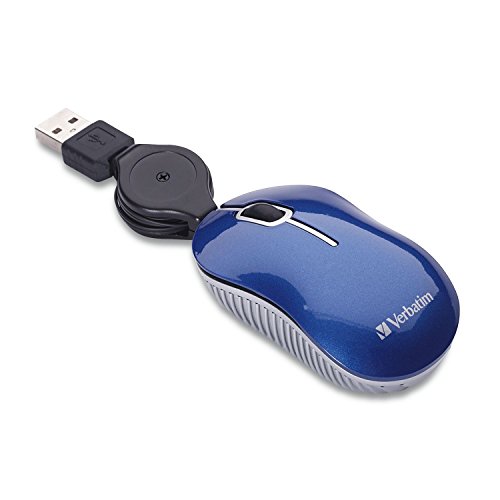
Verbatim Wired Optical Computer Mini USB-A Mouse

TECKNET Compact Ambidextrous Wireless Mouse Mint Green
More Details On Our Top Picks
The wegear model leans into practical wireless control with a 2.4GHz connection, six buttons, and a five-step DPI range up to 4000, so you can tune cursor speed for spreadsheets, browser work, or tighter editing tasks. The shape suits laptop use better than bulky desktop mice, and the black finish keeps it plain enough for office bags and shared workspaces.
The 24-month battery claim matters most on travel rotations and hybrid desks, where you do not want to think about power every few weeks. The trade-off is simple, it is still a basic single-receiver mouse rather than a multi-device specialist like the Uiosmuph.
Strong Points
- Five DPI steps give you more control over pointer speed.
- Six-button layout supports extra shortcuts in daily work.
- Wireless setup keeps cables out of a packed laptop bag.
- Plain black styling fits office gear without drawing attention.
- The long battery claim suits commuters and frequent travelers.
Points To Note
- It stays in the standard wireless lane, so multi-device switching is not part of the story.
- Six-button designs can feel busy for people who want a very simple pointer.
- Battery life depends on usage patterns, especially with higher DPI settings.
Feature Rundown
Who It Suits Best
Frequent laptop users who want a wireless mouse with more control than the bare minimum fit this one well.
A Better Fit Elsewhere
Logitech M185 Compact Ambidextrous Wireless Mouse suits you better if you want a more established ambidextrous shape for shared desks and simpler daily use.
Guiheng takes the no-drama route with a wired USB connection, which makes sense for office stations, home homework setups, and kiosks that stay plugged in all day. Compared with the wegear wireless model, you give up cord-free movement, but you also avoid receiver management and battery checking.
The mini optical format should suit compact desks and smaller hands, while compatibility with Windows, Linux, and Mac makes it a safer fit for mixed environments. The honest read is that corded mice feel less tidy, yet they remain straightforward for people who want a stable pointer without setup fuss.
What We Like
- USB wired design keeps the connection straightforward.
- Mini size helps on small desks and in tight laptop bags.
- Cross-platform support broadens its appeal for mixed computer setups.
- Optical tracking suits basic navigation, browsing, and document work.
Small Caveats
- The cable adds desk clutter compared with the wireless picks above.
- People who travel often may prefer a cordless body.
- The shape is utilitarian, so style comes second to function.
Core Details
Who Should Grab It
Desk-based users who want a compact wired mouse for everyday navigation should feel at home here.
Another Choice May Suit
Verbatim Wired Optical Computer Mini USB-A Mouse suits you better if a retractable cable matters more than cross-platform compatibility.
Uiosmuph is the most flexible pick in the group because it combines Bluetooth 5.1, Bluetooth 5.0, and 2.4GHz wireless support with USB-C charging and a Type-C adapter. That mix is useful for tablet work, laptop travel, or a desk where you move between devices without wanting a drawer full of separate mice.
The pocket-size body, measured at 3.07 by 1.89 by 1.06 inches, is made for travel kits and small hands rather than full palm support. Compared with the Logitech M185, you get more connection options, but you also get a stronger emphasis on portability than long-haul desktop comfort.
Highlights
- Tri-mode connectivity gives you flexible pairing options.
- USB-C charging fits newer laptops and travel gear.
- Small body slips into a carry pouch with little bulk.
- 1600 DPI is a sensible middle ground for daily pointer work.
- The included adapter helps when your setup needs a simple bridge.
Areas To Watch
- The very small shell may feel tight for larger hands.
- All those connection options make it less bare-bones than a basic office mouse.
- Travel-focused designs can trade away full-size comfort.
Details At A Glance
Best Suited To
Frequent travelers and tablet users who want one small mouse for several device types are the strongest match here.
Where A Sibling Pick Shines
TECKNET Compact Ambidextrous Wireless Mouse Mint Green suits you better if you want a simpler 2.4G setup with a more playful finish.
SHARE SUNSHINE keeps this one stripped down to the essentials, with a three-button layout, 1000 DPI, and a small cordless body that tucks easily into a tote or school bag. That minimal setup makes sense for kids, casual browsing, and travel use, especially where a mouse is more about convenience than fine-grain control.
Compared with the Uiosmuph, this pick gives up extra connection flexibility and charging features, but it also keeps the shape and feature list easy to grasp. A tiny mouse can feel almost featherlight in a laptop sleeve, which is the point here, though larger hands may want something roomier.
Upsides
- Three-button layout keeps daily use easy to learn.
- 1000 DPI fits simple navigation and basic schoolwork.
- Small body is easy to stash in carry bags.
- Cordless design keeps the workspace less crowded.
Things To Consider
- The simpler control set leaves out extra shortcuts.
- Small size is better for portability than for long sessions.
- Minimalist mice can feel cramped in larger hands.
Quick Facts
Built With In Mind
Kids, occasional laptop users, and anyone who wants a very small travel mouse should find the size easy to live with.
Look Elsewhere When
Logitech M185 Compact Ambidextrous Wireless Mouse suits you better if you want a more traditional shape and a fuller office-ready feel.
The M185 sits in the middle of the pack in the best possible way, with an ambidextrous shape, 2.4GHz wireless connectivity, optical tracking, and a USB-A nano receiver. For shared desks, guest laptops, and everyday office use, that kind of predictable layout usually makes more sense than chasing a crowded feature list.
Battery life is rated at 12 months, which puts it behind the wegear claim but still squarely in the low-maintenance zone for normal work routines. The trade-off is that it does not try to be fancy, so you are paying for dependable basics rather than extra buttons or multi-mode pairing.
Best Bits
- Ambidextrous shape works for left- or right-handed use.
- Nano receiver stays small enough for frequent travel.
- Optical tracking keeps routine navigation smooth.
- One-year battery estimate reduces upkeep for busy desks.
- Plain design suits school, office, and home setups.
Honest Caveats
- It stays close to the basics, so extra control features are limited.
- USB-A receiver support fits older and current laptops better than USB-C-only setups.
- The design is conservative, which some people will love and others will ignore.
Feature Snapshot
The Right Fit
People who want a compact wireless mouse for mixed office, home, and travel use will usually appreciate this balanced layout.
Skip It When
Uiosmuph Mini Wireless Bluetooth Mouse suits you better if you need Bluetooth options and USB-C charging for newer devices.
Verbatim’s mini wired mouse is built for people who want a small, carry-friendly pointer and do not mind staying tethered by a retractable cable. That cable is the main practical advantage here, because it shortens storage space and reduces the tangle that comes with loose cords in backpacks.
The blue finish gives it a little more personality than the plain black wegear or Logitech options, though the bigger story is convenience rather than style. In a travel kit or a backup drawer, it makes sense as a compact spare that stays ready without battery checks.
Bright Spots
- Retractable cable makes packing easier than with a standard cord.
- USB-A plug keeps setup straightforward on older laptops and desktops.
- Mini body fits neatly into small accessory pockets.
- Wired design avoids receiver storage and battery upkeep.
Minor Gripes
- The corded format gives up wireless freedom.
- USB-A focuses it more on conventional computer setups.
- Travel convenience matters more here than long-session comfort.
Technical Sheet
Whose Shelf It Belongs On
Travel kits, spare-drawer setups, and small desks are the natural home for this compact corded choice.
Reach For A Different Pick When
wegear USB Wireless Mouse suits you better if you want cordless movement and adjustable DPI for more varied daily work.
TECKNET brings the most personality in the group, and the mint green color is a real differentiator for a mouse this compact. The ambidextrous shape, quiet 2.4G connection, and three DPI levels make it easy to slot into school bags, shared family computers, or a small desktop where color matters as much as size.
Compared with the Logitech M185, this one leans harder into visual style, while still staying practical for Chromebook, laptop, PC, and Mac use. You may find the color alone helps it feel less generic in a kid’s setup, though the feature set remains deliberately simple.
Reasons To Buy
- Mint green finish gives it a distinct look on a desk.
- Ambidextrous body suits both hand orientations.
- Three DPI settings cover common daily cursor speeds.
- Quiet wireless setup fits shared rooms and study spaces.
- Compact form makes it easy to pack for school or travel.
Worth Noting
- The feature list stays basic compared with the Uiosmuph tri-mode model.
- Style is a major part of its appeal, so plain-office users may prefer a more muted finish.
- Three DPI choices are useful, but they do not match the wider range on the wegear.
At A Glance
Who Will Love This
Style-conscious shoppers, kids, and anyone with small hands will get the most from this colorful compact design.
Swap It Out When
Logitech M185 Compact Ambidextrous Wireless Mouse suits you better if you want a more understated everyday look with the same general compact approach.
How To Choose The Right Small Computer Mouses
Match The Mouse To Your Desk Life
Small mice are not all solving the same problem. A wired option like Guiheng works well on a fixed desk, while a pocket-size wireless model like Uiosmuph makes more sense for laptops, tablets, and bag carry. Think about where you spend most of your time, because the most compact shell is not always the easiest to use for long stretches.
Pay Attention To Shape And Button Count
Ambidextrous designs such as Logitech M185 and TECKNET keep things simple for either hand, which helps on shared desks and guest machines. Extra buttons, like the six-button wegear, help with shortcuts and browsing, but they can feel crowded in a very small body.
Check Connection Type Before Anything Else
2.4GHz wireless is the common sweet spot for compact mice because it stays tidy and fast to set up through a USB receiver. Bluetooth and tri-mode designs add flexibility, which matters more for newer laptops and tablets, while wired USB models still appeal to people who want zero charging and no receiver to misplace.
Size Should Match Your Hand, Not Just Your Bag
Pocket mice save space, yet smaller shells often suit fingertip grip better than full palm use. That trade-off matters on longer workdays, especially for people with larger hands or anyone moving across spreadsheets for hours. In that case, a compact but more traditional shape often feels better than the tiniest travel body.
A Quick Reality Check
Common Shopping Slip Ups
Many people focus on size alone and ignore grip shape, which is how a mouse ends up feeling too cramped at a desk. Another common miss is buying a cordless model for travel without checking whether you want Bluetooth, a receiver, or a rechargeable battery.
A simple spec check avoids that frustration. The right match usually comes from connection type, hand fit, and how often you plan to carry it, not from the smallest number on the page.
The Upgrade Payoff
Higher-tier compact mice usually cost more because they add multi-mode connectivity, rechargeable power, extra buttons, or a more polished shell. That matters for people who switch between devices all day or want fewer compromises in a tiny body.
Spending up makes sense when the mouse is a daily tool, not just a backup in a laptop sleeve. For occasional use, a straightforward wired or basic wireless pick still covers the job without unnecessary complexity.
Frequently Asked Questions
What makes a small mouse worth choosing over a full-size one?
A small mouse takes less space in a bag and feels easier to use with a laptop setup. It usually suits travel, shared desks, and compact workstations better than a larger desktop model.
Is wireless better than wired for compact mice?
Wireless keeps the desk cleaner and travels more easily. Wired avoids charging and receiver storage, which helps in fixed setups.
Do small mice work for larger hands?
Some do, but the fit depends on the shape more than the brand name. Ambidextrous models with a slightly fuller body usually feel easier than very tiny pocket mice.
What does DPI mean on a mouse?
DPI stands for dots per inch, and it describes how far the cursor moves for a given hand movement. Higher settings move faster, while lower settings feel more controlled.
Which pick suits travel best?
Uiosmuph Mini Wireless Bluetooth Mouse fits travel well because it combines small size with multiple connection modes and USB-C charging. Verbatim Wired Optical Computer Mini USB-A Mouse is also handy when you prefer a corded backup that packs neatly.
Closing Thoughts
A good small mouse should disappear into your routine, not demand attention. The wegear and Logitech M185 fit everyday laptop work, the Uiosmuph covers device-hopping, and the Verbatim gives you a tidy corded fallback. For small hands, school bags, and cramped desks, the best choice is the one that matches your grip and connection habits first. Start there, and the rest gets much easier.
