
Small desk speakers can make a laptop or monitor setup feel less flat without eating the whole workspace. You’re usually choosing between simple USB-powered pairs, single-speaker setups, clamp-on designs, and more flexible options with Bluetooth or AUX. That mix matters more than flashy extras, because the right fit depends on your desk space, your ports, and how often you switch between work, music, and video calls.
The seven picks below lean into different kinds of everyday use, from tight dorm desks to cleaner home-office setups. You’ll see which ones keep cabling simple, which ones add more connection options, and which ones are better for people who want easier volume control within arm’s reach.
The Shortlist At A Glance

XKX Single Computer Speaker for Desktop PC
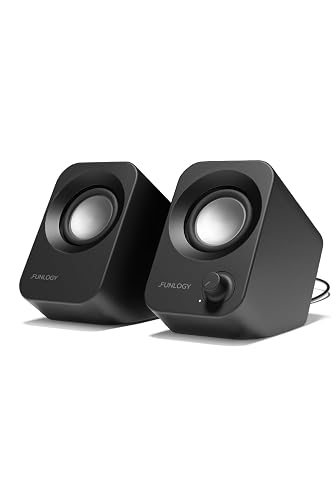
FUNLOGY Speaker 14W Stereo PC Speakers
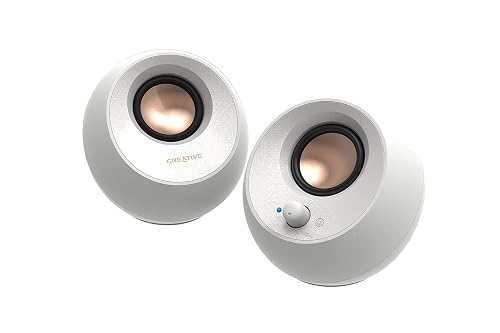
Creative Pebble V3 2.0 USB-C Desktop Speakers
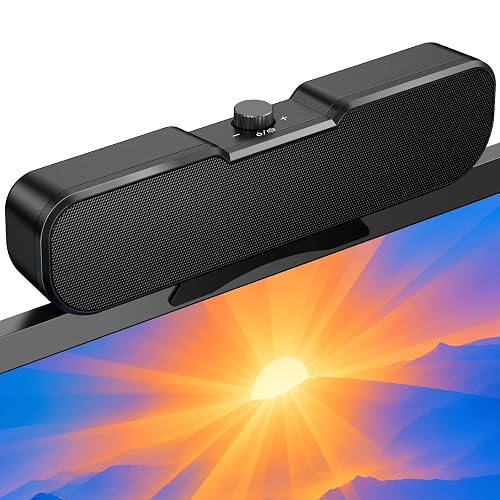
Cirqon Computer Speakers for Desktop PC
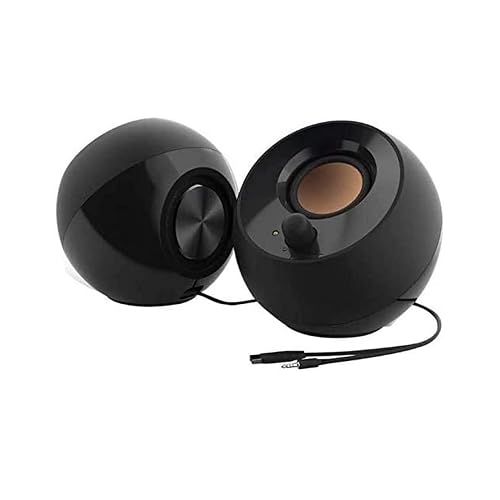
Creative Pebble 2.0 USB Desktop Stereo Speakers
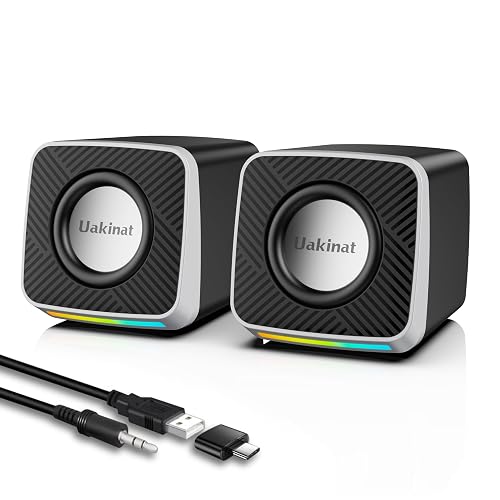
Uakinat Computer Desktop Speaker
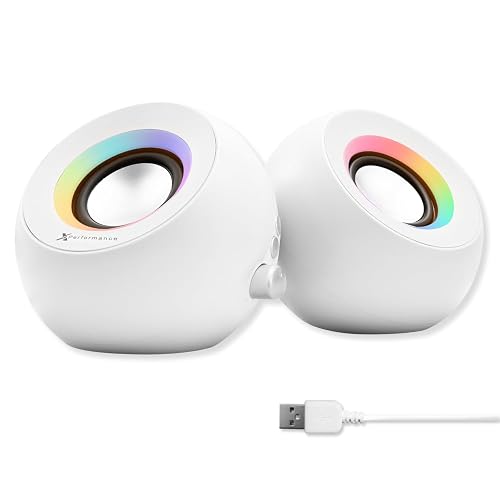
X9 Performance White Computer Speakers with RGB Lighting
For a desk that only needs one compact audio source, this XKX pick keeps things simple. USB power and a wired connection suit a work laptop, and the built-in USB-C adapter helps it make sense on newer setups without forcing you to hunt for extra accessories.
The larger driver and passive radiator arrangement points toward fuller sound than a bare-bones mini speaker usually gives you. The trade-off is obvious, though, since a single-speaker layout won’t give you true left-right separation, so it fits video calls, casual music, and general desktop use better than a more immersive listening setup.
Strong Points
- USB-powered setup keeps cable clutter low.
- USB-C adapter broadens laptop compatibility.
- Single-speaker format suits tight desks and dorm rooms.
- Driver and radiator design aims for fuller low end.
Things To Consider
- You give up stereo separation, so music fans may want a pair instead.
- A wired layout is simple, but it also means less placement freedom.
- Single-unit designs can feel less expansive in larger rooms.
Core Details
Who It Suits Best
Desk workers, students, and casual listeners who want a simple audio upgrade without extra setup steps will get the most from it.
Where A Sibling Pick Shines
Creative Pebble V3 fits better for anyone who wants a pair of speakers with more connection options and a more spacious desktop sound.
FUNLOGY leans into desk-friendly stereo sound rather than gimmicks, and that makes it easy to place in a busy workspace. The 30-degree tilt is the kind of detail that matters in real use, because it aims the sound upward instead of sending it straight into the desk surface.
The 14W output gives it a stronger spec sheet than the smallest speakers in this roundup, though the compact body still keeps it practical for monitor stands and narrow shelves. You may find the volume dial especially handy during long work sessions, since it’s quicker than hunting for on-screen controls.
What We Like
- Compact body keeps valuable desk space open.
- Upward tilt helps sound reach ear level more naturally.
- Volume dial is easy to reach during daily use.
- Stereo layout suits music, streaming, and work calls.
Worth Noting
- Compact speakers can still sound small in a larger room.
- The fixed angle helps placement, but it’s less flexible than a movable stand.
- USB power keeps setup easy, though it ties the speaker to a nearby port.
Feature Snapshot
Best Suited To
Commuters who dock a laptop at a small desk, or anyone with a monitor-led setup that needs tidy sound, should find it a sensible fit.
Look Elsewhere When
Creative Pebble 2.0 suits a more minimal setup better if you want a softer visual footprint and a simpler pair with a cleaner profile.
Creative’s Pebble V3 stands out because it gives you both USB-C and Bluetooth 5.0, which makes it easier to move between a desktop, laptop, or phone-driven setup. The white finish also feels cleaner than the black options above, so it suits bright workspaces that already lean modern.
The 8W RMS rating and clear-dialog tuning point to a setup aimed at voices, calls, and everyday media rather than room-filling sound. A built-in gain switch adds flexibility, but it’s worth noting that the louder mode depends on the right USB power source, so your result can vary with the port you use.
Highlights
- Bluetooth and USB-C add welcome connection flexibility.
- Clear-dialog tuning helps spoken audio come through cleanly.
- USB-A adapter improves compatibility with older ports.
- White finish blends well with lighter desk setups.
- Gain switch gives you more control over output level.
Room For Improvement
- The feature set is broader, so setup choices take a little more thought.
- Louder mode depends on USB power strength.
- Wireless convenience is nice, but wired use still suits a more stable desktop routine.
At A Glance
Who Will Love This
Hybrid workers and multi-device desk users who switch between wired and wireless playback will get the most from it.
Another Choice May Suit
X9 Performance White Computer Speakers with RGB Lighting makes more sense for someone who wants Bluetooth plus a more playful visual style.
Cirqon takes a different route from the earlier picks, because the clamp design is built around monitor mounting instead of sitting on the desk. That matters in cramped setups, since freeing up the surface around your keyboard can make the whole station feel less crowded.
The single volume knob is refreshingly direct, especially if your screen sits above the speaker and you don’t want to reach around for tiny buttons. You may find the clamp especially useful on a home office monitor, but the fit does depend on screen thickness, so it’s worth paying attention to the mounting range before you commit.
Upsides
- Clamp mount helps reclaim desk space.
- Volume knob keeps adjustments fast and simple.
- USB and USB-C power input broadens compatibility.
- Can clip to the top, bottom, or side of a monitor.
Small Caveats
- Clamp fit depends on monitor thickness, so placement needs a quick check first.
- Mounted speakers may need occasional repositioning after screen changes.
- Clamp-based designs feel less universal than a plain desktop pair.
Details At A Glance
Right Fit For
Monitor-mounted workspaces, especially shared desks or smaller home offices, are where this one makes the most sense.
Skip It When
FUNLOGY Speaker 14W Stereo PC Speakers fits better for anyone who wants a free-standing pair with a more traditional desktop layout.
The Pebble 2.0 stays popular for a reason: it keeps the look minimal while still giving you a proper stereo pair. The 45-degree elevated drivers help angle sound upward, which is useful on a lower desk where speakers would otherwise fire into the tabletop.
Compared with the Pebble V3, this version keeps the setup simpler by sticking to USB power and a cleaner desktop footprint. That simpler approach is a plus for offices and study spaces, though you give up wireless flexibility and some of the extra tuning options found on the newer model.
Best Bits
- Minimal shape fits neatly beside a monitor.
- Elevated drivers help sound travel toward ear level.
- Single USB cable keeps the desk tidier.
- Stereo layout works well for everyday media.
Areas To Watch
- No wireless option, so it stays tied to the computer.
- Very small speakers can sound modest in larger rooms.
- Glossy-minimal styling may show dust more easily than textured finishes.
Quick Facts
Whose Shelf It Belongs On
Minimalists, students, and office users who want a clean-looking pair without extra complexity will appreciate it most.
A Better Fit Elsewhere
Creative Pebble V3 suits you better if Bluetooth and broader device support matter more than keeping the setup stripped back.
Uakinat keeps the formula straightforward, with USB power and a 3.5mm audio cable handling the basics. That split is useful on older laptops or desktop towers, because power and audio travel separately and the setup stays familiar.
The small size makes it easy to tuck beside a keyboard or slide under a monitor riser, and the upgraded 2x3W output suggests enough presence for casual media and background listening. The honest read is that this is more about simplicity than flexibility, so it suits everyday desk sound better than mixed-device living room use.
Positives
- USB power plus 3.5mm audio keeps setup familiar.
- Small body is easy to place on crowded desks.
- 2x3W output points to solid everyday volume.
- Plug-and-play behavior reduces setup friction.
Points To Note
- Separate power and audio leads mean a little more cabling.
- Compact builds usually work best close to the listener.
- Simple construction leaves less room for advanced controls.
Feature Rundown
Made For
Budget-minded shoppers who want a no-frills speaker for everyday desktop sound will find it easy to live with.
Where Another Pick Suits Better
Creative Pebble 2.0 is the cleaner fit for someone who wants a more polished stereo pair and a more refined look.
X9 Performance is the most flexible pick here, because it combines Bluetooth, USB, and AUX in one compact white package. That triple-mode approach helps when your desk shifts between a work PC, a tablet, and a phone, so the speaker doesn’t feel locked to just one role.
The dual 2.25-inch drivers and passive radiators point toward a livelier sound than basic mini speakers usually manage, while the RGB lighting adds a visual layer that some setups will enjoy and others will turn off. The trade-off is that you’re paying for features, so it makes more sense for mixed-use desks than for someone who only wants a plain, quiet-looking speaker.
Reasons To Buy
- Bluetooth, USB, and AUX cover many devices.
- White cabinet with RGB suits a more expressive desk.
- Dual 2.25-inch drivers support fuller desktop sound.
- Lighting can be switched off for a calmer look.
Honest Caveats
- The feature set adds complexity you may not need for basic listening.
- RGB styling won’t suit every workspace.
- More connection modes mean a little more setup choice up front.
Feature Card
The Right Fit
Desk setups that move between work and play, especially with a mix of wired and wireless sources, are where this model fits best.
Swap It Out When
FUNLOGY Speaker 14W Stereo PC Speakers is a cleaner choice for someone who wants a simpler black stereo pair with less visual flair.
How To Choose The Right Small Speakers For Computer
Start With The Way You Use Your Desk
The best match usually follows your routine. A student or office worker who mostly watches meetings and streams a little music can stay happy with a simple USB pair, while a mixed-use desk with a phone, laptop, and monitor calls for Bluetooth or AUX alongside USB.
Placement matters just as much. Clamp-on models save surface area, tilted designs aim sound at ear level, and tiny desktop units feel easiest in dorms or narrow home offices.
Match The Audio Format To The Room
Stereo speakers create a wider feel than a single unit, which helps with videos and music. A single speaker still works well for calls and basic background audio, though it won’t spread sound across the desk the same way.
Driver size, passive radiators, and output wattage shape the result, but the room still changes everything. Small speakers can sound convincing at arm’s length and a bit restrained across a larger room, so keep expectations tied to your space.
Check Ports, Controls, And Cable Count
USB-only models are the simplest path for most laptops and desktops, especially when you want fewer cables. A 3.5mm input adds flexibility for older systems, and USB-C support helps newer machines feel less awkward.
Controls also deserve attention. A front dial or knob is quicker in daily use than software volume sliders, and that small detail becomes more noticeable the more you move between calls, music, and games.
What To Weigh Before You Decide
Wrong Turns To Avoid
Shoppers often focus on output numbers and ignore placement. A compact speaker with a tilted baffle can work better on a crowded desk than a louder model that sits awkwardly behind a monitor.
Another common miss is forgetting about connectivity. A speaker that only works one way can be fine for a single laptop, but a workspace with multiple devices usually benefits from Bluetooth, USB, or AUX flexibility.
The Upgrade Payoff
Higher-tier small speakers usually cost more because they add better drivers, broader connection options, or more thoughtful hardware like clamp mounts and tilt angles. Those details can matter a lot in daily use, especially in a compact office where every inch and every cable counts.
Extra money also tends to buy convenience. Wireless pairing, better voice clarity, and easier physical controls are the kinds of upgrades you notice every day, while flashy lighting or niche features make more sense only when they fit your setup style.
Final Thoughts
Your best choice comes down to how much desk space you have and how many devices you want to connect. Simple USB speakers make sense for a no-fuss workstation, while Bluetooth and clamp-mounted options suit more varied setups. Creative Pebble V3 and X9 Performance stand out for flexibility, while Creative Pebble 2.0 keeps things clean and easy. Pick the format that fits your desk first, and the sound usually falls into place after that.
