
Quiet mice matter more than most desk setups admit. You notice it on late-night laptop sessions, in shared offices, on trains, and in hotel rooms where a loud click can feel like tapping a glass. The seven picks below focus on low-noise buttons, travel-friendly shapes, and the sort of battery and connection options that fit daily use without much fuss.
Some are slim and simple, others add programmable controls or higher DPI ranges. That spread makes it easier to match your desk habits, hand size, and device mix without paying for features you won’t use.
Quick Look At The Shortlist

wegear WL300 Bluetooth Mouse Silent Wireless Mice (Grey)

Logitech M330 Silent Plus Full Size 2.4 GHz Wireless Mouse (Black)

Lenovo WL310 Bluetooth Silent Mouse, Ergonomic, Adjustable DPI, Grey
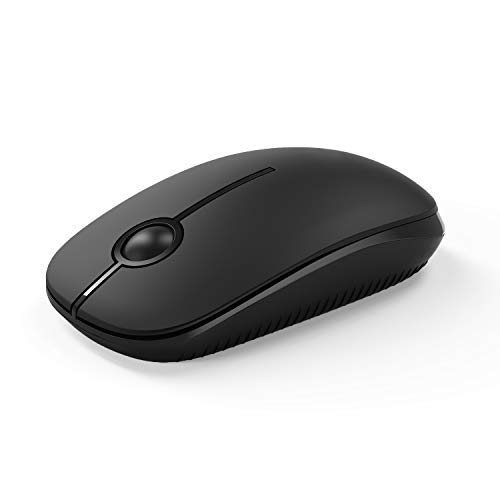
VssoPlor Wireless Mouse, 2.4G Slim Computer Laptop Mouse (Black)

Logitech M350s Pebble 2 Bluetooth Wireless Mouse (Tonal White)

Acer Wireless Mouse for Laptop, 2.4GHz Computer Mouse 3 Adjustable 1600 DPI

Logitech G305 Lightspeed Wireless Gaming Mouse (White)
More Details On Our Top Picks
The WL300 makes sense for laptop work that moves between home, office, and carry-on bags. Six buttons and an adjustable DPI setting give you more control than the simplest travel mice, while the sculpted grip should feel steadier during long spreadsheet sessions.
The trade-off is that a fuller shape usually takes a bit more space than a pebble-style mouse like the Logitech M350s Pebble 2. That said, the 18-month battery claim and Bluetooth connection make it a sensible pick for people who want less cable clutter and fewer charging chores.
What We Like
- Silent clicks suit shared offices and late-night work.
- Six buttons give you more control for browser and document tasks.
- Adjustable DPI helps you tune pointer speed to different screens.
- The sculpted shape should feel better than ultra-flat travel mice for longer sessions.
- Bluetooth support reduces dependence on a receiver-dongle setup.
Things To Consider
- The fuller body is less pocket-friendly than the slimmest models here.
- Extra buttons add usefulness, but they also mean more controls to learn.
- Grey finishes can show wear marks sooner than darker shells.
Feature Snapshot
Whose Shelf It Belongs On
You get the most from this model in a commuter bag or a home office that needs a quiet, comfortable wireless mouse with a few extra controls.
Where A Sibling Pick Shines
Logitech M350s Pebble 2 Bluetooth Wireless Mouse suits minimal carry setups better, especially for people who want a thinner shape than the WL300.
The M330 Silent Plus takes a very practical route, with a full-size body that should feel familiar to anyone replacing a basic wired mouse. Its 2.4 GHz USB-A nano receiver keeps the setup direct, and the 1000 dpi optical tracking suits steady office navigation more than fast, twitchy pointer work.
Compared with the WL300, this one looks simpler and a touch more traditional. That makes it easy to live with on a desk, though the receiver-based design gives you one more tiny accessory to keep track of in transit.
Best Bits
- Full-size shape gives your hand a more natural resting position.
- Silent button action helps in shared workspaces.
- 2.4 GHz connection is straightforward for desks with a USB-A port.
- 1000 dpi tracking fits routine navigation, documents, and web use.
- The lightweight build should sit easily in a laptop bag.
Points To Note
- USB-A receiver use is less elegant than Bluetooth on newer slim laptops.
- 1000 dpi is comfortable, but not especially quick for large high-resolution screens.
- Black shells tend to show smudges more clearly over time.
Core Details
Built With In Mind
You suit this mouse well if you want a comfortable office shape and a no-drama setup for everyday tasks.
Reach For A Different Pick When
Logitech M350s Pebble 2 Bluetooth Wireless Mouse is the cleaner match for travelers who prefer Bluetooth over a receiver.
Lenovo leans into portability here, and Bluetooth 5.0 means you can keep a receiver slot open on the laptop. The ergonomic shape and adjustable DPI make it more adaptable than the bare-bones VssoPlor, especially for people who split time between Windows machines, Macs, and Chromebooks.
One thing worth considering is that Bluetooth convenience depends on the devices you carry. Once that fits your setup, the silent clicks and small footprint make this a tidy companion for commuting, hotel work, and classroom use.
Highlights
- Bluetooth 5.0 supports a cleaner wireless setup.
- Silent clicks help keep shared spaces calmer.
- Adjustable DPI gives you room to tune pointer speed.
- The portable shape is easy to pack with a laptop sleeve.
Softer Spots
- Bluetooth-only use depends on device compatibility and pairing habits.
- Smaller travel mice can feel cramped during long desk sessions.
- Grey finishes usually look best with regular surface care.
Details At A Glance
The Right Fit
You suit this model best if your day includes travel, multiple devices, and a strong preference for Bluetooth over dongles.
A Better Fit Elsewhere
Logitech M330 Silent Plus Full Size 2.4 GHz Wireless Mouse fits better for desk-first users who want a fuller grip and a USB-A receiver.
The VssoPlor is the simplest shape in this lineup, and that is exactly the point. A slim body and plug-and-play USB nano receiver keep setup easy for notebook use, while the quiet optical clicks make sense in dorm rooms, shared desks, and evening laptop sessions.
Compared with Lenovo’s WL310, you give up Bluetooth convenience and a more refined ergonomic profile. In return, you get an inexpensive, straightforward mouse that does the job without asking for much attention.
Positives
- Slender profile slips into small laptop sleeves.
- USB nano receiver keeps the connection quick to set up.
- Quiet clicking suits low-noise environments.
- Simple operation reduces the learning curve for casual use.
Areas To Watch
- The slim shell may feel less filling under the palm than fuller models.
- Receiver storage matters, because tiny accessories are easy to misplace.
- Basic construction is sensible here, but it is still a simple budget mouse.
Feature Card
Made For
You suit this mouse best if you want a low-cost, travel-sized option for lighter laptop work.
Skip It When
Acer Wireless Mouse for Laptop makes more sense for larger hands that need a fuller body and adjustable 1600 DPI.
The Pebble 2 has a clear style angle, but the shape is not just about looks. Its slim Bluetooth design, lightweight build, customizable button, and Easy-Switch support make it useful for people who move between Windows, macOS, iPadOS, and Chrome OS without carrying extra clutter.
That thin profile is the trade-off, and you may notice it most during long desk sessions if you prefer a deeper grip. For travel, coffee shops, and small work surfaces, though, the compact footprint is hard to argue with.
Reasons To Buy
- Very slim body saves room in bags and on crowded desks.
- Bluetooth-only use keeps the setup tidy.
- Customizable button adds flexibility for common shortcuts.
- Easy-Switch support helps across several device types.
- Quiet clicks suit libraries and shared work spaces.
Minor Gripes
- The low-profile shape can feel shallow during long desktop sessions.
- Bluetooth pairing habits matter more here than on receiver-based mice.
- White finishes usually ask for more regular cleaning.
Core Details
Who Should Grab It
You fit this mouse best if travel, minimal desk clutter, and multi-device use matter more than a deep palm rest.
Another Choice May Suit
Logitech M330 Silent Plus Full Size 2.4 GHz Wireless Mouse suits people who want a fuller hand feel at a desk.
The Acer lands in the middle of the pack in a useful way, with a 2.4 GHz connection, six buttons, and three DPI levels up to 1600. That combination gives office users more room to tune pointer speed than the Logitech M330, while still keeping the setup familiar for PC, laptop, and desktop work.
The bigger shell should suit medium to large hands more naturally, though compact-bag travelers may find it less slip-in friendly than the VssoPlor or Pebble 2. It feels aimed at people who want a straightforward office mouse with a little more control and less hand cramping.
Bright Spots
- Three DPI settings give you some flexibility across tasks.
- Six buttons support shortcuts and everyday efficiency.
- Medium-to-large hand fit should feel less cramped for many users.
- The 2.4 GHz link keeps operation simple on standard workstations.
Trade Offs
- The larger shape takes more room in a carry case.
- USB-A receiver use works best on older or hub-friendly laptops.
- Button-heavy layouts can feel unnecessary for very casual use.
At A Glance
Whose Shelf It Belongs On
You fit this mouse best if you spend long hours at a desk and want a larger grip with adjustable pointer speed.
Where Shoppers Go Wrong
Logitech M350s Pebble 2 Bluetooth Wireless Mouse is the better match for travelers who care more about portability than palm support.
The G305 moves beyond quiet office basics and heads straight for precision work. A 12,000 DPI sensor, six programmable buttons, and on-board memory make it far more configurable than the other picks here, which matters when your desk time includes games, editing, or fast cursor movement across large displays.
The white shell keeps the look clean, but this mouse is still a performance-first shape rather than a comfort-first office slab. For people who want one wireless mouse to cover both daily work and more demanding input, that’s a strong argument.
Best Bits
- 12,000 DPI supports fast and precise cursor movement.
- Six programmable buttons suit shortcuts and game actions.
- On-board memory helps keep settings with the mouse.
- Lightweight build should feel agile during long sessions.
- 250-hour battery claim points to low-maintenance use between changes.
Worth Noting
- The shape is more task-driven than plush, so it may not feel as relaxed as a full office mouse.
- Programmable controls add flexibility, but they also take more setup time.
- White surfaces usually need a bit more care to stay neat.
Quick Facts
Perfect Match For
You suit this model best if you want a wireless mouse that can handle gaming-style precision and serious desk work.
Swap It Out When
Logitech M330 Silent Plus Full Size 2.4 GHz Wireless Mouse is the calmer choice for people who care more about silence than speed.
How To Choose The Right Smooth Mouses
Connection Type Matters More Than It Looks
Bluetooth keeps ports free and makes slim laptops easier to live with. A 2.4 GHz receiver usually gives you a straightforward plug-in setup, which helps on older notebooks, desktop towers, and shared workstations.
The trade-off is simple, Bluetooth wins on tidiness, while receiver-based mice often win on convenience for immediate desk use. For travel, Bluetooth models like the Lenovo WL310 and Logitech M350s Pebble 2 feel especially neat.
Shape And Hand Size Change The Whole Experience
Low-profile mice save space, but they do ask your hand to work a little differently. Fuller shapes such as the Logitech M330 Silent Plus and Acer mouse tend to suit longer sessions because your palm has more to rest on.
That difference matters on a crowded desk or during a long workday. Smaller shells are easier to pack, while larger shells usually feel steadier for spreadsheets, browsing, and general office use.
DPI And Button Count Set The Pace
DPI means dots per inch, a measure of pointer sensitivity. Lower numbers usually feel calmer and steadier, while higher numbers help the cursor cross big screens faster.
Button count matters too, especially once you start using browser shortcuts or app commands. The WL300 and Acer give you more controls than the simplest picks, while the G305 goes further for people who want programmable input and faster movement.
Noise, Battery Claims, And Maintenance
Silent clicks are a real comfort in open offices, libraries, and home setups with light sleepers nearby. Battery claims also change the ownership rhythm, because longer runtimes mean fewer interruptions for replacements or charging.
Cleaning is part of the equation as well. Lighter finishes and slim shells can show hand oils sooner, so a quick wipe-down keeps them looking presentable without much effort.
Things Worth Knowing First
Mistakes Worth Dodging
A common miss is choosing a mouse only by looks, then finding the body too flat or too small for daily work. Another is ignoring connection type, especially on laptops with few ports or on desks where a receiver can get lost.
Pointer speed is another place where people go wrong. A low-DPI office mouse feels calm on documents, while a high-DPI model can feel twitchy until you match it to your workflow.
The Upgrade Payoff
More expensive mice usually buy you better sensors, extra buttons, on-board memory, or a more refined shell shape. Those extras matter most for people who spend hours at the keyboard and mouse each day, because comfort and control start to stack up.
That said, a simple quiet mouse still makes sense for routine browsing, email, and classwork. Paying more pays off when the mouse becomes a daily tool rather than a spare accessory.
Frequently Asked Questions
Are Smooth Mouses good for open offices?
Yes, silent-button designs fit open offices well because they cut down on clicking noise. Models like the Logitech M330 Silent Plus and Logitech M350s Pebble 2 are especially suitable here.
Does Bluetooth beat a USB receiver?
Bluetooth is cleaner for travel and newer laptops with limited ports. A USB receiver can be simpler for desktop setups that stay in one place.
What DPI range works for everyday use?
Around 1000 to 1600 DPI suits most office tasks and web navigation. Higher settings matter more when you want the pointer to move quickly across larger screens.
Which mouse shape is easiest on the hand?
A fuller body usually feels more natural during long desk sessions. Slim travel mice save space, but they can feel less supportive over time.
Is a gaming mouse usable for work?
Yes, a gaming mouse can work very well for desk tasks because the sensor and buttons are often more flexible. The Logitech G305 is the clearest example in this roundup.
Closing Thoughts
Your best quiet mouse depends on how you work, not just how the listing looks. Choose slim Bluetooth designs for travel and cleaner desks, choose fuller shapes for longer office sessions, and move up to programmable controls only when you know you’ll use them. The good news is that this category gives you clear trade-offs instead of guesswork, so the right fit usually stands out fast. Pick the shape that matches your hand and your routine, and the rest gets easier.
