
You need clear dialogue for calls, fuller music for work sessions, or stronger game audio without filling your desk with bulky equipment. The right setup depends on your available space, connection preferences, bass expectations, and tolerance for extra cables. This roundup covers compact 2.0 pairs, 2.1 systems with dedicated bass units, soundbar-style designs, Bluetooth options, and RGB-equipped desktop audio. You’ll find practical trade-offs for home offices, gaming desks, laptops, and shared rooms.
The Shortlist At A Glance
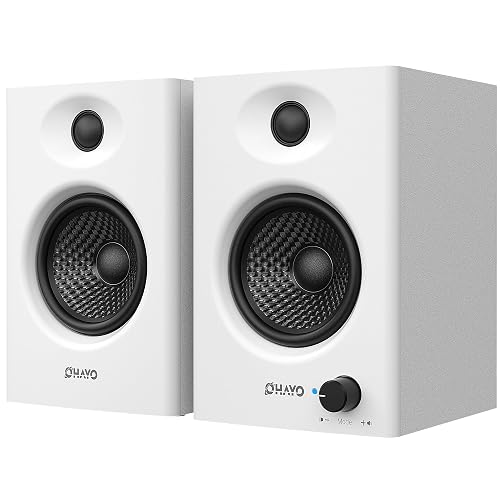
OHAYO 60W Computer Speakers for Gaming and Music
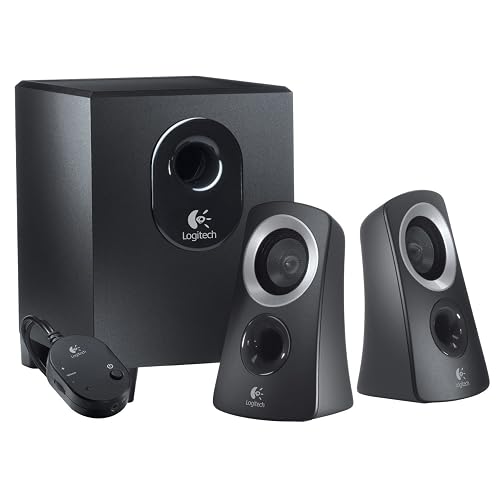
Logitech Z313 Speaker System (Renewed)
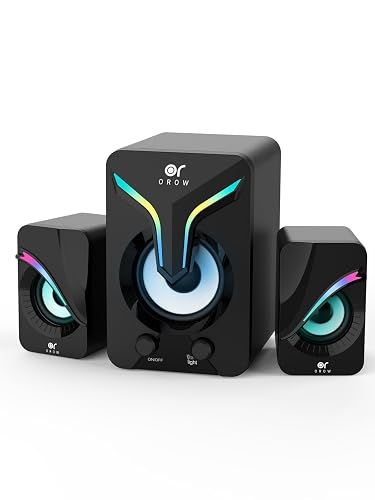
OR O R O W OROW Computer Speakers with Subwoofer
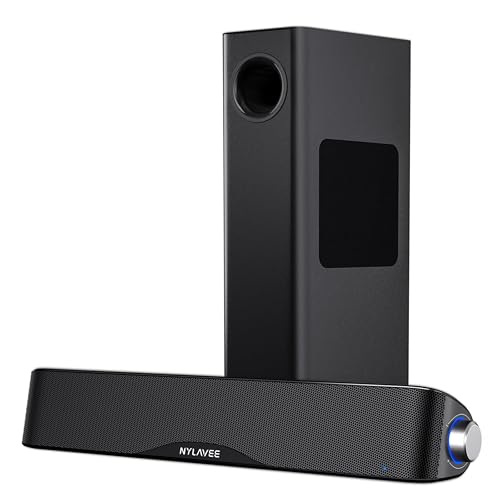
Nylavee Computer Speakers with Subwoofer, 2.1 PC Soundbar
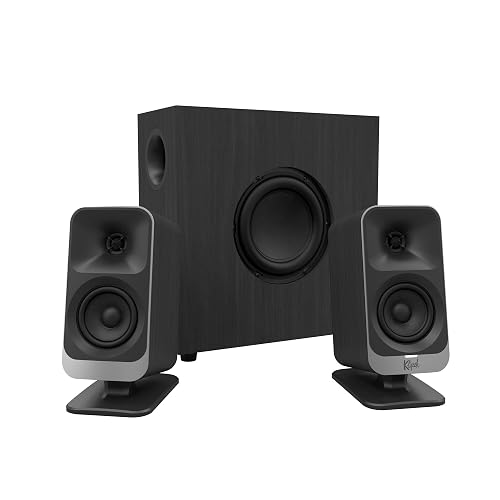
Klipsch ProMedia Lumina 2.1 Computer Gaming System
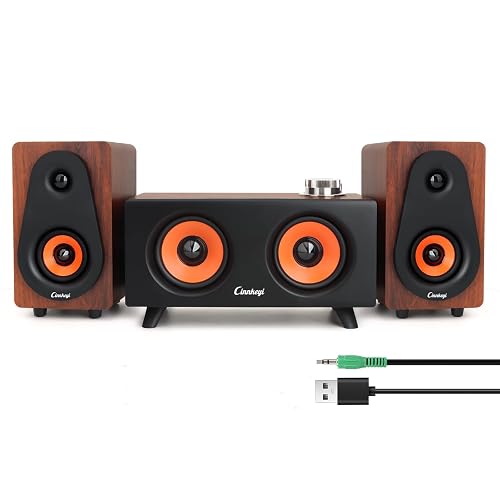
USB 2.1 Computer Speakers with Subwoofer

Nylavee Computer Speakers with Subwoofer, 2.1 PC Speakers

Bluedee Computer Speakers with Subwoofer, 2.1 PC Speakers
More Details On Our Top Picks
White 2.0 speakers can suit a clean office, dorm desk, or gaming station where a separate bass unit would crowd the workspace. The 60-watt setup, Bluetooth 5.3, 3.5 mm auxiliary, RCA, and USB power give you several ways to connect a computer, monitor, or laptop.
That flexibility makes OHAYO a sensible everyday option, especially for switching between a laptop and a desktop. You may find the 2.0 layout less satisfying for bass-heavy games than the Logitech Z313, but the simpler two-speaker footprint is easier to place and maintain.
Strong Points
- Bluetooth 5.3 adds cable-free listening from compatible devices.
- RCA, 3.5 mm, and USB power support varied desk arrangements.
- The white finish suits bright offices and contemporary setups.
- A two-speaker layout leaves more floor and desk space than a 2.1 system.
Things To Consider
- Without a dedicated subwoofer, very low bass may feel restrained.
- USB power keeps installation convenient, though your desk still needs a suitable power source.
Key Specs
Who It Suits Best
Choose this for a home-office or gaming desk needing flexible connections, a compact layout, and a light-colored finish.
Where Another Pick Suits Better
Logitech Z313 Speaker System suits you more when a small subwoofer and dedicated volume pod matter more than Bluetooth.
For a straightforward desktop upgrade, the Z313 keeps the arrangement familiar: two satellite speakers, a compact subwoofer, and a wired control pod. The pod places volume adjustment and headphone access near your hand, which is handy during calls, late-night gaming, or quick music changes.
Its 25-watt RMS output, meaning the stated continuous power level, is suited to personal desks and smaller rooms. Compared with OHAYO’s Bluetooth-enabled design, this renewed Logitech system is less flexible for wireless playback, yet the dedicated bass enclosure gives films and games more low-end presence.
What You Like
- The 2.1 layout separates stereo channels from bass duties.
- A compact subwoofer adds depth without demanding much floor space.
- The control pod makes everyday volume changes easier.
- Headphone access on the pod helps you switch listening modes quickly.
- Setup is uncomplicated for a first desktop audio system.
Worth Noting
- The renewed condition may bring more variation in cosmetic appearance than a new unit.
- Wired connections and the lack of listed Bluetooth support limit phone-first listening.
- Keep the subwoofer ventilated and dust the speaker openings regularly for easier ownership.
At A Glance
Made For
This fits beginners and office users who want simple wired 2.1 audio with convenient controls and a compact bass unit.
Consider Something Else When
OHAYO 60W Computer Speakers suit you more when Bluetooth and multiple wired input types are higher priorities.
RGB lighting gives this small 2.1 system a more playful presence than the plain OHAYO pair. The USB-powered design and included 3.5 mm auxiliary cable make it a natural match for a monitor, laptop, or tablet on a compact gaming desk.
The stated 11-watt stereo mini-subwoofer arrangement favors close-range listening rather than filling a large room. You may appreciate the option to switch the lights off during work, while the trade-off is less output headroom than the 60-watt Nylavee systems.
Highlights
- The 2.1 layout gives games and videos more bass character than basic stereo pairs.
- RGB lighting adds visual interest to a gaming station.
- Lighting can be turned off for calls or focused work.
- USB power simplifies placement near a computer.
Trade Offs
- The lower stated output suits personal listening better than larger shared rooms.
- USB power and 3.5 mm audio require nearby connection points.
Feature Snapshot
Right Fit For
This suits casual gamers and students who want compact 2.1 sound with adjustable lighting around a small desk.
Not Your Match When
Nylavee Computer Speakers with Subwoofer, 2.1 PC Soundbar fit you better for stronger room presence and a larger bass driver.
A soundbar-style main unit can leave more room beneath a monitor than two wide satellites, while the separate 5.25-inch bass driver handles low frequencies away from the screen. Nylavee pairs that arrangement with Bluetooth 5.4, 3.5 mm AUX, and an AC adapter, making it suited to a more permanent desk or media setup.
The stated 60-watt peak output, with 30 watts RMS also specified, gives you more headroom than the compact OR O R O W system. In most home offices, that extra scale should make movies and games feel fuller, though the AC-powered design adds another cable and the larger bass unit needs deliberate placement.
Upsides
- The dedicated 5.25-inch bass driver gives low-frequency effects their own enclosure.
- Dual soft-dome tweeters are designed for clearer high frequencies.
- Bluetooth 5.4 supports convenient wireless playback from compatible devices.
- Soundbar-style placement keeps the monitor area visually orderly.
- AC power supports a permanent desktop installation.
- 30-watt RMS output offers a clearer reference than peak output alone.
Room For Improvement
- The separate bass unit takes more floor or shelf space than a 2.0 pair.
- AC power adds installation work compared with USB-powered compact systems.
- Dust can collect around the larger driver, so open placement is easier to maintain.
Technical Sheet
Best Suited To
This fits desktop movie fans, gamers, and home-office users who have room for a dedicated bass unit and want stronger output.
A Better Fit Elsewhere
Klipsch ProMedia Lumina 2.1 Computer Gaming System suits you more when tiltable speakers and a more design-focused RGB setup matter most.
Gaming desks often need audio that looks intentional as well as sounds substantial, and the ProMedia Lumina addresses that brief with built-in RGB effects, redesigned cabinets, and tiltable stands. The 2.1 arrangement gives you separate satellites and a subwoofer, while the angled stands can help direct sound toward your listening position.
Compared with Nylavee’s soundbar form, Klipsch gives the left and right channels a more traditional desktop presentation. You may find the styling worth the extra space, particularly for a dedicated gaming room, although a 2.1 system brings more cable management and more surfaces to dust.
Bright Spots
- Tiltable stands help aim the satellite speakers toward your chair.
- Built-in RGB effects add customization without a separate lighting accessory.
- The 2.1 design gives games and films dedicated bass support.
- The cabinet redesign gives the setup a more considered desktop appearance.
Points To Note
- A separate subwoofer requires more room than a compact 2.0 arrangement.
- RGB hardware may be unnecessary for an understated office.
- Use careful cable routing around the stands and bass unit during installation.
Quick Facts
Who Will Love This
This suits dedicated PC gamers who value speaker positioning, cabinet styling, and integrated lighting alongside 2.1 sound.
Swap It Out When
USB 2.1 Computer Speakers with Subwoofer suit you more for a simpler mixed-device setup with PC, line-in, and Bluetooth modes.
Three connection modes make this 2.1 system useful for a desk shared by a computer, phone, and secondary device. PC mode uses USB for power and audio, line-in accepts a 3.5 mm connection, and Bluetooth handles compatible wireless playback.
The speaker layout combines two 2.5-inch units, two 2-inch units, and a passive bass diaphragm, which is a non-powered surface that helps reinforce low frequencies. That specification points to a space-conscious system with more tonal range than basic laptop audio, though you’ll need to choose the right mode for each device.
Reasons To Buy
- PC, line-in, and Bluetooth modes cover common home listening scenarios.
- USB audio and power reduce the need for a separate audio cable in PC mode.
- The 2.1 arrangement gives music and films more bass structure.
Minor Gripes
- Multiple modes can require more attention during initial setup.
- The compact drivers may suit close listening better than a large open room.
- Keep the control area accessible so switching sources doesn’t become inconvenient.
- The passive diaphragm still relies on the system’s compact enclosure, so deep bass expectations should stay measured.
Feature Rundown
Who Should Grab It
This suits households that move between wired computers, 3.5 mm devices, and Bluetooth sources from one desk.
Another Choice May Suit
Klipsch ProMedia Lumina 2.1 Computer Gaming System suits you more for a dedicated gaming room with adjustable speaker stands and RGB styling.
Eight lighting modes give this Nylavee system a more configurable appearance than the soundbar-style Nylavee option. You also get Bluetooth 5.4, USB, USB-C, and 3.5 mm AUX inputs, so a desk can support newer and older devices without an adapter-heavy arrangement.
The 60-watt peak rating and 2.1 design place it in the same broad performance class as the other Nylavee system, but the input selection is the meaningful difference. Depending on your desk, the USB-C option may simplify placement, while the RGB controls add another feature to manage and keep clean.
Best Bits
- Eight lighting modes let you change the desk atmosphere without external lighting.
- USB, USB-C, AUX, and Bluetooth 5.4 cover a broad device mix.
- The dedicated subwoofer adds weight to games, films, and music.
- 60-watt peak output suits users seeking more room presence than mini systems.
- AC adapter power supports a fixed desktop arrangement.
Small Caveats
- The feature set may feel excessive for a work-only setup.
- RGB elements and multiple ports create more surfaces and connections to organize.
Details At A Glance
Built With In Mind
This suits gaming-desk owners who want substantial 2.1 sound, multiple inputs, and adjustable RGB effects in one system.
Reach For A Different Pick When
Bluedee Computer Speakers with Subwoofer suit you more for DSP-tuned sound and a higher stated peak output.
Bluedee aims at listeners who want a fuller desktop system without giving up connection flexibility. Its 2.1 layout, dedicated subwoofer, Bluetooth 5.4, USB, USB-C, AUX, and RGB lighting make it a strong match for a workstation that also handles music, movies, and games.
DSP, or digital signal processing, uses internal audio adjustment to shape the sound before it reaches the speakers. The stated 80-watt peak output gives Bluedee more headroom than the Nylavee alternatives, although peak figures don’t describe continuous output, so room size and listening distance still matter.
Plus Points
- DSP tuning is intended to keep vocals balanced and high frequencies smoother.
- The separate subwoofer preserves space in the satellite speakers for mids and highs.
- USB, USB-C, AUX, and Bluetooth 5.4 support varied desktop hardware.
- RGB lighting adds visual customization to a monitor setup.
- 80-watt peak power gives the system more stated output headroom.
- Adapter power fits a permanent workstation or gaming desk.
Areas To Watch
- The dedicated subwoofer needs placement space beside or under the desk.
- DSP tuning reflects a particular sound balance, so listeners who prefer fully neutral audio may want to adjust expectations.
- RGB lighting, multiple inputs, and adapter power create more setup decisions than a basic pair.
Core Details
Whose Shelf It Belongs On
This suits music-focused desktop users and gamers who want broad connectivity, DSP shaping, dedicated bass, and visual customization.
Look Elsewhere When
Logitech Z313 Speaker System suits you more for a smaller, simpler wired setup with a nearby control pod.
How To Choose The Right Speakers And Subwoofers For Computer
Start With The Desk You Have
Measure the space beside your monitor before choosing a 2.1 system. A pair of satellite speakers needs left and right placement, while a separate subwoofer may sit under the desk, beside a tower, or on a shelf. Soundbar-style designs can preserve width on a narrow surface, but they may not create the same left-right separation as two distinct speakers.
USB-powered systems suit laptop desks and flexible workstations because power can come from a computer or hub. AC adapter systems make more sense for a permanent setup with an accessible outlet.
Choose 2.0 Or 2.1 Audio
A 2.0 system uses two main speakers, which keeps installation and cable management straightforward. OHAYO’s 2.0 layout suits calls, music, and everyday videos where desk space matters more than deep bass.
A 2.1 system adds a dedicated subwoofer. That extra enclosure can give explosions, bass lines, and cinematic effects more weight, though it also increases the footprint and setup work. For small rooms, a compact 2.1 system usually makes more sense than chasing high output.
Match Connections To Your Devices
Bluetooth helps you switch between a computer and mobile device without moving cables, but wired inputs remain useful for stable desktop connections. A 3.5 mm AUX input works with many computers and monitors, while USB audio can combine power and sound in a computer setup.
USB-C is useful for newer hardware, yet you should still check the ports on your computer, monitor, and hub. Multiple inputs bring flexibility, but they can also make source switching less immediate.
Read Power Claims Carefully
Peak power describes a maximum stated level, while RMS gives a more useful indication of continuous output when it appears in the product information. Higher wattage doesn’t automatically mean clearer sound, especially in a small office where listening distance is short.
Look at the whole system: driver arrangement, subwoofer design, input options, cabinet placement, and sound processing. A moderate system positioned well can suit daily work better than a larger setup that overwhelms your desk.
What To Weigh Before You Buy
Mistakes Worth Dodging
A common mistake is choosing by wattage alone. Peak figures can look impressive, but your room size, desk distance, and need for low bass matter just as much.
Cable planning deserves attention too. AC-powered 2.1 systems need an outlet and space for the bass unit, while USB-powered choices need accessible computer power. Check every source device before settling on Bluetooth, AUX, USB, or USB-C.
The Upgrade Payoff
Higher-tier desktop systems usually add a better-separated 2.1 layout, more connection types, stronger cabinet design, adjustable lighting, or internal sound processing. Those additions matter during long gaming sessions, frequent device switching, and music listening at a desk.
The upgrade makes sense for a dedicated workstation where you’ll use the system every day. Casual call audio may not justify the extra footprint of a large subwoofer, while music and game enthusiasts can gain more from dedicated bass and better speaker positioning.
Final Verdict
Your best choice depends on the desk, not just the power figure. OHAYO keeps a compact 2.0 setup flexible, Logitech makes 2.1 audio approachable, and the OR O R O W system adds RGB style for smaller gaming spaces. Nylavee, Klipsch, and Bluedee suit fuller sound with more hardware around the desk, while the cinnkeyi system stands out for its three listening modes. Start with available space, then match inputs and bass needs to your daily routine. A well-placed system can make work, games, films, and music feel noticeably more engaging.
