
Laptop speakers often leave you straining to hear dialogue, video calls, music, or game audio across a busy desk. You need a compact setup that matches your ports, listening habits, and available space, whether you work from a dorm room, shared office, or home workstation. The options below range from simple USB-powered pairs to monitor-mounted soundbars with wireless playback and lighting. You’ll find practical trade-offs for everyday listening, gaming, travel, and cleaner desk layouts.
The Shortlist At A Glance

XKX Computer Speaker for Desktop PC USB-Powered
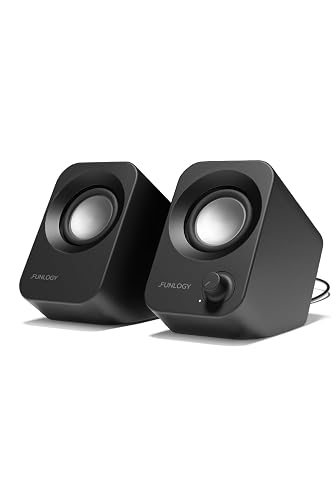
FUNLOGY Speaker 14W Stereo PC Speakers 30° Tilt Design
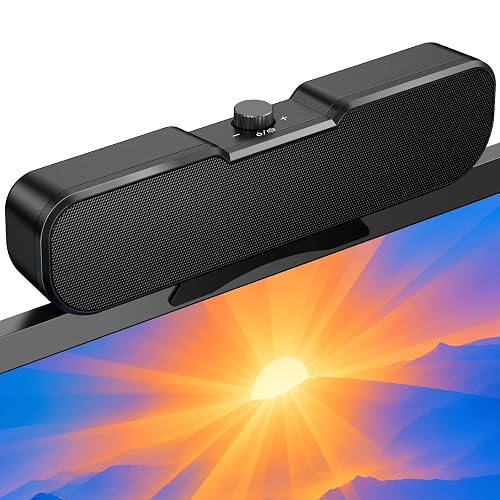
Cirqon Computer Speakers for Desktop PC Compact Design
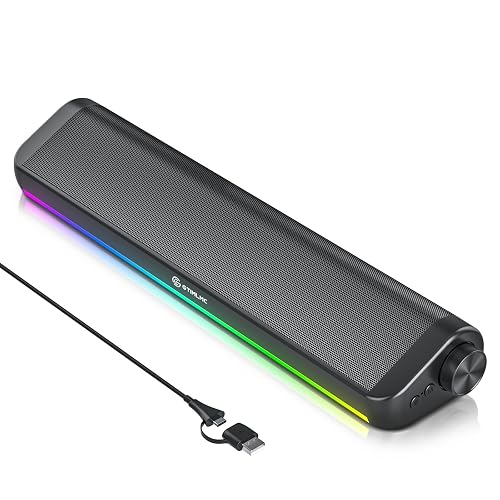
Tylubio Computer Speakers HiFi Stereo PC Soundbar RGB Lighting
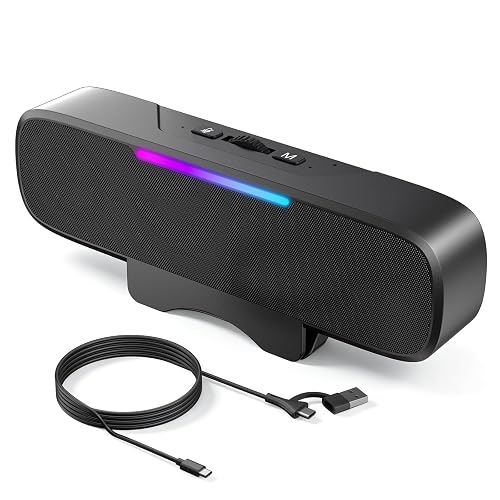
OHAYO Computer Speakers for Desktop PC Monitor BT 6.0 RGB Light
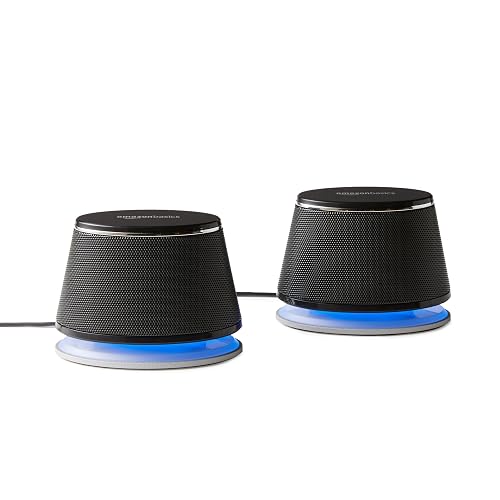
Amazon Basics Stereo 2.0 Speakers for PC or Laptop
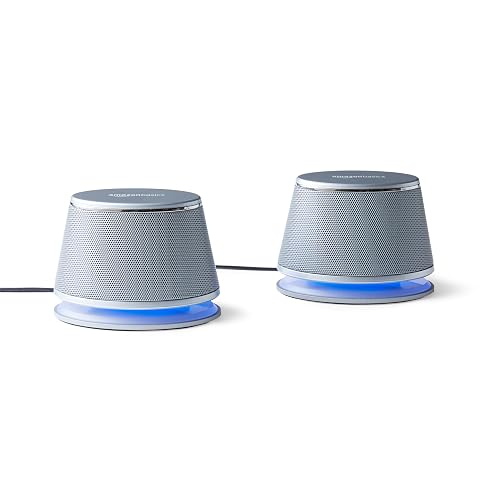
Amazon Basics Stereo 2.0 Computer Speakers LED Lights

XKX Computer Speakers for Desktop PC Monitor USB Plug-in
More Details On Our Top Picks
A USB-powered single speaker keeps a laptop station tidy, especially beside a monitor or on a narrow dorm desk. The larger 2.25-inch driver handles the main sound, while a passive radiator, a non-powered element that supports low-frequency output, adds weight to voices and music.
That arrangement suits podcasts, calls, streaming, and casual games without asking you to arrange two separate cabinets. You may find the single-channel layout less spacious than FUNLOGY’s stereo pair, but the built-in USB-C adapter makes newer laptops easier to connect.
Strong Points
- The 2.25-inch driver is sized for fuller desktop audio than very small laptop add-ons.
- USB plug-and-play operation keeps setup straightforward across Windows, macOS, ChromeOS, and Linux computers.
- The passive radiator adds bass presence for spoken content and background music.
- The included USB-C adapter helps you avoid an extra port converter on newer laptops.
Things To Consider
- A single enclosure won’t create the left-right separation of a stereo pair.
- Dust can collect around the exposed speaker surface, so gentle dry cleaning is sensible.
Key Specs
Who It Suits Best
You’ll appreciate this choice most for a compact laptop workspace that needs simple, fuller sound from one enclosure.
Consider Something Else When
FUNLOGY Speaker 14W Stereo PC Speakers 30° Tilt Design suits you more when separated left-right audio matters for gaming or music.
Small desks benefit from the 30-degree tilt, which angles the stereo pair upward toward your ears instead of sending sound across the desktop. Each cabinet uses a 48 mm full-range driver, a unit designed to cover bass, mids, and treble from one speaker, with passive radiators supporting the lower end.
The 14W total output gives this pair more headroom than the single XKX speaker for casual gaming, video calls, and streaming. The honest trade-off is that compact cabinets still need sensible placement, so crowded desks may limit the benefit of the angled design.
What We Like
- Stereo separation makes dialogue, music, and game effects feel less centered than a single-bar design.
- The upward tilt directs sound toward a seated workstation rather than the desk surface.
- Its compact footprint leaves more room for a keyboard, notebook, or controller.
- A front volume dial offers quick adjustments during a meeting or gaming session.
- USB power keeps the cable arrangement familiar for desktop and laptop use.
Worth Noting
- The USB connection handles power, while compatibility with a particular audio setup should be checked before installation.
- Small cabinets may not satisfy you in a large room where high listening levels are common.
At A Glance
Made For
This pair fits students, casual gamers, and office users working at a small desk who still want stereo sound.
Not Your Match When
Cirqon Computer Speakers for Desktop PC Compact Design is a better fit for you when a monitor clamp matters more than separate left-right cabinets.
Monitor space becomes much easier to manage with Cirqon’s non-slip clamp, which fits screens from 0.1 to 0.98 inches thick. You can mount the speaker on the top, bottom, or side of a compatible display, then use the volume knob from that position.
That physical layout works well for a shared office where a front control saves repeated trips to the computer menu. You may find installation less convenient with an unusually thick monitor edge, while the independent standing option gives you a fallback on a regular desk.
Highlights
- The adjustable clamp clears desk space beneath a monitor.
- A non-slip grip is designed to hold screens within the stated thickness range.
- One knob handles power and volume, which keeps daily operation uncomplicated.
- USB and USB-C connection options help accommodate newer laptop ports.
Trade Offs
- Clamp fit depends on your monitor’s edge thickness and shape.
- Mounted hardware may need removal before moving the monitor between work areas.
- The compact enclosure prioritizes desk efficiency over room-filling sound.
Feature Snapshot
Right Fit For
You’ll get the most value from Cirqon in a compact workstation where monitor-mounted audio and an easy front control matter.
Look Elsewhere When
FUNLOGY Speaker 14W Stereo PC Speakers 30° Tilt Design suits you better for open stereo placement and a dedicated pair on the desktop.
A soundbar layout suits you when two separate speakers make a monitor area feel cluttered. Tylubio combines stereo drivers and passive radiators with dynamic RGB illumination, giving a gaming desk a more styled appearance than the understated Amazon Basics pairs.
The volume knob keeps everyday control within reach, while USB and Type-C plug-and-play connections simplify laptop or desktop placement. In a shared office, the lighting may feel unnecessary, and the wired design keeps this choice tied to the computer rather than a flexible room setup.
Upsides
- The soundbar form uses less horizontal separation than two individual cabinets.
- Dedicated passive radiators are intended to add bass depth without a separate subwoofer.
- Dynamic RGB modes can coordinate with a gaming desk or add visual character to an office.
- A physical volume knob makes quick changes easier during games and calls.
- USB and Type-C support gives you useful connection flexibility.
Minor Gripes
- RGB lighting may distract you during focused work, depending on the selected mode.
- A soundbar cannot be positioned as widely as a stereo pair for stronger separation.
Technical Sheet
Who Will Love This
This suits you best as a gaming or entertainment soundbar for a desk where visual styling and one-piece placement matter.
A Better Fit Elsewhere
Amazon Basics Stereo 2.0 Speakers for PC or Laptop is a better fit for you when a plain two-speaker arrangement and 3.5mm input are more useful than lighting.
OHAYO expands the usual wired desktop format with Bluetooth 6.0, a short-range wireless standard, alongside USB computer mode. The clip-on bar also includes a G-sensor, a motion sensor used to adjust channel behavior, plus RGB lighting and a front volume knob.
That mix works for a desk that shifts between laptop work, phone playback, and gaming. You may find the extra controls take longer to learn than the simpler XKX bar, and the clip-on design still depends on a compatible monitor edge.
Reasons To Buy
- USB and Bluetooth modes let you switch between computer audio and wireless devices.
- The 16W maximum output gives the bar useful headroom for videos, music, and games.
- A clip-on form keeps the speaker close to the monitor instead of occupying desk depth.
- The knob provides direct volume access without relying on a software slider.
Room For Improvement
- Wireless mode adds another connection step compared with a basic USB speaker.
- RGB lighting and multiple modes may be more than you need for quiet office work.
- Clip-on installation requires attention to monitor fit and cable routing.
Quick Facts
Perfect Match For
You’ll benefit most from OHAYO when one desk system needs wired computer audio, wireless playback, lighting, and monitor clipping.
Swap It Out When
Cirqon Computer Speakers for Desktop PC Compact Design suits you more when a simpler clamp and single control matter more than Bluetooth.
A familiar two-speaker setup can be the right answer for an older laptop or desktop with a 3.5mm audio output. This pair uses USB for power and a separate 3.5mm auxiliary input for sound, so you get a straightforward arrangement without wireless pairing.
The metal finish, padded base, blue LED lights, and bottom radiator give it more visual structure than a basic plastic enclosure. Compared with Tylubio, it lacks RGB effects and newer Type-C connectivity, but daily care is easy: keep the grilles clear and leave room around the bottom radiator.
Bright Spots
- A separate 3.5mm input supports many traditional computers and audio devices.
- USB power avoids a dedicated wall adapter for a standard desk setup.
- Inline volume control makes quick adjustments convenient.
- The padded bases help protect the desk surface during regular placement.
Points To Note
- The 3.5mm audio cable is less convenient for devices with USB-C-only ports.
- Blue LEDs are always a visible design element, which may not suit every workspace.
Details At A Glance
Who Should Grab It
This pair suits you as a traditional desktop speaker setup for an older computer, office station, or simple media desk.
Another Choice May Suit
XKX Computer Speakers for Desktop PC Monitor USB Plug-in is a better fit for you when USB-C convenience and monitor placement matter more than an analog input.
The silver version gives you the same practical two-speaker layout as the black Amazon Basics pair, with a brighter finish for a light-colored desk. USB supplies power, the 3.5mm auxiliary input carries audio, and inline volume control stays easy to reach.
Blue LEDs and a bottom radiator add a little personality without the more active lighting of the Tylubio or OHAYO options. You may prefer this finish in a visible office, though the older-style connection layout is less convenient for USB-C-only laptops.
Best Bits
- The silver metal finish gives a clean contrast against darker monitors and desks.
- Two speakers create a more natural left-right layout for music and video.
- USB power and 3.5mm audio keep the connection method familiar.
- The padded bases help reduce direct contact with the desktop.
- Inline volume control supports quick adjustments during work.
Small Caveats
- The blue LED treatment may not suit a minimalist or light-sensitive workspace.
- Separate speakers occupy more desk width than a soundbar.
- Routine dusting around the metal finish and bottom radiator helps keep the setup presentable.
Feature Rundown
Whose Shelf It Belongs On
You’ll find this pair useful for a traditional silver-toned desk where basic stereo audio and an analog input cover your needs.
Where A Sibling Pick Shines
Amazon Basics Stereo 2.0 Speakers for PC or Laptop suits you better when a black finish blends more quietly into your workstation.
A monitor-mounted soundbar can clear the space beneath a display while keeping audio close to your line of sight. This XKX model uses USB plug-in operation, includes a USB-C adapter, and features adaptive channel switching intended to manage sound across its bar-style layout.
Compatibility covers Windows, macOS, ChromeOS, and Linux computers, while the source data excludes monitors, televisions, and projectors as compatible devices. That limitation matters during installation, so you may prefer it for a laptop or desktop connection rather than treating it as a universal display speaker.
Positives
- The clip-on soundbar format keeps the desktop beneath your monitor open.
- USB-C adapter support helps newer laptops connect without an extra converter.
- Adaptive channel switching is designed to suit the bar’s compact speaker arrangement.
- Computer compatibility spans Windows, macOS, ChromeOS, and Linux.
Honest Caveats
- The stated incompatibility with monitors, televisions, and projectors limits some installation plans.
- Monitor clipping requires careful cable routing and a suitable screen edge.
Core Details
Built With In Mind
This choice suits you as a laptop or desktop user who wants monitor-adjacent audio, USB-C flexibility, and a clear desk surface.
Reach For A Different Pick When
OHAYO Computer Speakers for Desktop PC Monitor BT 6.0 RGB Light is a better fit for you when wireless playback and lighting are part of the plan.
How To Choose The Right Speakers For Laptop Computer
Match The Connection To Your Computer
USB-powered speakers use the computer for electrical power, while the audio path may be handled through USB, USB-C, or a separate 3.5mm auxiliary plug. That distinction matters because a laptop with only USB-C ports may need an adapter unless the speaker includes one. Traditional desktops often make the 3.5mm route easy, while newer portable computers favor USB-C convenience.
A wired connection keeps setup predictable for office calls and streaming. Wireless playback adds flexibility for phones and tablets, but pairing becomes another step during daily use. OHAYO is the most flexible option here because it combines computer mode with Bluetooth 6.0.
Decide Between Stereo, Soundbar, And Single Speaker
Stereo means two separate channels, left and right, which can make music and game effects feel more spread out. FUNLOGY and the Amazon Basics pairs use that arrangement, but they occupy more desk width. A soundbar such as Tylubio or the second XKX model keeps the system together and works better beneath a monitor.
A single speaker saves even more space, though centered audio lacks the separation of two cabinets. That format fits podcasts, calls, and casual video viewing particularly well. Your desk width and listening habits should guide the choice before output figures become the focus.
Prioritize Controls And Placement
A physical volume knob is useful during meetings, late-night viewing, or gaming because you can adjust sound without leaving the current application. Monitor clamps clear the area beneath your screen, but you need to confirm edge thickness and cable routing first. Cirqon provides a stated clamp range, while the other clip-on designs require closer attention to the individual listing.
Lighting is a style feature rather than an audio requirement. Fixed LEDs create a small accent, while RGB modes suit gaming stations but may distract during focused work. Bottom radiators also need breathing room, so avoid pressing those speakers tightly against a wall or desk organizer.
Match Output To Your Room
Output figures describe the speaker’s stated power capability, not a guaranteed volume level in every room. A compact 14W stereo pair may suit a seated desk, while a larger-sounding 16W bar gives more headroom for entertainment. Room size, listening distance, and the type of content you play matter just as much.
For calls and tutorials, clear mids and convenient controls usually matter more than heavy bass. Music and games benefit from stereo separation, passive radiator support, or a fuller driver design. Keep expectations grounded: compact USB speakers improve laptop audio, but they won’t replace a large room audio system.
Things Worth Knowing First
Mistakes Worth Dodging
Port confusion causes many disappointing setups. A USB cable may provide power without carrying sound, while a 3.5mm plug needs a separate audio output. Check your laptop’s available ports and confirm whether the chosen item includes the required adapter.
Desk placement also deserves attention. A clamp may not fit every monitor edge, and two speakers can crowd a narrow surface. Leave space around bottom radiators, keep cables away from moving hinges, and choose a bar when clear desk depth matters more than wide stereo placement.
What Separates Premium From Basic
Higher-tier designs generally add more connection choices, physical controls, monitor mounting, wireless playback, stronger output figures, or lighting systems. Those additions make sense for a gaming station, a mixed-device desk, or a user who changes between laptop and phone audio.
Basic USB pairs remain sensible for calls, music at moderate levels, and older computers with 3.5mm audio. Spending more becomes worthwhile when a single feature solves a daily nuisance, such as OHAYO’s wireless mode or Cirqon’s monitor clamp. Extra lighting alone may not justify a more elaborate setup for focused office work.
Final Verdict
You can keep the choice simple by matching the speaker format to your desk and ports. FUNLOGY gives you compact stereo sound, Cirqon focuses on monitor mounting, OHAYO adds wireless flexibility, and the Amazon Basics pairs cover traditional 3.5mm setups. Tylubio brings a styled soundbar format, while the XKX options suit USB-C laptop stations with limited space. Choose the layout that removes the most friction from your daily routine, and you’ll have a more comfortable way to handle calls, streaming, music, and games.
