
Windows touchpads make sense when you want gesture control without a mouse crowding your desk. They suit laptop users, desktop setups, and travel rigs that need a smaller footprint. The right model can help with scrolling, drag-and-drop work, and everyday navigation in a way that feels more natural than a basic pointer. This roundup focuses on wired, wireless, Bluetooth, and multi-device options so you can match the pad to your setup, not the other way around.
Quick Look At Our Shortlist
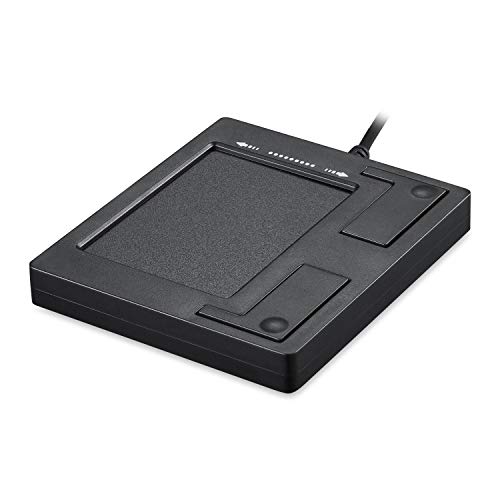
Perixx PERIPAD-501 Wired USB Touchpad 11284

Apple Magic Trackpad White Multi-Touch Surface

Amazon Basics Multi-Touch Trackpad Dual Device Control
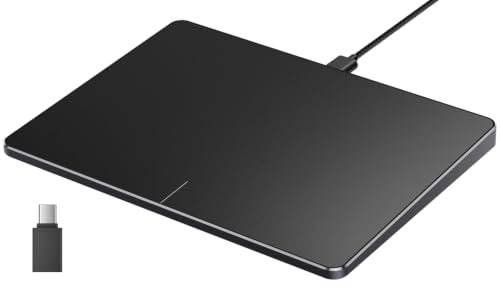
ProtoArc T1 Wired Large USB Trackpad Grey Black

Trackpad with 2.4G USB Receiver for Mac and Windows

Wireless Trackpad for Mac and Windows 7.5-inch Glass Surface

ProtoArc T1 Plus Bluetooth Trackpad Black
More Details On Our Top Picks
The Perixx PERIPAD-501 keeps things stripped back with a wired USB connection and two external buttons, so it suits a desk that needs a dependable pointer surface without extra setup. Plug-and-play support matters here, especially for older Windows desktops or secondary workstations where you want movement and scrolling without hunting for drivers.
Its small footprint makes sense beside a compact keyboard or in a tight office corner, though that same size can feel modest next to larger gesture pads like the ProtoArc T1. The honest read is that you trade luxury for simplicity, and for basic navigation that’s often enough.
Strong Points
- USB wiring keeps the connection straightforward for fixed desktop use.
- Two physical buttons give you clear click control without relying only on gestures.
- Plug-and-play setup fits machines where you want minimal fuss.
- Small size leaves more room for a keyboard or notebook.
Things To Consider
- The compact surface leaves less room for broad gesture work.
- Wired use means a cable stays part of your desk layout.
- The simple button layout may feel basic beside the more gesture-focused pads in this list.
Feature Snapshot
Who It Suits Best
Desktop users who want a simple, wired Windows touch surface with no software detour fit this Perixx well.
A Better Fit Elsewhere
ProtoArc T1 Wired Large USB Trackpad fits more easily for gesture-heavy office work, since its larger 6.4-inch surface gives your fingers more room.
Apple’s Magic Trackpad stands apart because it pairs a multi-touch surface with Force Touch, which means pressure-sensitive input sits alongside standard gesture control. That combination makes the most sense in Apple-centered workspaces, especially for iPad users and anyone already comfortable with the Mac trackpad style.
The USB-C charging connection keeps the design current, but it also narrows the appeal for Windows-focused setups, which is the major trade-off here. Compared with the more universal options in this roundup, this one is a specialist tool rather than a broad-fit desk accessory.
Highlights
- Force Touch adds pressure-aware input for more nuanced control.
- Multi-touch gestures suit scrolling, swiping, and window movement.
- USB-C charging matches modern Apple accessories.
- Clean white finish fits minimal desk layouts.
Worth Noting
- Its strongest fit sits inside Apple ecosystems, not Windows-first desks.
- The higher-end design language comes with less cross-platform flexibility.
- White surfaces can show wear more readily in busy setups.
Core Details
Who Will Love This
Apple users who want a refined gesture pad for Mac, iPad, or Vision Pro setups are the clearest match.
Swap It Out When
Amazon Basics Multi-Touch Trackpad fits better for Windows-only desks that need a more straightforward wireless setup.
This Amazon Basics trackpad targets Windows PC use and brings dual-device control into a 6.4-inch wireless format. For a desk that switches between a home computer and a work machine, that kind of control can feel far more useful than a fancier surface with narrower compatibility.
Rechargeable power keeps it from relying on disposable cells, though wireless accessories do ask for occasional charging and a little attention to pairing. Compared with the wired Perixx, you gain freedom from a cable, and compared with the Apple unit, you get a clearer Windows-first fit.
Best Bits
- Wireless layout keeps the desk cleaner.
- Dual-device control helps when you move between two computers.
- 6.4-inch size leaves enough room for broad gestures without taking over the workspace.
- Rechargeable design reduces the need to swap batteries.
Softer Spots
- MacOS is not supported, so the fit is narrow by design.
- Wireless gear needs periodic charging to stay ready.
- Large gesture fans may still prefer the more spacious ProtoArc T1 Plus.
Details At A Glance
Made For
Windows desktop users who split time between two devices and want a wireless pad with a familiar footprint fit this well.
Look Elsewhere When
ProtoArc T1 Wired Large USB Trackpad suits you better for a fixed desk where a cable and steady connection are fine.
ProtoArc’s T1 is the pick that leans hardest into gesture room, because its 6.4-inch surface gives your hand more area to work with than the smaller Perixx pad. In a busy office or shared desk, that extra space makes multi-touch movement feel less cramped and a bit more natural.
The wired USB connection keeps latency concerns out of the picture, which is useful for long work sessions where you want the input path to stay predictable. It does ask for desk space near a port, so it fits permanent setups better than travel-first kits.
Plus Points
- Large 6.4-inch surface gives gestures more room.
- Wired connection keeps the setup steady.
- Plug-and-play design simplifies installation.
- Works with computers, desktops, and laptops in Windows 11 or 10 setups.
Areas To Watch
- The cable keeps it anchored to the desk.
- Large surface size uses more space than the compact Perixx.
- Grey-black styling stays restrained, so it may feel plain beside more premium-looking options.
Feature Rundown
Built With In Mind
Windows users who want a larger gesture surface for a permanent desk setup are the clearest match here.
Where A Sibling Pick Shines
Amazon Basics Multi-Touch Trackpad fits better for a wireless-first desk where dual-device control matters more than a wired link.
POLARMETA takes a cross-platform approach here, with a 2.4G USB receiver that suits both Mac and Windows desktops. That receiver style often appeals to people who want a quick wireless link without depending on Bluetooth menus or a more complex pairing path.
Its multi-touch surface and high-precision tracking make it a sensible middle ground for mixed-device homes, though the name itself hints at a lot of compatibility breadth rather than a single focused platform. Compared with the Amazon Basics option, this one stretches farther across operating systems.
Reasons To Buy
- 2.4G receiver gives you a simple wireless connection path.
- Works across Mac and Windows, which helps mixed households.
- High-precision tracking suits detailed pointer work.
- Multi-gesture support keeps everyday use flexible.
Room For Improvement
- Broad compatibility can matter more than deep platform tuning.
- A USB receiver means you need to keep track of the dongle.
- Users who want a very large surface may prefer the 7.5-inch POLARMETA model below.
Core Details
Whose Shelf It Belongs On
Mixed Mac and Windows households that want one pad for both machines are the best match.
Another Choice May Suit
ProtoArc T1 Plus Bluetooth Trackpad fits better for Windows users who want to switch among three devices without carrying a receiver.
This POLARMETA pad stands out for its 7.5-inch glass surface and aluminum body, which gives it a more substantial feel than the smaller, more basic pads in the list. For remote work, hotel desks, or coffee-shop setups, the slim profile and anti-slip rubber base make it easier to place and keep steady.
The trade-off is that a larger glass surface can ask for a little more care during transport, especially in crowded bags where scratches and scuffs become more likely. Still, for a mobile desk that values a smooth surface and a more finished build, this one lands well.
Best Bits
- 7.5-inch glass surface gives your fingers more room.
- Aluminum body adds a more solid feel.
- Anti-slip rubber base helps keep it planted on a desk.
- Slim shape slides into a laptop bag more easily than bulkier options.
Minor Gripes
- Glass surfaces can ask for more careful handling in transit.
- The more finished build may matter less on a permanent office desk.
- Travelers with very tight sleeves may still prefer the smaller Perixx pad.
At A Glance
Right Fit For
Mobile Windows or Mac setups that need a larger, portable touch surface fit this one especially well.
Where Shoppers Go Wrong
ProtoArc T1 Wired Large USB Trackpad is a better match for users who want the same larger-surface feel but with a fixed wired connection.
ProtoArc’s Bluetooth T1 Plus is built for people who want to move between multiple Windows devices without juggling a USB receiver. The 6.4-inch touch surface keeps it in the same roomy class as the wired T1, but Bluetooth adds a cleaner desk and more freedom from ports.
Three-device switching is the real hook here, and that matters for a work-from-home desk with a laptop, tower, and spare machine in rotation. The flip side is that Bluetooth setup can feel a bit more layered than a simple wired plug-in, so it suits organized setups better than casual one-off use.
Upsides
- Bluetooth connection avoids a USB receiver.
- Three-device switching helps multi-machine workflows.
- Large 6.4-inch surface supports comfortable gesture use.
- Rechargeable design works well for a tidy desk.
Small Caveats
- Bluetooth pairing usually asks for a little more setup than wired use.
- Three-device switching matters most for people who actually move between several machines.
- Desk-first users who want absolute simplicity may still prefer the ProtoArc T1 Wired model.
Feature Card
The Right Fit
Windows multitaskers who switch among several machines and want one pad to stay on the desk belong here.
Skip It When
Amazon Basics Multi-Touch Trackpad fits better for users who want a simpler wireless path with dual-device control instead of Bluetooth switching.
How To Choose The Right Touchpads For Windows
Connection Style Comes First
Wired touchpads suit a fixed desk because they remove pairing and charging from the routine. USB receivers keep the desk cleaner while still giving you a straightforward wireless link, and Bluetooth adds even more flexibility once several devices enter the picture.
Your daily setup matters more than the spec sheet headline. A desktop in a home office can live with a cable, while a laptop bag or shared work zone usually benefits from a cordless design.
Surface Size And Gesture Space
A larger touch surface gives your fingers more room for swipes, scrolling, and multi-touch moves. That matters most for spreadsheet work, browser-heavy days, and anyone who wants gestures to feel less cramped.
Smaller pads can still work well for basic pointing, especially beside a compact keyboard. The trade-off is tighter motion, so they suit lighter use better than all-day gesture work.
Compatibility Should Match Your Workflow
Windows-first models make the most sense when you want a straightforward setup on a PC or laptop. Cross-platform options help more in mixed homes, but the better fit depends on which machine you use most often.
Apple-focused surfaces belong in Apple environments, not on a Windows desk just because the shape looks appealing. Matching the operating system saves you from awkward workarounds later.
Build, Power, And Portability
Rechargeable models are practical for a modern desk, while a wired pad avoids charging altogether. Glass and aluminum usually feel more substantial, but they also ask for a little more care in transit.
For travel, slim shapes and stable bases matter more than flashy extras. For a permanent workstation, a larger, heavier pad can feel more settled and easier to control.
What To Weigh Before You Choose
Hidden Buying Traps
Windows touchpads can look interchangeable, then turn out to be limited by compatibility, connection type, or surface size. A Mac-first model can disappoint on a Windows desk, and a receiver-based pad can frustrate anyone who hates keeping track of tiny parts.
Another common miss is choosing too small a pad for your actual work. A compact surface is fine for mail and web browsing, but gesture-heavy work usually benefits from more room.
The Upgrade Payoff
Higher-tier touchpads usually pay for better surface materials, more generous gesture space, and cleaner switching between devices. Bluetooth multi-device control and larger glass surfaces cost more because they add convenience that basic pads skip.
That upgrade makes sense for a desk that sees long hours, multiple computers, or frequent travel. For simple navigation on one Windows machine, a more modest wired option can be the smarter spend.
Frequently Asked Questions
Do touchpads for Windows need special software?
Some work straight away through plug-and-play support, while others may pair or charge through a more guided setup. The product page usually tells you which path you’re dealing with.
Is a larger touch surface always better?
Not always. A larger pad helps with gestures, but a smaller one can feel better on a tight desk or beside a compact keyboard.
Are wireless touchpads harder to live with?
They ask for charging or battery attention, and Bluetooth models may need an extra pairing step. In return, your desk stays cleaner and more open.
Can a Mac touchpad work on Windows?
Some Apple accessories are built mainly for Apple hardware, so Windows support can be limited or awkward. A Windows-first model is the safer route for a PC setup.
What matters most for multi-device use?
Look for explicit device switching or broad cross-platform support. That feature matters most when you move between a desktop, laptop, or secondary machine during the day.
Closing Thoughts
Touchpads for Windows work best when the connection style, surface size, and compatibility match your desk instead of your wish list. A wired pad suits simple, dependable use, while wireless and Bluetooth models earn their place when clutter, travel, or multi-device work matters more. The larger ProtoArc options make sense for heavier gesture use, and the Perixx stays appealing for straightforward control. Pick the one that fits how you actually sit and work, and the rest tends to fall into place.
