
Touchpads make sense for you when a mouse feels awkward on a cramped desk, a travel tray, or a living-room setup. They also suit mixed-device homes, especially where gestures, portability, and a low-profile layout matter more than a bulky pointer. The seven picks below span Apple, Perixx, Logitech, FINTIE, and Nillkin, so you can match the control surface to your workspace instead of forcing the workspace around the device.
The Shortlist At A Glance

Apple Magic Trackpad White Multi-Touch Surface
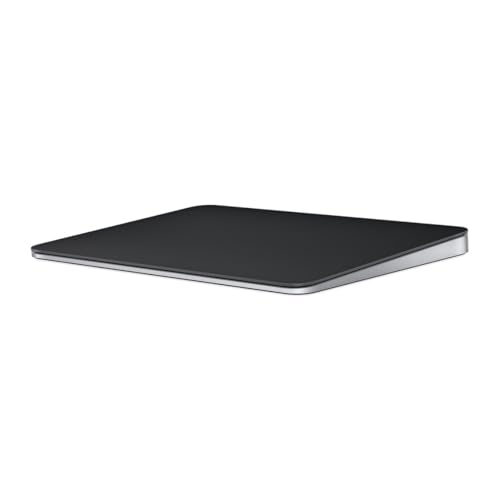
Apple Magic Trackpad Black Multi-Touch Surface
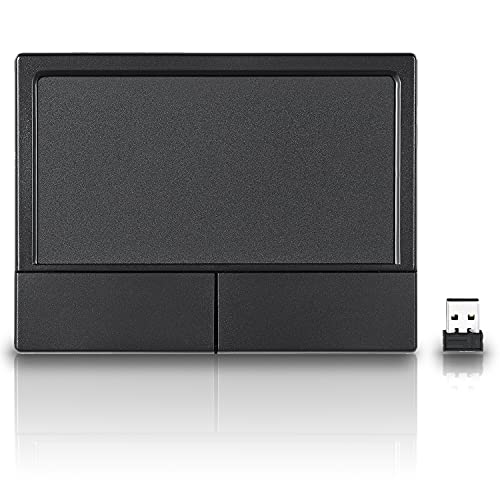
Perixx PERIPAD-704 Wireless Touchpad Black

Logitech Wireless Touchpad Multi-Touch Navigation
FINTIE Ultrathin Wireless Bluetooth Keyboard Touchpad

Perixx PERIPAD-506 Wired USB Touchpad Black

Nillkin Foldable Bluetooth Keyboard Touchpad Number Pad Black
More Details On Our Top Picks
Apple’s white trackpad fits the kind of desk where gestures matter as much as pointer control. The Force Touch surface adds pressure-sensitive input, and USB-C keeps the cable situation straightforward for a Mac, iPad, or Apple Vision Pro setup.
The honest read is that this one makes the most sense in a tidy workstation, not on a cluttered rolling cart or a cramped dorm desk. You get a wide, glassy control area that feels deliberate, while the trade-off is a more premium approach that won’t be the casual choice for every budget.
Strong Points
- Force Touch adds an extra input layer for gesture-heavy work.
- USB-C keeps charging and cable handling straightforward.
- Works naturally beside Apple devices in a shared setup.
- The smooth surface suits long browsing sessions and creative shortcuts.
- White finish blends cleanly into bright, minimalist desks.
Things To Consider
- Its size and finish make more sense on a dedicated desk than in a travel kit.
- Force Touch has a learning curve for users coming from basic touch surfaces.
- The lighter finish can show grime sooner than darker hardware.
Feature Snapshot
Who It Suits Best
You are the best match here if your desk revolves around Apple hardware and you want gesture control without a mouse.
Where A Sibling Pick Shines
Perixx PERIPAD-704 Wireless Touchpad Black makes more sense for a portable PC station or a mixed desktop-laptop routine.
The black version follows the same core formula as the white Apple model, but the darker finish changes the mood of the desk immediately. For a low-glare setup, especially beside a dark keyboard or monitor stand, that tonal shift matters more than it sounds.
You get the same broad gesture surface, so the use case stays centered on Apple ecosystems and users who prefer a trackpad to a mouse. The catch is similar too, since this still makes the most sense as a desk anchor rather than a throw-it-in-a-bag accessory.
Highlights
- Dark finish pairs neatly with darker peripherals.
- Multi-touch gestures support fluid navigation and editing.
- USB-C keeps the connection tidy and current.
- Feels at home in a pared-back workstation.
Worth Noting
- The visual appeal is strong, but the practical role stays very close to the white model.
- It is still a desk-first device, not the easiest travel companion.
- Dark surfaces can make fingerprints more visible over time.
Core Details
Built With In Mind
You fit this model best when you want Apple hardware that looks as deliberate as the rest of your setup.
Another Choice May Suit
Logitech Wireless Touchpad Multi-Touch Navigation is the better match for someone who wants a broader desktop surface without staying inside Apple-only gear.
Perixx takes a more portable route than the Apple models, and that matters for anyone moving between a desktop tower and a laptop. Its 4.72 by 3.54 inch footprint gives you a larger working area than many compact alternatives without turning the desk into a landing strip.
For daily office work, the wireless layout keeps the top of the desk cleaner and easier to rearrange. The trade-off is simple enough, since wireless convenience can mean one more thing to charge or pair compared with a wired pad.
Upsides
- Wireless design removes cable clutter from the work area.
- Larger surface helps with scrolling and dragging on a desktop.
- Portable size suits people who move between rooms or workstations.
- Black finish is easier to blend into mixed setups.
Areas To Watch
- Wireless gear usually needs occasional attention for pairing and charging.
- The larger footprint is useful, but it still asks for room on the desk.
- Gesture depth depends on how comfortable you are with touch-based navigation.
Details At A Glance
Right Fit For
You suit this one best if you want a wireless touch surface for everyday work and value a slightly larger control area.
Swap It Out When
Logitech Wireless Touchpad Multi-Touch Navigation fits better for someone who wants a roomier 5-inch surface and a more established navigation-first design.
Logitech leans into simple web navigation here, and that makes sense for a family computer or a media-room desk. The 5-inch surface gives your fingertips more room to scroll, swipe, and point without feeling boxed in.
The small Unifying receiver keeps the wireless side tidy, which is a real plus when ports are already crowded. Compared with Perixx PERIPAD-704 Wireless Touchpad Black, this one is less about portability and more about an easy, desk-ready control zone.
Bright Spots
- Large touch area helps with relaxed browsing.
- Gesture controls keep common navigation actions close at hand.
- Wireless setup reduces cable clutter on a desk or tabletop.
- Receiver stays unobtrusive once plugged in.
Softer Spots
- Its broad shape asks for a bit more desk width than pocketable options.
- It focuses on navigation, so it is less flexible than hybrid keyboard-pad designs.
- Older wireless hardware can feel less current beside newer USB-C accessories.
Technical Sheet
Whose Shelf It Belongs On
You fit this pick best if your main need is casual pointing and gesture control at a fixed desk.
Look Elsewhere When
FINTIE Ultrathin Wireless Bluetooth Keyboard Touchpad makes more sense for tablet owners who want typing and touch control in one piece.
FINTIE goes after a different problem than the standalone pads above, since it folds keyboard input and trackpad control into one piece. That matters for tablet owners who want a smaller travel setup for notes, streaming, or light work on a couch tray.
The 4 mm slim design keeps profile low, which helps it disappear into a bag without much fuss. The trade-off is that combo devices ask you to accept a narrower layout than a separate keyboard and touch surface, so comfort depends on how much typing you actually do.
Reasons To Buy
- Keyboard and touchpad together reduce the number of items you carry.
- Bluetooth pairing supports tablet-friendly use.
- Thin profile suits travel bags and desk drawers.
- Multi-touch trackpad adds pointer control without a separate mouse.
Small Caveats
- Combo layouts can feel tighter than a dedicated keyboard and pad.
- Tablets and operating systems vary, so compatibility should match your device first.
- Very thin gear often asks for more careful handling in transit.
Quick Facts
Perfect Match For
You are the right fit here if your iPad or Android tablet doubles as a light workstation.
Reach For A Different Pick When
Apple Magic Trackpad White Multi-Touch Surface suits someone who already has a desktop keyboard and only wants the touch surface.
This Perixx model takes a grounded route, with wired USB use and a slim body that should suit a desktop station better than a roaming laptop routine. The 5.31 by 4.57 inch footprint gives you enough room for steady finger movement without crowding a compact keyboard tray.
Detachable design language usually helps with desk organization, though the obvious trade-off is that a cable still anchors the setup. For most home offices, that’s not a drawback, especially when reliability and a fixed position matter more than portability.
Best Bits
- Wired USB connection avoids battery management.
- Slim form works well beside a keyboard on a desk.
- Detachable design can simplify placement and storage.
- Black finish keeps the look understated.
Room For Improvement
- The cable makes it less flexible than wireless options.
- It is built around desk use, not travel-first convenience.
- Users who prefer large gesture surfaces may want more reach.
At A Glance
The Right Fit
You are the right match if your setup stays in one place and you want a wired pad with a low profile.
Another Choice May Suit
Perixx PERIPAD-704 Wireless Touchpad Black is the easier pick for someone who wants to move the device between rooms or laptops.
Nillkin is the most travel-minded shape in the group, and it goes further than the FINTIE combo by adding a number pad to the foldable layout. That makes it appealing for mobile workstations where spreadsheet entry, quick calculations, and tablet typing all happen in the same day.
The 64 full-size keys and 1.5 mm key travel point to a more deliberate typing feel than many ultra-compact foldables. The trade-off is clear enough, since a folding mechanism adds moving parts, so this is a thoughtful pick for mobile workers who value space-saving design more than absolute simplicity.
Positives
- Folds down for easier packing and storage.
- Three-device connection helps you switch between gear without rethinking the whole setup.
- Number pad adds practical value for data entry.
- Full-size keys suit more serious typing than tiny travel boards.
- Touchpad keeps pointer control built into the same device.
Points To Note
- Foldable hardware is smart, but hinges and joints deserve gentle handling.
- Multi-part layouts suit mobile work, yet they can feel busy on a very small tray table.
- Anyone who wants only a touchpad may find the extra keyboard and number pad more than needed.
Feature Rundown
Who Will Love This
You are the best match here if you travel with a tablet or laptop and want one foldable device to cover typing, navigation, and number entry.
Where A Sibling Pick Shines
FINTIE Ultrathin Wireless Bluetooth Keyboard Touchpad suits lighter tablet use better when you want a simpler combo without the number pad.
How To Choose The Right Touchpads
Match The Surface To The Room
Desk size changes the whole experience. A 5-inch pad like the Logitech gives more room for sweeping gestures, while the Perixx PERIPAD-704 Wireless Touchpad Black and Perixx PERIPAD-506 Wired USB Touchpad Black fit tighter work areas more gracefully.
The more limited the space, the more value you get from a slim edge and a clean footprint. On a crowded laptop tray, a touchpad that takes over too much room quickly becomes annoying.
Pick The Connection That Fits Your Routine
Wireless models keep cables off the surface and suit quick repositioning. Wired USB favors a fixed station, especially for home offices where the device stays parked beside the keyboard.
Bluetooth adds convenience for tablets and mobile gear, but it also asks for more attention during setup. USB-C on the Apple trackpads is cleaner for modern Apple setups, while the Logitech receiver style keeps the link discreet once plugged in.
Think About The Whole Device, Not Just The Pad
Some options are standalone control surfaces, and others fold a keyboard into the mix. That difference matters more than surface size, because FINTIE and Nillkin change how much you carry, how much you type, and how quickly you can switch tasks.
Combo units work well for travel and shared tablet use. Separate pads suit people who already have a keyboard and only want more natural pointer control.
Choose The Finish For Your Setting
Color sounds cosmetic, but it affects daily use. Apple’s white and black models have a cleaner desktop look, while darker Perixx and Logitech-style hardware tends to blend more easily with mixed equipment.
That matters in a bright office, a media nook, or a studio desk where visual clutter adds up quickly. A touchpad can be the quiet piece that keeps the rest of the setup looking intentional.
Things Worth Knowing First
Common Shopping Slip Ups
Many people focus on surface size and ignore device fit. The better move is to check whether you need Apple compatibility, generic desktop support, or tablet-friendly Bluetooth before anything else.
Another common miss is forgetting about storage and handling. Foldable gear like Nillkin saves space, but it also asks for a bit more care than a flat pad such as the Perixx options.
What The Higher Tier Buys
Higher-priced models usually bring better materials, cleaner finish work, and tighter integration with the devices they serve. Apple’s trackpads stand out here because they pair premium build with Force Touch and USB-C, which is a strong fit for a polished desk.
Spending more can make sense for long daily sessions or for setups that double as a main work surface. Basic models still cover the job, but the upgrade tends to show up in comfort, fit, and how naturally the control surface disappears into your routine.
Frequently Asked Questions
Are touchpads better than a mouse for laptop desks?
They often are in cramped spaces because they need less side-to-side movement. Gesture control also feels more natural for scrolling and swiping.
Do wireless touchpads need special setup?
Wireless models usually need pairing, and some use a small receiver while others use Bluetooth. That setup is straightforward for most desks, though it adds one more step than a wired pad.
Can you use an Apple trackpad with non-Apple gear?
The Apple models in this roundup are aimed at Mac, iPad, and Apple Vision Pro use. For mixed systems, Perixx, Logitech, FINTIE, or Nillkin are the safer starting points.
What makes a combo keyboard and touchpad useful?
A combo unit trims the number of devices you carry and keeps pointer control close to typing. That helps for tablets, travel work, and sofa-table setups.
Which touchpad style is easiest to live with every day?
A wired desk pad is usually the simplest because it avoids pairing and charging. For a cleaner desk, a wireless standalone model is the next easiest step.
Closing Thoughts
The right touchpad depends on where you work and how much of your day lives in gestures, typing, and quick pointer moves. Apple’s pair suits dedicated Apple desks, Perixx and Logitech cover more conventional computer setups, and FINTIE or Nillkin make more sense once portability enters the picture. Pick the format that fits your routine first, then the surface size, then the finish. That order keeps the choice practical, which is usually the point.
