
Travel work asks a lot from a mouse: it has to fit a laptop sleeve, pair fast, and stay comfortable after hours in airports, trains, or hotel desks. The seven picks below focus on portability, click noise, battery behavior, and connection style, so you can match the mouse to how you actually move. Some are better for multi-device desks, others keep things stripped down and simple.
Quick Look At The Shortlist

Logitech MX Anywhere 2S Bluetooth Edition Compact Wireless Mouse

Bluetooth Wireless Arc Travel Mouse, Tri-Mode, Foldable Ergonomic Mouse
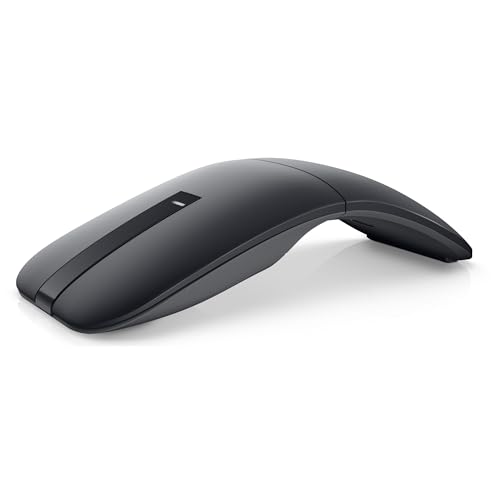
Dell Bluetooth Travel Mouse MS700

WL300 Bluetooth Mouse Silent Wireless Mice-Grey

Logitech Mobi Fold Foldable Wireless Mouse, Graphite

Logitech M240 Compact Silent Bluetooth Wireless Mouse – Graphite
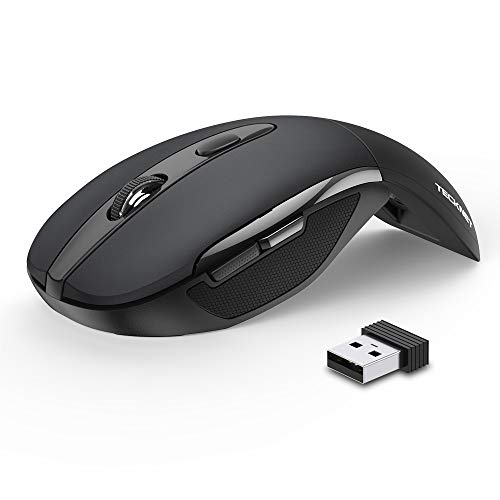
TECKNET Folding Wireless Mouse, 2.4G Travel Mouse
More Details On Our Top Picks
Long workdays across more than one laptop suit this model well, because the Bluetooth-only setup keeps your bag clear of a dongle. The 4K DPI tracking and any-surface aim point to a mouse that stays useful on café tables, airline trays, and polished hotel desks.
MagSpeed scrolling matters most in spreadsheets or long documents, where faster wheel movement cuts down on repetitive swipes. The trade-off is simple, there’s no USB receiver in the box, so this makes more sense for Bluetooth-first setups than for desks that still lean on wired habits.
Strong Points
- Bluetooth setup keeps carry weight down.
- 4K DPI helps cursor control stay precise on tight laptop screens.
- Any-surface tracking supports uneven travel workspaces.
- MagSpeed scrolling helps with long sheets and documents.
- Works across several laptops, which suits hybrid workdays.
Things To Consider
- No USB receiver is listed, so Bluetooth compatibility matters.
- Travel bags that already run light may not need the extra feature depth.
- The feature set leans premium, so it may feel more complex than basic options.
Feature Snapshot
Who It Suits Best
Frequent laptop switchers who want compact precision and a cleaner bag setup get the most from this one.
A Better Fit Elsewhere
Logitech M240 Compact Silent Bluetooth Wireless Mouse – Graphite suits you better when you want a simpler Bluetooth mouse with fewer moving parts.
This one leans hard into shape and travel behavior, with a rotating foldable body that packs smaller than a standard office mouse. Tri-mode means it can use Bluetooth 5.0, Bluetooth 4.0, or 2.4G wireless, so it fits more devices than the simpler single-mode picks above.
The silent click detail matters in shared spaces, and the Type-C recharge angle suits people who already carry one charging cable for several devices. The honest read is that the foldable design is the main draw, while the ergonomic angle depends on how your hand likes curved travel mice.
Highlights
- Foldable body saves bag space.
- Tri-mode connection broadens device matching.
- Quiet clicking suits conference rooms and trains.
- Type-C charging simplifies cable packing.
- Useful for travel kits that change devices often.
Areas To Watch
- The rotating structure adds moving parts to keep track of.
- Ergonomic comfort can feel subjective on longer sessions.
- The feature set may feel busy for simple point-and-click use.
Core Details
Who Should Grab It
Travelers who want a compact mouse with multiple connection paths and a foldable shell will get the most value here.
Swap It Out When
Logitech M240 Compact Silent Bluetooth Wireless Mouse – Graphite fits better for you if you want a simpler, non-folding shape with less to manage.
The Dell option takes a stripped-down route with two buttons, touch scroll, and Bluetooth 5.0 LE, which is Bluetooth Low Energy, a power-conscious connection style. That makes it a neat match for short business trips where you want less clutter and a mouse that feels unobtrusive beside a thin laptop.
Swift Pair is a useful touch for Windows setups, because pairing can feel less fiddly on hotel-night work sessions. The AAA battery approach keeps charging out of the picture, though that also means you’ll want to remember a spare set in your bag.
Upsides
- Two-button layout keeps use straightforward.
- Touch scroll reduces wheel bulk.
- Bluetooth 5.0 LE suits lean power use.
- Swift Pair helps Windows pairing feel smoother.
- AAA battery use avoids recharging routines.
Minor Gripes
- Two buttons limit shortcut flexibility.
- Touch-based scrolling can feel different from a physical wheel.
- AAA batteries add one more travel item to remember.
Details At A Glance
Built With In Mind
Minimalist travelers and Windows laptop users who value straightforward pairing will feel at home here.
Look Elsewhere When
Logitech MX Anywhere 2S Bluetooth Edition Compact Wireless Mouse is the stronger fit for you when multi-device control matters more than a bare-bones button layout.
Six buttons put this one closer to a mobile productivity mouse than a bare travel shell, and the sculpted grip helps it feel less flat in the hand. For work trips where you spend hours in email, slides, and browser tabs, that extra control can be more useful than a minimalist shape.
Adjustable DPI lets you tune cursor speed, which matters when you move between a laptop screen and an external monitor in a hotel room or coworking space. The quieter click profile is a practical touch, though the more feature-rich layout also means it takes a bit more attention than the simplest Bluetooth models.
Bright Spots
- Six-button layout gives you more control points.
- Sculpted grip supports longer use sessions.
- Adjustable DPI helps match different screen sizes.
- Quiet clicking works well in shared rooms.
Points To Note
- More buttons can take time to get used to.
- The shape is less minimal than simpler travel mice.
- Grey styling is practical, though not flashy.
Quick Facts
The Right Fit
You get the most from this mouse if you like a little more control in a travel-friendly body and don’t mind a fuller feature set.
Where A Sibling Pick Shines
Logitech M240 Compact Silent Bluetooth Wireless Mouse – Graphite suits you better when the main goal is a simpler, lighter Bluetooth carry.
Logitech keeps the travel-first logic clear here: a foldable body, quiet clicks, Bluetooth connection, and Fast Pair for quicker setup on compatible devices. That combination makes sense for frequent flyers who want a mouse that packs small without feeling stripped down.
The 4K DPI spec helps with pointer control on dense laptop screens, and Fast Pair is handy when you move from one work machine to another. The trade-off is that a folding mechanism always invites a little more care during packing than a rigid shell does.
Best Bits
- Foldable design makes packing easier.
- Quiet clicks fit shared spaces.
- Bluetooth connection avoids a receiver.
- Fast Pair speeds up setup on supported devices.
- 4K DPI supports precise travel work.
Softer Spots
- Fold joints call for a little packing care.
- Fast Pair only helps on supported systems.
- Some shoppers will prefer a fixed-body mouse.
Technical Sheet
Whose Shelf It Belongs On
You fit this mouse best if your carry-on setup rewards compact hardware and quick wireless setup.
Another Choice May Suit
Logitech MX Anywhere 2S Bluetooth Edition Compact Wireless Mouse makes more sense for you when multi-device control and wider tracking flexibility matter more than fold-flat packing.
This is the cleanest no-fuss pick in the list, and that simplicity suits laptop travel better than a lot of feature-heavy options. Bluetooth connectivity removes the need for a receiver, while the quiet-click design keeps it polite in conference rooms, libraries, and airplane cabins.
The three-button layout keeps learning time low, which helps when the mouse is shared between a work laptop and a home machine. The honest trade-off is that the fixed-button design doesn’t give you the extra control layers seen on the WL300 or MX Anywhere 2S.
Positives
- Compact size fits easily in small tech pouches.
- Quiet clicks suit close quarters.
- Bluetooth-only use keeps your bag less cluttered.
- Three-button design is easy to live with.
Room For Improvement
- Three non-customizable buttons limit shortcut flexibility.
- It’s built for simplicity, not extra control features.
- Bluetooth pairing depends on the devices you carry.
Core Details
Made For
Minimalist travelers who want a dependable Bluetooth mouse with little setup friction will appreciate this one.
Reach For A Different Pick When
Logitech MX Anywhere 2S Bluetooth Edition Compact Wireless Mouse is the smarter fit for you when you need multi-device control and more advanced scrolling.
TECKNET keeps the shape-changing idea front and center, because the folding body is built to shrink down for travel bags. The 2.4G connection, built-in nano receiver storage, and plug-and-play setup make it attractive for people who still want a simple USB-based route.
Three DPI levels, set at 2000, 1500, and 1000, give you useful cursor-speed options without turning the mouse into a control panel. The auto-sleep feature and long battery claim are practical for road use, though a USB receiver means you need to keep track of one more small piece.
What We Like
- Fold-flat design makes packing easy.
- Three DPI settings help match different tasks.
- Plug-and-play use keeps setup simple.
- Receiver storage inside the body helps prevent misplacement.
- Auto sleep supports travel-friendly power behavior.
Small Caveats
- The nano receiver adds one more item to manage.
- 2.4G use depends on a USB port being available.
- Folding hardware can feel more involved than a fixed shell.
Feature Rundown
Perfect Match For
You’re the best fit here if you like foldable hardware and still prefer a USB receiver over Bluetooth pairing.
Consider Something Else When
Logitech M240 Compact Silent Bluetooth Wireless Mouse – Graphite is the easier choice for you when you want fewer parts to carry and no receiver at all.
How To Choose The Right Travel Mouses For Laptop
Connection Style Comes First
Bluetooth keeps your bag cleaner and works well for ultrabooks, tablets, and desks with limited ports. A 2.4G mouse still has value when you want a receiver-based link and less pairing setup, especially on older laptops. Multi-mode models, like the Arc Travel Mouse, suit people who move between several machines and don’t want to commit to one path.
Shape Matters More On The Road
A travel mouse should disappear into the bag, but it still has to fit your hand for an hour or two at a time. Foldable bodies save space, while sculpted shells and low-profile frames trade compactness for steadier grip. The better choice depends on whether your day is mostly short tasks between flights or longer work sessions at a hotel desk.
Quiet Clicks And Battery Behavior
Quiet switches make a real difference in shared spaces, and they’re especially useful on trains, in conference rooms, and in late-night hotel work. Battery choice also changes the ownership experience, because rechargeable models reduce disposable upkeep while battery-powered ones avoid charging downtime. A long battery claim sounds mundane, but it matters when your carry-on already has enough cables.
Precision Versus Simplicity
Higher DPI settings help when your laptop screen feels cramped or you jump between screen sizes. Simple mice are easier to live with, though, and not everyone needs touch scroll, multiple buttons, or advanced switching. Match the control level to your work, because extra features only pay off when you actually use them.
What To Weigh Before You Commit
Wrong Turns To Avoid
A common miss is choosing a mouse for the shape alone and ignoring connection needs. Bluetooth-first laptops make that easy, while a USB-only workflow can leave a receiver-based mouse feeling awkward in the wrong setup. Another common issue is overbuying controls, since a feature-rich shell adds bulk without helping simple note-taking or browsing.
The Case For Spending Up
Higher-tier travel mice usually spend the extra money on build quality, multi-device support, quieter switches, and more polished tracking. Those upgrades matter most for people who live on the road, switch machines often, or use the mouse for long spreadsheet sessions. A basic model still does the job, but the smoother pairing and better handling can feel worth it after a few weeks of real travel use.
Frequently Asked Questions
Are Travel Mouses For Laptop Better With Bluetooth?
Bluetooth works well for most laptop travel setups because it cuts down on cable clutter and receiver management. It’s especially useful when you switch between places often.
Do Foldable Travel Mice Hold Up Well?
Foldable designs save space and pack neatly, which is the whole point. The trade-off is a more mechanical shape that asks for a little more care in transit.
How Many Buttons Do You Need For Travel?
Three buttons are enough for simple browsing and office work. More buttons help only when you rely on shortcuts or heavier multitasking.
Is 4000 DPI Overkill For A Laptop Mouse?
Not really, since higher DPI can help on small laptop screens and trackpads you’re replacing for precision work. The useful part is control, not raw speed.
Should You Choose Rechargeable Or Battery-Powered?
Rechargeable mice suit people who already carry charging cables and want less ongoing upkeep. Battery-powered models work better when you prefer to swap power and keep moving.
Final Thoughts
You get the best results from a travel mouse when the shape, connection, and power style match your actual routine. The Logitech MX Anywhere 2S is the most versatile pick for multi-device work, while the Logitech M240 keeps things clean and uncomplicated. Foldable options make more sense when bag space is tight, and quiet clicks matter more than most people expect in shared spaces. Choose the one that fits your commute, your laptop, and the way you work between stops.
