
Travel work punishes clunky peripherals fast. You need a mouse that fits a laptop sleeve, wakes quickly, and doesn’t turn every hotel desk into a cable puzzle. This roundup focuses on compact shapes, silent or quiet clicks, wireless convenience, and the kind of battery behavior that matters on flights, train rides, and remote work days. The right choice depends on how you pack, how often you switch devices, and whether you prefer a flat shell or a folding shape.
The Shortlist At A Glance
Logitech M340 Compact Ambidextrous Silent Wireless Mouse

Bluetooth Wireless Arc Travel Mouse, Tri-Mode
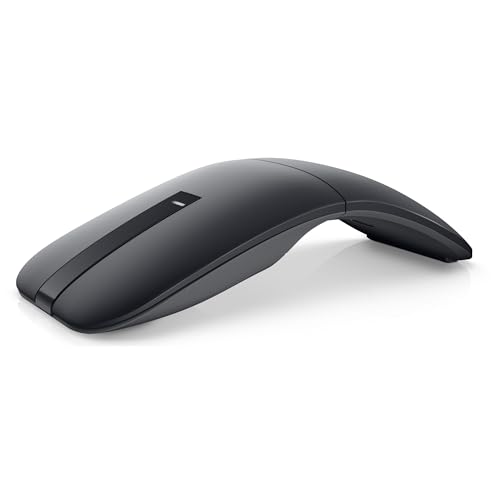
Dell Bluetooth Travel Mouse MS700

Dell Wireless Gaming Mouse MS700, Misty Blue

Travel Mouse Pink Wireless Mouse for Laptop

DELUX Wireless Bluetooth Pocket Mouse MF20-Black
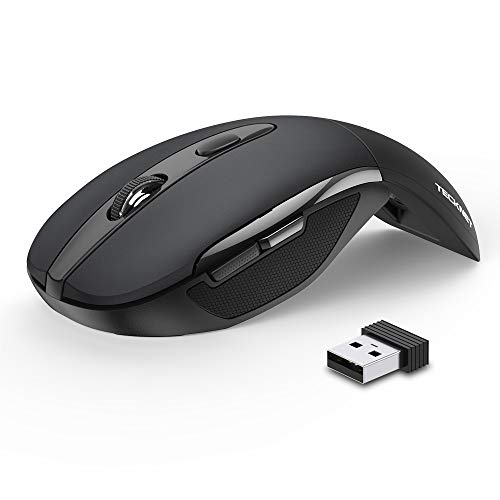
TECKNET Folding Wireless Mouse
More Details On Our Top Picks
That compact shell suits carry-on work without asking for much desk space. The ambidextrous layout keeps the shape friendly for either hand, and the silent-click design fits hotel rooms, shared offices, and late-night train rides where button noise stands out fast.
The 2.4 GHz USB-A nano receiver keeps setup straightforward on laptops with a spare USB-A port, while the three non-customizable buttons keep the layout simple. The trade-off is obvious: you get less control than a programmable mouse, but you also get less clutter and less to set up.
Strong Points
- Silent clicks suit conference calls and quiet spaces.
- Compact shape slips easily into a sleeve or pouch.
- Ambidextrous body works well for either hand.
- Simple three-button layout keeps learning time low.
- Battery claim points to long stretches between changes.
Things To Consider
- USB-A receiver use may feel dated on newer port-light laptops.
- Fixed buttons leave out shortcut-heavy workflows.
- Small travel mice like this can feel too light for users who prefer a fuller grip.
Feature Snapshot
Who It Suits Best
Frequent travelers who want a quiet, low-fuss mouse for basic laptop work fit this shape best.
Where A Sibling Pick Shines
TECKNET Folding Wireless Mouse makes more sense for you if bag space matters more than a familiar palm shape.
The folding arc shape is the main attraction here, because it gives you a flatter travel profile than the Logitech M340 while still aiming for a more ergonomic hand angle. For business trips, that kind of design can save space in the bag without feeling as boxy as a standard compact mouse.
Tri-mode connectivity, meaning it can work across Bluetooth 5.0, Bluetooth 4.0, and 2.4G wireless, makes it flexible for mixed-device travel. The catch is that more connection paths also mean more to think about during setup, so it suits people who like options more than people who want the least possible fuss.
Highlights
- Foldable arc form packs flatter than a fixed-shell mouse.
- Tri-mode support suits laptops, tablets, and mixed environments.
- Silent, soft clicking helps in shared spaces.
- USB-C charging fits newer cable kits.
- Ergonomic curve gives your hand a more open rest position.
Worth Noting
- The folding mechanism adds a moving part to keep track of.
- Multi-mode pairing can take a little more setup attention than a single-dongle mouse.
Details At A Glance
Who Should Grab It
Travel-heavy professionals who split time between laptops and multiple devices will get the most from this shape.
Another Choice May Suit
Logitech M340 Compact Ambidextrous Silent Wireless Mouse fits you better if you want a simpler, more familiar layout with less setup to manage.
Dell leans into a cleaner, more polished travel mouse here, and the touch scroll plus 4000 DPI setting give it a more precise feel than the simpler Logitech M340. The two-button setup keeps the footprint tidy, which helps on café tables and airplane trays where space runs out fast.
Bluetooth 5.0 LE, with LE meaning Low Energy, supports a lower-draw wireless link, and Swift Pair is meant to streamline connection on compatible systems. AAA power comes included, which is handy for travel, although disposable batteries can feel less convenient than rechargeables once you get used to carrying cables instead.
Upsides
- Touch scroll gives you a smoother feel for long documents.
- 4000 DPI supports fast pointer movement on larger screens.
- Two-button layout keeps the body uncluttered.
- Bluetooth LE is a sensible fit for portable use.
- AAA batteries included help you start with less extra packing.
Areas To Watch
- Two buttons keep shortcut flexibility modest.
- AAA power means you still need to think about replacements over time.
Core Details
Made For
Traveling professionals who want a tidy Bluetooth mouse with a more precise pointer benefit most here.
Look Elsewhere When
DELUX Wireless Bluetooth Pocket Mouse MF20-Black suits you better if rechargeability matters more than using replaceable batteries.
The Misty Blue finish and gaming label give this Dell a more assertive look than the steadier MS700 travel model above. The 4000 DPI ceiling and optical LED tracking point toward faster pointer response, so it makes sense for work that mixes spreadsheets, image review, and lighter gaming sessions in a hotel room.
Battery runtime is listed at 24 months, which is a practical travel advantage because fewer replacements mean less packing hassle. The trade-off is that the same two-button layout still keeps it lean, so you get speed and simplicity rather than deep customization.
Best Bits
- 4000 DPI supports quick cursor moves on larger displays.
- Optical LED tracking suits precise pointer work.
- 24-month runtime reduces maintenance during frequent travel.
- Swift Pair helps connection on compatible systems.
- Misty Blue finish gives it a distinct look in a laptop bag.
Softer Spots
- The two-button setup keeps it straightforward rather than highly configurable.
- AAA power still means eventual battery swaps.
Feature Rundown
Whose Shelf It Belongs On
Frequent travelers who still want a sharper, higher-response mouse for mixed work and light gaming fit this model well.
Reach For A Different Pick When
Dell Bluetooth Travel Mouse MS700 makes more sense for you if you want the cleaner office-focused feel instead of the brighter gaming tilt.
The pink finish and donut-style shape make this one feel more personal than the black-and-blue Dell options, so it fits a bag or desk setup that leans playful without going overboard. Dual-mode wireless support and one-button device switching matter most for commuters who jump between a laptop, iPad, and a second computer during the day.
The 1200 DPI setting keeps things simple rather than hyper-sensitive, which suits general office work and browsing more than precision-heavy tasks. Quiet clicking helps in shared spaces, though the smaller, cute-bodied design can feel less substantial in a larger hand.
Positives
- Dual-mode support adds flexibility across devices.
- One-button switching keeps handoffs quick.
- Quiet clicks fit libraries, trains, and open offices.
- Rechargeable design cuts down on disposable battery planning.
- Small form makes it easy to stash in a pouch.
Minor Gripes
- 1200 DPI stays on the modest side for fast, large-screen work.
- The decorative shape may not suit every workspace.
- Smaller mice often ask for a lighter grip during longer sessions.
At A Glance
Best Suited To
Style-conscious travelers who want a quiet, compact mouse for light day-to-day work will feel at home here.
Swap It Out When
Logitech M340 Compact Ambidextrous Silent Wireless Mouse is the more practical choice for you if you want a plainer shape with broader hand neutrality.
DELUX goes all in on portability, and the sliding, foldable body makes it stand out from the flatter Logitech and Dell picks above. In a crowded backpack, that kind of profile matters because the mouse can occupy less space than a traditional shell while still giving you a full wireless control surface.
The rechargeable 300mAh battery, with 300mAh meaning the cell’s stored charge capacity, pairs with a front USB-C port, so you can top it up with the same cable many laptops already use. The trade-off is runtime discipline, since the listed working window is shorter than the long-battery designs in this roundup.
Reasons To Buy
- Sliding foldable body packs neatly for tight travel kits.
- Quiet clicks fit shared desks and late-night work.
- Dual-mode support covers both dongle and Bluetooth use.
- USB-C charging makes cable sharing easier on the road.
- 4000 DPI gives it more speed than basic travel mice.
Small Caveats
- Listed working time is short compared with battery-life-focused models.
- The foldable mechanism adds a moving part to manage.
- Very compact shapes can feel different during all-day use.
Spec Overview
The Right Fit
Travelers who prize a pocketable shell and chargeable power in a very small package will get the most from this design.
Consider Something Else When
TECKNET Folding Wireless Mouse suits you better if you want a longer-battery folding option with a simpler setup profile.
TECKNET takes a practical route with folding hardware, three DPI settings, and a dongle-based wireless setup that asks very little from you. That makes it a sensible companion for commuters and students who want something easier to pack than a normal desktop mouse, yet more familiar than the more stylized options in this list.
Plug-and-play means no driver install is required, and the USB nano receiver stores inside the mouse body, which helps keep loose parts together in transit. The honest read is that this design focuses on convenience over flair, so it fits everyday travel better than highly specialized desk setups.
Highlights
- Foldable design trims bulk for bag storage.
- Three DPI levels make cursor speed easier to tune.
- Plug-and-play setup keeps connection simple.
- Nano receiver storage reduces the chance of misplacing the dongle.
- Two-year battery life claim supports lighter maintenance planning.
Points To Note
- 2.4G receiver use still depends on keeping track of the dongle.
- Folding designs can feel less traditional in the hand than fixed-shell mice.
- Three DPI steps help, though they stop short of deeper customization.
Quick Facts
Best Suited To
Travelers who want a simple, foldable mouse with easy setup and low maintenance will be well served here.
A Better Fit Elsewhere
Bluetooth Wireless Arc Travel Mouse, Tri-Mode works better for you if multi-device pairing matters more than a plain dongle connection.
How To Choose The Right Travel Mouses
Match The Shape To Your Trip
Compact mice fall into a few clear shapes: flat shells, arc forms, and folding bodies. Flat models like the Logitech M340 are easy to learn and live with, while folding models such as the TECKNET and DELUX save more room in a carry-on.
Your trip pattern matters more than the marketing language. Daily commuters usually want quick grab-and-go simplicity, while people who split time between hotel desks and co-working spaces often appreciate a shape that packs small without feeling awkward in use.
Focus On Connection Style
Wireless choice changes the whole experience. A 2.4G nano receiver is easy and fast for a laptop with available USB-A, while Bluetooth removes the dongle from the equation and suits slimmer machines better.
Tri-mode mice, like the NYIEFADA arc model, add flexibility because they can work across more connection types. The trade-off is more setup complexity, so they suit people who switch devices often rather than travelers who want a single, fixed routine.
Check Power And Pointer Behavior
Battery style affects packing and upkeep. Rechargeable mice reduce the need to carry spare cells, while AAA-powered models like the Dell MS700 keep charging off the itinerary, which some travelers still prefer.
DPI, meaning dots per inch, tells you how sensitive the pointer can feel. Higher DPI can help on large screens or fast-moving work, while lower DPI often feels calmer for browsing and simple office tasks.
Look For Quiet Use In Shared Spaces
Silent or soft-click buttons matter more than many shoppers expect. In hotel rooms, on night flights, and in open offices, reduced click noise keeps the mouse from feeling intrusive.
That detail often beats flashier extras for real-world travel. A quiet, compact mouse with sensible controls usually earns its place faster than a crowded feature list.
A Quick Reality Check
Common Shopping Slip Ups
A lot of people focus on size alone and forget the connection type. A tiny mouse still frustrates you if the receiver gets lost, the Bluetooth pairing is fussy, or the shape doesn’t suit long sessions at a conference table.
Another common miss is choosing a travel mouse with more buttons than you plan to use. Simpler layouts usually fit casual travel better, because they keep setup fast and reduce the chance of accidental presses.
The Upgrade Payoff
Higher-tier travel mice usually cost more because of better shape design, broader wireless support, and finer sensors. That extra spend also tends to buy nicer scroll behavior, stronger materials, and more polished button feel.
The upgrade makes sense for constant travelers, mixed-device setups, or anyone who uses a mouse for real work after the laptop leaves the office. Casual pack-and-go use can stay in the simpler lane without much regret.
Frequently Asked Questions
Are Travel Mouses Better Than Laptop Trackpads?
A mouse usually gives you more control for long spreadsheets, detailed edits, and general navigation. Trackpads still win for pure portability, but a travel mouse is easier on the hand during extended desk sessions.
Do You Need Bluetooth For Travel Use?
Bluetooth helps when you want to avoid carrying a dongle or you use a slim laptop with few ports. A USB receiver still works very well, especially for people who prefer a simple plug-in setup.
What DPI Works Best For Travel?
A middle range usually feels safest for general travel work because it balances speed and control. Higher DPI helps on larger screens, while lower DPI can feel steadier for browsing and document use.
Are Folding Travel Mouses Comfortable?
Folding designs help with packing, and some hands like the flatter fit. The shape can feel unusual at first, so long-session comfort depends on how much you value portability versus a more traditional body.
How Do You Keep A Travel Mouse Ready In Transit?
Store the mouse in a sleeve or small pocket inside your bag so it doesn’t rub against chargers and adapters. Models with built-in receiver storage help a lot because the tiny dongle stays with the mouse.
Closing Thoughts
A good travel mouse should make your bag lighter in practice, not just in theory. Quiet buttons, sane wireless pairing, and a shape that suits your hand matter more than flashy extras once you’re working from cafés, airports, or hotel desks. Logitech M340 is the safest all-round fit, while the folding designs make more sense when every inch of bag space counts. Choose the profile that matches your travel routine, and the mouse will feel like part of the setup rather than another thing to manage.
