
Small hands need more than a vertical shape. You need a mouse that settles into your grip, keeps thumb controls reachable, and does not force awkward wrist angles after an hour of work. That matters on long desk sessions, laptop days, and commutes that end with another few hours of clicking at home.
The seven picks below span wired, wireless, Bluetooth, and multi-device setups, with a clear split between simple office use and more flexible everyday carry. Some lean sturdy and traditional, while others trim weight and add quieter clicks. The right match depends on your hand size, your desk setup, and how much convenience you want to trade for charging or battery swaps.
Quick Look At The Shortlist
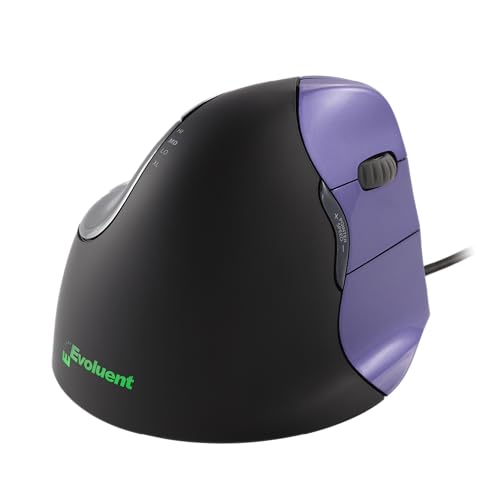
Evoluent VM4S Ergonomic Vertical Mouse Small Wired USB

PHILIPS SPK7628 Ergonomic Mouse Wireless 3 Adjustable DPI

J-Tech Digital Wireless Ergonomic Vertical Mouse Small Hands Pink

SANWA Wired Ergonomic Mouse Vertical Mouse Small Medium Hands Black

SANWA 2.4G Wireless Ergonomic Mouse Optical Vertical Ergo Mice Small Hands Black

SABLUTE MAM3 Ergonomic Mouse Wireless Small Medium Hands

Luhaso Ergonomic Vertical Wireless Mouse 57 Degrees Small Medium Hands Black
More Details On Our Top Picks
Evoluent takes the most deliberate approach here, and the shape shows it. The right-hand shell, broad lip, and six-button layout make sense on a work desk where your hand stays planted for hours, especially in Windows-heavy setups that benefit from extra controls.
The wired USB connection keeps the setup simple, which is useful in offices that prefer plug-and-play gear over charging routines. The trade-off is obvious, though, you lose cordless freedom, so this suits a fixed desk better than a laptop bag.
Strong Points
- Right-hand shape is built for small hands that need a steadier vertical grip.
- Four pointer speeds help you adjust cursor feel without digging through software.
- Six customizable buttons in Windows can speed up repetitive office tasks.
- The wide lower edge keeps the pinky from scraping the desk during long sessions.
- No driver install keeps setup straightforward on a work machine.
Things To Consider
- Wired use keeps the cable in your workspace, which some desks handle better than others.
- The Windows-focused customization is less compelling for mixed-platform households.
- The sculpted shape can feel more committed than flatter mice during the first day or two.
Feature Snapshot
Who It Suits Best
You get the most from this model in a fixed office setup, especially if your work day leans on Windows shortcuts and a stable, right-hand grip.
A Better Fit Elsewhere
SANWA Wired Ergonomic Mouse B07JKWL3WN suits you better if you want a simpler wired vertical mouse with fewer comfort extras and broader compatibility.
PHILIPS goes after everyday comfort without asking for much desk space or setup effort. The wireless 2.4 GHz connection, quiet buttons, and auto-sleep behavior make it a tidy fit for a laptop station, and small or medium right hands should find the size friendlier than bulkier office mice.
The three DPI settings matter because cursor speed often feels too twitchy or too slow on compact screens, and this lets you tune that without fuss. The honest read is that the lighter build may not feel as substantial as Evoluent’s wired model, but that trade-off keeps it easy to move between rooms or bags.
What We Like
- Wireless design cuts cable clutter on crowded desks.
- Three DPI levels make cursor control easier to tune for laptop and desktop use.
- Silent buttons suit shared spaces, especially late-night work sessions.
- Lightweight construction helps when you carry gear between locations.
- Auto-sleep behavior supports lower-maintenance everyday use.
Room For Improvement
- The lighter body may feel less planted than a heavier wired mouse.
- Right-hand fit is the focus, so left-handed use is not part of the picture.
- Wireless convenience still means you need to mind battery life and receiver storage.
Details At A Glance
Who Will Love This
You’ll appreciate this pick for mixed home-and-office use, especially when you want quiet clicking and a wireless setup that stays out of the way.
Where Another Pick Shines
Evoluent VM4S Ergonomic Vertical Mouse Small Wired USB makes more sense for a stationary workstation that benefits from extra customization and a more anchored feel.
J-Tech Digital leans into portability, with the included USB nano transceiver keeping the wireless setup compact. That matters on a travel desk or a laptop tray, where a tiny receiver is easier to leave in place than a bulkier dongle arrangement.
The AA battery setup is simple and familiar, though it does ask you to keep a spare around more often than a rechargeable model. Pink also gives it a little personality, which helps in a shared home office where you want something easier to spot than a standard black shell.
Bright Spots
- The nano receiver is small enough to suit travel and daily laptop carry.
- Wireless operation reduces cable clutter in tight work areas.
- Mac and PC compatibility widens its appeal for mixed device homes.
- Small-hand sizing makes the grip less oversized than many full-size vertical mice.
Points To Note
- AA battery power means you’ll want to keep track of replacements.
- The pink finish is distinctive, but it won’t suit every desk setup.
- The simpler DPI setup offers less tuning than the more flexible models above.
Core Details
Made For
You’ll get the most from this mouse on a laptop setup that moves often, especially when small-hand comfort and easy receiver storage matter.
Swap It Out When
SABLUTE MAM3 Ergonomic Mouse B0G1MNP7MM fits better for multi-device desks where rechargeable power and Bluetooth flexibility matter more than a single-receiver layout.
SANWA keeps things straightforward, and that is exactly the appeal for a work mouse that should stay out of the way. The wired connection, 5-button layout, and 1000 or 1600 DPI options make it easy to match to a basic office machine, a laptop dock, or a home PC with little setup friction.
The blue LED tracking note is useful because it suggests broader surface compatibility than many bare-bones office mice. The flip side is that you don’t get the wireless flexibility of the PHILIPS or SABLUTE options, so this is the cleaner fit for a fixed desk rather than a moving kit.
Highlights
- Wired plug-and-play setup is easy to live with on a permanent desk.
- Two DPI settings cover basic pointer preference without complexity.
- Five buttons provide enough control for everyday work tasks.
- Win, Mac, PC, and laptop compatibility broadens the setup match.
Softer Spots
- The wired cord keeps the mouse tied to the desk.
- The feature set is simpler than the more adjustable picks in this roundup.
- Small-hand fit is there, but the body is also sized for medium hands, so ultra-compact grips may want more shape detail.
Feature Card
The Right Fit
You should look at this one for a dependable office desk, especially when you want a vertical mouse that stays simple and compatible across common systems.
A Better Fit Elsewhere
PHILIPS SPK7628 Ergonomic Mouse B0F6NFDYJV suits you better if you want quiet wireless use and a lighter feel for switching between rooms.
This SANWA model sits in the useful middle ground, adding wireless freedom without abandoning the simple office shape. The 800, 1200, and 1600 DPI steps give you a bit more control than the wired SANWA above, which helps on a laptop screen one day and a larger monitor the next.
It also works across MacBook, Windows, and Mac OS setups, so the value here is less about flair and more about flexibility. The trade-off is that you still have to think about wireless upkeep, but that’s a fair exchange for a tidy desk and less cable drag.
Reasons To Buy
- Wireless layout keeps the workspace cleaner than a corded mouse.
- Three DPI choices help you adapt to different screen sizes.
- Five buttons give you useful control without overcomplicating the shape.
- Cross-platform compatibility is handy for mixed Apple and Windows homes.
Worth Noting
- The wireless side means a little more upkeep than a wired desk mouse.
- The design is practical rather than especially compact or fancy.
- Right-hand use is the natural fit, so left-handed comfort is not the target here.
At A Glance
Best Suited To
You’ll like this mouse for general home-office work where a wireless vertical shape and moderate customization matter more than premium extras.
Look Elsewhere When
Evoluent VM4S Ergonomic Vertical Mouse Small Wired USB is the stronger fit for a fixed workstation that benefits from more buttons and a more specialized hand feel.
SABLUTE stands out for mixed-device homes because it combines Bluetooth for three devices with a rechargeable battery and four DPI levels. That combination makes sense on a desk where you jump between a laptop, tablet-adjacent work, and a desktop without wanting multiple receivers cluttering the space.
The shape is aimed at small and medium hands, and that makes it more accommodating than larger vertical models that can feel like a tall wall under the palm. The trade-off is that the extra flexibility comes with a bit more feature management, so it suits organized setups better than minimal ones.
Plus Points
- Three-device Bluetooth support is useful for switching between workstations.
- Rechargeable power removes the need to keep buying disposable batteries.
- Four DPI settings give you more tuning than the simpler entry-level options.
- The small and medium hand focus helps it feel less oversized in grip.
Areas To Watch
- Bluetooth management can feel more involved than a simple wired mouse.
- The extra feature set may be more than you need for a single PC desk.
- Recharge cycles add a maintenance routine that wired mice avoid.
Technical Sheet
Whose Shelf It Belongs On
You’ll appreciate this model most in a multi-device workspace where wireless switching and rechargeable power save time during a busy day.
Where A Sibling Pick Shines
SANWA Wired Ergonomic Mouse B07JKWL3WN suits you better if your desk stays in one place and you want fewer features to manage.
Luhaso brings the most specific hand angle in the group, with a 57-degree stance that sits between a conventional mouse and a steeper vertical shell. That makes it a smart middle path for smaller hands that want a more natural grip without jumping straight into a tall, rigid profile.
The 86-gram weight and quiet click design also help in shared rooms or long laptop sessions, where a lighter body and softer sound can feel less tiring. One thing worth considering is that the 57-degree shape is a compromise by design, so it won’t feel as dramatic as Evoluent’s more specialized form.
Best Bits
- 57-degree angle offers a gentler vertical position than some steeper designs.
- 86-gram weight keeps the mouse light in hand and easy to shift.
- Quiet click behavior fits shared spaces and late sessions.
- Forward and back buttons add everyday navigation convenience.
- The small and medium hand focus makes the fit feel more deliberate.
Small Caveats
- The lighter profile may feel less planted than heavier desk mice.
- The 57-degree angle is more moderate, so it may not satisfy you if you want a very steep vertical posture.
- Wireless power still means you need to keep up with charging habits.
Feature Rundown
Built With In Mind
You’ll get the most from this mouse in a small-hand laptop setup where comfort, quiet clicks, and a lighter shell matter more than a heavily specialized shape.
Another Choice May Suit
Evoluent VM4S Ergonomic Vertical Mouse Small Wired USB fits better for users who want a more committed vertical stance and more button control at a fixed desk.
How To Choose The Right Vertical Mouses For Small Hands
Hand Size Comes Before Feature Count
Small hands need a shell that lets your fingers rest on the buttons without stretching. A mouse can have plenty of extras, but a poor fit turns every click into a small reach, and that adds up fast during office work or long browsing sessions.
Measure comfort by grip position, not just by length on the page. A compact vertical shape with a reachable thumb rest often serves you better than a larger model with more buttons.
Connection Style Shapes Daily Use
Wired models keep things simple and steady, which suits a desk that rarely changes. Wireless mice add freedom, but they also add battery or charging habits, receiver storage, and one more detail to remember.
A 2.4 GHz receiver is handy for laptops and shared spaces, while Bluetooth helps when you switch between devices. For work-from-home setups, the better choice often comes down to whether you value fewer cables or fewer maintenance steps.
DPI And Button Layout Change The Feel
DPI, or dots per inch, controls pointer sensitivity. Lower numbers usually feel calmer and more precise, while higher settings move faster across a large display.
Button count matters too, but only after the shape feels right. Extra side buttons help with shortcuts and navigation, yet they should sit where your thumb can reach them without shifting your grip.
Material, Weight, And Quietness Affect Fatigue
A lighter mouse feels easier to move, especially on laptop days or during travel. Heavier models often feel more planted on a desk, which some people prefer for spreadsheet work or repeated pointing.
Quiet click buttons are worth paying attention to in shared rooms. They do not change cursor control, but they can make a long session feel less abrasive.
What To Weigh Before You Buy
Hidden Buying Traps
A common mistake is choosing by vertical angle alone and ignoring hand size. A tall shape can still feel awkward if the button arch sits too far from your fingertips.
Another miss is overlooking connection type. A wireless mouse looks tidy, but a wired model can save you from battery routines that get annoying during busy weeks.
The Upgrade Payoff
Higher-tier models usually cost more because of better shape refinement, more button control, multi-device switching, or rechargeable power. Those features matter most when you spend long stretches at a desk and want the mouse to disappear into the background.
Pay more when your setup is consistent and you rely on the mouse all day. For light casual use, a simpler wired or single-receiver wireless model often covers the basics without extra complexity.
Frequently Asked Questions
What makes a vertical mouse better for small hands?
A smaller shell keeps the fingers within easy reach of the buttons and thumb controls. That usually matters more than the number of extra features.
Is wired or wireless better for small-hand vertical mice?
Wired works well for a fixed desk and avoids charging concerns. Wireless makes more sense when you move between spaces or prefer a cleaner workspace.
How many DPI settings do you actually need?
Two or three settings cover most everyday use. More levels help, but only when you regularly switch between screens or tasks.
Do quiet buttons change how the mouse feels?
Quiet buttons mainly change the sound, not the grip. They can still make shared work areas feel calmer.
Should you choose the steepest vertical angle available?
Not always. A moderate angle can feel easier to adapt to, especially during the first few days of use.
Final Thoughts
A good vertical mouse for small hands should feel like it belongs in your grip, not like something you have to negotiate with every hour. The Evoluent suits a fixed Windows desk, the PHILIPS keeps things simple and quiet, and the Luhaso offers a lighter, more moderate angle. The rest fill useful middle ground for wireless convenience, travel, or multi-device work. Pick the shape that matches your hand first, then choose the extras that actually fit your day.
