
1920 x 1080 still makes sense for work, gaming, and travel because it keeps text readable without pushing your graphics card too hard. You’ll see that balance play out differently here, from compact portable screens to larger desk monitors with faster refresh rates and broader color support. The right choice depends on your desk space, how often you move the display, and whether you care more about speed, comfort, or simple plug-and-go use.
Quick Look At The Shortlist

LG 24U411A-B 24-inch Full HD IPS Monitor

Yodoit Portable Monitor 15.6" FHD IPS Travel Screen

LG 24G411A-B 24-inch Ultragear Full HD Gaming Monitor

Acer 21.5in FHD 100Hz Office Monitor KB220Q H2bi

Acer 23.8in FHD 100Hz Office Monitor SB242Y H1bi

Philips 22 Inch Computer Monitor 22E2N1100 FHD 120Hz
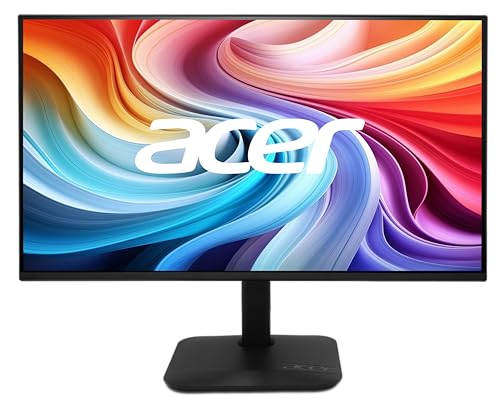
Acer 27in FHD IPS 144Hz Gaming Office Monitor KB272 P6bi
More Details On Our Top Picks
The 24-inch size gives you enough room for side-by-side documents without turning a desk into a command center. IPS means in-plane switching, which matters because it keeps viewing angles steadier than basic panels, and that helps when you lean back or share the screen in a home office.
120Hz gives the motion a smoother feel than the usual 60Hz office screen, while HDR10 adds broader tone handling for supported video and games. Reader Mode and Flicker Safe point this one toward long work sessions, though the slim stand base still leaves a modest footprint rather than a wide, heavy base.
Strong Points
- 120Hz makes window movement and scrolling feel more fluid than standard office displays.
- IPS viewing angles suit shared desks and mixed seating positions.
- Reader Mode fits long stretches of email, docs, and web work.
- Flicker Safe and the black finish keep the setup straightforward and low fuss.
Worth Noting
- The slim stand helps with space, but it still lacks the adjustability some ergonomic setups need.
- HDR10 support is useful on compatible content, though it is not the same as a higher-tier display experience.
Feature Snapshot
Who It Suits Best
Office workers, students, and home users who want a single screen for daily tasks and occasional entertainment will get the most from it.
Where A Sibling Pick Shines
LG 24G411A-B 24-inch Ultragear Full HD Gaming Monitor suits you better for faster-paced gaming, since it adds stronger motion-focused specs.
Portable screens live or die by convenience, and this 15.6-inch format keeps the carry load sensible for work trips or a crowded desk. USB-C plug-and-play is the key detail here, because a single cable can simplify the jump from laptop to second screen in a hotel room or remote workspace.
Built-in speakers and the smart cover add utility without extra accessories, though portable monitors rarely replace a full desktop setup for sound or stand stability. For MacBook users, PC users, and even console setups like Xbox, it makes the most sense as a travel companion rather than a permanent centerpiece.
Highlights
- 15.6-inch size fits in bags and tight desks with less bulk than a full monitor.
- USB-C plug-and-play keeps setup simple on compatible laptops.
- Built-in speakers reduce the need for extra desk clutter.
- The smart cover adds protection during transit and storage.
Points To Note
- The smaller panel suits travel, but it gives you less workspace than the 24-inch options here.
- Sound from built-in speakers is handy, yet most desks still benefit from separate audio.
- The cover helps during transport, though you still need to handle the panel carefully in a packed bag.
Core Details
Who Should Grab It
Frequent travelers, hybrid workers, and laptop users who want a second screen without hauling a desktop monitor will get the most value from it.
Another Choice May Suit
LG 24U411A-B 24-inch Full HD IPS Monitor is the better fit for a fixed home office, since the larger screen gives you more room for split-window work.
Motion handling is the point here, and the 144Hz overclocked refresh rate gives you a noticeably faster frame for supported games than the more office-focused LG 24U411A-B. 1ms MBR, or motion blur reduction, is aimed at sharpening fast action, though you’ll still get the most from it in titles that can actually push high frame rates.
NVIDIA G-Sync Compatible and AMD FreeSync help the monitor stay friendlier to variable frame rates, which matters during fast scenes and irregular GPU output. HDR10, HDMI, DisplayPort, and the slim stand make it a capable desk piece, but the honest read is that this one makes more sense for gaming first and office work second.
Best Bits
- 144Hz overclocked refresh rate suits fast-paced games.
- 1ms MBR supports clearer motion during action-heavy play.
- G-Sync Compatible and FreeSync broaden GPU support.
- DisplayPort and HDMI give you useful connection flexibility.
Small Caveats
- The motion-focused setup is excellent for gaming, but it is more display than most office users need.
- Overclocked refresh rates are useful, though you may need matching system performance to see the full benefit.
Details At A Glance
Whose Shelf It Belongs On
Gamers who want a 1080p screen with faster motion handling and broad sync support should put this near the top of the list.
Skip It When
Acer 23.8in FHD 100Hz Office Monitor SB242Y H1bi makes more sense for everyday office use, since it leans less heavily into gaming features.
Small desks often punish large monitors, and that’s where the 21.5-inch footprint earns its keep. The 100Hz refresh rate, 1ms response claim, and AdaptiveSync support give it more snap than a basic office panel, while the 99% sRGB coverage points toward steadier color for everyday graphics work.
HDMI and VGA keep older and newer machines in play, which helps in mixed home-office setups, and VESA mounting matters if you want the desk clear. The trade-off is straightforward, you get a compact workspace rather than a sprawling canvas, so spreadsheet heavy users may still prefer a larger panel.
What We Like
- 21.5-inch size fits narrow desks and shared work corners.
- 100Hz adds a little extra smoothness for general use.
- VESA mounting gives you more placement options.
- HDMI and VGA support older and newer gear.
Areas To Watch
- The smaller screen can feel tight for side-by-side window work.
- VGA is useful for legacy setups, though many modern desks will lean on HDMI.
Key Specs
The Right Fit
Space-conscious office users, students, and anyone setting up a neat secondary workstation will appreciate the compact footprint.
Look Elsewhere When
Acer 23.8in FHD 100Hz Office Monitor SB242Y H1bi suits you better for more comfortable split-screen work, thanks to its slightly larger panel.
The 23.8-inch panel is the comfortable middle ground in this list, larger than the 21.5-inch Acer but still easier to place than a 27-inch display. That size works well for spreadsheets, web apps, and split windows, especially in a home office where the monitor has to do a bit of everything.
100Hz gives you a smoother feel than a standard 60Hz screen, and the 4ms response time is plenty for everyday work and casual media. HDMI, VGA, VESA mounting, bluelight filter support, and Flickerless Technology round out a practical package, though the setup leans more toward steady comfort than flashy extras.
Upsides
- 23.8 inches hits a practical middle ground for most desks.
- 100Hz keeps motion a bit smoother than base office displays.
- VESA support lets you mount it and reclaim desk space.
- Bluelight filter and Flickerless Technology suit long work sessions.
- HDMI and VGA make setup easier across different machines.
Softer Spots
- The feature set stays focused on office use, so gaming-first shoppers will likely want more speed-focused specs.
- VGA is useful for legacy gear, but HDMI is the cleaner match for most modern setups.
Feature Rundown
Perfect Match For
Home office users who want a balanced monitor for work, browsing, and streaming will find the size and feature mix easy to live with.
A Better Fit Elsewhere
LG 24G411A-B 24-inch Ultragear Full HD Gaming Monitor is the stronger call for fast-paced gaming, since it focuses more heavily on motion handling.
This Philips sits in the small-to-mid screen zone that works well on compact desks, especially where you want 120Hz motion without jumping to a larger footprint. Overclocked refresh rate, 1ms MPRT, and Adaptive Sync make it more responsive than plain office panels, while the IPS panel keeps the image more even across off-angle seating.
HDMI 1.4, VGA, VESA support, Flicker-Free, and Low Blue Light round out a display that leans toward comfort and flexibility. The four-year advance replacement warranty wording signals a service-oriented package, but you still need to match the size to your workspace, since 22 inches can feel modest for dense multitasking.
Bright Spots
- 120Hz overclocked refresh rate gives the screen a quicker feel.
- IPS panel helps the image hold up from different angles.
- VESA support makes mounting and desk planning easier.
- Flicker-Free and Low Blue Light suit longer work sessions.
Room For Improvement
- The 22-inch size is tidy, but it can feel limited for heavy multitasking.
- HDMI 1.4 and VGA cover the basics, though some setups may want more modern connectivity.
At A Glance
Built With In Mind
Compact workstations, dorm rooms, and smaller home offices suit this monitor well.
Reach For A Different Pick When
Acer 23.8in FHD 100Hz Office Monitor SB242Y H1bi is the smarter match for multitaskers who want a bit more screen room.
The 27-inch panel gives you more breathing room than the 24-inch displays in this list, which helps with split windows, timeline work, and casual gaming. IPS, 144Hz, 1ms response, and AMD FreeSync make it a flexible pick for mixed use, while sRGB 99% suggests more dependable color for everyday creative tasks.
That bigger footprint is the trade-off, because it asks for more desk depth than the smaller Acer and Philips options. HDMI, VGA, VESA support, Bluelight Filter, and Flickerless Technology make it easy to place and easier to live with, so this one suits you best when one monitor has to do nearly everything.
Reasons To Buy
- 27-inch size gives you room for multitasking and media.
- 144Hz refresh rate supports smooth gaming and fluid movement.
- sRGB 99% helps with more reliable everyday color.
- VESA support and multiple inputs simplify setup choices.
- Bluelight Filter and Flickerless Technology support longer sessions.
Minor Gripes
- The larger screen needs more desk depth than the smaller models here.
- That extra size can feel excessive for very tight workspaces.
Feature Card
The Right Fit
Mixed-use setups, gamers who also work at the same desk, and anyone who wants a larger 1080p panel should look here first.
Where Another Pick Suits Better
Acer 21.5in FHD 100Hz Office Monitor KB220Q H2bi is the easier choice for tight desks, since it keeps the footprint smaller.
How To Choose The Right 1920 X 1080 Monitors
Screen Size And Desk Distance
Screen size changes how a 1080p panel feels more than many shoppers expect. A 21.5-inch monitor like Acer KB220Q H2bi suits cramped desks and close viewing, while 24 inches is the comfort zone for most homes, and 27 inches makes sense when you want more room for side-by-side windows.
Distance matters too. A larger panel can look cleaner from farther back, while a smaller one keeps everything within easy eye movement in a compact office.
Refresh Rate And Motion Handling
Refresh rate tells you how often the screen updates each second. A 100Hz or 120Hz display feels smoother for scrolling, casual gaming, and fast cursor movement, while 144Hz is the stronger fit for quicker action.
That extra smoothness matters most when your desk time mixes work and play. Office-only use can live happily on 60Hz, but a faster panel reduces the step-down feeling when you move from spreadsheets to games or video.
Ports, Mounting, And Everyday Setup
HDMI covers most modern laptops, desktops, and consoles, while VGA still helps with older hardware. VESA mounting, which means the screen uses a standard back-hole pattern for arms or wall mounts, can free up valuable desk room.
USB-C is especially useful in portable monitors because it can simplify a laptop connection. That’s a big reason Yodoit fits remote work far better than a basic desk panel with only legacy inputs.
Comfort Features Worth Prioritizing
Flicker-free backlighting, blue-light filters, and reader modes are practical for long stretches of text work. They do not change the monitor’s core purpose, but they can make long sessions feel less tiring in a busy home office or dorm room.
Color coverage labels like sRGB matter more for photo, design, and presentation work than for email or spreadsheets. A monitor with broader color support is the smarter spend when visual consistency matters to your day.
What To Weigh Before You Choose
Common Shopping Slip Ups
Many people focus on size alone and ignore desk depth, which is how a 27-inch panel ends up crowding a small workspace. The safer move is to match the screen to the furniture first, then look at speed and color.
Another easy miss is overvaluing a high refresh rate on a machine that won’t use it. A 144Hz display sounds impressive, but a work-only setup usually gets more value from good ergonomics and a sensible stand.
Where The Extra Money Goes
Higher-tier models usually spend their budget on motion control, wider sync support, better color handling, and more flexible ports. That’s why gaming-oriented screens in this list carry features like 144Hz, FreeSync, G-Sync Compatible support, or stronger response-time claims.
You feel the upgrade most in mixed-use setups, shared desks, and gaming corners. For plain document work, a simpler 100Hz office monitor can be the smarter spend.
Frequently Asked Questions
Is 1920 x 1080 still enough for a monitor in 2026?
Yes, 1080p still works well for general office work, school tasks, streaming, and many games. The key is matching it to the right screen size so text stays comfortable to read.
What size works best for 1080p?
Twenty-three to twenty-four inches is the most balanced range for many desks. Smaller screens suit tight spaces, while 27 inches works best when you want more room and sit a bit farther back.
Do higher refresh rates matter for office work?
They do matter, but mostly for the feel of scrolling and pointer movement. For basic office tasks, they are helpful rather than essential.
Should you choose IPS over another panel type?
IPS is a strong all-round choice because it keeps viewing angles and color steadier. That makes it a good fit for shared desks and everyday work.
Is a portable monitor a good second screen?
Yes, especially for travel, hybrid work, and small setups. A model like Yodoit makes the most sense when you need portability more than desk-dominating size.
Closing Thoughts
The best 1080p monitor for you comes down to the shape of your day, not just the diagonal measurement on the box. A compact office setup favors the Acer 21.5-inch models, a shared home desk suits the 23.8-inch or 24-inch LG options, and gaming leans toward the faster LG Ultragear or the 27-inch Acer. Travel work points straight at the Yodoit. Match the screen to your space and your habits, and the choice gets a lot easier.
