Tablets and laptops have become increasingly popular in recent years, leading to a growing discussion about Tablet vs Laptop. With the global laptop market valued at around USD 194.25 billion in 2022 and projected to grow significantly, it’s clear that both devices serve important roles in our lives. Understanding the key differences between Tablet vs Laptop can help you make an informed choice for your specific needs. So, which device is better suited for you?
Key Takeaways
Tablets are lighter and more portable than laptops, making them ideal for travel and on-the-go use.
Laptops generally offer better processing power and multitasking capabilities, perfect for demanding tasks like video editing.
Consider your software needs; tablets excel at casual tasks, while laptops handle complex applications more effectively.
Tablets usually have longer battery life and faster charging times, which is great for users who need quick access.
Think about your budget; tablets are often cheaper upfront and have lower long-term maintenance costs.
Portability: Tablet vs Laptop
Weight and Size
When it comes to portability, weight and size play a crucial role in your decision. Tablets are generally much lighter and smaller than laptops. Most tablets weigh under 0.8 kg (1.75 lbs) and have screen sizes ranging from 5 to 13 inches. In contrast, laptops typically weigh around 2.3 kg (about 5 lbs) and can go up to 2.7 kg (6 lbs) for lightweight versions. Here’s a quick comparison:
Device Type | Average Size | Average Weight |
|---|---|---|
Laptop | 10 to 20 inches | 2 to 7 lbs (1 to 3 kg) |
Tablet | 5 to 13 inches | 0.5 to 2 lbs (225g to 1kg) |
This significant difference in weight and size makes tablets a more appealing option for those who prioritize mobility.
Ease of Transport
Tablets shine when it comes to ease of transport. Their lightweight and compact design allows you to slip them into smaller bags or even a large pocket. This is especially beneficial for travelers who often rely on carry-on luggage. You can easily navigate through busy airports or crowded cafes without feeling weighed down.
On the other hand, while laptops offer more power and functionality, their bulkier design can make them cumbersome to carry around. You might find yourself needing a dedicated bag, which adds to the hassle. If you’re looking for a device that you can take anywhere without the extra bulk, a tablet is likely the better choice for you.
Performance: Which Is Better?
Processing Power
When it comes to performance, processing power is a key factor. Laptops generally outperform tablets in this area. They come equipped with powerful processors and more RAM, allowing you to run demanding applications smoothly. For instance, if you’re into video editing or software development, a laptop is your best bet. It can handle heavy workloads without breaking a sweat.
To give you a clearer picture, here’s a comparison of some leading tablets and their benchmark scores:
Rank | Tablet Name | Benchmark Score | Screen Size | Processor | GPU |
|---|---|---|---|---|---|
13 | Xiaomi Pad 8 Pro | 2455 | 11.2″ | Snapdragon 8 Elite | Adreno 830 |
14 | Samsung Galaxy Tab S11 Ultra | 2422 | 14.6″ | Dimensity 9400+ | Immortalis-G925 MC12 |
15 | Xiaomi Pad 7S Pro 12.5 | 2417 | 12.5″ | Xring O1 | Immortalis-G925 MP16 |
16 | Samsung Galaxy Tab S11 | 2385 | 11″ | Dimensity 9400+ | Immortalis-G925 MC12 |
17 | Vivo iQOO Pad5 Pro | 2373 | 13″ | Dimensity 9400+ | Immortalis-G925 MC12 |
18 | Apple iPad Air 13 (2024) | 2298 | 13″ | Apple M2 | Apple M2 GPU |
19 | Redmagic Tablet 3 Pro | 2275 | 9.06″ | Snapdragon 8 Elite | Adreno 830 |
20 | Apple iPad Air 11 (2024) | 2158 | 11″ | Apple M2 | Apple M2 GPU |
21 | Xiaomi Redmi K Pad | 2157 | 8.8″ | Dimensity 9400+ | Immortalis-G925 MC12 |
22 | Xiaomi Pad Mini | 2156 | 8.8″ | Dimensity 9400+ | Immortalis-G925 MC12 |
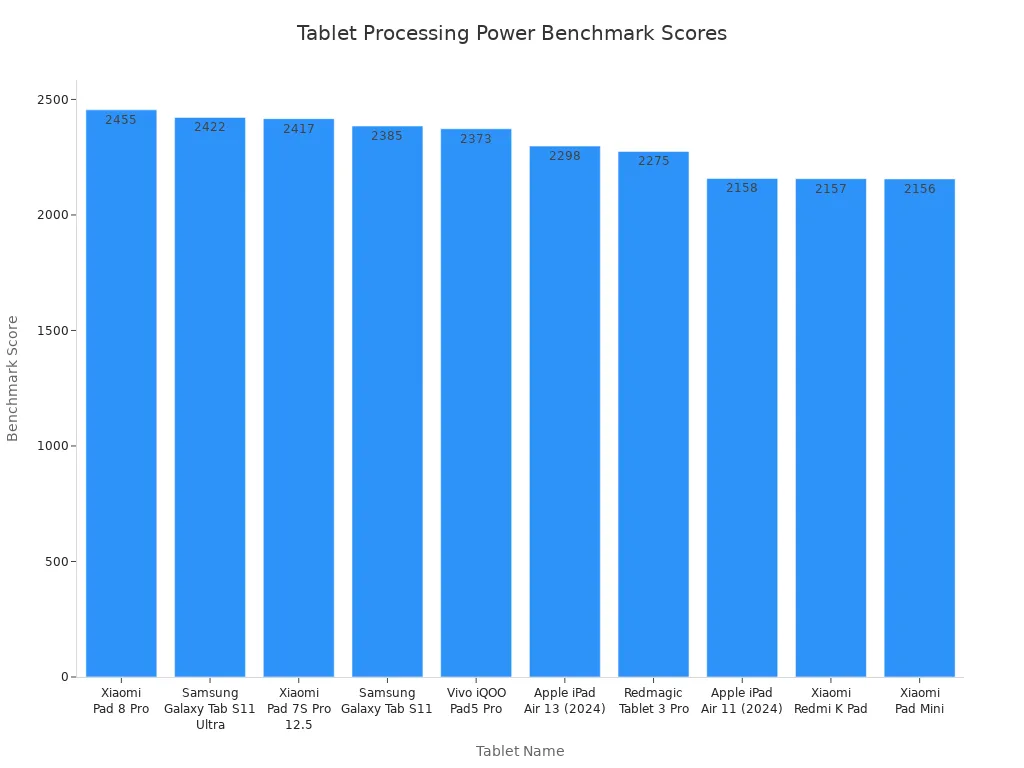
As you can see, while some tablets have impressive scores, they still lag behind laptops in terms of overall processing power.
Multitasking Capabilities
Now, let’s talk about multitasking. If you often juggle multiple applications at once, a laptop is the way to go. Laptops are designed for extensive multitasking, making them perfect for professional applications. For example, if you’re using software like AutoCAD or Blender, you’ll appreciate the superior performance of a laptop.
Tablets have made strides in this area, but they still struggle with heavy multitasking. You might find that running several apps simultaneously can slow down your tablet. While they’re great for casual use, they can’t quite match the capabilities of a laptop when it comes to demanding tasks.
Functionality: Choose Between a Tablet and a Laptop
Software Compatibility
When you think about software compatibility, it’s essential to consider what you plan to do with your device. Tablets and laptops offer different experiences in this area. For instance, pro tablets like the Microsoft Surface Pro and iPads excel at tasks like reviewing and annotating PDFs, storing handwritten notes in the cloud, and creating digital art. These devices are portable and versatile, making them great for on-the-go tasks.
Windows tablets run the same operating system as laptops, which means you can use familiar office applications seamlessly. On the other hand, iPads and Android tablets shine as secondary devices. They come with a rich ecosystem of drawing and note-taking tools, although they may have limitations in multitasking and file sharing. If you need a device that can handle complex software, a laptop is likely your best bet.
Input Methods
Input methods can significantly affect how you interact with your device. Here’s a quick comparison of how tablets and laptops differ in this regard:
Device Type | Primary Input Method | Additional Input Options | User Interaction Differences |
|---|---|---|---|
Tablet | Touchscreen | Keyboards, Styluses | Tap to open apps, multitouch gestures |
Laptop | Keyboard, Touchpad | N/A | Double-click to open apps, scroll bars |
Tablets primarily rely on touchscreens, allowing you to tap and swipe your way through apps. You can also use keyboards and styluses for more precise input, especially for tasks like drawing and note-taking. Laptops, however, focus on traditional input methods like keyboards and touchpads, which can make typing and navigating more efficient for extensive work.
Battery Life: Tablet vs Laptop
Usage Duration
When it comes to battery life, you want a device that lasts through your busy day. Tablets generally offer impressive battery life, often lasting anywhere from 8 to 12 hours on a single charge. However, some high-end models can stretch that to even longer. For example, the Apple iPad Pro can last up to 10 hours, making it a solid choice for on-the-go use.
Laptops, on the other hand, have made significant strides in battery performance. Many modern laptops can last just as long, if not longer, than tablets. Here’s a quick look at the battery life of some top-selling laptops:
Laptop Model | Battery Life Duration |
|---|---|
HP OmniBook 5 14 (Snapdragon X Plus) | 32 hours and 31 minutes |
Lenovo Yoga 9i 2-in-1 Aura Edition (Intel Core Ultra 7 258V) | 23 hours and 34 minutes |
Microsoft Surface Laptop 7, 13.8-inch (Snapdragon X Elite) | 22 hours and 50 minutes |
Asus Zenbook A14 (Snapdragon X Plus) | 21 hours and 47 minutes |
Apple MacBook Pro, 14-inch (M5) | 21 hours and 17 minutes |
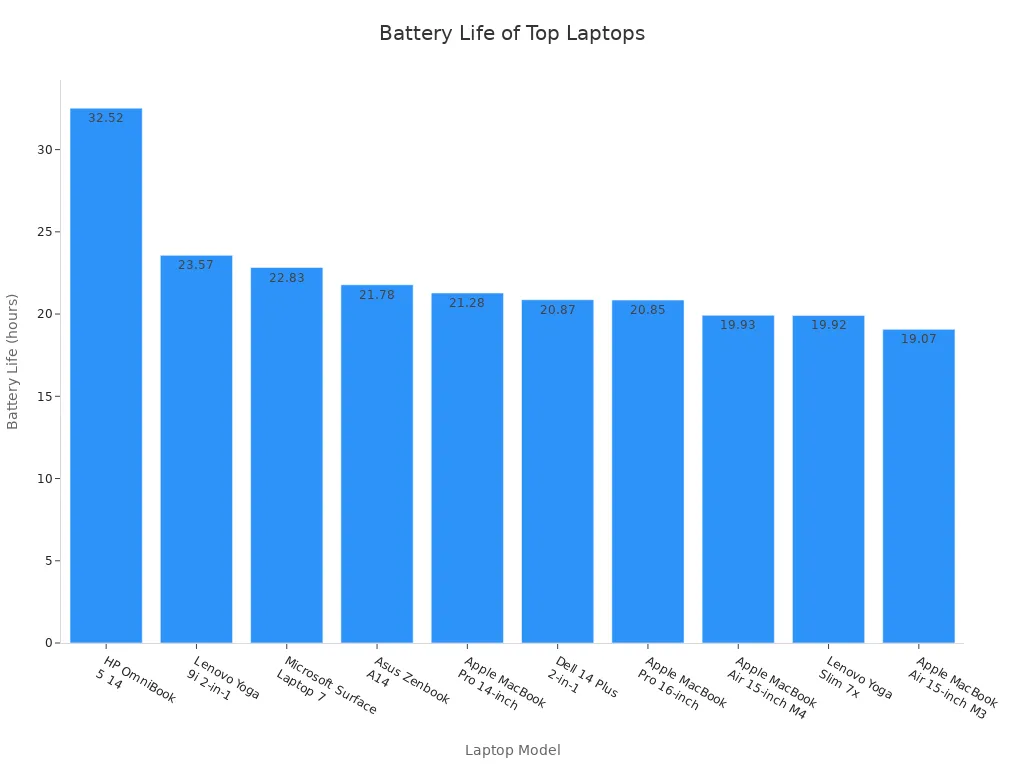
As you can see, some laptops can provide longer battery life than many tablets, making them ideal for extended use without needing to recharge.
Charging Times
Charging times can also influence your choice between a tablet and a laptop. Tablets typically charge faster than laptops. Most tablets can reach a full charge in about 2 to 4 hours. This quick turnaround means you can get back to using your device sooner.
Laptops, however, often take longer to charge. Depending on the model, you might wait anywhere from 3 to 6 hours for a full charge. Some high-performance laptops even require specialized chargers that can extend charging times. If you’re always on the move, the faster charging time of a tablet might be a significant advantage for you.
Price: Tablet vs Laptop
Initial Cost
When you’re considering a new device, the initial cost often weighs heavily on your decision. Generally, tablets come with a lower price tag compared to laptops. You can find decent tablets starting around $200, while laptops usually begin at about $400. Here’s a quick breakdown of what you might expect:
Tablets: Prices range from $200 to $1,000, depending on features and brand.
Laptops: Expect to pay between $400 and $2,500 for a good-quality device.
If you’re on a tight budget, a tablet might be the way to go. However, keep in mind that the initial cost is just one part of the equation.
Long-term Value
Long-term value is crucial when deciding between a tablet and a laptop. You want to consider how much you’ll get back if you decide to sell your device later. Here’s a comparison of depreciation and resale value:
Device | Original Value | Resale Value | Depreciation |
|---|---|---|---|
Laptops | $1,323.73 | $761.57 | -$562.16 |
Tablets | $492.73 | $200.88 | -$291.85 |
As you can see, laptops tend to depreciate more than tablets. This means that if you plan to resell your device, you might get more value from a tablet.
Additionally, consider ongoing costs. Tablets often have lower maintenance costs. You might only need to worry about software updates and occasional repairs. On the other hand, laptops can incur higher expenses for repairs and upgrades. For example:
Costs for employing technicians can add up, including shipping and labor.
Companies may spend up to 20% of their annual software licensing fee on maintenance and updates.
In the end, while laptops offer more power, tablets provide a more affordable option both upfront and in the long run. Think about your needs and how much you’re willing to invest in your device.
Use Cases: When to Choose a Tablet or Laptop
Work and Productivity
When it comes to work and productivity, your choice between a tablet and a laptop can significantly impact your efficiency. If you’re a professional who needs to run complex software or multitask across various applications, a laptop is likely your best option. Laptops provide the processing power and multitasking capabilities that professionals require. For instance, if you’re working on spreadsheets, presentations, or graphic design, a laptop’s larger screen and full keyboard make these tasks easier.
However, tablets can also be a great choice for certain work scenarios. They’re lightweight and portable, allowing you to take your work anywhere. If you often attend meetings or work remotely, a tablet can be a convenient option. You can quickly pull up documents, take notes, or even present slideshows. Plus, with apps like Microsoft 365, you can access essential productivity tools right from your tablet.
Entertainment and Media
When it comes to entertainment and media consumption, tablets have some clear advantages over laptops. Here are a few reasons why you might prefer a tablet for your entertainment needs:
Portability: Tablets are thinner and lighter, making them easier to carry around.
Battery Life: Tablets generally last longer on a single charge compared to laptops.
Cost: Tablets are often less expensive, making them budget-friendly.
Viewing Experience: Tablets have large touchscreens that enhance video watching and browsing.
Imagine curling up on your couch or taking your device to the park. With a tablet, you can easily stream movies, read e-books, or browse social media without the bulk of a laptop. If you’re an avid media consumer, a tablet might just be the perfect fit for you.
Education and Learning
For students, the choice between a tablet and a laptop can depend on their specific academic program and learning style. Tablets offer several benefits that can enhance the educational experience:
Tablets are lightweight and easy to carry, making them a convenient option for students on the go.
Students can hold all of their textbooks and notes in one device and work from anywhere.
Tablets can be a good alternative for students who cannot afford laptops.
Textbooks can be accessed through a tablet, which may be easier to use and more cost-effective compared to traditional paper options.
iPads can facilitate paperless classrooms, interactive presentations, and student assessments.
In contrast, laptops excel in providing a robust platform for online learning and research. Here’s how they can benefit students:
Feature | Benefit |
|---|---|
AI-accelerated performance | Enhances multitasking and productivity |
All-day battery life | Supports extended study sessions without interruptions |
Full HD front-facing cameras | Ensures clear video quality for virtual classes |
Stunning displays | Improves visual clarity for reading and watching lectures |
Microsoft 365 integration | Provides access to productivity tools for collaboration and organization |
Whether you’re a student or a professional, understanding your specific needs will help you choose the right device for your work, entertainment, and educational pursuits.
Choosing between a tablet and a laptop can be tricky, but understanding their differences helps. Here’s a quick recap:
Feature | Tablets | Laptops |
|---|---|---|
Mobility | Smaller, easier to carry | Varies in size, portable |
Battery Life | Longer battery life | Typically 10-12 hours |
Storage | Less storage capacity | Larger hard drives available |
Processing Power | Less powerful processors | More powerful processors |
Think about your needs. Are you always on the go? A tablet might suit you better. Do you need to run demanding software? A laptop could be the way to go. Remember, the right choice depends on your lifestyle and how you plan to use your device.
Tip: Avoid common mistakes like assuming a 2-in-1 device can fully replace a laptop. Evaluate what you truly need before making a decision!
FAQ
What is the main difference between a tablet and a laptop?
Tablets are lightweight and portable, perfect for casual use. Laptops offer more power and multitasking capabilities, making them better for demanding tasks like video editing or programming.
Can I use a tablet for work?
Absolutely! Tablets are great for light work tasks, like checking emails and taking notes. However, for heavy-duty applications, a laptop is usually a better choice.
How long do tablets and laptops typically last?
Tablets can last around 5 to 7 years with proper care. Laptops usually last about 3 to 5 years, depending on usage and maintenance.
Are tablets cheaper than laptops?
Yes, tablets generally have a lower initial cost. You can find decent tablets starting around $200, while laptops usually start at about $400.
Which device is better for gaming?
Laptops are typically better for gaming due to their powerful processors and graphics capabilities. Tablets can handle casual games but may struggle with more demanding titles.