
Some screens ask for attention in all the wrong ways. These picks lean toward easier viewing, cleaner desk setups, and niche builds for tinkerers, office use, and low-glare reading tasks.
You’ll see a mix of full-size office monitors and smaller E Ink panels for Raspberry Pi or ESP32 projects. That range matters, because the right choice depends on whether you need a daily desktop display or a reflective panel for a custom device.
The Shortlist At A Glance

Acer KB220Q H2bi 21.5in FHD 100Hz Office Monitor

BenQ GW2490 24in 100Hz FHD IPS Monitor

Waveshare 7.5inch E-Ink Raw Display 800×480
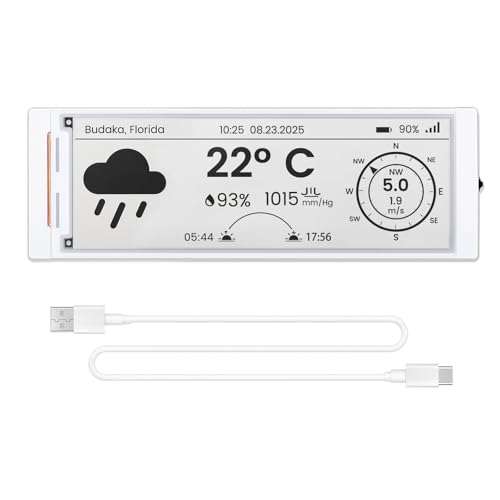
ELECROW ESP32 E-Ink Display 5.79 Inch CrowPanel
ELECROW ESP32 E-Ink Display 4.2 Inch CrowPanel
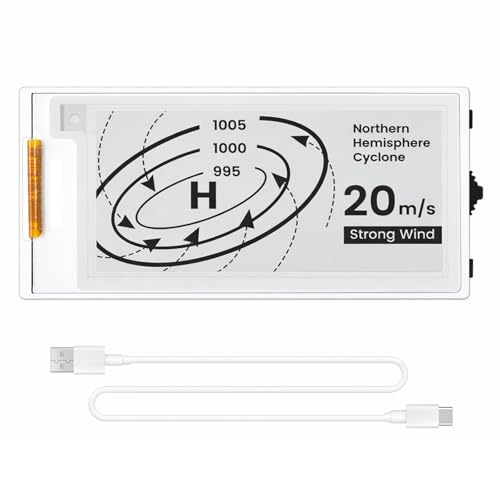
ELECROW ESP32 E-Ink Display 2.13 Inch HMI

Bigme B13 Color Epaper Monitor 13.3 Inch

waveshare 12.48inch E-Ink Display Module 1304×984
The Acer leans toward straightforward desk duty rather than flashy extras. A 21.5-inch Full HD panel keeps text readable without eating too much space, and the 100Hz refresh rate can make everyday motion feel calmer than a basic office screen.
AdaptiveSync, which helps a monitor match frame timing with a compatible graphics card, gives it a little more headroom for light gaming or smoother scrolling. The trade-off is simple, this is still a compact monitor, so people working with lots of side-by-side windows may want the larger BenQ instead.
Strong Points
- 21.5-inch size fits tighter desks without feeling cramped for email, browsing, or document work.
- 100Hz refresh is a pleasant step up for motion smoothness in daily use.
- HDMI and VGA cover both newer and older computers.
- sRGB 99% support suits lighter creative work better than a plain office panel.
- VESA mounting helps you clear desk space with an arm or wall mount.
Points To Note
- The 21.5-inch panel gives up workspace compared with the 24-inch BenQ GW2490.
- Speakers are not listed, so sound will need a separate solution.
- The compact footprint is useful, though it can feel small beside a dual-monitor setup.
Feature Snapshot
Who It Suits Best
Office workers, students, and casual home users who want a smaller, easy-to-place display will get the most from it.
Where A Sibling Pick Shines
BenQ GW2490 24in 100Hz FHD IPS Monitor suits you better for longer workdays and a bit more horizontal room.
Compared with the Acer, this BenQ feels more like a main desktop anchor than a compact side screen. The 24-inch IPS panel, meaning in-plane switching for broader viewing angles and steadier color from the side, gives you a friendlier layout for spreadsheets, writing, and split-screen work.
The thin bezel helps the screen look tidy on a desk or in a multi-monitor setup, and the built-in speakers reduce the need for a separate audio box. The honest read is that the speaker quality will usually be serviceable rather than exciting, but for office audio or video calls, that can be enough.
What We Like
- 24-inch size gives you more room for side-by-side windows than the Acer.
- IPS panel keeps the image easier to share with someone sitting off-center.
- 100Hz refresh makes cursor movement and scrolling feel more fluid.
- Built-in speakers trim cable clutter in a simple work setup.
- DisplayPort and HDMI make desktop hookup straightforward.
- Thin bezels help it sit neatly in a dual-screen arrangement.
Softer Spots
- The built-in audio is practical, though not a substitute for proper speakers.
- Wall or arm mounting depends on your setup, even with VESA support.
- The larger footprint may feel busy on a very small desk.
Core Details
Made For
You’ll appreciate this most in a home office, shared workspace, or any desk where you want a larger screen without chasing gaming-style extras.
Another Choice May Suit
Acer KB220Q H2bi 21.5in FHD 100Hz Office Monitor fits better for tighter desks and a smaller visual footprint.
Once you move from office screens into project parts, the Waveshare raw panel is a different kind of tool. It’s a 7.5-inch E Ink display with SPI, which stands for serial peripheral interface, a simple wiring standard common in microcontroller projects and single-board computers.
The catch is that this is just the panel, so you need the right controller and wiring comfort to make it useful. That makes it a smart fit for hobbyists building shelf labels, status boards, or low-power dashboards, but not for anyone who wants a plug-and-play monitor.
Best Bits
- Raw E Ink panel suits custom Pi or microcontroller builds.
- 800 x 480 resolution works well for text-heavy status screens.
- Low-power behavior matches always-on display projects.
- Wide compatibility list opens the door to several board families.
- No backlight makes it useful in bright ambient light.
Room For Improvement
- You need more technical setup than a finished desktop monitor.
- Without a PCB, integration takes more planning and care.
- The smaller size limits how much information fits at once.
Details At A Glance
Whose Shelf It Belongs On
You’ll get the most from this in a maker workspace or prototyping bench where wiring, code, and custom layouts are part of the fun.
Reach For A Different Pick When
ELECROW ESP32 E-Ink Display 5.79 Inch CrowPanel suits you better if you want a more integrated development panel with less bare-board assembly.
This CrowPanel sits in a useful middle zone, bigger than the 2.13-inch version and more project-friendly than the bare Waveshare panel. The built-in ESP32-S3 controller, a microcontroller with enough headroom for display logic and device control, means you’re not starting from a blank slate.
Its tall 272 x 792 layout suits narrow dashboards, menu strips, or smart home control screens, especially in spaces where width is limited. The trade-off is that black-and-white output keeps the design practical rather than lively, so it’s a better fit for information than for visual flair.
What We Like
- ESP32-S3 controller reduces the amount of extra hardware you need.
- SPI interface makes it familiar for embedded work.
- Long, narrow shape fits vertical menu and status layouts.
- Static content support suits always-on information panels.
- Arduino IDE compatibility helps you move from concept to code faster.
Minor Gripes
- Black-and-white output keeps the visual range limited.
- The tall shape is useful, though not every project will want it.
- It works best inside a planned enclosure rather than a casual desktop setup.
Feature Card
The Right Fit
This suits you well for smart labels, control interfaces, and battery-minded devices where refreshes matter more than animation.
Swap It Out When
ELECROW ESP32 E-Ink Display 4.2 Inch CrowPanel is the better choice for a smaller panel that still keeps the same project style.
After the taller 5.79-inch panel, this 4.2-inch ELECROW feels easier to slot into tighter enclosures. The 400 x 300 resolution gives you a cleaner canvas than the 2.13-inch model, which makes it friendlier for simple dashboards, labels, and compact home gadgets.
The built-in ESP32-S3 again saves you from sourcing a separate controller, so the path from code to working screen stays relatively direct. The honest read is that the size sits in a sweet spot for many small projects, though it still asks you to think carefully about enclosure depth and wiring access.
Upsides
- 4.2-inch size gives more usable space than the 2.13-inch display.
- 400 x 300 resolution makes text and icons easier to arrange.
- Built-in ESP32-S3 simplifies the parts list for a project build.
- SPI connection keeps integration familiar for hobby electronics work.
- Black-and-white format suits clean information screens.
Small Caveats
- The display still stays in the monochrome lane.
- Project success depends on good enclosure planning.
- It’s compact enough to be handy, though not roomy for dense menus.
Quick Facts
Built With In Mind
You’ll like this best for compact smart-home screens, bedside status panels, or other small devices where clarity matters more than color.
Look Elsewhere When
Bigme B13 Color Epaper Monitor 13.3 Inch makes more sense for a larger desktop-style display with broader physical presence.
The 2.13-inch ELECROW is the smallest and most space-conscious item in the group, and that matters in tiny enclosures or wear-free desk gadgets. It is built around the same ESP32 idea as the larger CrowPanel models, so you still get an integrated starting point rather than a bare panel.
Because the source data only confirms the display size, the honest take is simple: this one earns its place by being small, not by chasing extra complexity. For compact labels, minimalist indicators, or a first embedded project, that restraint can be exactly what you want.
Bright Spots
- Very small footprint suits the tightest project housings.
- ESP32 integration keeps the build direction familiar.
- Black-and-white display style works for straightforward information.
- Its size makes it easy to tuck into simple status devices.
Areas To Watch
- The tiny screen limits how much text you can present at once.
- The source data confirms less than the larger CrowPanel options.
- It suits focused use, not feature-heavy dashboard layouts.
At A Glance
Best Suited To
You should look here for tiny indicators, compact dashboard nodes, and first-pass embedded builds where size matters most.
Another Choice May Suit
ELECROW ESP32 E-Ink Display 4.2 Inch CrowPanel is better for you if the project needs more room for text and layout.
The Bigme B13 is the closest thing here to a full-size E Ink desktop display. Its 13.3-inch panel gives you far more room than the Acer or BenQ, and that extra surface makes a difference for reading, note-heavy work, or a laptop extension that needs breathing room.
Multiple USB-C ports and mini HDMI give it broad hookup flexibility, and built-in speakers add a bit of convenience. The trade-off is price class and desk footprint, so this is the kind of upgrade that makes sense for someone who really wants E Ink behavior in a larger format rather than a standard LCD.
Reasons To Buy
- 13.3-inch size gives much more room for documents and side panels.
- Color E Ink offers a different visual approach from the monochrome panels.
- USB-C and mini HDMI widen compatibility with modern devices.
- Built-in speakers reduce accessory clutter.
- Portable body suits a desk that changes from day to day.
Worth Noting
- The larger body needs more desk space than the smaller panels.
- Color E Ink still behaves differently from a normal LCD screen.
- It makes the most sense for specific comfort-focused use cases.
Technical Sheet
Who Should Grab It
You’ll get the most from this on a desk, in a reading corner, or with a portable setup that benefits from a larger reflective screen.
Where A Sibling Pick Shines
BenQ GW2490 24in 100Hz FHD IPS Monitor fits better for everyday office tasks that need a traditional screen and more general-purpose speed.
This Waveshare module stands out for size and its red, black, and white panel, which gives simple dashboards more visual hierarchy than a plain monochrome display. At 12.48 inches, it sits in a useful middle ground for Pi projects that need more space without jumping to a full monitor format.
The source data also points to broad Raspberry Pi family compatibility, which makes it easier to slot into existing maker setups. The main trade-off is the same one that comes with most modules here, you’re buying capability and flexibility, not a finished display that works on its own.
Standout Traits
- 12.48-inch panel gives you plenty of room for layouts and data blocks.
- Three-color output helps separate alerts, labels, and normal content.
- Designed for Raspberry Pi boards already common in hobby benches.
- Large format suits dashboards more than tiny status tags.
- Low-power E Ink behavior fits display projects that stay on most of the time.
Honest Caveats
- It remains a module, so setup takes more planning than a consumer monitor.
- The size asks for a roomy project case or panel mount.
- Three-color E Ink is practical, though still restrained compared with LCD color.
Core Details
Perfect Match For
You should look at this for Pi-based dashboards, control panels, or display art projects that benefit from a larger three-color module.
Skip It When
Acer KB220Q H2bi 21.5in FHD 100Hz Office Monitor is the cleaner choice for a normal desktop where plug-and-play matters more than wiring.
How To Choose The Right E Ink Computer Monitors
Start With The Job You Want Done
Traditional office screens and true E Ink panels solve different problems. The Acer, BenQ, and Bigme are closer to familiar monitors, so they suit writing, spreadsheets, and mixed computer use, while the Waveshare and ELECROW modules are built for embedded projects, control panels, and custom enclosures.
That split matters more than brand names. A 24-inch IPS display can help you keep two documents open side by side, while a 2.13-inch HMI panel belongs in a compact gadget where you want a few lines of status, not a whole desktop.
Check The Input And Build Path
Ports and interface type should guide your choice early. HDMI and DisplayPort work for normal computers, USB-C helps with newer devices, and SPI is the common route for microcontroller displays and Pi modules.
Need a quick desktop replacement? Favor the Acer, BenQ, or Bigme. Building a dashboard, label, or device screen? The Waveshare raw panel and ELECROW CrowPanel options make more sense because they’re built around integration rather than general office use.
Match Size To Viewing Distance
Screen size changes how comfortable the display feels in daily life. A 21.5-inch or 24-inch monitor suits a standard desk, while 13.3 inches works well for a portable extension or reading-focused setup.
Smaller modules, such as 4.2 inches, 2.13 inches, and 5.79 inches, fit inside products, not on a typical workstation. The right choice depends on whether you want more room for windows or a cleaner fit inside a project box.
Pay Attention To Refresh Behavior And Color
E Ink is valued for its calm, reflective look, but it isn’t meant to behave like a fast gaming monitor. Static content and low-power visibility are the draw, while rapid motion and vivid color are handled better by conventional LCD screens.
That’s why the Bigme and waveshare three-color module deserve attention for different reasons. The Bigme is the more desktop-like pick, while the three-color Waveshare helps custom projects separate content without turning to a full-color panel.
What To Weigh Before You Decide
Wrong Turns To Avoid
Plenty of mismatches start with size. A maker module can look attractive until you realize it needs wiring, firmware, and a case, while a full-size office monitor can feel oversized for a narrow shelf or desk corner.
Another common miss is assuming all E Ink products behave the same. A raw Waveshare panel, a CrowPanel with built-in ESP32, and a Bigme desktop display each fill a different role, so the shape of your project should lead the choice.
What The Higher Tier Buys
Higher-priced models usually buy you convenience, not magic. In this group, that means larger panels, built-in control hardware, more connection options, or a more refined desktop-friendly format.
Paying more makes sense for a desk you use every day, a portable monitor that needs multiple inputs, or a project where you want fewer extra parts. For a simple status display, a smaller CrowPanel or Waveshare module is often the cleaner route.
Final Thoughts
Your best match depends on whether you want a normal monitor or a maker display that happens to use E Ink. For office work, the BenQ and Acer are the most straightforward choices, while the Bigme B13 is the premium route for a larger reflective screen. For embedded builds, the Waveshare and ELECROW options cover the most useful sizes and integration styles. Pick the one that fits your desk, your code, and how much setup you want to take on.
