
Gaming on a 32-inch display gives you room to track the action without feeling cramped, and it also doubles as a very usable desk screen for work, streaming, or long sessions in a busy room. The right pick depends on whether you want faster motion, cleaner contrast, better stand adjustment, or extra extras like smart apps and USB-C. You’ll find both curved and flat options here, along with models that suit console play, PC play, and mixed everyday use.
Quick Look At The Shortlist

Samsung 32″ Flat Computer Monitor LS32B304NWNXGO
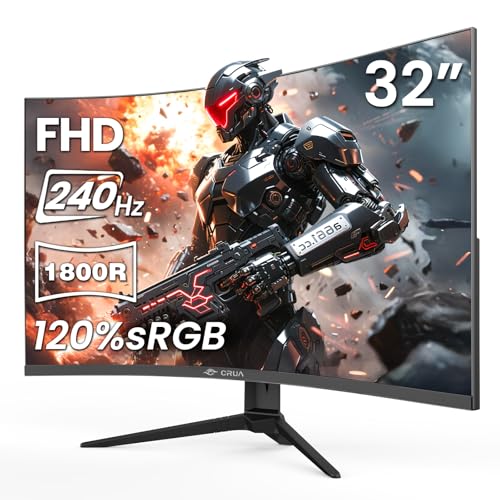
CRUA 32″ FHD 1080P 240Hz Curved Gaming Monitor

Samsung 32” Odyssey G5 (G50F) Series QHD Gaming Monitor LS32FG502ENXZA
Samsung 32″ S3 (S39GD) Series FHD 100Hz Curved Monitor LS32FM803UNXZA

AOC 32 Inch Curved Gaming Monitor 2K QHD 180Hz VA 0.5ms HDR CQ32G4VE

LG 32G600A-B 32-inch Ultragear QHD Curved Gaming Monitor Black

LG 32G620B-B 32-inch Ultragear QHD IPS Gaming Monitor Black

Sceptre Curved 32 inch Prime Gaming Monitor C325B-FW260D.A1
More Details On Our Top Picks
Samsung keeps this one straightforward, and that helps more than flashy extras would on a desk shared with work and play. A flat 32-inch panel with a borderless look fits a dual-screen setup neatly, while 75Hz suits lighter gaming and everyday use better than fast esports chasing.
The AMD FreeSync feature helps line up the panel and graphics output, which matters most when your frame rate drifts around during mixed PC use. Game Mode and Advanced Eye Care make it feel like a sensible all-day monitor, though the lower refresh ceiling means you should look higher in the list for twitch-heavy play.
What We Like
- The 32-inch flat layout gives you a broad work-and-play canvas without the curve pulling your attention inward.
- Borderless styling helps a multi-monitor desk feel cleaner, especially beside a second screen with matching height.
- AMD FreeSync can smooth out uneven frame pacing during everyday gaming and video playback.
- Game Mode and Advanced Eye Care make it easier to settle in for longer evening sessions.
- HDMI and DisplayPort give you flexible hookup options for a PC, console, or docked device.
Points To Note
- 75Hz is fine for casual use, but it does not match the speedier models later in the roundup.
- Flat panels feel less enveloping than the curved picks in this list.
- You’ll want to keep expectations grounded for competitive play, where higher refresh rates matter more.
Core Details
Who Should Grab It
It suits you best if you want a large, simple monitor for casual gaming, office work, and a tidy multi-screen desk.
Another Choice May Suit
LG 32G620B-B 32-inch Ultragear QHD Gaming Monitor makes more sense for competitive PC players who want a faster panel and sharper QHD detail.
CRUA leans hard into motion speed, so it stands out immediately for fast games and twitchy controls. The 1800R curve, which means the panel bends in a tighter radius for a more wrapped-in feel, gives the screen a more immersive shape than Samsung’s flat LS32B304NWNXGO.
The VA panel brings the contrast advantage many gaming setups lean on, and the 120%sRGB claim points to a more vivid color range for games and streaming. The trade-off is plain enough, though, because Full HD on a 32-inch panel is less crisp than the QHD options in this roundup, so desktop text may feel softer up close.
Strong Points
- 240Hz gives you a very quick motion ceiling for fast shooters and racing games.
- AMD FreeSync helps keep tearing down when your frame rate jumps around.
- The 1800R curve adds a wrapped-in feel that suits a dedicated gaming corner.
- VA panel contrast usually helps dark scenes keep more depth than a plain budget display.
- HDMI 2.0, DisplayPort 1.4, and 100 x 100 mm mounting support make setup flexible.
Minor Gripes
- Full HD on 32 inches is a softer fit for close desk work than the QHD entries here.
- The curve is immersive, though it can feel less natural for spreadsheet-heavy use.
- Low blue light support is handy for evening sessions, but it does not replace sensible screen breaks.
Feature Snapshot
Made For
You’ll appreciate this most if you care more about speed and immersion than razor-sharp desktop text.
Where A Sibling Pick Shines
AOC CQ32G4VE is the better fit for you if you want 32 inches, high refresh, and sharper QHD resolution in one package.
This Samsung sits in a very sensible middle ground, because QHD resolution gives you more desktop detail without pushing into the heavier demands of a 4K panel. The Fast IPS panel matters too, since IPS means in-plane switching, a panel type known for wider viewing consistency, which helps when your setup isn’t perfectly centered.
Compared with the CRUA above, it gives you a sharper picture at a slower 180Hz ceiling, and that trade feels easier to live with for mixed gaming and everyday use. HDR10, G-Sync compatibility, and FreeSync support help it fit systems that vary from one graphics setup to another, though the included stand still deserves enough desk depth to feel comfortable.
Highlights
- QHD resolution gives you noticeably more detail than a 1080p 32-inch screen.
- 180Hz and 1ms response support quick control for action-heavy games.
- Fast IPS helps the image stay consistent across a wider seating area.
- HDR10 adds a bit more range to games and streaming video.
- Both G-Sync compatibility and FreeSync support widen hardware match options.
Areas To Watch
- The stand may take more desk space than a compact base, depending on your layout.
- It is still a gaming-first display, so color work that needs strict accuracy belongs elsewhere.
- People who prefer a wrapped-in curve may prefer LG’s curved QHD option later in the list.
At A Glance
Best Suited To
It suits you well if you want a 32-inch monitor for mixed gaming, daily work, and a sharper-than-FHD image.
Look Elsewhere When
LG 32G620B-B 32-inch Ultragear QHD Gaming Monitor fits better for you if you want 200Hz and a more aggressive speed focus.
Samsung takes a different path here, because this screen is less about raw gaming speed and more about turning a desk into a small entertainment hub. The white finish, curved panel, and smart-app support make it feel tailored to mixed use, and the USB-C input is handy for simpler laptop hookups.
For gaming, 100Hz is a comfortable middle ground, not a performance statement, so it makes the most sense for relaxed play and lots of streaming. Compared with the Odyssey G5, you give up the sharper QHD picture and faster pace, but you gain a more flexible everyday monitor that suits a room where one screen has to do several jobs.
Reasons To Buy
- Smart TV apps let you move from gaming to streaming without adding another device.
- Gaming Hub keeps entertainment and play together in one screen space.
- USB-C reduces cable clutter when your laptop supports that single connection.
- The 100Hz curve works well for light gaming, films, and general browsing.
- The white finish gives the desk a softer look than the black models in this roundup.
Small Caveats
- 100Hz is fine for casual sessions, though speed-focused players will want more.
- FHD on 32 inches is easier on system demands, but it is less crisp than QHD.
- The smart features add versatility, yet they also shift the focus away from pure gaming.
Details At A Glance
Who Will Love This
It fits you best if you want a stylish 32-inch display that handles gaming, streaming, and laptop work in one place.
Swap It Out When
CRUA 32″ FHD 1080P 240Hz Curved Gaming Monitor suits you better if your priority is faster gaming motion rather than smart features.
AOC lands near the sweet spot for a lot of gaming desks, because it combines QHD sharpness, a 180Hz ceiling, and a fast 0.5ms response spec. Response time is the interval between a pixel change request and the visible update, and a lower figure usually helps quick motion look cleaner in practice.
The curved VA panel gives you strong contrast tendencies, which is useful for darker games and late-night play, and the VESA mount support helps with arm setups or wall placement. Compared with Samsung’s flat LS32B304NWNXGO, this one is built much more squarely for gaming speed, though the curve and feature set may feel like more monitor than a basic home office really needs.
Upsides
- QHD resolution on 32 inches keeps text and game detail noticeably cleaner than FHD.
- 180Hz and 0.5ms response give you a very quick-feeling motion profile.
- Adaptive-Sync support helps smooth out frame swings during intense matches.
- DP 1.4, HDMI 2.0, and earphone out make the connection set practical.
- VESA mount compatibility lets you free up desk space with an arm or wall mount.
Worth Noting
- The curve is comfortable for gaming, though flat-screen fans may not care for it.
- Its gaming-first personality makes it less relaxed for simple office-only setups.
- Console users should still check the rest of their chain, since the screen is only one part of the setup.
Core Details
Right Fit For
You should look at this one first if you want a curve, strong contrast, and a more serious gaming feel without losing QHD detail.
Another Choice May Suit
Samsung 32” Odyssey G5 (G50F) Series QHD Gaming Monitor is the better match for you if you want IPS viewing consistency alongside similar 32-inch QHD performance.
LG pushes this model toward comfort and immersion, and the 1000R curve is the thing you notice first. That tighter curve wraps closer to your field of view, which can feel especially natural at a 32-inch size if your desk puts you at a fixed sitting distance.
Compared with the AOC CQ32G4VE, this LG swaps a bit of feature density for an adjustable stand that moves in tilt, height, and swivel, which makes a real difference in a shared room or long work session. The 180Hz refresh rate, 1ms response, HDR10, and up to 99% sRGB coverage give it a serious spec sheet, though the curved format still won’t suit everyone who needs a flatter surface for design work.
Best Bits
- 1000R curvature creates a very wrapped, immersive field of view.
- Height, tilt, and swivel adjustment make desk positioning much easier.
- QHD resolution gives you strong detail without the strain of 4K demands.
- 180Hz and 1ms suit fast play without feeling overbuilt.
- HDR10 and up to 99% sRGB coverage help color look richer in games and streaming.
Room For Improvement
- The pronounced curve is great for some desks, but it can feel odd in flatter workspaces.
- Curved screens are less convenient for exact alignment in certain creative layouts.
- Some people will prefer a straight panel after using flat monitors for years.
Feature Rundown
The Right Fit
It suits you best if you want a curved QHD screen with strong adjustment range for both gaming and everyday desk work.
Where A Sibling Pick Shines
AOC 32 Inch Curved Gaming Monitor 2K QHD 180Hz VA 0.5ms HDR CQ32G4VE fits better for you if you want a more gaming-heavy feature set with Adaptive-Sync and VESA mounting.
This LG pushes speed a little harder than the rest of the QHD group, and that extra 20Hz over the Samsung Odyssey G5 can matter to you if fast-motion clarity is the whole point. IPS is the other big draw, because it keeps image consistency strong when your head moves or the screen sits slightly off-center.
HDR10, NVIDIA G-Sync compatibility, and AMD FreeSync Premium make it feel flexible across graphics setups, while the tilt, height, swivel, and pivot stand gives you unusually broad adjustment range. Pivot means the screen can rotate into portrait orientation, which is handy for coding, chat, or tall reference pages, though that feature matters less in a pure gaming-only room.
What We Like
- 200Hz gives you the fastest refresh rate in the QHD cluster here.
- IPS panel behavior helps keep colors and contrast steadier across wider seating angles.
- NVIDIA G-Sync compatibility and AMD FreeSync Premium broaden system matching.
- HDR10 gives the image a bit more punch in supported content.
- Height, swivel, tilt, and pivot adjustment make it easy to fit different desk postures.
Points To Note
- The extra speed is useful, but you still need hardware that can feed it well.
- Pivot and full adjustment are great for mixed use, though they may be more than a console-only setup needs.
- Compared with LG’s curved 32G600A-B, this flat IPS layout feels more versatile but less wrapped around you.
Quick Facts
Whose Shelf It Belongs On
It belongs with you if you want a serious gaming panel that still feels useful for everyday desk work.
Another Choice May Suit
Samsung 32” Odyssey G5 (G50F) Series QHD Gaming Monitor is the easier pick for you if you want a Samsung panel with similar QHD balance and a slightly simpler setup.
Sceptre gives you a lot of motion speed for the money-sensitive end of the category, and the headline numbers are unusually lively for a 32-inch FHD curved screen. The 1500R curve is tighter than the CRUA’s 1800R shape, so the display wraps a bit more around your view.
The built-in speakers are useful for quick desk setup or a spare room, even though serious gaming headsets or standalone speakers will usually sound fuller. Compared with the LG and Samsung QHD picks, the lower resolution keeps the system load lighter, but it also means you give up the fine detail that makes 32-inch QHD monitors feel cleaner for desk work.
Bright Spots
- Up to 260Hz gives you a very fast ceiling for a 32-inch curved display.
- FreeSync Premium helps keep motion steadier during high-action play.
- Dual HDMI and dual DisplayPort inputs make source switching more convenient.
- Built-in speakers are handy for casual use without extra desk clutter.
- The 1500R curve gives the screen a more enveloping shape than a gentler bend.
Softer Spots
- FHD on 32 inches is less crisp than the QHD alternatives in this roundup.
- The integrated speakers are convenient, though they are usually not the main reason to choose a monitor.
- Speed-focused design is the main story, so office-first users may want a different balance.
Technical Sheet
Built With In Mind
It fits you best if you want a fast, curved 32-inch gaming screen and you do not need the sharper detail of QHD.
Where A Sibling Pick Shines
CRUA 32″ FHD 1080P 240Hz Curved Gaming Monitor is the better fit for you if you want a similar speed-first setup with a slightly softer 1800R curve.
How To Choose The Right Gaming 32 Inch Monitors
Refresh Rate, Resolution, And The Pace You Actually Play At
Refresh rate is how many times the panel updates each second, so a higher number usually gives motion a cleaner feel. That matters most in fast shooters, racing games, and action titles where you track movement frame by frame, but it matters less in slower strategy or story games. At 32 inches, 1080p is easier on the graphics card, while QHD gives you sharper text and cleaner edges on a desk you also use for work.
You’ll feel the difference quickly in mixed use. A 75Hz flat screen like Samsung’s basic model is easy to live with for casual play, while 180Hz, 200Hz, or 240Hz screens make more sense for faster hands and stronger PCs. The honest read is simple, speed is only useful when your system can keep up.
Flat Or Curved, Plus How Much Desk Space You Have
Flat screens stay easier to align for spreadsheets, side-by-side windows, and multi-monitor setups. Curved screens bend the image toward you, which can feel more wrapped in at 32 inches and help the center-to-edge distance feel more even.
That trade-off shows up in real homes and gaming spaces. A 1000R curve on the LG 32G600A-B feels much more immersive than a flat panel, while a gentler curve such as 1800R can be an easier step for someone switching from a standard monitor. Deep desks make these panels more comfortable, and a shallow desk can make a strong curve feel a bit close.
Panel Type, Sync Support, And Color Behavior
VA panels usually lean toward stronger contrast, so darker scenes can look deeper and punchier. IPS panels usually hold color and viewing consistency better from side angles, which helps shared desks and people who shift posture often.
Adaptive sync matters too, because it helps the screen and graphics output stay aligned when frame delivery wobbles. FreeSync is common across this list, while some picks also support G-Sync compatibility for broader graphics pairing. HDR10 can add more depth to supported content, though it is not a substitute for choosing the right resolution and panel type in the first place.
Extras That Change Day-To-Day Ownership
USB-C, built-in speakers, VESA mounting, and adjustable stands all affect how pleasant the monitor feels after the novelty wears off. USB-C simplifies laptop hookups, speakers reduce desk clutter, and a height-adjustable stand can save your neck during long sessions.
Mount support is especially useful in smaller rooms, because it frees space for controllers, notebooks, or a larger keyboard tray. Smart apps and gaming hubs suit a room where the screen also handles streaming, while a stripped-back gaming panel suits someone who wants fewer menus and fewer distractions. Match the extras to the way you actually sit and play, not just the spec sheet.
A Quick Reality Check
Wrong Turns To Avoid
One common mistake is chasing refresh rate alone and ignoring resolution. A 240Hz 32-inch screen sounds exciting, but FHD on that size can look soft at close desk distance, especially beside a QHD alternative.
Another slip-up is overlooking stand depth and ergonomics. A monitor can look ideal on paper, then feel awkward once the base, curve, or cable layout lands on your desk.
When Paying More Pays Off
Higher-tier models cost more because you’re paying for faster panels, better adaptive-sync support, richer stand movement, and cleaner image behavior. QHD also adds pixel density, which gives you more usable detail across a 32-inch screen.
The upgrade is worth it for competitive play, mixed work-and-gaming desks, or any setup where you notice motion clarity and text sharpness every day. A simpler FHD panel still makes sense for secondary rooms, but the extra spend usually buys a smoother, easier screen to live with.
Final Thoughts
Your best fit depends on what you do most often at the desk. Samsung’s flat 75Hz model keeps things calm and practical, the faster curved picks lean into play, and the LG QHD options give you the cleanest balance of speed, detail, and comfort. For a lot of setups, that middle ground is where the long-term satisfaction lives. Pick the panel shape and refresh rate that match your actual routine, and the rest gets easier.
