
You want a gaming monitor that keeps the desk tidy without forcing you into a separate speaker setup. That matters most in bedrooms, dorms, shared offices, and compact gaming corners where every cable and inch counts.
The right screen depends on how you play, how much room you have, and how much motion smoothness you expect. Some of these picks lean toward fast-paced gaming, while others are easier to live with for work, streaming, and everyday use.
The Shortlist At A Glance

Gawfolk 24.5 in Gaming Curved Monitor 120Hz White FHD 1080P

Sceptre Curved 27-inch Prime Gaming Monitor 1500R 100Hz

ASUS ROG XG27ACS 27 Inch 1440p 180Hz USB-C G-SYNC HDR Gaming Monitor

Sceptre Prime Curved 30-inch Gaming Monitor 200+Hz FreeSync
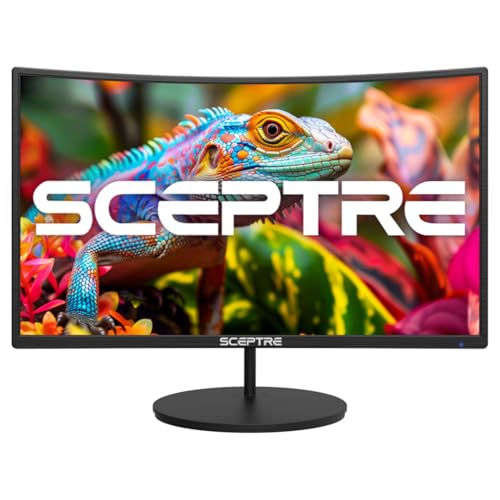
New! Sceptre Curved 27-inch Gaming Monitor 100Hz 1080p R1500 98% sRGB

Dell 24 Plus Monitor S2425HSM 23.8-inch FHD 144Hz

Westinghouse 22 Inch Computer Monitor 1080P FHD IPS Frameless Gaming Monitor

LG 27G414B-B 27-inch Ultragear Full HD IPS Gaming Monitor 144Hz
More Details On Our Top Picks
Small desks are where this Gawfolk makes immediate sense. The 24.5-inch size and 3000R curve keep the panel feeling wraparound without taking over your setup, and the white finish gives it a cleaner look than the usual black-heavy gaming gear. At 120Hz, motion should feel noticeably smoother than a basic 60Hz screen, which matters for fast camera turns and everyday scrolling alike.
The trade-off is straightforward, you’re still in 1080p territory, so sharpness won’t match higher-resolution picks later in this list. That said, for a dorm room, starter battlestation, or a tight desk beside a laptop, the mix of HDMI 2.0, VGA, wall-mount support, and built-in speakers keeps things easy to live with. It’s a neat little setup piece, not a flashy statement monitor.
Strong Points
- The 24.5-inch size fits narrow desks without crowding your keyboard or mouse pad.
- 120Hz gives movement a smoother feel than the basic screens many people start with.
- The curved panel can make long sessions feel a little more centered in front of you.
- Built-in speakers reduce cable clutter, which helps in compact rooms or shared spaces.
- Wall-mount support adds placement flexibility for a cleaner desk layout.
Points To Note
- 1080p on 24.5 inches is fine for gaming, but text detail won’t feel as crisp as on a sharper panel.
- VGA support is useful for older gear, though HDMI is the better route for most gaming setups.
- The integrated speakers are convenient, yet they’re usually a stopgap rather than a sound upgrade.
Feature Card
Who It Suits Best
Students, first-time PC gamers, and anyone working with a compact desk get the most from this one.
A Better Fit Elsewhere
LG 27G414B-B 27-inch Ultragear Full HD IPS Gaming Monitor 144Hz suits you better if you want a larger, more balanced all-purpose screen for gaming and daily use.
This Sceptre lands in the middle ground in a useful way. The 27-inch curved panel gives you more breathing room than the smaller Gawfolk above, and the 1500R curve is a little tighter, so the screen can feel more enveloping from a normal desk distance. For split time between gaming, streaming, and work documents, that kind of balance matters more than raw flash.
The 100Hz refresh rate won’t feel as brisk as the faster models later on, though it still clears the basic-office-screen baseline by a healthy margin. The inclusion of HDMI, DisplayPort, built-in speakers, and 100% sRGB also makes it easier to live with across mixed tasks, especially in a room where you don’t want extra accessories everywhere. The honest read is that it’s a sensible all-rounder, not a speed demon.
What We Like
- The 27-inch size gives you more room for game HUDs, timelines, and multitasking.
- 100% sRGB coverage helps color look more consistent for everyday media and creative work.
- DisplayPort plus two HDMI inputs give you flexible hookup options.
- Built-in speakers make it easier to keep a desk tidy with fewer external devices.
- The curved layout can feel comfortable during long desk sessions.
Softer Spots
- 100Hz is smooth, but competitive players may want a faster panel.
- The built-in audio is handy for convenience, though many setups will still sound fuller with separate speakers or headphones.
- Curved displays can take a little getting used to for spreadsheet-heavy work.
Core Details
Who Will Love This
You get the most from this monitor if you want a curved screen that handles gaming and day-to-day desk work without demanding much setup fuss.
Swap It Out When
Dell 24 Plus Monitor S2425HSM 23.8-inch FHD 144Hz suits you better if you want a more adjustable stand and faster refresh for a smaller, neater desk footprint.
This is the jump-up pick for you if sharper detail matters as much as speed. A 27-inch 1440p panel gives you more room to work with than the Full HD options above, so text, interface elements, and game textures should look cleaner side by side. The Fast IPS panel helps keep response quick while preserving color and viewing angles that suit a mixed-use desk.
USB-C adds practical value for modern laptops, and that’s where the setup feels less messy than a stack of separate cables. The trade-off is that a monitor like this asks more from your system, especially in games where 1440p at high refresh takes some muscle. For competitive players, that’s exactly the point, though casual users may be paying for headroom they won’t use every day.
Bright Spots
- 1440p gives you noticeably more workspace and finer image detail than the 1080p models in this roundup.
- 180Hz is a strong fit for fast shooters and high-motion action.
- USB-C helps simplify laptop docking and desk cable management.
- Fast IPS technology usually means a better blend of speed, color, and viewing comfort than basic panels.
- G-SYNC support helps keep gameplay smoother on compatible systems.
Areas To Watch
- 1440p at 180Hz asks more of your graphics hardware than 1080p screens do.
- The speaker setup is not the main reason to choose this class of monitor.
- Its strengths are strongest on capable gaming PCs, not entry-level machines.
Details At A Glance
Built With In Mind
Competitive PC gamers and laptop users who want a sharper, faster screen will get the most out of this one.
Consider Something Else When
Sceptre Prime Curved 30-inch Gaming Monitor 200+Hz FreeSync is the better fit for you if a wider ultrawide layout matters more than 1440p sharpness.
The 30-inch ultrawide format changes the feel of your desk in a big way. Compared with the 27-inch models above, this Sceptre gives you a longer horizon across the screen, which is handy for racing games, side-by-side windows, and timeline work. The 200Hz-plus refresh rate keeps it aimed at people who care about fluid motion more than anything else.
That extra width comes with a practical catch, though, because it occupies more space and asks for a bit of desk depth to feel comfortable. The 2560 x 1080 resolution is a fair match for the size, but it is still a horizontal-first layout, so text density won’t match a 1440p panel. For someone who wants a wide, fast, low-clutter gaming station, it makes a lot of sense.
Best Bits
- The 30-inch ultrawide shape gives you more horizontal room for games and multitasking.
- 200Hz-plus refresh is well suited to fast-action play.
- FreeSync support helps smooth out compatible gameplay.
- Built-in speakers save space on a desk that already has a keyboard, mouse, and controller.
- HDMI and DisplayPort keep connection options practical.
Room For Improvement
- The wider body needs more desk space than the standard 27-inch options.
- 2560 x 1080 is a compromise between width and sharpness, so text won’t feel as fine as on 1440p.
- Ultrawide layouts can take a little longer to fit into if you’re used to standard 16:9 screens.
Feature Rundown
Whose Shelf It Belongs On
Gamers who want an ultrawide feel and have the desk room to support it will get the most from this monitor.
Where A Sibling Pick Shines
LG 27G414B-B 27-inch Ultragear Full HD IPS Gaming Monitor 144Hz is the steadier choice for you if you want a simpler 16:9 layout that fits more desks.
This Sceptre sits in a very practical spot for everyday gaming. It gives you the same 27-inch size as the earlier Sceptre curved model, but with a more budget-friendly feature mix that focuses on the basics done well, including 100Hz refresh, 98% sRGB, and dual HDMI plus VGA. The 1500R curve should feel familiar quickly, especially for long evenings at a desk.
VESA wall-mount support is useful for saving surface space, and the built-in speakers make it easier to keep your setup lean. The catch is that this one is more about balance than headline specs, so performance-hungry players or detail-focused users may want to look farther up the list. For many gaming rooms, though, that restrained formula is exactly the point.
Highlights
- 27 inches gives you a comfortable size without moving into a wider ultrawide footprint.
- 100Hz keeps the motion upgrade obvious for most everyday gaming use.
- 98% sRGB is a useful color spec for general media and light creative work.
- VESA mount support can help clear desk space.
- VGA adds compatibility for older gear.
Minor Gripes
- 100Hz is smooth, but it sits below the faster monitors in this roundup.
- The built-in speakers are convenient, yet they rarely replace a dedicated audio setup.
- 1080p at 27 inches is serviceable, though not the sharpest match for text-heavy work.
Technical Sheet
Best Suited To
You’re a good match for this monitor if you want a simple curved 27-inch screen for gaming, streaming, and routine desk use.
Look Elsewhere When
ASUS ROG XG27ACS 27 Inch 1440p 180Hz USB-C G-SYNC HDR Gaming Monitor suits you better if you want more speed and sharper detail.
This Dell feels like the neatest desk companion in the group. The 23.8-inch size keeps it compact, but the real advantage is the stand, which adjusts for height, tilt, pivot, and swivel, so you can fit it to your posture instead of working around it. That matters more than people expect during long homework sessions, late-night gaming, or a workday that spills into entertainment.
The 144Hz panel and 1ms response make it a smarter gaming option than the slower curved picks above, while the pair of 3W speakers gives you a cleaner built-in audio setup than the usual barebones monitor sound. The display is still Full HD, so you’re not getting the sharpness of 1440p, but the practical upside is a screen that feels easy to place and easy to live with. For most small desks, that trade-off is sensible.
Upsides
- The fully adjustable stand makes it easier to line up the screen with your seating position.
- 144Hz suits smooth gaming without pushing you into a higher-resolution performance load.
- Two 3W speakers provide built-in sound that is more thoughtfully specified than many monitor speakers.
- The 23.8-inch footprint fits crowded desks and multipurpose rooms well.
- AMD FreeSync support helps improve motion consistency on compatible systems.
Worth Noting
- Full HD at 23.8 inches is fine, but detail won’t match a 1440p display.
- The speaker output is convenient, though it’s still built for everyday use rather than rich room-filling sound.
- Photographers and detail-heavy editors may want a sharper panel.
Quick Facts
Right Fit For
Desk users who want a tidy all-in-one monitor with real stand flexibility will get the most from this Dell.
Not Your Match When
ASUS ROG XG27ACS 27 Inch 1440p 180Hz USB-C G-SYNC HDR Gaming Monitor is the stronger choice if you want more resolution and faster gaming headroom.
This Westinghouse is built for small-space practicality. The 22-inch frameless body takes very little desk room, and the IPS panel gives you wider viewing angles than the more basic panels many starter monitors use. For a bedroom desk, study nook, or secondary gaming setup, that kind of footprint can matter more than a bigger spec sheet.
Its 100Hz refresh rate and 1ms response time put it in the useful middle ground for casual gaming, while the built-in speakers and VESA support keep the setup flexible. You may find the 22-inch size a bit tight for split-screen work, but that same compactness also makes it easier to place near a laptop or console. It’s a sensible little monitor, nothing showy.
Reasons To Buy
- 22 inches makes it easy to fit into tight rooms or shared work areas.
- IPS viewing angles help the image stay usable from off-center seating.
- 100Hz gives you smoother motion than the usual entry-level monitor pace.
- VESA support opens the door to arm or wall mounting.
- Built-in speakers cut down on extra gear for a secondary setup.
Small Caveats
- The smaller screen can feel cramped for multitasking.
- Built-in speakers are handy, but they’re usually better for convenience than for richer sound.
- Frameless styling looks clean, although it can make cleaning fingerprints more noticeable on glossy-looking surfaces.
Core Details
The Right Fit
You’ll like this monitor most if you want a compact gaming screen for a small room or an extra display beside a laptop.
Where Shoppers Go Wrong
LG 27G414B-B 27-inch Ultragear Full HD IPS Gaming Monitor 144Hz suits you better if you want more screen room and a stronger all-around gaming feel.
The LG feels like the most balanced screen in the lineup for day-to-day gaming. You get a 27-inch IPS panel, 144Hz refresh, 1ms response, and both G-Sync compatibility and FreeSync support, which makes it easier to match with different systems. That mix is especially appealing if your gaming time is shared with work, school, or console use.
The included stand also gives you tilt and height adjustment, so it’s easier to set the screen at a comfortable level without adding a mount right away. HDR10 and the built-in speaker are nice touches, though they’re not the main reason to choose this model. For most setups, this is the monitor that feels easiest to recommend without overthinking it.
What We Like
- 27 inches gives you a comfortable viewing size without moving into ultrawide territory.
- 144Hz and 1ms make motion feel responsive for fast gaming.
- IPS panel support is a strong fit for mixed gaming and media use.
- G-Sync compatibility and FreeSync broaden the range of systems it works well with.
- Tilt and height adjustment help you match the screen to your seating position.
Honest Caveats
- Full HD at 27 inches is workable, but it is not as crisp as 1440p.
- The built-in speaker is useful for convenience, though most serious audio setups will still use separate sound.
- Console and PC users alike may still want to pair it with better headphones or speakers for a fuller setup.
Feature Snapshot
Whose Shelf It Belongs On
You’re the best match for this LG if you want a versatile 27-inch gaming monitor that stays comfortable for everyday use.
Reach For A Different Pick When
ASUS ROG XG27ACS 27 Inch 1440p 180Hz USB-C G-SYNC HDR Gaming Monitor is the better step up if you want higher resolution and faster headroom.
How To Choose The Right Gaming Computer Monitors With Speakers
Screen Size And Desk Fit
A 22 to 24.5-inch monitor usually fits tighter spaces best, especially beside a laptop, console, or keyboard tray. A 27-inch screen gives you more room for HUDs, windows, and menus, while a 30-inch ultrawide spreads things out horizontally and needs deeper desk space.
The curve matters too. A gentle curve like 1500R or 3000R can make the screen feel more immersive from a typical seated position, but it also changes how straight lines look in office work. That trade-off shows up most clearly for people who split time between games and spreadsheets.
Refresh Rate, Response Time, And Smooth Motion
Refresh rate tells you how many times the screen updates each second, so 144Hz or 180Hz generally feels smoother than 100Hz or 120Hz. Response time, often listed as 1ms, describes how quickly pixels change, which helps keep fast movement looking cleaner.
For competitive play, those numbers matter a lot more than speaker extras. Casual gaming and media use can live comfortably at 100Hz or 120Hz, but fast shooters and racing games benefit from the quicker options higher up the list.
Built-In Speakers And Real-World Convenience
Integrated speakers save space and reduce cable clutter, which is a real advantage on a small desk or in a bedroom setup. They’re handy for videos, system sounds, and casual games, especially when you don’t want to add another box to the desk.
The catch is simple, built-in audio rarely sounds as full as a separate speaker pair. That means you should treat monitor speakers as convenience-first, not as the main reason to choose a screen.
Resolution, Panel Type, And Everyday Use
Full HD works well on smaller displays and keeps system demands lighter, while 1440p adds sharper text and finer detail on a 27-inch panel. IPS panels usually offer better viewing angles and more consistent color, while curved VA-style screens often lean into contrast and a more wrapped-in feel.
That’s where your use case matters most. A gaming-first setup can lean toward faster refresh and curve, while a work-and-play desk usually benefits from IPS, adjustable stands, and a size that doesn’t crowd your posture.
Things Worth Knowing First
Common Shopping Slip Ups
A common mistake is focusing only on speaker inclusion and ignoring the panel size. A monitor can have built-in audio and still feel awkward on your desk, too small for your games, or too large for your spacing.
Another misstep is pairing a high-resolution screen with hardware that can’t keep up. A 1440p 180Hz monitor is a stronger experience on a capable PC, while a more modest system may get more practical value from a 1080p 144Hz screen.
Where The Extra Money Goes
Higher-tier gaming monitors usually spend the added cost on sharper panels, faster refresh rates, better adaptive-sync support, and more usable stands. USB-C, wider color coverage, and more advanced panel types also add to the bill.
That upgrade can make sense for you if gaming is a daily habit and the monitor doubles as a work display. For occasional play, the midrange options in this list already cover a lot without asking for the same hardware muscle.
Final Thoughts
You have a lot of good paths here, and the right one depends on how your desk actually works day to day. The Dell and LG models are the easiest broad recommendations, the ASUS is the step-up choice for speed and sharper detail, and the Sceptre ultrawide suits you best if you want width more than anything else. For a smaller room, the Gawfolk and Westinghouse keep things compact without feeling bare. Choose the monitor that matches your space first, then let speed and speaker convenience guide the rest.
