
A good 4K monitor does more than sharpen text. It gives you more room for spreadsheets, cleaner photo detail, and a calmer desk setup when you work all day or split time between work and play. The eight picks below focus on value, screen size, refresh rate, and stand flexibility, so you can match the panel to your own routine without paying for extras you may not use.
The Shortlist At A Glance

Dell 27 Monitor S2725QS 4K UHD IPS, 120Hz, FreeSync Premium

KTC 27 Inch 4K Gaming Monitor UHD 160Hz Fast IPS, U27T6

Gawfolk 27 Inch 4K Monitor IPS 60Hz, UHD 3840 x 2160p

Sceptre 32-inch 4K UHD Monitor DisplayPort x2 HDMI x2, U325W-UPT Series

LG 27UP650K-W 27-inch Ultrafine 4K UHD IPS Computer Monitor, White

Z-Edge 27-inch 4K Gaming Monitor S274K, 120Hz 1ms MPRT
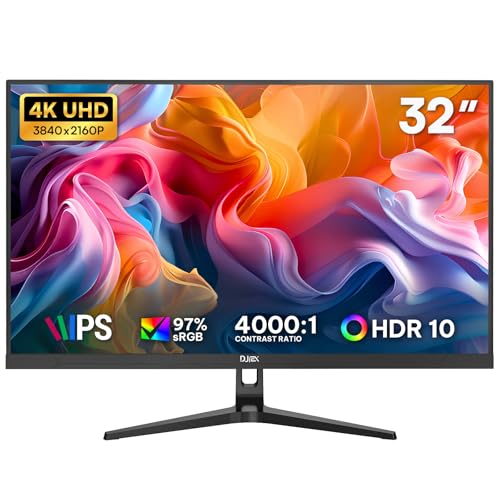
32 Inch 4K Computer Monitor UHD 3840x2160p IPS Display
Sceptre Prime 4K IPS 27-inch UHD Monitor, U275W-UPT Series
More Details On Our Top Picks
For a desk that handles both weekday work and evening games, this Dell lands in a very comfortable middle ground. The 27-inch IPS panel gives you sharp 4K detail, while the 120Hz refresh rate helps motion feel smoother than a plain 60Hz screen.
The stand also matters here, because height, swivel, and pivot adjustment make it easier to fit into a proper work posture. You may still want to check your desk depth, since a 27-inch 4K panel can feel dense at first, but the mix of USB-C, HDMI, and DisplayPort gives you a lot of setup flexibility.
What We Like
- 120Hz support makes scrolling and casual gaming feel less rigid than standard office panels.
- IPS viewing angles help the picture stay consistent when you shift in your chair or share the screen.
- USB-C, HDMI, and DisplayPort simplify pairing with newer laptops and desktop towers.
- The adjustable stand helps you fine-tune height and viewing angle for longer work sessions.
- 99% sRGB coverage points to broad color range for daily creative tasks and cleaner-looking media.
Things To Consider
- The 27-inch size can feel compact next to larger ultrawide layouts for heavy multitasking.
- At 4K, text scaling may take a little setup on smaller desks or with older apps.
- The high-refresh appeal is real, but it matters most for lighter gaming and smoother motion, not every office task.
Feature Snapshot
Who It Suits Best
You’ll get the most from this one if your day moves between spreadsheets, browser tabs, and a few hours of games after work.
Where A Sibling Pick Shines
KTC 27 Inch 4K Gaming Monitor U27T6 suits faster-paced gaming better, especially when high refresh matters more than a balanced work-first setup.
Speed is the clear story here, and the 160Hz refresh rate makes that obvious for action games and fast camera movement. The Fast IPS panel should also help keep colors lively without giving up the quicker feel that many gaming setups want.
Compared with the Dell S2725QS, this KTC leans harder toward motion-first use rather than all-around desk balance. HDR400 support and the fully adjustable stand help round out the package, though the real draw is still the refresh rate, especially for anyone who spends long evenings in competitive titles.
Strong Points
- 160Hz refresh is the headline feature for smoother motion in fast games.
- Fast IPS should help keep the image crisp while preserving familiar IPS viewing angles.
- HDR400 gives you a higher-brightness HDR tier for supported video and games.
- Height, pivot, swivel, and tilt adjustments make it easier to set a comfortable position.
- HDMI and DisplayPort inputs keep setup simple with a gaming PC or console.
Worth Noting
- Its gaming focus can feel like more screen than some casual office users need.
- High refresh makes sense most when your graphics hardware can keep up.
- The feature set is busy enough that first-time setup may take a few extra minutes.
Core Details
Who Will Love This
Fast-moving game fans and desk users who want higher refresh without moving to a giant screen will feel right at home here.
Another Choice May Suit
Dell 27 Monitor S2725QS is the steadier option for mixed workdays, since its balanced feature set feels less gaming-first.
This Gawfolk keeps things straightforward, which is often what you want for a home office or school desk. The 27-inch IPS panel gives you the 4K workspace bump without pushing into the bigger, more expensive-feeling territory of a 32-inch screen.
The trade-off shows up in its 60Hz refresh rate, so you’re getting a more standard feel than the faster Dell, KTC, or Z-Edge options. For documents, email, and general browsing, that’s usually enough, and the wall-mount support adds some flexibility for tight setups.
Bright Spots
- 27-inch 4K sizing makes text and windows feel roomy without a huge desk footprint.
- IPS viewing helps keep the image clear from the side, which is useful in shared spaces.
- HDMI and DisplayPort support keeps it easy to connect to common home office gear.
- Wall-mount compatibility gives you another way to save desk space.
Areas To Watch
- 60Hz is fine for office work, but it won’t feel as fluid as the faster gaming picks.
- The name and listing wording suggest a no-frills setup, so don’t expect a long list of extras.
- Wall mounting adds flexibility, but it also means you’ll want to plan cable routing carefully.
At A Glance
Best Suited To
Home office users and students who want a clean 4K display for everyday computing will get the most value here.
A Better Fit Elsewhere
Z-Edge 27-inch 4K Gaming Monitor S274K makes more sense for you if gaming performance matters alongside work.
A 32-inch 4K screen changes the feel of a desk fast, and this Sceptre gives you that larger layout without moving into specialty territory. The extra size makes room for side-by-side windows, which helps a lot in spreadsheets, editing timelines, or a workday with too many tabs open.
The built-in speakers are handy for casual use because they cut down on extra desk clutter, though they usually won’t replace a dedicated audio setup. Compared with the 27-inch picks above, this one is more about scale than speed, so it makes sense for people who value workspace first.
Highlights
- 32-inch size gives you more screen room for split windows and large documents.
- 4K resolution on a larger panel helps text and UI elements stay crisp.
- Two DisplayPort inputs and two HDMI inputs make multi-device setups simpler.
- Built-in speakers help keep the desk cleaner for basic audio needs.
- 100% sRGB support is useful for color-aware everyday work.
Small Caveats
- The larger size needs more desk depth, so compact setups may feel crowded.
- Built-in speakers are practical, but they’re usually a convenience feature rather than the main attraction.
- At 70Hz, it’s smoother than standard 60Hz, though still not in the gaming-first tier.
Details At A Glance
Who Should Grab It
Desk users who want a large, easy-to-manage work screen for business tasks or home productivity will appreciate the extra surface area.
Where A Sibling Pick Shines
LG 27UP650K-W is a neater fit for smaller desks, especially when you want a 27-inch frame with a more polished stand.
This LG feels especially suited to long desk sessions, because its stand and image-tuning features are built around comfort as much as clarity. Reader Mode and Flicker Safe are the sort of details that matter in a real office day, where your monitor spends hours showing documents instead of just trailers and games.
The 27-inch IPS panel and DisplayHDR 400 support make it an easy fit for mixed media and work use, and the White finish gives it a cleaner look than the darker models in this roundup. It does sit in the slower 60Hz class, so its appeal comes from polish and comfort rather than gaming speed.
Upsides
- Reader Mode is helpful for people who spend a lot of time on text-heavy pages.
- Flicker Safe support aims for a steadier viewing feel during long sessions.
- The adjustable stand helps you match height and angle to your chair and desk.
- DisplayHDR 400 adds a useful step up for supported video and games.
- The white finish gives it a lighter visual presence on a home desk.
Room For Improvement
- 60Hz keeps it in the everyday tier, not the fast-motion tier.
- The comfort features help most when your workday is long and text-heavy.
- White finishes can call for a bit more care to keep dust and marks from standing out.
Technical Sheet
Who It Suits Best
Knowledge workers, home office users, and anyone who spends long stretches in documents or browser tabs will appreciate the comfort-first feature set.
Look Elsewhere When
Dell 27 Monitor S2725QS is the better fit for you if higher refresh rate matters more than comfort extras.
Among the faster 27-inch options here, the Z-Edge puts a lot on the table for gaming and general desktop use. The 120Hz refresh rate and 1ms MPRT, which means motion picture response time, point to quick-feeling movement, while the 16.7 million color support keeps the image from looking bare-bones.
It also stands out for its port layout, with two HDMI 2.0 inputs and two DisplayPort 1.4 connections giving you room for more than one device. Compared with the KTC, it looks a little less aggressive on peak refresh, but that can be a fair trade if you care about flexibility across work and play.
Reasons To Buy
- 120Hz refresh keeps motion smoother than standard office-level panels.
- 1ms MPRT helps fast scenes feel more responsive in games.
- Two HDMI and two DisplayPort inputs give you flexible device routing.
- 16.7 million colors make it suitable for everyday visual work and media.
Points To Note
- Its gaming focus means some office users may not need every feature it offers.
- High refresh still depends on the rest of your system doing its part.
- With multiple ports and gaming language, setup is simple enough, but the feature list can look busier than it needs to be.
Feature Rundown
Built With In Mind
You’ll like this most if you split your time between a work desk and gaming after hours, and you want a monitor that keeps both jobs in view.
Swap It Out When
KTC 27 Inch 4K Gaming Monitor U27T6 is the stronger call when peak refresh and HDR400 matter more than broader input flexibility.
The big appeal here is workspace, plain and simple. A 32-inch 4K IPS screen gives you room to spread out documents, browsers, and messaging windows, which is a real help in a home office where one monitor has to do a lot.
HDR10, FreeSync, and 97% sRGB give it a more rounded feature set than a bare office panel, while the VESA 75x75mm mount support keeps wall or arm mounting realistic. The trade-off is desk size, because a 32-inch screen can feel oversized on a shallow table, even when the panel itself is doing useful work.
Standout Traits
- The 32-inch size creates a roomy desktop for multitasking.
- IPS viewing helps the screen stay clear from everyday seating angles.
- HDR10 and FreeSync add useful extras for mixed media and smoother motion.
- VESA 75x75mm support gives you mounting flexibility.
- 97% sRGB is a strong fit for common color-aware tasks.
Minor Gripes
- The size can overpower smaller desks or narrow workstations.
- At 60Hz, it’s built more for productivity than fast gaming.
- Large panels may take a little more care during setup and cable routing.
Core Details
Whose Shelf It Belongs On
Remote workers and home office users who want extra space more than gaming speed will get the most value from this size.
Reach For A Different Pick When
Gawfolk 27 Inch 4K Monitor IPS 60Hz is easier to place on smaller desks and still gives you sharp 4K clarity.
This Sceptre Prime sits in the familiar sweet spot for a lot of home desks, because 27 inches is large enough for 4K detail without demanding much space. The up-to-70Hz refresh rate gives it a little more motion comfort than a strict 60Hz panel, and that can make everyday browsing feel smoother.
Built-in speakers and 100% sRGB make it feel well rounded for simple office setups, light media, and the occasional game. The honest read is that it’s not trying to be the flashiest model in the list, but for a tidy desk where you want practicality first, that’s exactly the point.
Best Bits
- 27-inch size keeps the desk footprint manageable.
- Up-to-70Hz support adds a little extra smoothness over standard 60Hz screens.
- 100% sRGB is useful for cleaner everyday color consistency.
- Built-in speakers help reduce cable clutter in simple setups.
Softer Spots
- It sits between office and gaming use, so neither side is pushed to the extreme.
- Built-in speakers are convenient, but they’re still a space-saving feature first.
- 72-ish refresh territory is a small upgrade, not a full step into gaming-first speed.
Feature Card
The Right Fit
You’ll appreciate this most if you want a simple, tidy 4K monitor for daily computing, casual viewing, and light gaming.
Skip It When
Dell 27 Monitor S2725QS is the better match for you if a stronger 120Hz refresh matters more than built-in speakers.
How To Choose The Right Inexpensive 4k Monitors
Screen Size, Sharpness, And Desk Distance
A 27-inch 4K display gives you sharp text and a tidy footprint, which suits most home offices and shared desks. A 32-inch panel gives you more working room, but it also asks more from your desk depth and placement.
Pixel density, which means how tightly the pixels are packed, matters because it changes how crisp text looks at normal sitting distance. On a smaller screen, 4K can feel especially sharp; on a larger one, you gain space more than pure density.
Refresh Rate And Motion Feel
Refresh rate tells you how many times per second the image updates, and that’s why 120Hz or 160Hz feels smoother than 60Hz. For gaming, fast scrolling, and general motion comfort, the higher numbers matter more than many first-time monitor shoppers expect.
For spreadsheets, email, and web work, 60Hz still does the job well. The practical question is whether your desk time is mostly office work or a mix of work and games, because that answer usually points you to the right refresh tier.
Panel Type, Color, And Viewing Angles
IPS panels are popular in this category because they keep color and clarity more consistent when you shift in your chair or share the screen. That’s useful in a busy kitchen nook, a side-by-side office, or anywhere you do not sit perfectly centered all day.
Color coverage numbers such as sRGB help you judge how much of the common color range the monitor can show. Higher coverage helps photos, web graphics, and video look more complete, though it does not replace a properly tuned creative display.
Ports And Stand Adjustability
HDMI and DisplayPort are the connections you’ll see most often, and both matter because they let you match the monitor to your laptop, desktop, or console. USB-C on the Dell adds a cleaner one-cable path for some modern notebooks, which can cut clutter in a small setup.
A height-adjustable stand with swivel or pivot support sounds mundane, but it becomes valuable the moment your chair, desk, or lighting changes. If you spend long hours in front of the screen, those adjustments often matter more than one extra spec sheet line.
What To Weigh Before You Click Amazon
Common Shopping Slip Ups
A lot of people chase 4K and forget the rest of the setup. That leads to a screen that looks sharp but sits too large for the desk, or a fast panel that never reaches its potential because the connected device cannot feed it well.
Another common miss is ignoring ergonomics. A fixed stand can be fine for a spare room, but a monitor with height and tilt adjustment usually feels better once you start using it every day.
What The Higher Tier Buys
More expensive 4K monitors usually spend the money on refresh rate, color handling, stand quality, and a wider port spread. That means smoother motion, better flexibility, and less fiddling when you move between a work laptop and a gaming PC.
The upgrade is worth it when the monitor has to do several jobs at once. A basic 60Hz panel can be enough for documents and browsing, but once gaming or color-sensitive work enters the picture, the better panels start earning their keep.
Final Thoughts
The best inexpensive 4K monitor for your desk depends on how you use the screen more than on one spec alone. Dell and KTC suit mixed use and faster motion, LG feels better for long work sessions, and the larger Sceptre and 32-inch options make sense when extra workspace matters most. Keep your desk size, port needs, and refresh target in mind, and the right choice becomes much easier to spot.
