
Searching for the right IPS PC monitor gets easier once you separate desk comfort from gaming speed, screen size, and connection needs. Some of these picks suit daily email and spreadsheet work, while others make more sense for long sessions, side-by-side windows, or faster motion in games. The right choice usually comes down to how much desk space you have and how often you want to use the same screen for work and entertainment.
The Shortlist At A Glance

LG 27U411A-B 27-inch Full HD IPS Monitor

LG 24U411A-B 24-inch Full HD IPS Monitor
Gawfolk 34-Inch IPS Ultrawide Gaming Monitor

Samsung 27-inch S3 Series FHD IPS Monitor

LG 24G411A-B 24-inch Ultragear IPS Gaming Monitor

Dell SE2726HG 27-Inch 240Hz IPS Gaming Monitor

MSI PRO MP243L E14 24-Inch IPS Monitor
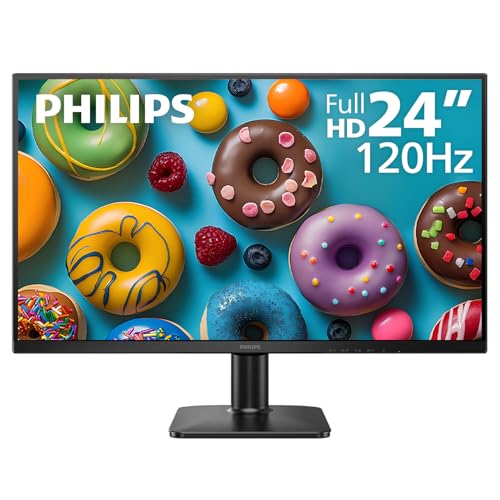
Philips 24E2N2100 24-Inch FHD IPS Monitor
More Details On Our Top Picks
LG’s 27-inch frame gives you enough room for side-by-side documents without pushing your desk into a cramped layout. The Full HD panel keeps everyday text clear, while IPS, or in-plane switching, helps color stay steadier from off-center seats, which matters in a shared office or a living room desk.
The 120Hz refresh rate should feel smoother than a standard 60Hz screen during scrolling and lighter gaming, though Full HD on 27 inches won’t look as dense as smaller panels. Reader Mode and Flicker Safe point this one toward long work sessions, so it suits you well if your day mixes spreadsheets, browsing, and the occasional film.
What We Like
- 27-inch size gives you generous room for multitasking without moving into ultrawide territory.
- IPS viewing helps the picture stay consistent when you sit slightly off center.
- 120Hz can make everyday motion feel smoother than basic office panels.
- Reader Mode is a sensible touch for long writing or research sessions.
- The slim stand base leaves more usable space for a keyboard, mouse, or notebook.
Things To Consider
- Full HD on a 27-inch panel is a comfort-first choice, not a sharpness-first one.
- The included feature set leans practical, so you are not getting a heavy gaming feature stack here.
- Slim bezels help the look, but they do not change the footprint of the panel itself.
Feature Snapshot
Who It Suits Best
You get the most from this model if your desk is used for office work, web browsing, and relaxed entertainment, with occasional light gaming on the side.
A Better Fit Elsewhere
Dell SE2726HG suits you better if you care more about very fast game motion than a balanced work-first screen.
The 24-inch size is the easygoing part here, because it fits smaller desks without feeling squeezed. Compared with LG’s 27-inch sibling, this one should feel tidier in tight spaces and a little easier to scan at close range.
Its Full HD panel, IPS viewing, 120Hz refresh, HDR10 support, Reader Mode, and Flicker Safe all point to a screen that can do long workdays without getting fussy. You may find the smaller canvas less ideal for heavy multitasking, but that trade-off makes sense for apartments, dorm rooms, or a compact home setup.
Bright Spots
- 24-inch sizing fits smaller desks, narrow nooks, and shared rooms with less fuss.
- IPS viewing helps the image stay more even as you shift positions.
- 120Hz gives simple everyday motion a smoother feel than basic office displays.
- Reader Mode and Flicker Safe make long sessions feel more comfortable for many desk setups.
Softer Spots
- The smaller panel gives you less room for side-by-side windows than the 27-inch LG.
- Full HD at this size is practical, though some users still prefer more pixel density.
- The feature set stays focused on comfort and daily use, not deep gaming extras.
At A Glance
Who Will Love This
You get the most from this screen if your desk is small and you want a tidy monitor that still feels a step above basic 60Hz office models.
Where A Sibling Pick Shines
LG 27U411A-B suits you better if you want extra room for split-window work and do not mind a larger footprint.
This one is built for people who live in spreadsheets, timelines, or wide game HUDs, because the 21:9 layout gives you more horizontal room than the earlier LG picks. The 34-inch IPS panel and 2560 by 1080 resolution work together to keep that wide view usable instead of awkwardly stretched.
It feels especially sensible for a home office that also handles gaming, though that wider format does ask for more desk width than a standard 27-inch screen. In most setups, the trade-off is worth it when you want fewer window swaps and a more open workspace.
Reasons To Buy
- Ultrawide shape gives you more side-by-side room for work and play.
- 34-inch size helps you keep multiple windows visible at once.
- 120Hz refresh supports smoother movement for fast-paced gaming and scrolling.
- IPS panel helps colors hold together across the broader view.
- DP and HDMI connection options make it easier to match common desktops and consoles.
Points To Note
- The wider footprint needs more desk depth and width than a standard monitor.
- 2560 by 1080 spreads pixels over a large panel, so sharpness is more work-focused than crispness-focused.
- Wall mounting helps with placement, though installation adds another step to setup.
Details At A Glance
Built With In Mind
You get the most from this screen if you spend your day juggling apps, chats, and browser tabs, then unwind with games that benefit from a wider field of view.
Look Elsewhere When
LG 24U411A-B is the safer pick if your desk is small and you want a simpler screen that takes up less horizontal space.
Samsung keeps the formula straightforward here, and that often works well for a daily desk screen. The 27-inch size gives you the same roomy feel as the first LG pick, but the focus here leans more toward visual comfort than a feature-heavy gaming story.
IPS keeps colors steady from different angles, while the 120Hz refresh rate should make motion feel smoother during scrolling or casual play. Flicker Free and Eye Saver Mode make this a sensible match for long office days, though the lack of a bigger connection feature stack means you are paying for a clean, focused experience rather than extras.
Upsides
- 27-inch size gives you enough room for documents, browsers, and light multitasking.
- IPS panel helps the image stay steady from side angles.
- 120Hz supports smoother motion than a basic office monitor.
- Eye Saver Mode and Flicker Free are useful touches for long stretches at the desk.
Small Caveats
- The screen leans simple, so it does not bring the gamer-focused extras found on some LG and Dell models.
- Like most 27-inch Full HD screens, sharpness is solid rather than ultra-dense.
- The cleaner feature set helps simplicity, but it also limits flexibility for advanced setups.
Core Details
Whose Shelf It Belongs On
You get the best match here if you want a simple 27-inch monitor for office work, homework, and general home use with a little extra smoothness.
Swap It Out When
Dell SE2726HG makes more sense if your priority is fast-moving games and you want a much higher refresh ceiling.
This LG shifts away from plain desk work and leans into gaming responsiveness. The 24-inch size keeps it compact, while the 144Hz overclocked refresh rate, 1ms motion blur reduction, and support for both G-Sync compatibility and FreeSync make motion feel like the main event.
Compared with the office-first LG 24U411A-B, this one asks less about comfort modes and more about keeping fast scenes clean. The honest read is that it makes the most sense for a gaming desk that still needs solid color from an IPS panel, especially in a smaller room where a 24-inch screen feels right.
Highlights
- 144Hz overclocked refresh gives you more headroom for fast gameplay.
- 1ms MBR helps motion look cleaner in quicker scenes.
- G-Sync compatibility and FreeSync support help reduce tearing across common setups.
- 24-inch sizing works well for desks where a bigger display would feel crowded.
- HDR10 adds another layer for games and video that support it.
Areas To Watch
- The 24-inch size feels tighter for spreadsheets than the 27-inch LG options.
- Motion-focused features help in games, but they do not replace a larger workspace.
- The best fit is a gaming-first desk, so office-only users may be paying for features they rarely use.
Technical Sheet
Best Suited To
You get the most from this model if your monitor is mainly for competitive gaming and you want a smaller screen that stays responsive.
Another Choice May Suit
MSI PRO MP243L E14 is a better fit if you want one screen to cover both office tasks and casual gaming without leaning so hard toward speed.
Dell pushes this pick firmly into speed territory, and that makes it stand apart from the more balanced Samsung and LG office models. A 240Hz refresh rate, fast IPS panel, and 0.5ms response time are the kind of specs you usually want for quick aim, rapid scrolling, or game play where every frame feels visible.
The TÜV Rheinland 3-star eye comfort rating, AMD FreeSync Premium, and HDMI VRR support round out a monitor that still has practical touches outside gaming. You may find the 27-inch Full HD size a little softer than sharper QHD screens, but the trade-off is a high-speed panel that keeps motion front and center.
Standout Traits
- 240Hz refresh gives you a very fast feel for supported games.
- 0.5ms response time helps reduce blur in quick motion.
- Fast IPS keeps color handling stronger than many pure speed panels.
- FreeSync Premium and HDMI VRR help gameplay stay smoother across PC and console use.
- Two HDMI ports and DisplayPort 1.4 make connection setup more flexible.
Room For Improvement
- Full HD on a 27-inch screen is less sharp than higher-resolution alternatives.
- The tilt-only stand keeps ergonomics simple, but not especially adjustable.
- This is a performance-first display, so office-only use leaves some of the speed hardware underused.
Feature Card
Who Should Grab It
You fit this monitor best if you play fast-paced games and want a 27-inch screen that stays centered on motion performance.
Skip It When
LG 27U411A-B makes more sense if you want a more work-friendly balance with comfort features and less focus on raw speed.
MSI splits the difference between office monitor and entry gaming screen better than some of the more specialized picks above. The 23.8-inch Full HD IPS panel, 144Hz refresh rate, Free-Sync support, and 1ms response give you a setup that can handle work during the day and games later without feeling mismatched.
Its 1500:1 contrast ratio and 178-degree viewing angles are practical details worth noticing, because they help the screen stay legible and balanced when you are not sitting dead center. Depending on how much desk adjustment you need, the tilt stand and VESA mount option make it easier to fit into a home office or a modest gaming corner.
Positives
- 24-inch class size fits easily on smaller desks and standard workstations.
- 144Hz refresh gives you a noticeable step up from ordinary office screens.
- Free-Sync support helps games feel smoother on compatible systems.
- VGA, HDMI, and VESA support make setup more flexible across older and newer gear.
- 4-side slim bezel helps the monitor look tidy in a dual-screen arrangement.
Honest Caveats
- The panel stays in the smaller 24-inch class, so split-window work is less roomy than on 27-inch models.
- The 1ms claim is aimed at speed, but your real comfort will still depend on settings and system use.
- Plain black styling keeps it unobtrusive, though it does not bring much visual flair.
Feature Rundown
Whose Shelf It Belongs On
You get the most from this monitor if you want one screen for work, casual play, and a setup that can adapt as your desk changes.
Reach For A Different Pick When
LG 24G411A-B is the sharper fit if your main priority is gaming speed and tear reduction rather than a balanced office mix.
Philips keeps this model focused on the basics that matter most for everyday desk use. The 24-inch Full HD IPS panel gives you a familiar footprint, while the 120Hz refresh rate and Adaptive Sync add some smoothness for browsing, videos, and light gaming.
The ultra-narrow bezel helps it blend into a dual-monitor setup, which is handy if you spend most of your day in documents and browser tabs. The 4-year advance replacement coverage also stands out in this group, though the real strength here is that the monitor stays simple rather than overloaded.
Best Bits
- 24-inch size sits comfortably on compact desks and standard home office setups.
- 120Hz helps everyday motion feel smoother than the usual entry-level screen.
- Adaptive Sync is useful for cleaner motion in supported games and video.
- HDMI, VGA, and VESA support make setup practical across older and newer gear.
- Ultra-narrow bezel helps dual-monitor layouts look more seamless.
Minor Gripes
- The monitor keeps things basic, so it lacks the deeper gaming feature stack found on some LG, Dell, and MSI options.
- 24 inches is easy to place, but you get less room for split windows than on 27-inch screens.
- The comfort-first approach suits daily work, though heavy gamers may want more speed.
Core Details
Perfect Match For
You get the most from this Philips if you want a dependable everyday monitor for office work, general computing, and a neat dual-screen desk.
A Better Fit Elsewhere
Samsung 27-inch S3 Series FHD IPS Monitor makes more sense if you prefer a larger screen and a softer, more relaxed viewing setup.
How To Choose The Right Ips Pc Monitors
Size And Desk Fit
Screen size changes the whole feel of your setup. A 24-inch monitor fits dorm desks, compact home offices, and shared tables with less hassle, while 27 inches gives you more room for spreadsheets, side-by-side tabs, and casual media. Ultrawide models stretch that idea further, but they also ask for more desk width and a deeper stand placement.
Think about viewing distance too. Close desk seating can make 24 inches feel tidy and focused, while a 27-inch panel tends to feel more relaxed for multitasking. A 34-inch ultrawide works best where you want one long horizontal workspace instead of two separate displays.
Refresh Rate And Motion Feel
Refresh rate is how many times the screen updates each second, so 120Hz, 144Hz, and 240Hz matter most for motion. Higher numbers usually help scrolling feel smoother and make fast games look more responsive, especially on the Dell SE2726HG and LG 24G411A-B. For office work alone, 120Hz already feels pleasant without pushing you into a gaming-first lane.
Response time also matters, because it affects how quickly a pixel changes between colors. Lower numbers help fast action stay cleaner, though the gain is most obvious in competitive play, not casual browsing. That’s why a balanced screen like the Samsung S3 can feel right for daily use, while the Dell makes more sense for fast-motion gaming.
Connections, Mounting, And Comfort
HDMI covers most modern laptops, desktops, and consoles, while DisplayPort is common on PC gaming setups. VGA still appears on some office-friendly monitors, which helps with older hardware, and VESA mount support gives you more freedom to place the screen on an arm or wall bracket. Those details matter more than they first look, especially in a shared office or multi-device room.
Comfort features deserve attention too. IPS viewing, flicker reduction, low blue light modes, and eye comfort presets can make a long workday feel less tiring. You do not need every feature on the list, but the right mix makes a monitor feel natural instead of demanding constant adjustment.
Things Worth Knowing First
Hidden Buying Traps
One common mistake is chasing speed without checking size. A 240Hz gaming screen sounds exciting, but it can feel like overkill on a desk used mostly for documents and video calls. Another slip-up is picking a 27-inch Full HD monitor without thinking about sharpness, because the larger screen can look softer than many people expect.
Port selection matters too, and it is easy to overlook. HDMI covers most basic setups, but older PCs may still need VGA, and some gaming rigs work better with DisplayPort. Match the monitor to the gear you already own, and setup becomes far less annoying.
Where The Extra Money Goes
Higher-tier IPS monitors usually spend the extra budget on speed, motion handling, and more polished ergonomics. That can mean a faster refresh rate, better support for tear reduction, sturdier stands, or wider connectivity for multiple devices. The jump is useful when you game often, keep many windows open, or sit at the screen for long stretches.
You pay for a more specialized experience, not just a bigger number on the box. A fast Dell or LG gaming model makes sense when motion clarity matters, while a simpler Philips or Samsung feels smarter for mixed office use. The upgrade only pays off when your daily routine actually leans on those extras.
Wrap Up
Your best IPS PC monitor depends less on a spec sheet and more on how you work, play, and fit the screen into your desk. The LG 27U411A-B and Samsung S3 keep things comfortable for everyday use, while the Dell SE2726HG and LG 24G411A-B lean hard into speed for gaming. For wider multitasking, the Gawfolk ultrawide stands apart, and the Philips 24E2N2100 brings a simple, practical balance. Pick the screen that matches your space first, then let the extras follow.
