
You want a screen that fits your space, your pace, and the work you do most. Some of these picks are for gaming rooms and dual-monitor desks, while others suit office setups, creative work, or small case-mounted displays that add useful information without clutter. The right one can make a cramped desk feel orderly and a long work session feel less tiring.
Quick Look At The Shortlist

ViewSonic VS2447M 24 Inch 1080p Monitor 100Hz

Dell 27 240Hz Gaming Monitor SE2726HG
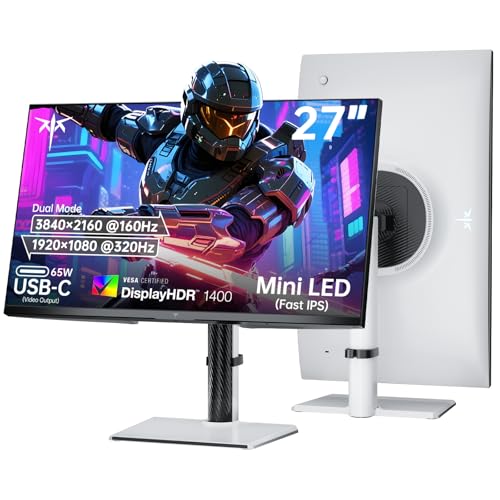
KTC 27 Inch Dual Mode Mini LED Monitor 65W Type-C

Lian Li 8.8 Universal Screen White SM088W
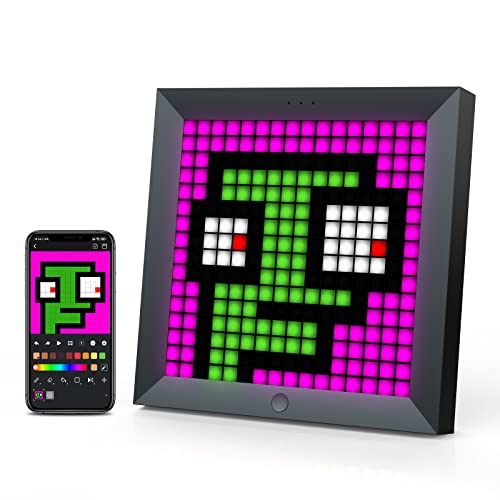
Divoom Pixoo LED Pixel Display Panel

Vetroo A6 Display Board w LED Lights

HP 23.8 LED Backlit Monitor V241ib Black

ViewSonic VP2765-LED 27 LED LCD Monitor
More Details On Our Top Picks
The VS2447M makes sense for a normal desk where you want a compact 24-inch screen without giving up smooth motion. Its 100Hz refresh rate means scrolling and everyday movement look steadier than on a plain 60Hz panel, and the anti-glare finish helps in rooms with side light or a bright window.
Compared with the gaming-leaning Dell and KTC picks later in this list, this ViewSonic keeps things calmer and more straightforward. The thin bezels also help a dual-monitor setup look tidy, while the built-in speakers trim a little desk clutter, though audio-minded setups will still want separate speakers or headphones.
Strong Points
- 24-inch size fits small and medium desks without taking over the whole surface.
- 100Hz refresh rate gives moving text and casual games a smoother feel.
- Anti-glare coating helps cut reflections during daytime work.
- Thin bezels suit side-by-side monitors and make the screen area feel larger.
- Dual speakers keep basic sound on the monitor itself, which is handy for light use.
Things To Consider
- 4ms response time is fine for general play, though faster gaming panels go further.
- Built-in speakers are practical, but they usually trail separate desktop audio.
- The feature set is tuned for everyday use, not for color-critical creative work.
Feature Snapshot
Who It Suits Best
You get the most from this model as a home office or student monitor where steady motion, simple hookups, and a modest footprint matter more than flashy extras.
Where A Sibling Pick Shines
ViewSonic VP2765-LED 27 LED LCD Monitor is a better fit for color-sensitive desk work, while the VS2447M suits you better for a smaller, more casual setup.
A 27-inch gaming screen only makes sense when speed and motion clarity sit near the top of your list, and this Dell leans hard into that. The 240Hz class panel and FreeSync Premium support help fast-moving games feel more controlled, while the IPS panel, or in-plane switching panel, keeps colors and viewing angles more consistent than basic TN-style designs.
The trade-off is that this model is focused on motion and comfort, not on a crowded feature list. Compared with the ViewSonic VS2447M, it aims more at serious gaming sessions, and the tilt-only stand keeps the physical setup simple, which some desks will appreciate and others may outgrow.
What We Like
- 240Hz refresh rate is built for fast, fluid motion in competitive games.
- FreeSync Premium helps reduce visible tearing during variable frame delivery.
- IPS panel offers wider viewing consistency for shared desks or off-angle use.
- Low blue light tuning supports long stretches in front of the screen.
- Two HDMI ports plus DisplayPort 1.4 make source switching easier.
Worth Noting
- 27-inch FHD can look less sharp at close range than a 27-inch higher-resolution panel.
- Tilt adjustment only means less ergonomic freedom than stands with height or swivel.
- It is aimed at gaming first, so office-first users may not need this much speed.
Details At A Glance
Who Will Love This
You should look at this Dell if your desk time splits between fast games, streaming, and general use, with gaming performance leading the decision.
A Better Fit Elsewhere
ViewSonic VP2765-LED 27 LED LCD Monitor is the better route for work that values screen uniformity and ergonomic adjustment more than raw speed.
This KTC is built for you if one screen needs to do two jobs, because the dual-mode setup changes the pace of the panel itself. In 4K at 160Hz it leans into detail and smoothness, and in 1080p at 320Hz it shifts toward speed, which is a strong match for players who jump between story games, console sessions, and fast shooters.
The 65W Type-C port adds practical desk value too, since a single USB-C cable can often carry display and charging duties for compatible laptops. Compared with the simpler Dell SE2726HG, this one asks for more money and desk planning, but the Mini LED backlight and 1152 dimming zones point to a much more layered picture for users who care about contrast and brightness control.
Highlights
- Dual-mode operation gives you a fast or detailed setup from one panel.
- Mini LED backlight with many dimming zones supports tighter brightness control.
- 65W Type-C works well for cleaner laptop-and-monitor desks.
- HDMI 2.1 and DisplayPort 1.4 widen compatibility for modern gear.
- Height adjustment helps tailor the screen to a better viewing line.
Points To Note
- The feature set is dense, so setup planning matters more than on a basic monitor.
- Dual-mode flexibility is useful, though many everyday desks will not need both speeds.
- Mini LED performance can be compelling, but it adds complexity you may not want for simple office work.
Core Details
Built With In Mind
You fit this model best as a power user who wants one monitor to handle gaming, laptop docking, and a cleaner desk without moving to separate screens.
Skip It When
Dell 27 240Hz Gaming Monitor SE2726HG is the simpler call for shoppers who want a straightforward high-refresh gaming display without dual-mode complexity.
This Lian Li screen is less about general computing and more about turning the inside or top of a PC build into a live display zone. The 8.8-inch format and adjustable mounting make it a natural fit for case builders who want temperature readouts, custom visuals, or a clean status panel without crowding the main desk monitor.
Compared with the bigger conventional displays in this list, it plays a very different role, almost like a dashboard badge for your tower. The white finish suits bright-themed builds especially well, though the setup depends on compatible software and careful installation, so it rewards tidy builders more than casual tinkerers.
Reasons To Buy
- Compact 8.8-inch size suits modern case builds without taking much room.
- Adjustable mounting helps it fit different PC layouts.
- Customizable ARGB frame gives you more control over the look.
- Screen-based temperature display is useful for quick status checks.
Areas To Watch
- It is a niche accessory, so it is not a replacement for a main monitor.
- Installation details matter, especially around screw choice and software setup.
- The value depends on how much you care about case presentation.
Feature Rundown
Perfect Match For
You fit this best as a PC builder who wants a polished internal display and already enjoys cable routing, case customization, and software control.
Look Elsewhere When
ViewSonic VS2447M 24 Inch 1080p Monitor 100Hz makes more sense for a main desk screen, especially for work and everyday viewing.
The Pixoo is for desks that need personality as much as utility, especially in gaming rooms where light, motion, and theme all matter. App control makes it more flexible than a plain novelty display, so you can use pixel art, custom animations, or visual sync effects without turning the setup into a wiring puzzle.
Compared with the Lian Li screen, which feels like a PC hardware dashboard, this Divoom piece leans harder into décor and atmosphere. The honest read is that it makes the most sense beside RGB bars, a TV setup, or a themed workspace, while minimal desks may find it a little busy.
Best Bits
- Smart app control gives you direct access to custom visuals.
- Pixel art animations bring motion to gaming and media setups.
- It pairs neatly with RGB light bars and other desk lighting.
- The design works well in shared spaces where you want visual character.
Softer Spots
- It is decorative first, so practical information display is limited.
- App-based control means the experience depends on your phone and setup habits.
- Highly themed lighting can feel busy in a very plain workspace.
At A Glance
Whose Shelf It Belongs On
You get the most from this panel if you like expressive desk décor and want something that feels more playful than a standard screen.
Another Choice May Suit
Lian Li 8.8 Universal Screen White SM088W is the stronger pick for hardware monitoring inside a PC build, while the Divoom suits decorative setups better.
This Vetroo board is the practical sibling to the more playful Divoom panel, because it focuses on case decoration in a slim vertical footprint. The 9.8 x 3.1-inch shape makes it easier to tuck into a build where space is tight, and the tape-based mounting keeps the installation path simple for neat builders.
It suits users who want a display accent inside the chassis rather than a desk-facing screen. The trade-off is that placement has to be deliberate, and the lighting modes are modest, so this works best as a subtle visual layer rather than a centerpiece.
Positives
- Vertical format fits narrow case spaces neatly.
- Double-sided tape installation keeps the mounting process simple.
- Full HD and 2K support give the panel a sharper visual feel.
- Three lighting modes add some motion without overwhelming the build.
Room For Improvement
- It has a narrow job, so it is only useful inside compatible PC cases.
- Tape mounting is convenient, but clean surface prep matters for a secure fit.
- The visual effect is more subtle than a larger desk display.
Quick Facts
The Right Fit
You fit this board best if your PC case has enough internal room for a vertical accent and you want an easier install than a fully custom display setup.
Reach For A Different Pick When
Lian Li 8.8 Universal Screen White SM088W makes more sense for users who want software-driven status data instead of a simpler decorative board.
The HP V241ib is the sort of monitor that makes sense for workdays that start with email and end with streaming or browsing. Its 23.8-inch size sits in a comfortable middle ground, and the low blue light feature gives the screen a calmer feel for long sessions without turning the picture dull.
Compared with the more gaming-heavy Dell and KTC models, this HP stays steady and ordinary in a good way. It is an easy match for home offices, student desks, or shared rooms where you want a familiar full HD screen instead of a spec-heavy setup.
What We Like
- 23.8-inch size fits everyday desk use without feeling oversized.
- Low blue light mode supports longer viewing comfort.
- Full HD resolution covers everyday work and entertainment cleanly.
- HP IPS panel wording points to more even viewing from different angles.
Small Caveats
- It is a basic monitor, so gamers may want higher refresh rates.
- Office-first users will like it more than spec chasers.
- Visual polish depends more on your source device than on extra display features.
Core Details
Who Should Grab It
You suit this monitor best if you want a dependable home or office screen without needing gaming speed or a feature-packed stand.
Swap It Out When
ViewSonic VS2447M 24 Inch 1080p Monitor 100Hz is the better fit for a little more motion smoothness, especially for mixed work and casual play.
The VP2765-LED is the most office-minded screen in this list, with ergonomics and viewing comfort taking center stage. The adjustable stand, anti-glare hard coating, and broad 178-degree viewing angles make it a calm fit for long hours at a desk, especially where screen position changes a lot during the day.
Compared with the HP V241ib, this ViewSonic feels more deliberate and more adjustable, which matters in shared workspaces or color-sensitive roles. The honest read is that it belongs on desks where accurate image handling and flexible placement matter more than gaming speed or decorative extras.
Positives
- Height, swivel, pivot, and tilt adjustment give you many positioning options.
- Anti-glare coating helps in bright offices and near windows.
- DisplayPort, USB, DVI-D, and VGA inputs cover a wide range of devices.
- Mac, Windows, laptop, and desktop compatibility makes it easy to place in mixed environments.
- VESA mount support gives you another way to set up the workspace.
Points To Note
- Its focus is professional use, so it does not chase gaming speed.
- Full HD at 27 inches is practical, though some users may prefer sharper density.
- The older-style input mix is flexible, but it also signals a more traditional design.
Technical Sheet
Built For In Mind
You fit this monitor best if your desk work involves long hours, careful image viewing, or frequent position changes throughout the day.
Another Choice May Suit
HP 23.8 LED Backlit Monitor V241ib Black is the simpler alternative for a smaller, more affordable-feeling everyday setup.
How To Choose The Right Led Computer Displays
Match The Panel To Your Routine
For everyday office work, a 23.8 to 24-inch screen often feels easier to place and easier to live with. A 27-inch display gives you more room for split windows, game interfaces, or creative tools, but it also asks for more desk depth. The size decision matters most when your desk already holds a laptop, speaker, and keyboard.
Refresh Rate And Motion Clarity
Refresh rate means how many times the screen updates each second, so a 100Hz panel looks smoother than a standard 60Hz screen, and a 240Hz class model goes further for fast gaming. That matters most for scrolling, action games, and moving video. The trade-off is that higher refresh usually pushes the cost up and can make you pay for speed you may never use.
Think About Ports And Placement
HDMI covers most modern devices, while DisplayPort is common on desktop gaming rigs and often better for high refresh use. USB-C with power delivery, like the KTC’s 65W Type-C port, can trim cable clutter for laptops that support it. Stands matter just as much, because height, pivot, and swivel are far more helpful on a shared office desk than tilt alone.
Decide Whether You Need Extras
Eye-comfort features, built-in speakers, anti-glare surfaces, and thin bezels all solve different problems. A screen with low blue light and an anti-glare finish suits long workdays near a window, while a display with custom lighting or case mounting fits a themed setup better. The right mix depends less on spec count and more on the way your desk actually gets used.
Things Worth Knowing First
Common Shopping Slip Ups
A common mistake is picking size before checking desk space, cable reach, and stand clearance. Another is buying gaming speed for a work-only setup, then realizing a calmer IPS office panel would have been easier to live with. You also want to watch for resolution and size pairs that can feel soft at close range.
Where The Extra Money Goes
Higher-tier models usually spend the budget on faster refresh, better backlight control, wider adjustment, and richer port selection. Mini LED and multi-mode panels add parts and tuning, which is why they tend to sit above simpler full HD office screens. That upgrade makes the most sense for gaming-heavy desks, laptop docking, or users who want more control over how the image looks.
Closing Thoughts
You have a fairly wide spread here, from compact office screens to flashy case displays and high-speed gaming panels. That’s useful, because your best choice depends on whether you spend more time writing, gaming, building PCs, or decorating a desk. The safest all-round route is the one that matches your room first and your specs second. Pick the model that fits your setup without making the rest of the desk feel crowded.
