
Choosing a monitor usually comes down to how you work, how much desk space you have, and how often you stare at it. These six LED-backlit LCD picks cover compact office setups, wider 24-inch displays, and refurbished options that can fit a tighter budget without going tiny. You’ll see where IPS panels help with viewing angles, where TN panels trade color consistency for speed, and which models make setup easier with better stands and port options.
The Shortlist At A Glance

Lenovo ThinkVision S22e-19 21.5-Inch LED Backlit LCD Monitor

Dell E2420H 24 Inch FHD IPS Monitor (25WFD)

Dell P2018H 20 LED-Backlit LCD Monitor, Black
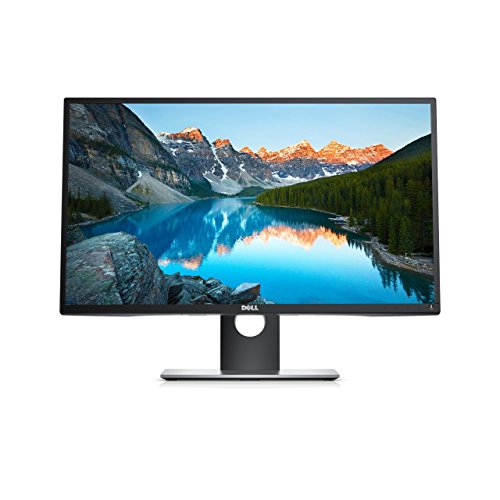
Dell Professional P2317H 23 Screen LED-Lit Monitor (Renewed)

Dell P2213 Professional 22 LED-Backlit LCD Monitor, Black

Dell E2420H 23.8 Inch FHD IPS Monitor (Renewed)
More Details On Our Top Picks
The Lenovo S22e-19 makes sense for a desk that doesn’t have room to waste. At 21.5 inches, it stays compact, yet the Full HD panel still gives you enough space for documents, email, and a couple of browser windows.
The VA panel, meaning vertical alignment, leans toward stronger contrast than many basic office screens, so text and dark backgrounds usually feel a little richer. That said, the HDMI and VGA mix keeps it friendly for older desktops and simple work setups, which is handy in a shared room or starter office.
Strong Points
- 21.5-inch size keeps your desk open.
- Full HD resolution gives you a clean everyday workspace.
- VA panel suits text-heavy use and mixed lighting.
- HDMI and VGA help with older or newer machines.
- The smaller footprint works well in dorm rooms or compact offices.
Things To Consider
- The screen size may feel tight for side-by-side creative work.
- VA panels can feel slower than IPS for fast motion, so that matters less for office tasks than gaming.
- Owners who rework cable layouts often may want to plan desk access carefully around the rear ports.
Feature Snapshot
Who It Suits Best
You get the most from this pick in a small home office, student desk, or basic work station where space matters more than having a giant panel.
Where A Sibling Pick Shines
The Dell E2420H 24 Inch FHD IPS Monitor (25WFD) suits you better for shared viewing and more consistent color across a wider screen.
The 24-inch size gives this Dell a more open feel than the Lenovo S22e-19, and that extra room matters once you live in spreadsheets or split a screen between a document and chat. IPS, short for in-plane switching, usually means better color consistency across the panel, so people sitting slightly off-center still get a useful picture.
DisplayPort and VGA make it fit mixed office setups, and the thinner profile helps when you want a cleaner desk line. For most home offices, this is the kind of monitor that fades into the background in a good way, which is often exactly what you want.
What We Like
- 24-inch size gives you more room for side-by-side work.
- IPS viewing holds up better from angled seats.
- DisplayPort and VGA cover modern and legacy connections.
- The slim body helps it sit neatly on crowded desks.
Room For Improvement
- The larger footprint needs a little more depth than a 21.5-inch model.
- It keeps things office-focused, so you’re not getting flashy extras.
- People who move between multiple computers may still want a separate hub for easier switching.
Core Details
Made For
You’ll appreciate this most in a steady work setup where screen space, clean image quality, and easy connections matter more than gaming extras.
Another Choice May Suit
The Dell P2213 Professional 22 LED-Backlit LCD Monitor, Black fits better for you if adjustable ergonomics matter more than a wider panel.
Not every desk needs a 24-inch panel, and that’s where the P2018H makes its case. Its 20-inch TN screen, meaning twisted nematic, keeps the footprint small and the response time quick enough for everyday office use or basic video playback.
The standout here is the stand. Tilt, swivel, pivot, and height adjustment give you far more positioning control than the simpler fixed designs in this roundup, so the monitor can work around your desk instead of the other way around.
Highlights
- Small 20-inch size suits tight desks and shared counters.
- The adjustable stand helps you set a comfortable viewing angle.
- DisplayPort, HDMI, and VGA widen your connection choices.
- 1600 x 900 resolution is enough for simple office tasks.
Areas To Watch
- The 1600 x 900 resolution feels less spacious than the Full HD picks.
- TN panels usually trail IPS on viewing angles and color uniformity.
- The 90-day manufacturer coverage is shorter than what many shoppers prefer for a desk anchor.
At A Glance
The Right Fit
You’ll get the most out of this one on a compact desk, a side station, or a simple office setup where flexibility matters more than extra screen width.
A Better Fit Elsewhere
The Dell E2420H 24 Inch FHD IPS Monitor (25WFD) is the cleaner match for you if you want a larger, sharper workspace for long document sessions.
This Dell lands in a nice middle ground: large enough for productivity, still manageable on a standard desk, and built with a port layout that suits workstations with extra peripherals. The Full HD screen and 60 Hz refresh keep office content smooth enough for day-to-day tasks, while the renewed angle may appeal to shoppers who are comfortable with a pre-owned route.
HDMI, VGA, USB 3.0, USB 2.0, and a USB upstream connection give it more docking-style flexibility than the simpler entry-level picks above. That mix can be especially handy in a busy home office, where a monitor that doubles as a connection hub saves a little desk clutter.
Upsides
- 23-inch screen gives you a comfortable workspace without feeling oversized.
- USB ports add everyday convenience for peripherals.
- The 6 ms response time keeps routine motion reasonably clean.
- Widescreen 16:9 shape works well for documents and presentations.
Small Caveats
- Renewed products can suit value-focused setups, but you may want to think through your comfort level with pre-owned gear.
- It lacks the broader viewing consistency you get from the IPS-based Dell E2420H models.
- Owners who want the lightest possible footprint may still prefer the 20-inch Dell P2018H.
Details At A Glance
Whose Shelf It Belongs On
You’ll like this most in a practical office setup where extra ports and a comfortable middle-size screen matter more than a minimalist design.
Skip It When
The Dell E2420H 24 Inch FHD IPS Monitor (25WFD) is the safer pick for you if color consistency from wider angles matters more than USB convenience.
The P2213 feels built for work first, which suits you well in a spreadsheet-heavy setup or a room that doubles as a desk and meeting space. Its 22-inch size keeps the display manageable, while the adjustable stand gives you tilt, swivel, pivot, and height control, so posture tuning is straightforward.
Port flexibility is the other draw here, especially for a monitor that may need to handle different laptops or office towers over time. The plain black finish stays discreet, and the design has enough practical polish that it won’t look out of place beside newer gear.
Best Bits
- Adjustable stand supports a more tailored setup.
- 22-inch size lands in a comfortable middle zone.
- Connection options help it slot into mixed workspaces.
- The professional styling fits office desks cleanly.
Softer Spots
- Its age means you should expect older design cues, even though that may not matter in daily use.
- The feature set is more practical than flashy.
- People who want a wider 24-inch canvas may prefer the Dell E2420H 24 Inch FHD IPS Monitor (25WFD).
Quick Facts
Best Suited To
This works well for office workers, home admins, and multitaskers who want a sensible screen with ergonomic flexibility.
Look Elsewhere When
The Dell P2018H 20 LED-Backlit LCD Monitor, Black suits you better when desk space is tighter and the smaller size matters more than extra width.
This renewed E2420H lands close to the non-renewed Dell in size and panel type, so the appeal is familiar: a 23.8-inch IPS screen with enough room for office work and enough visual consistency for shared use. The DisplayPort and VGA pair keeps it compatible with modern and older machines, which can matter in a mixed home office or a back-office workstation.
Because it’s renewed, the attraction is usually about getting a familiar office-style layout without jumping to a more expensive new unit. The trade-off is simple, you’re leaning on refurbished condition rather than fresh out of the box ownership, so it suits practical setups more than perfection-chasing ones.
Positives
- 23.8-inch IPS screen gives you an easy-to-work-on size.
- Full HD resolution suits documents, browsing, and light media.
- DisplayPort and VGA make it easy to mix older and newer systems.
- The renewed route can fit a sensible office refresh.
Minor Gripes
- Renewed condition can be a comfortable fit for some setups, but you may want to be clear on your comfort level with refurbished gear.
- The design stays utilitarian rather than polished or modern-looking.
- For a brand-new desk anchor, the standard Dell E2420H 24 Inch FHD IPS Monitor (25WFD) is the cleaner fit.
Feature Card
Built With In Mind
You’ll get the best fit from this renewed model in a value-conscious office or a spare workstation that still needs a dependable 24-inch-class screen.
Swap It Out When
The Lenovo ThinkVision S22e-19 21.5-Inch LED Backlit LCD Monitor makes more sense for you if a smaller footprint matters more than the larger IPS panel.
How To Choose The Right Led Backlit Lcd Monitors
Screen Size And Desk Reality
Screen size changes the whole feel of a desk. A 20- or 21.5-inch monitor keeps the footprint tight, which helps in dorm rooms, shared counters, and work corners where every inch counts. A 23.8- or 24-inch screen gives you more space for two windows side by side, but it also asks for a deeper desk and a little more visual attention.
The honest read is that bigger is not always better. For long email sessions and office documents, a smaller panel can feel calmer and easier to place, while a 24-inch screen makes more sense once spreadsheets or split-screen work show up daily.
Panel Type Shapes What You See
IPS panels usually keep color and contrast steadier when you’re not sitting dead center, which helps in shared spaces or side-by-side setups. TN panels tend to cost less and can feel responsive, but they usually give up some viewing consistency and color stability.
That trade-off matters most in your use case. For basic office work, a TN display can be fine, while an IPS screen better supports photo browsing, shared viewing, and desks where your chair position changes often.
Ports And Stand Adjustment Matter More Than They Sound
Port selection can save you trouble later. HDMI and DisplayPort cover most modern computers, while VGA still helps with older towers and legacy office machines, so a mix of inputs broadens the monitor’s useful life.
Stand movement matters too. Tilt is the bare minimum, but swivel, pivot, and height adjustment make a screen easier on your neck and easier to place beside lamps, shelves, and laptop stands.
Renewed Vs New, And Where That Trade-Off Lives
Renewed monitors can make sense when you want familiar office hardware without stepping into a higher new-unit cost bracket. The catch is condition and expectations, because refurbished gear works best for shoppers who care more about function and less about having untouched packaging.
New units usually feel simpler to place in a long-term workspace. Renewed models can still be a smart route, especially for a spare office or a desk that doesn’t need to be your permanent showpiece.
Things Worth Knowing First
Common Shopping Slip Ups
Size mistakes happen fast in this category. A 24-inch monitor can feel cramped on a small desk, while a 20-inch screen can feel a little small once you start splitting windows all day.
Another easy miss is connector mismatch. A monitor with only VGA, or one without the port you actually use, can turn a simple setup into a cable hunt.
What The Extra Spend Buys
Higher-tier models usually pay for better panel quality, more adjustable stands, and more useful port mixes. That often shows up as steadier viewing angles, easier cable setup, and a monitor that fits into a busier workstation without fuss.
For office work, the upgrade matters most when the screen sits in front of you for hours. A better stand and a cleaner IPS panel can matter more than any cosmetic detail on the box.
Closing Thoughts
You’ve got a solid spread here, from the compact Lenovo S22e-19 to the wider Dell E2420H options and the more flexible professional Dell stands. The right choice depends less on buzz and more on your desk, your ports, and how much room you want for documents, tabs, and side-by-side work. For a straightforward office screen, the Dell E2420H models are easy to respect. For tighter spaces, the smaller Lenovo and Dell P2018H make a more practical fit.
