
Choosing Led Computer Screens gets easier once you separate ambient light bars from full monitors. Some picks help you work late without glare, while others give you a new display with smoother motion, better color, or a smaller footprint for a tight desk.
That mix matters in real use. A gamer, a remote worker, and a dorm-room setup all need different things, and the wrong kind of screen gear can feel awkward fast. The shortlist below keeps those use cases in view.
Quick Look At The Shortlist

Govee Gaming Light for Monitor G1 RGBIC Backlight

Quntis Curved Monitor Light Bar 15 RGB Backlight

Monitor Light Bar Eye-Care USB Reading Lamp 11.8”
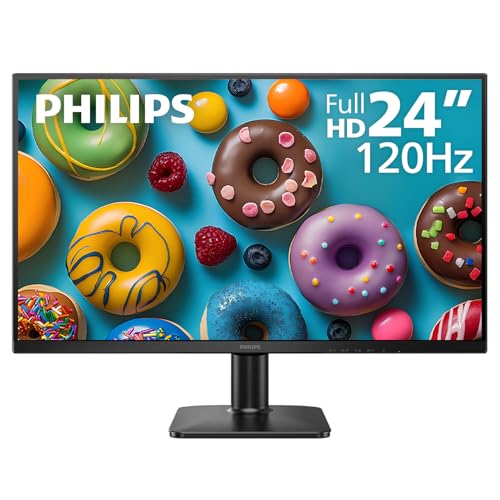
Philips 24 Inch Computer Monitor 24E2N2100

Philips 22 Inch Computer Monitor 22E2N1100

Philips 22 Inch Computer Monitor 221V8LB
Philips 24 Inch Computer Monitor 241V8LB

Sceptre 24-inch Prime Monitor E248W-19203R
More Details On Our Top Picks
Govee’s backlight makes more sense for a gaming desk than for a plain office setup. The RGBIC layout lets different sections show different colors, so the wall behind your monitor can feel more layered than a single-color strip.
The fit here is for 27-inch to 34-inch screens, including curved panels, and that makes it a stronger match than the smaller light bars below. The trade-off is simple, it’s a mood-first accessory rather than a task light, so you’re choosing atmosphere over white desk illumination.
Strong Points
- RGBIC lighting gives you more color separation than a basic single-zone strip.
- It suits 27-inch to 34-inch monitors, including curved designs.
- Double-strip bead placement should help the glow feel more even across the back edge.
- Its scene modes give you plenty of visual variety without extra gear.
Things To Consider
- It’s better for ambient lighting than focused desk work.
- The effect depends on how much space sits behind your display.
- Setting up a clean cable path takes a little patience around a crowded desk.
Feature Snapshot
Who It Suits Best
Gaming desk owners with a curved 27-inch to 34-inch monitor will get the most from this one.
Where A Sibling Pick Shines
The SAMPHON Monitor Light Bar is a better fit for you if you want plain task lighting instead of color effects.
The Quntis bar takes a different route from the Govee strip, because it sits above the screen instead of wrapping the back of it. That makes it more useful for a desk where you want a cleaner beam of light across the keyboard and notes.
Its foldable dual-light design and curved-monitor fit make sense for ultrawide setups, especially around 34-inch and larger screens. You may find the clamp style worth checking closely on thicker or unusually thin displays, since a snug fit matters more here than with a simple adhesive strip.
What We Like
- The 34-inch-plus fit points it toward larger desktops and ultrawide panels.
- Foldable dual lights give you more angle control than a fixed bar.
- Stepless dimming lets you fine-tune brightness instead of jumping between steps.
- Adjustable color temperature helps the light feel better suited to work or play.
- It reduces glare by staying out of the screen’s direct viewing path.
Room For Improvement
- It’s tuned for larger monitors, so smaller desks may feel crowded.
- The clamp fit needs a little attention during setup.
- RGB backlighting adds style, but that also makes it less purely task-focused.
Core Details
Made For
Ultrawide monitor owners who want a brighter desk surface without a lamp base taking up space will get the most from this pick.
Another Choice May Suit
The Govee Gaming Light for Monitor G1 fits you better if you want more dramatic ambient color rather than direct desk lighting.
This SAMPHON bar is the most straightforward desk helper in the group. At 11.8 inches, it stays compact, yet the wide spread and stated 800 lux center brightness give you a stronger work light than a tiny clip lamp usually does.
The 45-degree lighting angle matters because it keeps the beam on the desk instead of blasting straight into your eyes. For long email sessions, coding, or late-night homework, that usually feels calmer than a brighter room light, though the smaller bar means it’s best for modest setups.
Positives
- The 11.8-inch bar saves desk space.
- Its 30 x 20 inch coverage helps the light spread over more of your work area.
- 800 lux at the center gives it solid punch for note-taking and keyboard use.
- Three color temperature options make it easier to match the time of day.
Worth Noting
- Compact size means it suits smaller desks more naturally than wider stations.
- The fit depends on the monitor shape and available top edge space.
- You’ll want to keep the bar dusted so the light output stays even over time.
Details At A Glance
The Right Fit
Students, remote workers, and apartment dwellers with limited desk space will get the most from this one.
Skip It When
The Quntis Curved Monitor Light Bar 15 RGB Backlight makes more sense for you if your desk uses a large ultrawide display and you want a more adjustable bar.
A 24-inch IPS panel with 120Hz refresh is a sensible step up for everyday work that also sees some after-hours browsing or video. IPS means in-plane switching, which usually gives you steadier color and viewing angles than a basic panel, and that helps when you share the screen across a desk.
This Philips model feels like the calm middle ground in the list. Compared with the 22-inch versions, it gives you a bit more room for side-by-side windows, and the VESA mount support also makes it easier to place on an arm or wall setup.
Highlights
- The 24-inch size gives you more breathing room for documents and tabs.
- 120Hz motion looks smoother than a standard 60Hz office screen.
- IPS viewing angles help the image stay consistent across different seating positions.
- HDMI, VGA, and VESA support make it flexible for older and newer setups.
- Flicker-free and low blue light features suit long desk sessions.
Softer Spots
- It’s more desk monitor than entertainment display, so color hobbyists may want a different class of panel.
- The 24-inch size still needs a sensible desk depth for comfortable viewing.
- VESA mounting adds flexibility, but it also means you may want to plan cable routing carefully.
Technical Sheet
Whose Shelf It Belongs On
You’ll appreciate this one most in a home office where work, web browsing, and casual video all share the same desk.
Look Elsewhere When
The Sceptre 24-inch Prime Monitor E248W-19203R fits you better if built-in speakers and a wider color gamut matter more than IPS viewing angles.
The 22E2N1100 leans harder toward fast motion than the 24-inch Philips above. An overclocked 120Hz panel with 1ms MPRT, meaning a motion-response rating measured in milliseconds, makes it a sharper fit for quick scrolling, lighter gaming, and anything with frequent scene changes.
That speed comes in a smaller shell, so it works well on compact desks where every inch matters. The honest read is that 22 inches can feel tight for side-by-side office windows, but that same size can be a relief on a shallow gaming station.
Best Bits
- The 1ms MPRT spec points to crisp motion handling.
- 120Hz on a 22-inch panel keeps the setup compact and lively.
- IPS technology helps the image stay consistent when you shift position.
- VESA support gives you a route to arm or wall mounting.
- HDMI and VGA inputs keep the monitor useful with older and newer machines.
Points To Note
- The smaller screen can feel cramped for spreadsheet-heavy days.
- Overclocked refresh is useful, but it’s still a 22-inch workspace.
- Keeping a compact screen clean is easy, though it can show dust around the bezel quickly.
Feature Card
Best Suited To
Compact-desk users who want a faster-feeling display for gaming and everyday scrolling will get the most from this pick.
Reach For A Different Pick When
The Philips 24 Inch Computer Monitor 24E2N2100 suits you better if extra workspace matters more than compact size.
The 221V8LB is the quieter, more everyday-minded sibling in Philips’ 22-inch group. A VA panel, or vertical alignment panel, usually leans toward solid contrast, and that can make text, video, and general office work feel easy on the eyes without asking for much desk space.
Compared with the IPS-based 22E2N1100, this one focuses less on speed and more on simple daily comfort. The tilt adjust is useful on a lower or higher desk, and the 100Hz refresh rate gives you a bit more smoothness than a basic 60Hz display.
Bright Spots
- The 22-inch size keeps the footprint modest.
- 100Hz motion is a welcome step up from standard office pacing.
- VA panel contrast tends to suit reading, streaming, and casual desktop use.
- Tilt adjustment helps you line up the screen with your chair height.
- Flicker-free and low blue light features are helpful during long work blocks.
Areas To Watch
- It’s less focused on gaming speed than the 22E2N1100.
- 22 inches can feel a bit tight for heavy multitasking.
- Dust can collect around a small stand base, so occasional wiping keeps the setup tidy.
Core Details
Who Should Grab It
You’ll like this most if you want a modest-sized monitor for work, browsing, and casual video with a bit more motion smoothness.
Swap It Out When
The SAMPHON Monitor Light Bar is the better fit for you if your main need is adding light to an existing screen instead of replacing the screen itself.
This 24-inch Philips sits in a comfortable middle zone. You get the same VA-based feel as the 22-inch 221V8LB, but the extra size gives your browser tabs, spreadsheets, and video windows more breathing room.
That larger canvas helps in shared family spaces too, where a monitor may be used by more than one person in a week. The trade-off is that a 24-inch panel asks for a little more desk depth, so shallow setups should measure first.
Reasons To Buy
- The 24-inch size is easier to live with for mixed work and media.
- 100Hz keeps everyday motion pleasantly smooth.
- VA panel contrast can make casual viewing feel richer.
- Adaptive Sync helps motion feel steadier in supported content.
- Tilt adjustment gives you a simple comfort tweak.
Minor Gripes
- It still keeps a basic stand approach rather than a fully adjustable ergonomic base.
- A 24-inch desk monitor can feel large on a very shallow table.
- Like most glossy-front displays, fingerprints may need occasional wiping.
Feature Rundown
Built With In Mind
You’ll get the most from this one in a shared office or multipurpose desk where work and entertainment share the same screen.
Where Shoppers Go Wrong
The Philips 24 Inch Computer Monitor 24E2N2100 is the better fit if you’d rather have IPS viewing angles than VA contrast.
Sceptre’s 24-inch model rounds out the list with a simple, practical formula. The thin frame, 99% sRGB color coverage, and built-in speakers make it feel ready for a dorm room, second desk, or small apartment setup without asking you to add much else.
Compared with the Philips options, this one leans more toward convenience features than panel refinement. The honest read is that the built-in speakers will suit casual use more than serious audio, but they still reduce clutter when you want a minimal desk.
Upsides
- 99% sRGB coverage should help color look fuller for normal desktop use.
- Dual HDMI plus VGA gives you broad connection flexibility.
- Built-in speakers reduce the number of extra desk items you need.
- The 24-inch size works well for a general-purpose screen.
Small Caveats
- Built-in speakers keep things convenient, though external audio can still sound fuller.
- The thin-body design is tidy, but cable management still matters behind the desk.
- It’s more about everyday convenience than high-end panel tuning.
Core Details
Who Will Love This
You’ll appreciate this if you want a tidy everyday monitor for browsing, streaming, and light work with fewer add-ons.
Skip It When
The Philips 24 Inch Computer Monitor 241V8LB fits you better if you want a more panel-focused 24-inch option with a different visual character.
How To Choose The Right Led Computer Screens
Match The Screen To Your Desk
A light bar or backlight helps a display, while a monitor replaces one. That sounds obvious, but in practice it changes everything about space, glare, and setup time. A desk with a fixed shelf often suits a top-mounted bar, while a deeper desk can handle a 24-inch monitor more comfortably.
The screen size also changes the feel of your workday. A 22-inch panel keeps things tight and tidy, but a 24-inch model makes side-by-side windows less cramped. For gaming stations, larger ultrawide displays tend to pair better with bars that sit above the panel instead of behind it.
Think About Motion, Color, And Light
Refresh rate matters more than many shoppers expect. A 100Hz or 120Hz screen usually feels smoother during scrolling, video, and casual gaming than a standard 60Hz panel, and 1ms MPRT pushes that motion clarity idea further. On the lighting side, RGB effects are about atmosphere, while stepless dimming and color temperature control are about comfort.
Color tools matter too, but they solve different problems. IPS panels usually serve shared desks and mixed use well because viewing angles stay steadier, while VA panels often bring stronger contrast for movies and everyday work. For ambient strips, RGBIC can create layered color scenes, yet a plain white task light still helps more with late-night typing.
Check Fit Before You Fall In Love
Mounting and clamp design deserve a closer look than the glossy product photos suggest. A bar built for 34-inch-plus curved displays may sit awkwardly on a smaller flat panel, and a narrow monitor edge can make a clamp feel less stable than expected. VESA support on a monitor gives you extra placement freedom, which helps in tight rooms.
You should also think about upkeep. Light bars stay tidy with basic dusting, while monitors need you to watch stand depth, cable routing, and the occasional wipe across the bezel. Those small ownership details matter more than fancy wording on the listing.
A Quick Reality Check
Wrong Turns To Avoid
A common mistake is buying light effects for a problem that actually needs desk illumination. RGB backlighting looks great, but it won’t replace a bar that throws white light across your keyboard. Another easy miss is pairing a compact 11.8-inch lamp with a wide ultrawide monitor and expecting full coverage.
Screen size mistakes happen too. A 22-inch monitor can feel cramped for spreadsheet work, while a 24-inch panel may crowd a shallow desk. Measure the space, then match the display to the way you sit.
The Upgrade Payoff
Higher-tier screens usually cost more because the panel tuning, motion handling, and mounting flexibility improve together. IPS panels, 120Hz refresh, and slimmer bezels usually create a cleaner daily experience, especially for mixed work and media use. That extra spend also tends to buy more comfortable viewing over a longer day.
The upgrade makes the most sense for heavier use. Frequent gaming, multi-window office work, and shared desks benefit more than a spare bedroom setup that sees only occasional use. In a simple setup, a practical 22-inch or a basic light bar often does enough.
Final Thoughts
The right Led Computer Screens choice comes down to whether you want light, color, or a full display upgrade. The Govee and Quntis picks serve desks that need atmosphere or task lighting, while the Philips and Sceptre monitors cover the people who want a real screen with different sizes and panel styles. Match the pick to your desk depth, your daily use, and how much motion smoothness matters to you. That’s the cleanest way to end up with something you’ll use comfortably every day.
