
Finding the right monitor usually comes down to three things, size, sharpness, and how it feels after a long day at the desk. You want a screen that fits your space, matches your computer ports, and stays comfortable through spreadsheets, calls, or a late-night game session. This roundup keeps the focus on practical use, not flashy extras. It should help you narrow the field fast.
Quick Look At The Shortlist

Samsung 32″ Flat Computer Monitor LS32B304NWNXGO

Amazon Basics 24-inch Full HD IPS Monitor
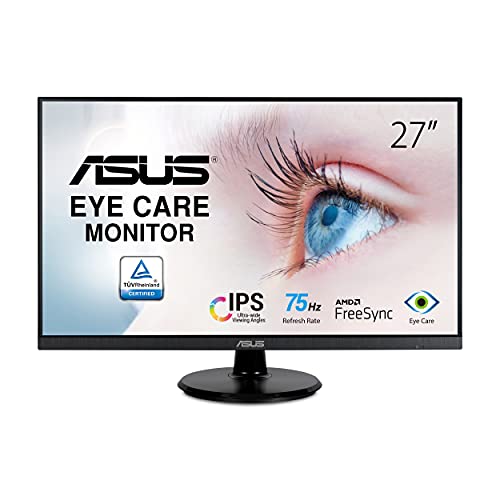
ASUS 27” 1080P Monitor VA27DQ

ViewSonic VS3225-2K 32 Inch QHD 1440p IPS Computer Monitor

Philips 22 Inch Computer Monitor 22E2N1100

Dell S-Pro S2719HSE 27″ FHD IPS LED LCD Computer Monitor

Philips 22 Inch Computer Monitor 221V8LB
Philips 24 Inch Computer Monitor 241V8LB
More Details On Our Top Picks
A 32-inch screen changes how you work, because windows stop crowding each other and spreadsheets breathe a little. The Samsung LS32B304NWNXGO leans into that roomy feel with a borderless look, so a dual-display desk should feel less chopped up. The honest read is that this size suits you best when desk depth isn’t tight and you like having several apps open at once.
Its 75Hz refresh rate, which means the screen updates 75 times per second, gives motion a steadier feel than a standard 60Hz panel. AMD FreeSync helps the display stay in step with a compatible graphics card, so scrolling and casual gaming can look cleaner. Advanced eye care is a useful touch for long work sessions, though the larger panel does ask for a bit more desk space and a sensible viewing distance.
Strong Points
- The 32-inch panel gives you more room for side-by-side windows, timelines, and reference tabs.
- The three-sided borderless design helps a multi-monitor setup feel more continuous.
- 75Hz motion support makes everyday movement look smoother than basic office panels.
- HDMI and DisplayPort cover common desktop and laptop connections without extra adapters.
Things To Consider
- The larger footprint can feel overbuilt on shallow desks.
- It makes the most sense only when you can sit at a comfortable viewing distance.
- There are no built-in speakers mentioned in the source data, so external audio may still matter for you.
Feature Snapshot
Who It Suits Best
You fit this monitor best if you work from a desktop setup and want more room than a 24-inch screen can offer.
Where A Sibling Pick Shines
Amazon Basics 24-inch Full HD IPS Monitor suits a smaller desk or a simpler home office better, especially when you want a lighter footprint than the Samsung LS32B304NWNXGO.
This is the sort of monitor that fits neatly into a plain office corner and gets out of the way. The 24-inch Full HD panel gives you a comfortable workspace for email, docs, calls, and web use without swallowing the desk. You may find it especially easy to place in a shared room, since the size stays sensible and the adjustable stand adds some posture flexibility.
IPS means in-plane switching, a panel type known for steadier color and wider viewing angles than many basic screens. That matters in a home office, because you can shift in your chair without the image looking washed out. The trade-off is simple, it’s more about dependable everyday use than fancy gaming features, even though the 75Hz rate still feels a touch smoother than standard office panels.
What We Like
- The 24-inch size lands in an easy middle ground for desks that are not especially large.
- IPS panel behavior suits shared viewing and regular office tasks.
- HDMI, DisplayPort, and VGA cover older and newer hardware.
- The tilting stand helps you dial in a more comfortable angle.
- VESA compatibility gives you wall or arm mounting options.
Small Caveats
- Built-in speakers are convenient, but external audio will usually sound fuller.
- The design is straightforward, so you should not expect extra visual flair.
- The 24-inch size is tidy, though it can feel limiting for heavy multitasking.
Core Details
Right Fit For
You suit this monitor best if you want a dependable everyday screen for office work, home learning, or a basic family desk.
A Better Fit Elsewhere
ViewSonic VS3225-2K 32 Inch QHD 1440p IPS Computer Monitor makes more sense for you if you want a larger canvas for multiple windows and sharper detail.
On a mixed-use desk, this ASUS lands in a comfortable middle zone. The 27-inch size gives you more room than a 24-inch monitor without stepping all the way up to a bulky 32-inch class display. That makes it a sensible choice for work during the day and relaxed media in the evening.
The frameless design helps the screen look tidy, especially beside another monitor, and the built-in speakers cut down on extra desk clutter. Adaptive Sync, ASUS’s variable refresh approach, helps reduce uneven motion when your computer and display are moving at different speeds. The trade-off is that the 1080p resolution on 27 inches won’t look as dense as a QHD panel, so text sharpness matters more here than it does on the ViewSonic above.
Highlights
- The 27-inch size gives you more room for documents and browser tabs.
- Built-in speakers keep a work desk simpler for calls and casual media.
- Low blue light and flicker-free design are helpful for long sessions at the screen.
- HDMI, VGA, and DisplayPort make it easier to match older and newer systems.
- The tilt-adjustable stand helps you set a more natural viewing angle.
Areas To Watch
- Full HD on 27 inches is usable, though sharper-text fans may want more resolution.
- The built-in speakers are practical, but they are still monitor speakers.
- It is a solid all-rounder, yet it does not chase the most aggressive gaming spec set.
Details At A Glance
Built With In Mind
You fit this monitor best if you want one screen for office work, light entertainment, and occasional gaming without crowding the desk.
Swap It Out When
Philips 24 Inch Computer Monitor 241V8LB suits you better if you want a smaller panel that takes up less room and feels easier to place in a compact setup.
The ViewSonic VS3225-2K is the sort of monitor that makes a larger desk feel more organized rather than more crowded. A 32-inch QHD panel, which means 2560 x 1440 resolution, gives you more room and finer detail than the 1080p screens above. For long workdays with reference docs, browser tabs, and creative apps open together, that extra sharpness can feel worthwhile.
Frameless styling helps the display disappear a bit when you line it up with another screen, and the anti-glare finish is useful in a bright room. Variable refresh rate can help smooth out motion across different sources, while HDR10 support gives the panel a little more range for compatible content. The honest trade-off is that this setup asks more of your desk space and your graphics hardware than the simpler 24-inch options.
Bright Spots
- QHD resolution gives you noticeably more workspace than Full HD models.
- The 32-inch size suits split-screen work and larger reference layouts.
- HDMI and DisplayPort cover common computer connections.
- Eye care features and anti-glare treatment make long sessions feel easier.
- Built-in speakers add convenience for casual calls and video.
Points To Note
- The larger size takes planning, especially on shallower desks.
- QHD can reveal the limits of older laptops or modest graphics setups more quickly.
- At this size, proper positioning matters so the top of the screen does not sit too high.
Technical Sheet
Who Should Grab It
You suit this monitor best if you spend long hours on a desktop setup and want more detail than a basic office screen can give you.
Look Elsewhere When
Amazon Basics 24-inch Full HD IPS Monitor makes more sense for a smaller desk, lighter workload, or a room where compact size matters more than extra resolution.
Small desks rarely leave room for wasted space, and that’s where this 22-inch Philips makes sense. It still uses a Full HD IPS panel, so the image should stay clear and steady from a normal sitting position, but the compact size keeps the setup easy to manage. For dorm rooms, secondary desks, or a gaming corner, the footprint is refreshingly restrained.
The overclocked 120Hz refresh rate is the standout here, because it pushes motion beyond what most budget office screens offer. A 1ms MPRT rating, meaning motion picture response time, aims to keep fast movement looking cleaner, which is useful in quicker games or fast scrolling. The trade-off is that the 22-inch format feels more intimate than expansive, so you gain speed and lose some workspace.
Reasons To Buy
- The 120Hz refresh rate gives you a smoother feel for motion-heavy use.
- The 22-inch size suits compact desks and smaller rooms.
- IPS panel behavior supports steady color and viewing comfort.
- VESA support gives you flexibility with mounting arms or wall mounts.
- HDMI and VGA help with newer and older devices alike.
Worth Noting
- The smaller screen is efficient, though it leaves less room for side-by-side work.
- Overclocked refresh rates can matter more to motion-sensitive users than to office-only setups.
- The source data points to a more feature-focused experience than a polished office centerpiece.
Feature Card
Whose Shelf It Belongs On
You fit this monitor best if your desk is small and you want speed without moving up to a larger screen class.
Reach For A Different Pick When
ASUS 27” 1080P Monitor VA27DQ makes more sense if you want a bigger display for day-to-day productivity and media.
Comfort matters a lot once a monitor becomes your main work companion, and this Dell puts that idea front and center. The 27-inch FHD IPS panel gives you a broad, familiar workspace, while the adjustable stand helps you tune height, tilt, swivel, and pivot for a better sitting position. For people who spend long afternoons at a desk, that flexibility is often more useful than one extra spec.
The InfinityEdge design trims down the visible frame, so the screen feels cleaner in a dual-monitor setup. It also includes HDMI, VGA, and DisplayPort, which gives you good flexibility with older laptops, office towers, and docking gear. A 5ms response time is adequate for everyday use, though the monitor clearly leans toward productivity and comfort rather than faster-paced play.
Best Bits
- The adjustable stand gives you more control over posture and desk ergonomics.
- 27 inches is a comfortable size for most desk setups.
- The slim bezel style works well beside a second screen.
- HDMI, VGA, and DisplayPort cover a wide range of devices.
- USB upstream and downstream ports add practical desk convenience.
Room For Improvement
- The 5ms response time is fine for office work, but it is not built around fast gaming priorities.
- The design leans functional, so the visual style stays modest.
- The more adjustable stand can also make setup a bit more involved than a basic fixed base.
Quick Facts
Best Suited To
You suit this monitor best if you value posture, desk adjustability, and a calm work screen more than gaming extras.
Another Choice May Suit
ViewSonic VS3225-2K 32 Inch QHD 1440p IPS Computer Monitor is the better fit if you want a larger, sharper screen for multitasking and media.
This Philips sits in a very practical middle ground, especially for home setups that do a little bit of everything. The 22-inch VA panel, meaning vertical alignment, tends to give deeper contrast than many basic IPS office screens, so text, dark themes, and evening viewing can feel a bit richer. It remains compact, though, which keeps it friendly for a desk that also holds a laptop, notebook, or printer.
A 100Hz refresh rate adds a smoother feel to scrolling and everyday motion, and Adaptive Sync helps reduce uneven frame behavior when supported. The tilt adjustment makes basic positioning easier, while the low blue light and flicker-free design are comforting features for longer sessions. The trade-off is that 22 inches won’t satisfy you if you want a large multitasking canvas, but it does make sense as a dependable daily screen.
Positives
- The 100Hz refresh rate makes everyday movement feel livelier than 60Hz office panels.
- The VA panel should give you stronger contrast for dark themes and evening use.
- Its compact frame fits naturally on smaller desks or shared spaces.
- HDMI 1.4 covers common modern connections.
- Low blue light and flicker-free behavior are useful for longer stretches at the screen.
Points To Note
- The 22-inch size is tidy, though it gives you less workspace than 24- or 27-inch options.
- VA panels can feel a little slower in some motion-heavy scenes than faster gaming-focused models.
- The stand only tilts, so height adjustment will depend on your desk setup.
Core Details
The Right Fit
You suit this monitor best if you want a compact daily screen that handles work, browsing, and light entertainment without fuss.
Where A Sibling Pick Shines
ASUS 27” 1080P Monitor VA27DQ makes more sense if you want a larger 27-inch layout for documents, side-by-side tabs, and media.
The 24-inch size gives this Philips a practical sweet spot for many desks, especially where space is available but not abundant. It feels easier to live with than a 27-inch screen while still offering enough room for everyday work and casual streaming. For a bedroom desk, student setup, or compact home office, that balance matters a lot.
You also get the same useful mix of a 100Hz refresh rate, VA panel contrast, and Adaptive Sync support found on the smaller Philips above. That means smoother motion and a more relaxed feel for scrolling, with the added benefit of a slightly larger workspace. The trade-off is that it stays firmly in the Full HD lane, so you’re choosing size and ease over extra pixel density.
Upsides
- The 24-inch format is easier to place than a larger monitor while still feeling roomy.
- 100Hz keeps motion and scrolling feeling more fluid.
- VA contrast can make darker scenes look more defined.
- The tilt-adjustable stand helps with simple comfort tuning.
- Low blue light and flicker-free behavior are useful for daily desk time.
Softer Spots
- Full HD resolution is sensible here, though not especially dense at 24 inches.
- It is built for everyday use more than highly specialized gaming setups.
- The stand is basic, so advanced ergonomic adjustment will need extra mounting gear.
Feature Rundown
Who Will Love This
You suit this monitor best if you want a compact but not cramped screen for home computing, study, or light entertainment.
Not Your Match When
ViewSonic VS3225-2K 32 Inch QHD 1440p IPS Computer Monitor is the stronger choice for you if sharper detail and a much larger canvas matter more than desk-saving size.
How To Choose The Right Led Lcd Computer Monitors
Screen Size, Resolution, And Desk Fit
A monitor starts with physical fit. A 22-inch screen works well on a tight desk, a 24-inch panel feels like a safer middle ground, and 27 to 32 inches suits people who keep several windows open all day. Resolution matters just as much, because Full HD on a smaller panel looks different from Full HD stretched across a 32-inch screen.
You also want to think about how far you sit from the display. Larger panels feel comfortable only when the desk has enough depth, otherwise the top edge can sit too close or too high. That’s why the Samsung 32-inch and ViewSonic 32-inch models suit roomy workstations, while the Philips 22-inch picks are easier in compact rooms.
Panel Type, Motion, And Everyday Comfort
IPS panels usually keep colors steadier when you shift position, which helps in shared spaces or wider desks. VA panels tend to lean toward stronger contrast, so darker scenes and evening use can feel a little richer. Neither type is automatically better, they just fit different habits.
Refresh rate also changes the daily feel. A 75Hz screen can make scrolling look smoother than a plain 60Hz panel, while 100Hz or 120Hz gives motion a faster, cleaner feel that some gamers and heavy scrollers notice right away. The trade-off is simple, more motion fluidity often shows up in price and focus, so you should match the speed to how you actually use the monitor.
Ports, Stands, And Long-Session Comfort
Connections matter more than many people expect. HDMI covers a lot of laptops and desktops, DisplayPort is helpful for newer systems, and VGA still matters for older gear in mixed households or offices. The right mix saves you from relying on adapters that clutter the back of the desk.
Stand flexibility is worth close attention too. Tilt-only stands work fine in simple setups, but height, swivel, and pivot adjustment are better for long workdays because they help the screen match your posture instead of forcing your posture to match the screen. Low blue light and flicker-free backlights are also useful comfort features, especially for evening work, though they do not replace good room lighting or a sensible desk setup.
A Quick Reality Check
Mistakes Worth Dodging
A common slip is choosing size before checking desk depth. A 32-inch monitor can feel luxurious, but on a shallow table it becomes awkward fast. Another mistake is overlooking ports, which is how a perfectly fine monitor turns into an adapter puzzle.
People also overfocus on refresh rate and ignore the rest of the setup. A 120Hz panel sounds exciting, yet a cramped desk, a weak stand, or poor cable matching can matter more in daily use. The safer move is to match screen size, connection needs, and comfort features first.
The Upgrade Payoff
Higher-tier monitors usually cost more because the panel class, resolution, stand hardware, and feature mix all rise together. QHD panels show more detail than Full HD, while larger screens need stronger construction and more careful tuning to stay usable across a wide area. That extra refinement often shows up in multitasking and longer work sessions.
Spending up makes sense when your monitor is the center of your day, not just a spare screen. A ViewSonic 32-inch QHD panel or a Dell with a more adjustable stand fits that story well. For lighter use, a simpler 24-inch Philips or Amazon Basics screen often leaves you with exactly enough and nothing wasted.
Closing Thoughts
You have a strong spread here, from compact desk-friendly screens to larger monitors that make multitasking easier. The right choice depends on how much room you have, how sharp you want the image to look, and how often you sit in front of the screen. For a lot of setups, the sweet spot is calmer than the spec sheet suggests. Pick the size and stand that suit your desk, and the rest tends to fall into place.
