
You want a monitor that fits your desk without turning it into visual clutter. The right screen can make long workdays easier, keep your setup tidy, and feel less tiring during email, spreadsheets, gaming, or a late-night streaming session. This roundup focuses on compact office displays, curved everyday screens, and larger 27-inch options with smoother motion, better stands, and practical port layouts. If your desk doubles as a workbench, that balance matters more than flashy extras.
The Shortlist At A Glance

LG 24U411A-B 24-inch Full HD IPS Monitor

Samsung 24″ Essential S3 (S36GD) Curved Monitor

Acer 21.5in FHD 100Hz Office Monitor KB220Q H2bi

Dell 27 Plus Monitor S2725HSM 27-inch FHD
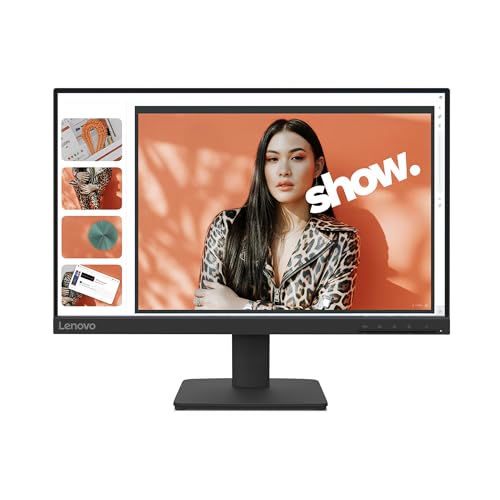
Lenovo L22-4e 21.5-inch FHD IPS Monitor

Dell 24 inch Monitor FHD 100Hz IPS

Philips 22 Inch Computer Monitor 221V8LB
More Details On Our Top Picks
LG’s 24-inch class panel fits neatly into a home office without feeling cramped, and the IPS panel means colors stay steady from side angles. The 120Hz refresh rate helps scrolling feel smoother than a basic office screen, which is handy on busy workdays or during casual gaming after hours.
HDR10 can add a bit more punch to compatible video, while Reader Mode and Flicker Safe are practical touches for long sessions at a desk. The slim stand base also leaves more room for a keyboard tray, notebook, or a second display, which matters more than people often expect.
Strong Points
- IPS panel keeps documents and colors consistent across the screen.
- 120Hz motion feels smoother for scrolling, menus, and light gaming.
- Reader Mode gives you a calmer look for late work sessions.
- Flicker Safe is a thoughtful comfort feature for extended desk time.
- Slim stand base helps preserve usable space on smaller desks.
Things To Consider
- The 24-inch class is tidy, but it won’t replace a larger canvas for heavy multitasking.
- HDR10 support is useful mainly with content that actually takes advantage of it.
- The minimal stand is practical, though some setups may want more height adjustment.
Feature Snapshot
Who It Suits Best
Home-office users who split time between spreadsheets, browser tabs, and casual entertainment will get the most from this setup.
A Better Fit Elsewhere
Lenovo L22-4e suits a tighter desk better, especially for you if the smaller 21.5-inch frame matters more than LG’s extra room.
The curved 1800R shape gives this Samsung a more wrapped-around feel than flat screens like the LG and Acer picks. In most desk setups, that curve makes long work sessions and evenings of video feel a little more immersive without needing a huge panel.
Its 100Hz refresh rate keeps movement smooth, and Game Mode gives you a quick way to sharpen the picture for play or fast-moving content. Advanced Eye Comfort is a sensible addition for anyone staring at a monitor all day, though the curved shape can take a short adjustment period.
Highlights
- 1800R curvature helps the screen feel more enveloping on a desk.
- 100Hz support gives motion a cleaner, more responsive look.
- Game Mode adds a quick tuning option for entertainment use.
- Advanced Eye Comfort suits long stretches of routine computer work.
- HDMI and D-sub ports offer flexible hookup choices for older and newer gear.
Worth Noting
- The curved shape is a taste-based choice, and it won’t suit every spreadsheet-heavy setup.
- At 24 inches, the viewing effect is subtle rather than dramatic.
- That curved panel can be a little less straightforward to line up beside a flat secondary display.
At A Glance
Who Should Grab It
You’ll like this most if you want a curved screen for mixed work, streaming, and light gaming without moving into a larger desktop footprint.
Another Choice May Suit
Dell 27 Plus Monitor S2725HSM is the better call for you if motion smoothness and a larger 27-inch view matter more than curvature.
The Acer KB220Q H2bi keeps things compact, which makes sense for a dorm desk, side station, or a cramped home office corner. Its 21.5-inch Full HD panel is smaller than the LG and Dell 24-inch models, so you give up some workspace, but you gain a setup that feels easier to place.
That 100Hz refresh rate and 1ms response time help motion look cleaner than a basic office screen, and AdaptiveSync can smooth out mismatched frame pacing with compatible graphics hardware. The VESA mount support is especially useful for desk setups that need a wall arm or multi-monitor layout, though you’ll want to plan cable routing with the mount in mind.
Upsides
- Small footprint suits tight work areas and compact furniture.
- 1ms response time helps fast motion feel more controlled.
- AdaptiveSync supports a smoother link with compatible graphics cards.
- VESA mounting opens up desk-arm and wall-mount placement options.
- HDMI and VGA cover both modern and legacy connections.
Softer Spots
- The 21.5-inch size is tidy, but it can feel limited for heavy multitasking.
- VGA is still handy for some older systems, though HDMI will be the more common choice.
- The compact frame rewards careful stand or mount planning to avoid a crowded desk.
Quick Facts
Built With In Mind
Small-space users, students, and anyone setting up a side monitor for mail, calls, or casual play will get the most value here.
Where A Sibling Pick Shines
LG 24U411A-B makes more sense for you if a slightly larger screen and IPS viewing comfort matter more than Acer’s compact footprint.
This Dell leans harder into motion and desktop flexibility than the office-first screens above it. A 27-inch panel with 144Hz refresh and 1ms Moving Picture Response Time, or MPRT, gives it a snappier feel for gaming, fast scrolling, and general use that benefits from clean motion.
The built-in 2 x 3W speakers are a real convenience for a simple desk setup, and the height, tilt, pivot, and swivel stand gives you far more positioning freedom than the fixed-foot designs in this list. Ash white also softens the look, which can help a setup feel less heavy in a bright room.
Best Bits
- 144Hz refresh rate supports especially smooth motion.
- 1ms MPRT helps keep fast action looking cleaner.
- Built-in speakers reduce the need for separate desktop audio.
- Height, tilt, pivot, and swivel adjustment makes placement easy to fine-tune.
- 27-inch size gives you more room for side-by-side windows.
Areas To Watch
- The larger panel takes more desk width than the 22-inch and 24-inch options.
- Built-in speakers are convenient, though dedicated speakers still sound fuller for many setups.
- Its more gaming-leaning feature set may be more than a pure office desk needs.
Core Details
The Right Fit
You should look at this one for gaming, entertainment, or any desk where a larger screen and a flexible stand matter.
Skip It When
Samsung 24″ Essential S3 is the calmer fit for you if a curved 24-inch screen and a smaller footprint matter more than Dell’s larger, more dynamic setup.
The Lenovo L22-4e is made for a clean, minimal desk, and its three-sided borderless look helps it feel less bulky than many office monitors. Compared with Acer’s small-frame option, this one leans more toward an easygoing everyday screen than a feature-packed one.
The 21.5-inch IPS panel, 100Hz refresh rate, and 4ms MPRT give it a practical blend for work, streaming, and light gaming. 99% sRGB coverage is a useful color spec for a monitor in this class, though the tilt-only stand keeps the ergonomics more basic than Dell’s adjustable 27-inch model.
Positives
- Borderless styling helps the screen look tidy on a modern desk.
- IPS technology supports steadier color and viewing comfort.
- 100Hz motion is a nice step up from standard office refresh rates.
- 99% sRGB is reassuring for routine color-sensitive work.
- The compact panel fits well beside laptops or notebooks.
Room For Improvement
- The tilt-only stand gives you less positioning flexibility than more adjustable displays.
- At 21.5 inches, you may outgrow it for heavier multitasking.
- Its simple layout is clean, but it doesn’t bring many extra convenience features.
Technical Sheet
Perfect Match For
This fits students, home workers, and anyone who wants a modest-size monitor that stays visually calm on the desk.
Look Elsewhere When
Dell 24 inch Monitor is the better fit for you if you want a larger canvas and anti-glare practicality on the same general budget-minded tier.
This Dell lands in a very practical middle ground, and that’s exactly why it’s easy to recommend for everyday desks. You get a 24-inch Full HD IPS panel with 100Hz motion, plus sRGB 99% and a 1500:1 contrast ratio, which usually means a cleaner look for work documents and casual media than a plain basic panel.
Anti-glare treatment is a quiet advantage in bright rooms, especially near windows or overhead lighting, and the VESA support gives you room to mount it later. Speakers and two HDMI 1.4 ports make the setup feel convenient, though the tilt-only stand keeps the ergonomics simpler than the Dell 27 Plus model.
Bright Spots
- 24-inch size hits a comfortable middle ground for many desks.
- IPS panel and sRGB 99% support steady, useful everyday color.
- Anti-glare finish helps in rooms with noticeable light reflections.
- Two HDMI ports make source switching less awkward.
- Built-in speakers keep the setup neat for office or general use.
Points To Note
- The tilt-only stand is fine for simple setups, though not as flexible as a full ergonomic base.
- Built-in speakers are handy, but they still fit the usual monitor-speaker role.
- For very dense multitasking, a 27-inch screen still gives you more breathing room.
Details At A Glance
Whose Shelf It Belongs On
You’ll get the most from this if you want a clean, sensible monitor for work, browsing, and light entertainment.
Swap It Out When
LG 24U411A-B is the stronger choice for you if you want smoother 120Hz motion and Reader Mode in a very similar size class.
Philips keeps this model straightforward, and that simplicity makes it appealing for smaller setups or a second screen beside a laptop. The VA panel, which is a type of display that usually emphasizes deeper contrast, pairs with 100Hz and Adaptive Sync for a smoother look than many basic office monitors.
The 22-inch size helps it stay manageable on tight desks, and Flicker-Free plus Low Blue Light are welcome comfort touches for long stretches of writing or browsing. The four-year advance replacement coverage is a notable extra in the listing, though the core hardware is still aimed more at practical everyday use than flashy features.
Reasons To Buy
- 22-inch size keeps the monitor compact and easy to place.
- VA panel can give you stronger contrast for mixed media.
- 100Hz and Adaptive Sync help motion look smoother and steadier.
- Flicker-Free and Low Blue Light are sensible comfort touches for long sessions.
- VESA support makes wall or arm mounting possible later.
Minor Gripes
- The smaller screen gives you less room for side-by-side windows.
- VA panels can feel different from IPS if you prefer the most consistent off-angle color.
- Its feature set is practical, but it stays firmly in the essentials lane.
Core Details
Made For
This suits you best as a simple everyday monitor for a smaller desk, a student setup, or a second screen.
Where Shoppers Go Wrong
Acer KB220Q H2bi is the better route for you if you want IPS color consistency and a slightly more performance-leaning spec sheet.
How To Choose The Right Looking Computer Monitors
Screen Size, Desk Space, And Daily Reach
Size changes how a monitor feels more than many people expect. A 21.5-inch screen, like the Acer or Lenovo, works well on compact desks, while 24-inch models such as LG, Dell, and Samsung give you a friendlier balance between space and reach. A 27-inch option like the Dell 27 Plus gives you more room for split windows, but it also asks more of your desk depth and layout.
The right choice depends on how close you sit and how many windows you keep open. For focused office work, smaller screens feel tidy and efficient, while larger ones help with side-by-side documents, browsing, or editing. The physical footprint matters just as much as the panel itself.
Panel Type And Motion Behavior
IPS screens, found on the LG, Acer, Lenovo, and Dell 24 inch model, usually give you steadier color from different angles. VA, used by Philips and Samsung, tends to lean toward stronger contrast, which can make video look a bit richer. Curved screens can also change the feel of the image, though the effect is more noticeable on some desks than others.
Refresh rate and response time shape motion clarity. A 100Hz panel already feels smoother than a plain office screen, while 120Hz or 144Hz raises that sense of flow for scrolling, gaming, and fast movement. MPRT, or Moving Picture Response Time, and standard response time both point to how quickly the image can shift, which matters most for action-heavy use.
Comfort Features And Stand Flexibility
Comfort features are worth paying attention to because they affect how the monitor feels after hours of use. Reader Mode, Flicker Safe, Advanced Eye Comfort, Low Blue Light, and Flicker-Free all point in the same direction, less strain from harsh screen behavior and a calmer look during long sessions. Those extras matter most if you spend full workdays at a desk or study into the evening.
Stand design is another quiet detail that shapes ownership. A tilt-only base keeps things simple, but height, swivel, pivot, and VESA support make it much easier to get the screen into a natural position or move it onto an arm. That flexibility can turn a decent setup into a much easier one to live with.
Ports, Speakers, And Setup Practicality
Connection options decide how painless the first setup feels. HDMI covers most modern laptops, desktops, and consoles, while D-sub or VGA still help with older machines that refuse to retire quietly. Built-in speakers can be useful for a clean desk, but they are best treated as convenience audio rather than the main event.
Think about the whole desk, not just the screen. A monitor with two HDMI ports, VESA mounting, or an adjustable stand can save you extra accessories later. For many setups, that kind of practicality matters more than a single flashy spec.
What To Weigh Before You Decide
Mistakes Worth Dodging
Size mismatch is the easiest mistake to make. A 27-inch panel sounds appealing, but on a shallow desk it can crowd your keyboard and leave you sitting too close. Color and panel type matter too, since IPS and VA each behave differently in daily use.
Another common misstep is ignoring the stand. A fixed or tilt-only base may be fine for a simple setup, but you’ll feel the limits quickly on a long workday. Port layout deserves a glance as well, especially for older desktops or a second device.
When Paying More Pays Off
Higher-tier monitors usually spend money on smoother motion, better stands, and more thoughtful screen tuning. That’s why the Dell 27 Plus brings 144Hz, a more adjustable base, and speakers, while the LG adds 120Hz and comfort modes in a compact frame. Those details can change how the screen feels every day, not just on a spec sheet.
Spending up makes the most sense for long desk hours, mixed gaming and work, or setups that need easier positioning. If your screen sits at the center of your day, those extras earn their keep through comfort and flexibility. If you only need a simple second display, a leaner model can still make more sense.
Final Thoughts
You’ve got a strong spread here, from compact office screens to larger, smoother panels that do more than basic work. The safest all-round starting points are the LG 24U411A-B and the Dell 24 inch Monitor, while the Dell 27 Plus is the most compelling step up for motion and stand flexibility. Smaller desks should look hard at the Acer and Philips models. Match the size, stand, and panel type to your space, and the right monitor will feel natural from day one.
