
Mini-LED gaming monitors make sense when you want crisp detail, strong contrast, and motion that keeps up with fast play. For console rooms, desk setups, and hybrid work spaces, they also bring more usable brightness than many plain IPS screens. The tricky part is sorting out which models favor sheer speed, which ones lean into color, and which sizes feel comfortable at arm’s length. This roundup keeps those differences clear so you can match the screen to how you actually use your setup.
Quick Shortlist For Fast Comparison

INNOCN 32 Inch Mini LED 4K 160Hz Monitor

AOC Q27G3XMN Mini-LED 27 Inch Gaming Monitor
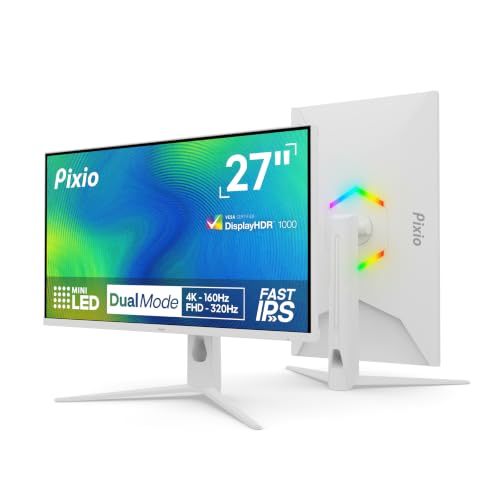
Pixio PX27UM Mini LED White Dual Mode Gaming Monitor
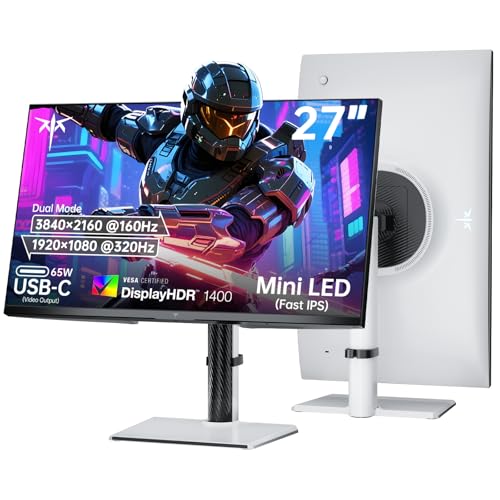
KTC 27 Inch Dual Mode Mini LED Monitor

KTC 27 Inch 4K Mini-LED Gaming Monitor M27U6

KTC 27 Inch Mini LED Gaming Monitor M27T6

KTC M27T6S 27 Inch Gaming Monitor

SAMSUNG Odyssey Neo G7 43 Inch 4K Gaming Monitor
More Details On Our Top Picks
A 32-inch panel with 4K resolution gives you room to enjoy sharp text and broad game worlds without feeling cramped. The 160Hz refresh rate matters most for fast console and PC play, while the USB Type-C connection keeps a modern desk setup tidy. That mix makes this INNOCN a sensible middle ground for you who want size first, then speed.
The honest trade-off is that a 32-inch screen asks for more desk depth, so a shallow workspace can feel crowded. It sits closer to a do-everything display than a specialist esports screen, which is exactly why many mixed-use setups will like it.
Strong Points
- 32-inch sizing gives you generous workspace for games, creative apps, and side-by-side windows.
- 4K detail helps fine textures and interface elements stay clean at close range.
- 160Hz refresh suits fast motion without pushing the panel into single-purpose territory.
- USB Type-C support can simplify a laptop desk with fewer separate cables.
- Height adjustment makes it easier to line up the panel with your seated eye level.
Things To Consider
- The larger footprint needs enough depth, so compact desks may feel tight.
- 4K at 32 inches asks for a strong graphics card if you want high frame pacing.
- Owners who like quick cable swaps may still prefer a simpler small-monitor layout.
Feature Snapshot
Who It Suits Best
You suit this pick best if you split time between console gaming, PC play, and everyday desk work on a larger screen.
A Better Fit Elsewhere
AOC Q27G3XMN makes more sense for you if you want a tighter 27-inch setup with a sharper focus on competitive motion.
The AOC leans hard into speed, and that starts with its 27-inch size. QHD resolution, which means 2560 x 1440, keeps the image sharp without asking quite as much from your graphics card as 4K panels do. For you who care about snappy response in shooters or action games, that balance can feel just right.
Mini-LED backlighting with many dimming zones should help dark scenes hold more shape than a basic edge-lit screen, though the trade-off is a more complex display that may cost more than a plain 1440p panel. It feels less like a roomy all-rounder than the INNOCN and more like a screen built for fast movement first.
What We Like
- 180Hz refresh rate supports very smooth motion for competitive sessions.
- 27-inch QHD format hits a sweet spot for desk use and frame demands.
- Mini-LED backlight can improve contrast in dark scenes and bright highlights.
- Height adjustment helps you dial in a comfortable seated position.
- HDMI 2.1 and DisplayPort give you flexible connection options for modern gear.
Worth Noting
- Its speed-first tuning leaves less room for users who want a cinema-style large display.
- Mini-LED sets can be more complex to position and tune than simpler monitors.
- The many features make it a stronger fit for focused gaming desks than casual family spaces.
At A Glance
Who Will Love This
You suit this monitor best if you play fast-paced titles on a compact desk and want motion clarity ahead of sheer screen size.
Another Choice May Suit
INNOCN 32 Inch Mini LED 4K 160Hz Monitor fits you better if you want more screen area for work and slower-paced games.
Dual-mode monitors exist for people who don’t want to choose between crisp detail and very high motion speed, and this Pixio leans into that idea hard. You get 4K at 160Hz for visual quality, then a switch to FHD, which means 1920 x 1080, at 320Hz for lighter gaming loads. That makes it a flexible match for mixed genres, especially on a white desk where the finish can help the setup feel a little calmer.
The trade-off is that dual-mode screens ask you to think about which mode fits each game, so they suit hands-on users more than set-and-forget setups. Compared with the AOC, this one spreads its value across two operating styles instead of chasing a single motion target.
Highlights
- 4K mode gives you detail-rich image quality for slower games and desktop work.
- 320Hz FHD mode is built for very fast competitive play.
- Fast IPS panel helps keep colors lively and viewing angles forgiving.
- White finish can suit brighter rooms and cleaner-looking desk themes.
- Adaptive Sync helps reduce tear lines during variable frame rates.
Areas To Watch
- Dual-mode operation adds a layer of decision-making to everyday use.
- FHD mode lowers detail, so you give up sharpness for speed.
- White finishes can show dust more readily than darker shells.
Details At A Glance
Best Suited To
You suit this Pixio best if you play a mix of story-driven titles, shooters, and general desktop tasks on one screen.
Reach For A Different Pick When
KTC M27T6S 27 Inch Gaming Monitor suits you better if you want a higher-refresh 1440p screen without changing modes as often.
This KTC reads like the more loaded version of the Pixio idea, with a 65W Type-C port that can be handy for laptops and a display path that favors both 4K detail and faster FHD play. HDR1400 signals very high peak brightness support, and that can help bright scenes carry more punch in rooms with a lot of ambient light. For a desk that handles work by day and gaming later, the feature mix feels unusually practical.
The catch is that so much capability can be overkill for a simple console-only setup. It asks for a user who actually values connection flexibility, stand adjustability, and a more ambitious display spec rather than a stripped-down monitor.
Reasons To Buy
- 65W Type-C support can simplify a laptop-oriented desk.
- Dual-mode design covers both crisp 4K work and fast FHD play.
- HDR1400 points to stronger highlight impact in bright scenes.
- HDMI 2.1 and DisplayPort broaden compatibility with modern devices.
- Height, tilt, swivel, and pivot adjustments make placement flexible.
Small Caveats
- The richer feature set can feel more complex than a plain plug-in screen.
- High-brightness mini-LED hardware may be more than you need for basic use.
- Desk setups with little room may not fully benefit from the broad adjustability.
Core Details
Made For
You suit this model best if you want a feature-dense desk monitor that can move between gaming, work, and laptop docking.
Where A Sibling Pick Shines
Pixio PX27UM Mini LED White Dual Mode Gaming Monitor makes more sense if you want similar dual-mode flexibility with a lighter visual style.
The M27U6 takes a calmer route than the higher-refresh KTC models, pairing 4K at 75Hz with FHD at 144Hz. That makes it easier to live with for general use, photo work, and games that do not demand the fastest motion numbers. For most desks, the lower refresh ceiling can also keep the rest of your setup more modest.
Think of it as the easygoing middle of the KTC group. You give up the razor-edge speed of the 160Hz and 180Hz models, but you keep Mini-LED contrast, a Fast IPS panel, and a monitor that should feel less demanding day to day.
Positives
- 4K mode keeps desktop work and media sharp.
- FHD 144Hz mode gives you a smoother option for casual play.
- Mini-LED backlighting should help dark scenes keep more shape.
- Fast IPS helps colors stay consistent across normal sitting positions.
- Adjustable stand features make it easier to set up neatly.
Trade Offs
- 75Hz in 4K mode is modest next to the faster monitors in this list.
- The dual-mode concept helps, but it still asks you to switch based on use.
- Speed-focused competitive players may want more headroom.
Feature Rundown
Right Fit For
You suit this monitor best if you want a more relaxed all-purpose screen that still brings Mini-LED contrast to a 27-inch desk.
Look Elsewhere When
KTC M27T6S 27 Inch Gaming Monitor is the better call if you want a stronger push toward fast-paced gaming and higher refresh headroom.
This KTC lands in a very workable middle ground: 1440p resolution, 180Hz refresh, and HDR1400 support. That combination tends to suit you who want a sharp 27-inch screen without the heavier hardware burden of 4K. It also feels more balanced than the dual-mode models, because the focus stays on one clear operating point instead of making you juggle modes.
In a home office that turns into a gaming desk at night, that simplicity matters. The screen should feel easier to keep mounted, easier to configure, and easier to live with over time, though it gives up the sheer pixel density of the 4K picks.
Bright Spots
- 1440p hits a very practical balance between detail and system load.
- 180Hz refresh gives you room for fast, smooth motion.
- HDR1400 support suggests strong brightness headroom for lively scenes.
- 148% sRGB is useful for rich-looking color on games and media.
- Height, swivel, pivot, and tilt adjustments help with desk comfort.
Points To Note
- It is less sharp than the 4K monitors in this roundup.
- People who want a two-mode screen may prefer one of the dual-mode KTC options.
- Brightness-heavy hardware can be more than casual desktop use really needs.
Spec Overview
The Right Fit
You suit this monitor best if you want a straightforward 1440p gaming screen with strong contrast and very usable desk ergonomics.
Swap It Out When
AOC Q27G3XMN suits you better if you want a 27-inch Mini-LED panel that pushes harder into speed-first gaming.
The M27T6S leans even harder toward fast play, with a 210Hz headline refresh and a 27-inch 1440p panel. That makes it attractive for you who live in shooters, racing games, or any title where motion clarity matters a lot. The 157% sRGB figure also points to lively color, so the screen should not feel dull while it’s chasing speed.
Compared with the plain M27T6, this one raises the ceiling and gives more room for a high-frame-rate desk. The trade-off is that it asks a bit more from your system and makes the most sense for a gaming-first setup rather than a casual mixed-use room.
Best Bits
- 210Hz refresh gives you very smooth motion for competitive play.
- 1440p resolution keeps the screen crisp without 4K pressure.
- 1ms MPRT, meaning motion picture response time, helps frame action appear cleaner.
- 157% sRGB suggests strong color range for a gaming display.
- Adjustable stand and VESA support make installation flexible.
Room For Improvement
- Its high-refresh focus makes it less of an all-purpose media screen.
- Competitive tuning can be more than casual players really need.
- Large color coverage numbers matter less if your content use stays basic.
Technical Sheet
Whose Shelf It Belongs On
You suit this monitor best if you want a fast 27-inch gaming screen with a clear focus on motion over office-first convenience.
A Better Fit Elsewhere
KTC 27 Inch Mini LED Gaming Monitor M27T6 fits you better if you want a slightly calmer 180Hz option with the same 1440p class of clarity.
This Samsung goes well beyond the usual 27- and 32-inch format, and that alone changes the feel of the room. A 43-inch 4K screen gives you a display that can work as both a gaming monitor and a media centerpiece, especially in a deeper desk setup. Quantum Matrix technology, which uses dense mini-LED control, is there to help bright scenes and dark scenes carry more separation.
It’s a bold choice, not a casual one. The size can feel huge on a standard desk, so it suits you who want an entertainment-first screen and have the space to treat it properly. Compared with the INNOCN, this Samsung is less about compact balance and more about filling your field of view.
What We Like
- 43-inch size creates a very immersive viewing experience.
- 4K resolution keeps the larger panel from looking soft.
- 144Hz refresh gives you useful speed for games and motion-heavy content.
- VESA Display HDR600 supports stronger highlight contrast than basic HDR labeling.
- AMD FreeSync Premium Pro helps smooth frame mismatch on supported systems.
Minor Gripes
- The size can overwhelm smaller desks or tight rooms.
- It makes the most sense when you have space to sit a bit farther back.
- Smart-monitor extras may matter less if you only want a pure PC display.
Core Details
Built With In Mind
You suit this Samsung best if you want a big-screen gaming and media setup with room to sit back and enjoy the scale.
Skip It When
KTC M27T6S 27 Inch Gaming Monitor is the better fit if your desk is smaller and you want a much more compact gaming footprint.
How To Choose The Right Mini-Led 4k Gaming Monitors
Screen Size And Desk Depth
Size changes everything with mini-LED displays. A 27-inch model stays easy to place and usually feels natural on a standard gaming desk, while 32-inch and 43-inch screens ask for more viewing distance and a deeper surface. For you who split time between gaming and work, the larger panels can feel generous, but only when the room can support them.
4K looks especially good once the panel is large enough to show fine detail without crowding the interface. On a smaller desk, a 27-inch 1440p screen often feels more comfortable and less demanding. That’s why a big panel isn’t automatically better, even though the spec sheet looks tempting.
Refresh Rate Versus Game Type
Refresh rate tells you how many times per second the screen updates, so 180Hz or 210Hz can help motion look smoother than 75Hz. Competitive players usually feel the difference more than casual story-game fans, especially in fast shooters or racing titles. A 4K 160Hz panel gives you detail and speed together, while a lower-refresh 4K screen eases strain on your system.
The right choice depends on the games you actually play most nights. Fast action leans toward the higher-refresh 27-inch monitors, while a mix of gaming, browsing, and media use can make a calmer 4K model feel more sensible.
Mini-LED, HDR, And What Contrast Means
Mini-LED uses many small backlight zones, which helps the screen dim dark areas more precisely than a plain backlight. HDR, short for high dynamic range, means the display is built to show a wider spread between bright and dark parts of an image. Together, those traits can make explosions, night scenes, and bright UI elements stand out more cleanly.
The trade-off is cost and complexity. Higher-zone panels and stronger HDR support usually push prices up, and the real-world benefit shows most in games or media with strong contrast. For your setup, that makes sense only when you value image depth as much as raw motion speed.
What To Weigh Before You Click
Wrong Turns To Avoid
Many shoppers focus only on resolution and forget the rest of the desk setup. A 4K monitor with the wrong size or stand can feel awkward fast, especially on a shallow desk. Panel speed matters too, because a sharp screen still feels sluggish if your game style needs higher refresh.
Another common miss is ignoring connection needs. Console users often benefit from HDMI 2.1, while laptop users may want USB Type-C, and some desks need VESA mount support for arm placement. The cleanest setup usually comes from matching the port mix to your gear first.
Why Top Tier Costs More
Higher-tier models in this category usually spend money on backlight control, brightness headroom, and more flexible stands or ports. You are also paying for better motion tuning, stronger HDR support, and in some cases dual-mode operation that gives you two very different performance profiles in one chassis. That’s the stuff that separates a basic large display from a more tuned gaming screen.
Those extra features matter most for mixed-use setups and serious gaming desks. If your use stays casual, the upgrade can feel unnecessary, but for a room that does double duty, the added flexibility often makes more sense than a bare-bones panel.
Closing Thoughts
You have plenty of good paths here, and the right one depends on how much you value screen size, speed, and flexibility. The AOC and the KTC high-refresh models suit faster play, while the INNOCN and Samsung make more sense for bigger-picture immersion. For most people building a serious gaming desk in 2026, the best choice is the one that fits the room before it tries to impress the room.
