
Curved screens make more sense than flat panels for a lot of desk setups, especially when you split your day between spreadsheets, streaming, and a few rounds of gaming. The curve can help the edges feel easier to follow, and the right size keeps your posture from turning into a slow shrug by Friday. You still need the right match, though, because ultrawide office displays, compact 27-inch picks, and gaming-first panels each ask for something different.
Quick Look At The Shortlist

Dell 34 Monitor S3425DW
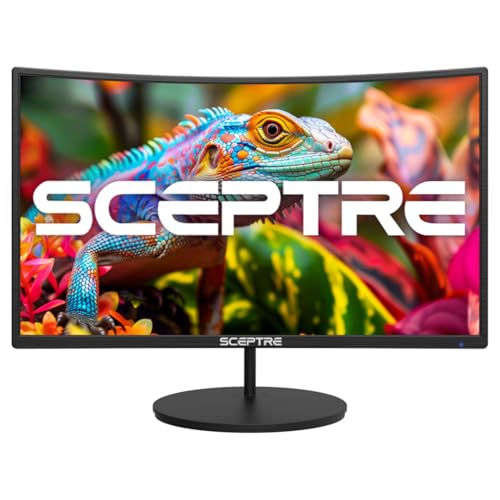
Sceptre Curved 27-inch Gaming Monitor C275W-1920RN Series

Samsung 49” Business Curved Ultrawide Dual QHD Computer Monitor LS49C954UANXZA
Samsung 32″ S3 (S39GD) Series FHD 100Hz Curved Monitor LS32FM803UNXZA

Samsung 40” Odyssey G7 (G75F) Series WUHD Curved Gaming Monitor LS40FG75DENXZA

Samsung 27″ Essential S3 (S36GD) Series FHD 1800R Curved Computer Monitor LS27D366GANXZA

LG 32MR50C-B Curved Monitor 32-Inch FHD 100Hz Black

SANSUI 34-Inch Curved Gaming Monitor UWQHD 3440 x 1440P 200Hz 1500R
More Details On Our Top Picks
A 34-inch ultrawide like this suits people who want more room for side-by-side windows without jumping to a giant desk presence. The WQHD panel gives you more usable space than standard Full HD, and the USB-C port with 65W power delivery can simplify a laptop setup by handling both video and charging through one cable.
Compared with the smaller Sceptre pick, this Dell feels more like a steady daily driver than a pure budget play. The 120Hz refresh rate, VA panel, and 3,000:1 contrast ratio should suit work, movies, and casual gaming in equal measure, though the real trade-off is that a 34-inch ultrawide asks for a deeper desk than a compact 27-inch screen.
Strong Points
- 34-inch ultrawide format gives you a wide canvas for documents, timelines, and split-screen work.
- USB-C with 65W power delivery can keep a compatible laptop charged through the same cable used for display.
- 120Hz refresh support helps scrolling and lighter gaming feel smoother than a standard office monitor.
- VA panel contrast and HDR10 support should make dark scenes and mixed media look more layered.
- Built-in 2 x 10W speakers reduce desk clutter for rooms where separate speakers are unnecessary.
Things To Consider
- Ultrawide sizing can feel large on a shallow desk, especially in tighter home offices.
- The built-in speakers are convenient, though separate audio usually brings better depth and placement.
- Anti-glare coating helps in bright rooms, but direct lamp reflections can still matter during long work sessions.
Core Details
Who It Suits Best
People who want a single screen for office work, streaming, and lighter gaming will get the most from this layout.
Where A Sibling Pick Shines
LG 32MR50C-B Curved Monitor 32-Inch FHD 100Hz Black suits a simpler home office desk better, especially when you want a larger screen without ultrawide proportions.
This Sceptre lands in the sweet spot for smaller desks, dorm setups, and first gaming rigs. The 27-inch size is easier to place than the Dell 34, and the 1500R curve pulls the edges a little closer, which can make a single-screen setup feel less flat and more centered.
The honest read is that it looks built for straightforward use rather than feature overload. With 100Hz refresh, 1080p resolution, HDMI inputs, VGA, built-in speakers, and VESA wall-mount support, it gives you a workable mix for everyday gaming and general computing, although the 1080p resolution won’t feel as roomy as the ultrawide Samsung and Dell choices.
Positives
- 27-inch size fits easier on compact desks and shared spaces.
- 100Hz refresh rate should make casual gaming and scrolling feel smoother than a standard 60Hz display.
- HDMI x2 and VGA give you flexible hookups for newer and older devices.
- Built-in speakers keep the setup simple for bedrooms or secondary work areas.
- VESA wall-mount support helps you clear desk space.
Small Caveats
- 1080p on 27 inches is fine for many uses, though dense text may not look as sharp as higher-resolution panels.
- The built-in audio is practical, but most people will still prefer separate speakers or headphones for fuller sound.
- The feature set stays basic, so this is better for practical needs than for demanding color work.
Feature Card
Right Fit For
Budget-minded gamers and casual home users who want a curved screen without a big desk footprint will feel at home here.
Another Choice May Suit
Samsung 27″ Essential S3 (S36GD) Series FHD 1800R Curved Computer Monitor LS27D366GANXZA suits work-first setups better, especially when you want a simpler Samsung display with a less gaming-focused stance.
This one makes the biggest statement in the list, and it’s built for desks where a wide work surface matters more than keeping things small. The 49-inch ultrawide shape, Dual QHD layout, and 120Hz refresh rate create a workspace that suits long timelines, multiple windows, and side-by-side reference material without the seams of two separate monitors.
Compared with the Dell 34, you’re moving into a much more expansive format, almost like spreading a long paper map across the desk. USB-C with 90W charging, DisplayPort, two HDMI inputs, built-in speakers, eye care features, and a height-adjustable stand make it feel like a proper hub for laptop work, though the size will ask for serious desk depth and a bit of planning around placement.
Highlights
- 49-inch ultrawide panel gives you a very broad working area for multitasking.
- Dual QHD resolution helps keep text and windows organized across the screen.
- USB-C with 90W charging can reduce cable clutter for laptop users.
- Height-adjustable stand helps you line up the screen more comfortably.
- 120Hz refresh rate supports smoother motion than a standard office panel.
- Built-in speakers can simplify a clean desk setup.
Worth Noting
- The very wide frame needs space, so compact desks can feel crowded fast.
- Setting up a screen this large takes more attention than a 27-inch or 32-inch model.
- It makes the most sense for multitasking, so casual users may not need this much area.
Details At A Glance
Whose Shelf It Belongs On
Remote workers, spreadsheet-heavy users, and anyone who prefers one wide screen over two separate panels will get the most from it.
Skip It When
Samsung 40” Odyssey G7 (G75F) Series WUHD Curved Gaming Monitor LS40FG75DENXZA suits gaming-focused setups better, especially when your priorities lean toward speed and dramatic motion over office multitasking.
This Samsung takes a different path from the work-first models above, because it leans into monitor and smart-TV crossover use. The white finish and 32-inch curved panel suit a bedroom, studio corner, or casual living space where you want the screen to do more than standard office duty.
Vision AI, smart TV apps, Gaming Hub, USB-C, HDMI, and USB-A make it easier to move between streaming, light gaming, and laptop work without constantly swapping gear. The trade-off is pretty clear: this is less about raw workstation scale than the Samsung 49-inch panel, so you’re paying for flexibility and home-friendly convenience rather than maximum screen area.
What We Like
- Smart TV apps and Gaming Hub add flexibility beyond a normal monitor.
- USB-C, HDMI, and USB-A give you several straightforward connection paths.
- 32-inch size feels roomy without taking over the whole desk.
- White finish can blend well with lighter rooms and modern setups.
Points To Note
- The smart features are handy, though they make the screen feel more like a hybrid than a pure productivity monitor.
- Casual streaming appeal is strong, but serious color work still belongs elsewhere in the lineup.
- The white shell may need more frequent dusting to stay neat in brighter rooms.
At A Glance
Made For
People who want one screen for entertainment, light gaming, and general desk use will find the mix most appealing.
A Better Fit Elsewhere
Dell 34 Monitor S3425DW suits a more focused work-and-play setup better, especially for anyone who wants USB-C charging and a wider desktop view without smart-TV extras.
For fast-paced gaming, this is the most aggressive choice in the group. The 40-inch WUHD panel, 180Hz refresh rate, 1ms response time, and DisplayHDR 600 support point squarely at people who want motion to feel sharp and scenes to carry more depth.
Compared with the Samsung 49-inch business ultrawide, this one puts more weight on game feel than office multitasking. FreeSync Premium Pro helps sync the display with supported graphics hardware, and the 1000R curve should wrap the view in a way that suits long sessions, though the size and power of the panel make it a better match for a serious gaming desk than a shared workspace.
Best Bits
- 180Hz refresh rate is built for fast motion and responsive gameplay.
- 1ms response time helps reduce blur on quick movement.
- W UHD resolution gives you a broad, detailed ultrawide image.
- DisplayHDR 600 can add more depth between bright and dark areas.
- FreeSync Premium Pro supports smoother pacing with compatible systems.
Softer Spots
- 40 inches is a lot of screen, so desk depth matters.
- Gaming-first features make it less efficient for straightforward office work.
- The premium feature mix makes sense mainly for people who will notice and use it regularly.
Feature Rundown
Best Suited To
Dedicated gaming setups and ultrawide fans who want a dramatic screen with speed to match will get the most from it.
Look Elsewhere When
Samsung 49” Business Curved Ultrawide Dual QHD Computer Monitor LS49C954UANXZA suits work-heavy multitaskers better, especially when the desk needs to serve office tasks first.
This Samsung keeps things simple, and that’s the point. A 27-inch FHD panel with a 1800R curve is easy to place on a normal desk, so it works well for home offices, student setups, and spaces where you want a curved screen without a lot of drama.
Relative to the Sceptre 27-inch model, this one feels a little more polished for everyday mixed use rather than just entry-level gaming. Game Mode and Advanced Eye Comfort are helpful additions for longer sessions, though the HDMI and D-sub connections tell you clearly that this is a straightforward monitor rather than a feature-heavy hub.
Reasons To Buy
- 27-inch size is easy to fit in small to mid-size work areas.
- 100Hz refresh rate helps motion feel steadier during work and play.
- Game Mode can make on-screen action look clearer with quicker adjustment.
- Advanced Eye Comfort is useful for long stretches at the desk.
- HDMI and D-sub support broadens compatibility with older and newer gear.
Areas To Watch
- Full HD on 27 inches is practical, though not especially dense for text-heavy work.
- The design stays focused on basics, so you’re not getting a lot of extras.
- Older D-sub use can feel dated, even if it helps with legacy equipment.
Core Details
Who Should Grab It
People who want a dependable curved monitor for daily office work, streaming, and light gaming will get what they need here.
Where A Sibling Pick Shines
Sceptre Curved 27-inch Gaming Monitor C275W-1920RN Series suits a tighter budget-focused gaming setup better, especially when the priority is straightforward value over a more settled Samsung feel.
The LG sits in a very sensible middle ground, especially for a home office that doubles as a streaming corner. A 32-inch FHD panel gives you more breathing room than the 27-inch Samsung, while the curved shape and 100Hz refresh rate keep the screen feeling relaxed and smooth for day-to-day use.
OnScreen Control, Dynamic Action Sync, Black Stabilizer, and the tilt stand point to a monitor that wants to be easy to live with rather than flashy. The 3-side borderless look also helps the panel feel less bulky on the desk, though Full HD at 32 inches can look soft for users who sit very close and spend all day in dense text.
Plus Points
- 32-inch size gives you a roomy workspace without reaching ultrawide proportions.
- 100Hz refresh rate keeps general motion smooth for work and entertainment.
- AMD FreeSync is useful for supported gaming systems.
- OnScreen Control makes adjustments easier from the desktop.
- Black Stabilizer and Dynamic Action Sync help in game-friendly settings.
- Tilt stand gives you basic posture tuning without extra fuss.
Honest Caveats
- Full HD on a 32-inch panel can look less crisp than higher-resolution options in the roundup.
- No height adjustment is listed, so desk ergonomics depend more on your chair and stand height.
- The all-black finish is practical, though it won’t stand out much in a design-led room.
Spec Overview
The Right Fit
Home office users who want a larger curved screen for work, casual gaming, and streaming will find this one easy to live with.
Reach For A Different Pick When
Samsung 49” Business Curved Ultrawide Dual QHD Computer Monitor LS49C954UANXZA fits power multitaskers better, especially when one wide panel is more useful than a taller 32-inch screen.
The SANSUI leans hard into speed and screen width, which makes it feel like a step up for gaming desks that want more immersion without jumping all the way to a 40-inch panel. UWQHD resolution, up to 200Hz refresh, 1ms response time, and a 1500R curve make it the most aggressive ultrawide choice in this group.
Against the Dell 34, this one swaps a more work-friendly balance for a stronger gaming profile, plus extras like PIP and PBP for split-screen use. The supplied cable, HDMI 2.1 inputs, DP 1.4, HDR, and wide color claims point to a feature-heavy display, though the lack of built-in speakers means you should plan on separate audio.
Bright Spots
- Up to 200Hz refresh rate gives you a very smooth feel for fast games.
- UWQHD resolution provides sharp detail across a wide 34-inch canvas.
- PIP and PBP support add flexibility for multi-device use.
- HDMI 2.1 and DP 1.4 make the connection set more versatile.
- 1ms response time helps reduce blur during quick movement.
- Included cable saves a small setup step right out of the box.
Minor Gripes
- No built-in speakers are listed, so audio needs its own plan.
- The gaming-heavy feature set may be more than casual users need.
- A 34-inch ultrawide still asks for room, so narrow desks can feel tight.
Technical Sheet
Built With In Mind
Gamers who want a wide, responsive screen with a strong feature set will get the most out of it.
Swap It Out When
Dell 34 Monitor S3425DW suits mixed work and leisure better, especially for people who want USB-C charging and a calmer everyday balance.
How To Choose The Right Curved Monitors
Size And Desk Shape
Screen size matters more on curved panels than many shoppers expect. A 27-inch model suits compact desks, while 34-inch and 40-inch ultrawides need more depth so the curve feels natural instead of crowded. A 49-inch display can replace two monitors, but only when your desk and chair position leave enough breathing room.
Resolution And PPI
Pixel density, or PPI, means how tightly those pixels are packed together. Higher density usually makes text and fine details look cleaner, which is why ultrawide QHD and Dual QHD panels feel more refined than Full HD at larger sizes. For spreadsheets, editing, and long reading sessions, that difference matters more than flashy branding.
Refresh Rate And Motion
Refresh rate tells you how many times the screen updates each second. A 100Hz panel feels smoother than a standard office display, while 120Hz, 180Hz, and 200Hz step up the motion clarity for games and fast scrolling. The trade-off is that your connected device needs enough graphics headroom to make the most of it.
Ports, Power, And Daily Use
USB-C with power delivery can turn a monitor into a dock-like centerpiece, which is handy for laptops and cleaner desks. HDMI and DisplayPort still matter for consoles, desktop towers, and extra devices, so the right mix depends on how often you swap sources. Built-in speakers, height-adjustable stands, and VESA mounting round out the comfort side, but none of them can make up for a screen size that doesn’t fit your space.
Things Worth Knowing First
Wrong Turns To Avoid
Many people focus on curvature alone and ignore resolution, which can leave a large panel looking softer than expected. Another common miss is buying a gaming-heavy screen for office work, then realizing the desk space and feature set are more than you need. A curved monitor should match your room and your routine, not just the spec sheet.
Connection planning matters too. A laptop-heavy setup benefits from USB-C charging, while a mixed household may need HDMI, DisplayPort, or even a legacy port for older gear. The cleanest desk is the one that still works after the novelty fades.
The Case For Spending Up
Higher-tier curved monitors usually cost more because you’re paying for wider panels, higher refresh rates, stronger contrast, better sync support, and more complete stand or connectivity options. Those upgrades matter most in gaming rooms, content-heavy desks, and workstations where one wide display replaces extra hardware. A premium screen can feel like a smoother daily tool, but only when you actually use the added space and speed.
Basic models make more sense for straightforward browsing, email, and casual play. Spend up when the screen will carry your workday or your gaming time, not just fill a corner of the desk.
Closing Thoughts
You’ve got a clear spread here, from modest 27-inch picks to sweeping ultrawides that can take over an entire workstation. For most desks, the Dell 34 or LG 32 hit a comfortable middle ground, while the Samsung 49 and Odyssey G7 make sense only when space and purpose justify the size. Match the curve to your room, your ports, and the way you actually work, and the right screen will feel easy to live with day after day.
