
You need a display that shows color honestly, keeps gradients smooth, and fits the way you actually edit. Some of these picks lean toward color-critical studio work, while others make more sense for a laptop-based setup, a shared desk, or a portable field kit. The right choice saves you from second-guessing every file. It also keeps long retouching sessions from feeling like a chore.
Quick Look At The Shortlist

ASUS ROG XG27UCG 27 Inch 4K USB-C Gaming Monitor

ASUS ProArt PA279CRV 27 Inch 4K UHD USB-C HDR Monitor

ViewSonic VP3256-4K 32 Inch 4K ColorPro Monitor

LG 27UP650K-W 27-inch Ultrafine 4K UHD IPS Monitor
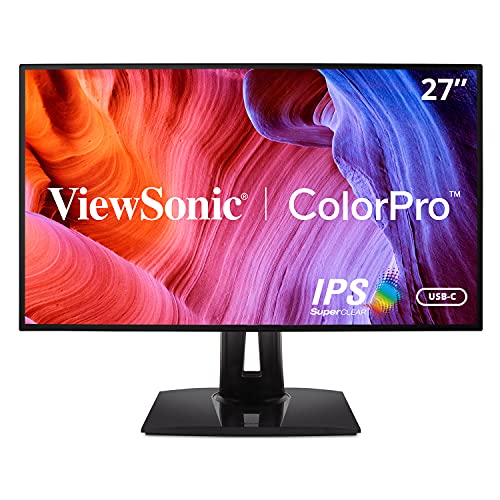
ViewSonic VP2768A 27 Inch 1440p ColorPro IPS Monitor

ARZOPA D10 Metal Digital Picture Frame 10.1" Champagne Gold

BenQ SW272Q 27-inch 2K 90W USB-C Photographer Monitor

Yodoit 4K Portable Monitor 16" Sunlight-Readable
More Details On Our Top Picks
That 4K panel matters most for mixed work, where you edit stills one hour and move into fast motion the next. The dual-mode setup gives you a sharper desktop or a much faster Full HD view, so the monitor makes more sense for a hybrid desk than a strict studio-only setup.
USB-C keeps cabling simpler, and the 27-inch size stays friendly on a normal desk. The trade-off is plain: this model leans into speed and flexibility more than pure color-reference calm, so dedicated retouchers may prefer something less gaming-flavored.
Strong Points
- 4K resolution gives you fine detail for masks, skin work, and small text overlays.
- Dual-mode operation lets you switch to a faster Full HD view for motion-heavy work.
- USB-C reduces desk clutter for laptop-based editing.
- Fast response time helps keep motion blur low during mixed creative and gaming use.
Areas To Watch
- The gaming-first styling may feel louder than a neutral studio monitor.
- Color-focused editors may want a panel built more narrowly around print-style grading.
- It makes the most sense on a desk with enough room for 27 inches and a keyboard.
Feature Snapshot
Who It Suits Best
You fit this model best if your editing desk also doubles as a gaming or mixed-use station.
A Better Fit Elsewhere
ASUS ProArt PA279CRV suits you better when your main goal is quiet, color-first photo editing with less emphasis on speed.
The ProArt line makes the most sense when color accuracy comes before everything else. This 27-inch 4K panel is built for careful editing, and the 99% DCI-P3 plus 99% Adobe RGB coverage gives you a wider working range than more general-purpose screens.
USB-C with 96W power delivery can tidy up a laptop desk, and the height adjustment helps you set the panel at a sane eye level. The honest read is that this one feels purpose-built rather than flashy, which is exactly what many photo and video desks need.
What We Like
- 4K resolution gives you crisp room for detailed retouching.
- Factory calibration and Calman verification point toward careful color setup.
- Wide DCI-P3 and Adobe RGB coverage suits color-managed work.
- USB-C with 96W power can handle a neat single-cable laptop connection.
- Height adjustment helps you line it up comfortably for long sessions.
Minor Gripes
- Its strength is precision, so it may feel overbuilt for casual streaming or office use.
- Color-critical tools can take time to set up well inside your workflow.
- The 27-inch footprint is efficient, but not expansive, for split-screen layouts.
Core Details
Who Should Grab It
You fit this monitor best if your work depends on dependable color and a tidy USB-C desk.
Another Choice May Suit
BenQ SW272Q suits you better when you want a matte, print-minded panel for even more reflection control.
A 32-inch screen changes the feel of the whole desk, especially when you keep a lot of panels open at once. Compared with the 27-inch ASUS picks, this ViewSonic gives you more room to park timelines, toolbars, and reference images without constant tab switching.
Its 100% sRGB coverage and Pantone validation make it easy to trust for digital content work that needs consistent color handling. You may find the large size best on a deeper desk, because the trade-off is simple: more screen space also asks for more physical space.
Highlights
- 32-inch size creates breathing room for multi-window editing.
- 100% sRGB suits standard web and digital image work.
- Pantone validation adds confidence for color-sensitive tasks.
- USB-C, HDMI, and DisplayPort make source switching easier.
- Advanced ergonomics help you set a comfortable working angle.
Small Caveats
- The larger panel needs a wider, deeper desk than a 27-inch model.
- sRGB focus is solid for digital work, though print-heavy users may want a wider gamut.
- Large monitors can take more time to position cleanly in a tight room.
Details At A Glance
Whose Shelf It Belongs On
You suit this screen best if you want a larger workspace for layered editing, review, and side-by-side reference material.
Where A Sibling Pick Shines
LG 27UP650K-W fits you better when you want a smaller 27-inch footprint that’s easier to place in a compact room.
The LG lands in a comfortable middle zone, which helps if you want a straightforward 4K editing monitor without too many extras to sort through. Its 27-inch size is easy to live with, and the 4K IPS panel should feel familiar to anyone moving between photo work, general desktop tasks, and light content review.
Reader Mode and Flicker Safe make it a calm fit for long sessions, while the tilt, height, and pivot stand add useful physical flexibility. The caveat is plain: the 60Hz refresh rate is fine for editing, but it gives you less motion headroom than the ASUS gaming-leaning pick at the top.
Reasons To Buy
- 4K resolution keeps detail crisp for retouching and UI work.
- IPS panel supports easy viewing from normal desk angles.
- Reader Mode and Flicker Safe add comfort for long desktop sessions.
- Tilt, height, and pivot adjustment make setup easier in a shared space.
Points To Note
- Its feature mix is practical, not especially specialized for high-end color workflows.
- 60Hz is enough for editing, though not the fastest motion experience.
- A white finish may show dust more readily than darker frames.
Core Details
Built With In Mind
You suit this display best if you want a dependable 4K monitor for daily photo editing, general work, and simple desk ergonomics.
Look Elsewhere When
ASUS ProArt PA279CRV fits you better when your workflow leans harder into color-managed studio editing and wider gamut coverage.
The 1440p resolution is a smart middle ground for you if 4K feels demanding on your system or too small at native scaling. Compared with the 4K models above, this ViewSonic gives you a bit less pixel density, but it can feel easier to manage on a midrange workstation and still leaves plenty of room for edits.
USB-C with 90W power delivery and daisy chain support make it appealing for a cleaner desk setup. The drawback is just as clear, because serious pixel-peepers may prefer the sharper 4K options once they start zooming into fine retouching work.
Upsides
- 1440p resolution is easier on some systems than 4K.
- 27-inch size stays comfortable on a standard desk.
- USB-C with 90W can simplify a laptop workflow.
- Daisy chain support helps reduce cable clutter in multi-monitor setups.
- 100% sRGB and Pantone validation support color-aware creative work.
Worth Noting
- It gives you less fine-detail room than the 4K monitors in this list.
- Users chasing maximum image sharpness may outgrow 1440p quickly.
- A 60Hz panel is fine for editing, though not especially quick for motion.
Technical Sheet
Perfect Match For
You fit this display best if you want a color-aware 27-inch screen that’s easier to drive than 4K panels.
Skip It When
ViewSonic VP3256-4K is the better move when you want a larger 32-inch canvas with native 4K detail.
This is a different kind of display entirely, but it still belongs in a photo-focused roundup because it shows images rather than editing them. The 10.1-inch touchscreen and cloud upload support make it useful on a desk, a shelf, or in a home office where you want finished images to stay visible.
Metal construction gives it a more substantial feel than many plastic frames, and the champagne gold finish leans decorative without looking overly loud. For thoughtful gifting or family photo sharing, it has a very easygoing role, though it obviously does not replace a true editing monitor.
Best Bits
- Touchscreen controls make day-to-day use feel straightforward.
- Cloud-based uploading suits remote photo sharing from a phone.
- Metal frame material adds a more polished desk presence.
- Anti-glare screen helps the image stay readable in brighter rooms.
Softer Spots
- It’s a display for showing photos, not for editing them.
- The 10.1-inch size is best for intimate viewing, not large-room impact.
- Decorative finishes can show fingerprints and need regular wiping.
Feature Card
The Right Fit
You suit this frame best if you want a stylish way to display finished photos in a home, office, or gift setting.
Where Another Pick Shines
Yodoit 4K Portable Monitor fits you better when you need a screen for active editing on the move rather than presentation.
BenQ aims squarely at photographers who spend a lot of time judging tone, reflection, and gamut, and the SW272Q makes that focus obvious. Compared with the ASUS ProArt model, it leans more into the viewing surface itself, thanks to the Nano Matte Panel and TUV anti-reflection certification, which helps tame glare in bright rooms.
The 2K resolution is a sensible middle ground, and the 1.07 billion color range gives you plenty of gradation to work with while refining skies, skin, and shadows. You may find the price of that specialization in the usual place, because a matte, color-managed panel tends to ask for a more committed workflow.
Positives
- Wide Adobe RGB and DCI-P3 coverage support careful color work.
- Nano Matte surface helps reduce distracting reflections.
- 16-bit 3D LUT supports smoother color handling across the panel.
- USB-C with 90W power can streamline a laptop desk.
- Photographer-first tuning suits color-managed editing rooms.
Room For Improvement
- The 2K panel gives you less raw desktop space than the 4K monitors here.
- Its specialist focus may be more than casual photo editors need.
- Matte surfaces are great for glare control, though some people prefer a glossier look.
Quick Facts
Who Will Love This
You fit this monitor best if you shoot and edit with a strong focus on controlled color, reflection reduction, and print-minded work.
Reach For A Different Pick When
ASUS ProArt PA279CRV suits you better when you want a 4K panel with a little more resolution for fine-detail work.
This portable screen fills a very specific role, and it does that role with unusual confidence. The 16-inch 3840 x 2400 panel gives you more vertical room than many travel displays, while the 1,200-nit brightness and matte finish help the image stay visible outdoors or near bright windows.
That makes it useful for field photographers, mobile editors, and anyone who reviews images away from a fixed desk. The trade-off is obvious: portability and brightness come with a smaller workspace, so this is a companion display rather than a main editing station.
Plus Points
- Very high brightness helps the display stay readable in strong light.
- Matte anti-glare surface supports outdoor or window-side use.
- 4K-class resolution on a 16-inch panel keeps text and images sharp.
- 145% sRGB coverage suggests lively color for mobile review work.
- USB-friendly portable format suits laptop and travel workflows.
Trade Offs
- The small screen is practical for travel, not for a full desktop replacement.
- Portable setups usually need more care with cables and storage.
- High brightness can be useful outdoors, though battery-based rigs may need attention to power planning.
Feature Rundown
Whose Shelf It Belongs On
You suit this screen best if you edit away from home and need a bright, compact companion for laptop-based work.
Swap It Out When
ViewSonic VP3256-4K is the better fit when you want a larger, fixed monitor for a permanent editing desk.
How To Choose The Right Displays For Photo Editing
Color Accuracy Comes First
For photo editing, the main job of a display is to show color in a way that feels consistent from file to file. Wide-gamut coverage such as Adobe RGB or DCI-P3 matters when you work across web, print, and client review, while a tighter sRGB screen can still suit lighter digital workflows. Factory calibration, low Delta E values, and validation programs help reduce guesswork, which matters most when you edit skin tones, product shots, or mixed lighting.
You also want to think about panel behavior across different rooms. A matte panel cuts reflections better in bright spaces, while an IPS screen tends to keep color and contrast steadier at normal viewing angles. That balance becomes important in home offices with windows, shared studios, or desks where you lean back and check work from the side.
Resolution And Screen Size Need To Match Your Workflow
4K on 27 inches gives you sharp detail and plenty of room for tool panels, but some people find the interface small unless scaling is set carefully. A 32-inch 4K display opens up more workspace, which helps when you keep reference images, layers, and file browsers open at once. A 1440p screen can still make sense for editing if you want easier system demands and a more relaxed UI.
The right size also depends on your room. Smaller desks usually feel better with 27-inch panels, while deeper desks can handle 32 inches without feeling crowded. Portable displays play a different role altogether, since they’re made for travel work, field review, and quick on-location checks rather than all-day desktop editing.
Ports, Ergonomics, And Daily Convenience
USB-C matters because it can carry video and power over a single cable, which keeps laptop setups tidy. Daisy chain support helps in multi-monitor desks, and height, tilt, and pivot adjustments make a long editing session less awkward. Those details sound small until you’re rearranging a desk for the third time in a month.
Think about the way you actually sit and work. A well-placed stand, a clean cable path, and reliable input options save time every day, especially for freelance work or shared spaces. Convenience does not replace color accuracy, but it makes the monitor easier to live with once the novelty wears off.
Things Worth Knowing First
Wrong Turns To Avoid
It’s easy to chase resolution alone and ignore color handling, but sharpness without consistency can still leave you adjusting the same file twice. Another common miss is choosing a panel that looks great in a product shot yet feels uncomfortable in a real room with overhead light or a nearby window.
Desk size trips people up too. A 32-inch screen can feel generous on paper and cramped in a shallow workspace, while a portable display can look appealing until you realize it’s meant to supplement, not replace, your main monitor.
What The Higher Tier Buys
More expensive models usually pay for tighter calibration, wider color coverage, better stand hardware, and stronger surface treatments against glare. You’re also paying for convenience features such as USB-C power delivery, daisy chaining, and more polished controls, which matter a lot once editing becomes part of your daily routine.
That upgrade makes the most sense for print work, client proofing, or long-term creative use. Casual editors can do fine with a more basic screen, but anyone who depends on repeatable color may find the extra spend easier to justify over time.
Final Thoughts
You have a strong spread here, from color-first studio panels to a portable display for field work and a digital frame for showing finished images. For serious desktop editing, ASUS ProArt PA279CRV and BenQ SW272Q stand out for control and color confidence, while ViewSonic VP3256-4K gives you a roomy, practical middle path. The best fit depends less on hype and more on your desk, your files, and how often you work away from one place.
