
You’re shopping for a display that fits a coding desk, a Raspberry Pi project, or a compact control panel without turning setup into a weekend chore. The right screen can make menus easier to read, status lines easier to follow, and prototypes easier to show off in a lab, workshop, or home office. Smaller character modules suit tidy instrument-style builds, while touchscreens and TFT panels make sense for projects that need a real interface.
The Shortlist At A Glance

ELECROW 5 Inch Touch Screen Monitor

HiLetgo HD44780 1602 LCD Module 2pcs

Hosyond 3.5 Inch 480×320 Touch Screen TFT LCD SPI Display Panel

Dorhea 0.96 Inch OLED I2C Display Module
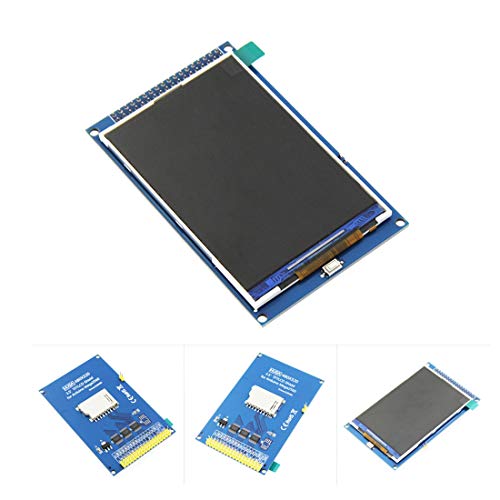
HiLetgo 3.5 Inch TFT LCD Display ILI9486/ILI9488

ELEGOO 0.96 Inch OLED Display Screen Module 3PCS

Hosyond IIC I2C 2004 LCD Module 3pcs

GeeekPi IIC I2C TWI Serial LCD 2004 20×4 Display Module
More Details On Our Top Picks
A 5-inch touchscreen like this fits the kind of desk setup where you want immediate feedback without a full-size monitor. The HDMI path handles the image, while the USB line handles touch input and power, so the wiring stays pretty straightforward for a Pi bench or a classroom project. The built-in power button and on-screen display controls matter more than they first sound, especially during long coding sessions or demo days.
The trade-off is size, since this feels more like a compact control screen than a tiny status panel. Compared with the Hosyond 3.5-inch panel, this ELECROW option gives you a roomier surface for taps, menus, and readable text. You’ll appreciate that extra space most in a home lab, a kiosk-style build, or any project you plan to show to other people.
Strong Points
- Touch input and display wiring stay separate, which keeps setup clearer on a crowded bench.
- Five inches gives you enough room for menus, icons, and larger text during coding demos.
- The power button helps cut down unnecessary screen use between sessions.
- OSD controls let you adjust the image without digging through software every time.
Things To Consider
- The larger panel takes more space than the 0.96-inch OLED options in this roundup.
- Touchscreens usually mean a little more cable management than plain character displays.
- It suits project stations better than a pocket-sized enclosure.
Feature Snapshot
Who It Suits Best
It suits you best when you want a compact touchscreen for Raspberry Pi builds, coding lessons, or prototype demos.
Where A Sibling Pick Shines
Hosyond 3.5 Inch 480×320 Touch Screen TFT LCD SPI Display Panel fits you better when you want a smaller Pi-mounted panel with a tighter footprint.
This is the kind of display you reach for when the job is plain text and nothing more. The 16-by-2 character layout keeps menu labels, sensor readings, and short prompts compact, which helps in instrument-style projects or simple controllers. Because you get two modules here, you also have a little room to keep one on hand for a second build.
Compared with the ELECROW touchscreen, this HiLetgo set is far more basic, but that simplicity is part of the charm. It tends to suit beginner-friendly Arduino or Raspberry Pi tasks where you want dependable text output and low visual clutter. The honest read is that it won’t feel flashy, yet for status lines and terse readouts, that’s exactly the point.
Highlights
- Two-line, 16-character layout keeps information short and readable.
- Small footprint helps it fit crowded project boxes.
- Dual-pack format gives you a spare display for another build.
- Blue backlight improves contrast in dim work areas.
Worth Noting
- The narrow text area leaves little room for long labels.
- Character-only output feels limited beside the touchscreen picks in this list.
- Backlight-focused panels can need careful placement to stay easy to read.
Core Details
Made For
It suits you best for straightforward status panels, small Arduino projects, and quick prototype readouts.
Look Elsewhere When
ELEGOO 0.96 Inch OLED Display Screen Module 3PCS fits better when you want a brighter little screen with more pack flexibility.
Compared with ELECROW’s larger touchscreen, this Hosyond panel leans into a more Pi-native feel, especially for projects that mount directly to the board. The 3.5-inch size and 480 by 320 resolution make it a solid middle ground for dashboards, simple controls, and handheld-style builds. For a bench setup or a compact enclosure, that balance usually matters more than sheer screen size.
The catch is that this style of display asks a bit more from setup than a plain character module, so it rewards anyone who’s comfortable following install steps. You’ll likely like it most for Raspberry Pi projects that need a sharper interface without jumping all the way to a larger desktop-style panel. It feels like a middle lane option, which is often where many hobby builds land.
What We Like
- 3.5-inch panel size stays manageable in compact enclosures.
- 480 by 320 resolution gives you a clearer interface than basic text displays.
- Touch support helps with menus, controls, and quick demos.
- Fits several Raspberry Pi models, which broadens project use.
Small Caveats
- Setup takes more effort than a simple serial character display.
- The smaller surface can feel tight for larger touch targets.
- Best results usually come from careful wiring and driver setup.
Details At A Glance
Built With In Mind
It suits you best for Raspberry Pi builders who want a compact touch panel for everyday project use.
Swap It Out When
ELECROW 5 Inch Touch Screen Monitor fits better when you want a larger surface for classroom demos or more spacious control layouts.
This tiny OLED module is a good fit for status lines, sensor labels, and other spaces where every millimeter counts. OLED means organic light-emitting diode, so each pixel produces its own light, which usually helps contrast in low-light corners of a project box. The 0.96-inch size keeps it discreet, almost like the instrument cluster for a miniature build.
Compared with the 3.5-inch options above, this Dorhea display is much better for terse information than for anything graphical or touch-based. It also supports a broad voltage range, which helps on mixed-voltage hobby benches. You may find the small footprint especially useful in a temperature monitor, a DIY meter, or a tidy Raspberry Pi enclosure.
Bright Spots
- Very small size makes it easy to place in tight housings.
- 128 by 64 resolution gives more room than basic 16×2 text screens.
- Wide viewing angle helps the display stay legible from different positions.
- Low power draw suits always-on status projects.
Points To Note
- The tiny screen size limits how much information fits at once.
- It works best for text and simple graphics, not full interfaces.
- Small modules can be fiddlier to mount cleanly inside cramped cases.
Technical Sheet
Whose Shelf It Belongs On
It suits you best for compact microcontroller projects that only need short, readable status text.
Another Choice May Suit
HiLetgo 3.5 Inch TFT LCD Display ILI9486/ILI9488 fits better when you want a much larger, more visual panel.
Arduino Mega2560 users will notice the appeal right away, because this panel is built around direct insertion and a 36-pin layout. The level-conversion chip matters too, since it helps bridge 5V and 3.3V logic, which can make mixed-voltage projects less awkward. For dashboards, menus, and controller-style builds, that kind of compatibility saves time and guesswork.
Unlike the Dorhea OLED module, this HiLetgo panel is much more about screen real estate than minimal power and tiny size. You do need to remember that it isn’t a touch screen, so it’s best for display-first projects rather than tap-heavy interfaces. The honest read is that it suits tinkerers who want a sturdy visual panel for a Mega-based build and prefer direct board fit over extra touch features.
Upsides
- Direct insertion on Mega2560 makes the physical fit simpler.
- Level conversion helps with mixed-voltage board compatibility.
- 3.5-inch display area works well for practical menus and graphs.
- Suited to projects where the screen does the talking.
Areas To Watch
- No touch layer, so control has to come from the board or external inputs.
- It’s more specialized than the broader Pi-friendly touchscreen picks.
- Pin-heavy builds can need tidy wiring to stay serviceable.
Feature Card
Right Fit For
It suits you best for Arduino Mega2560 projects that need a fairly large display without touch control.
Where Shoppers Go Wrong
Hosyond 3.5 Inch 480×320 Touch Screen TFT LCD Display Panel fits better when you want touch interaction on a Raspberry Pi build.
Three identical small OLED modules make sense for hobby work that repeats across projects. Each panel uses self-lit pixels, so contrast stays strong for status messages and sensor output, especially in dim enclosures or on a cluttered desk. The included wire set also lowers the friction of getting a first build running, which is handy for a bench full of half-finished ideas.
Compared with the Dorhea single module, this ELEGOO pack gives you more flexibility straight away, since you can place one display on a prototype and keep the others for later. The 0x3C address detail matters for I2C setup, but it also means you’ll want to check address planning if you’re stacking several modules on one bus. It suits makers who like to keep spare parts within reach.
Positives
- Three modules give you room for multiple builds or backups.
- Self-luminous pixels help text stand out with strong contrast.
- Small size keeps it practical for compact cases and dashboards.
- Ten included wires reduce the number of extras you need to source.
Honest Caveats
- The display is small, so it suits short messages more than full menus.
- Bus address planning matters in multi-display setups.
- Fine mounting work can take patience in very tight project boxes.
Core Details
The Right Fit
It suits you best for compact projects where you want a small OLED on more than one build.
Reach For A Different Pick When
ELECROW 5 Inch Touch Screen Monitor fits better when your project needs touch input and a much larger visual area.
This 20-by-4 character format gives you more breathing room than the 16×2 displays above, which matters for stacked menus, lab labels, or multi-line prompts. The serial I2C connection keeps wiring simpler than a parallel LCD, and that tends to help a lot once a project moves from bench mess to a tidier enclosure. Three modules in the box also make it useful for iterative builds.
Compared with the smaller HiLetgo 1602 set, this Hosyond option handles longer names and more status lines without feeling cramped. The backlight can be adjusted with a potentiometer, which is handy when your workspace shifts from bright daylight to a dim corner. It suits you well for Raspberry Pi or Arduino projects that need a clear text interface without graphical overhead.
What We Like
- Four rows of text give you more room for labels and prompts.
- I2C wiring keeps the connection count lower than many LCD layouts.
- Three-pack format supports multiple builds or future spares.
- Backlight adjustment helps the screen fit different lighting conditions.
Minor Gripes
- Character output is still less flexible than the touch panels in this roundup.
- Five-volt operation may require more attention on mixed-voltage setups.
- Text-only layouts can feel plain beside graphic displays.
At A Glance
Best Suited To
It suits you best for text-heavy Arduino or Raspberry Pi projects that need a clean four-line display.
A Better Fit Elsewhere
GeeekPi IIC I2C TWI Serial LCD 2004 20×4 Display Module fits better when you want a similar text layout with an adapter-forward maker package.
This GeeekPi module speaks to builders who like a practical text display with a bit more support around it. The 20×4 layout suits device menus, measurement screens, and DIY project dashboards, especially where you want more than a terse two-line readout. I2C keeps the wiring approach familiar, and the included adapter makes the package feel ready for a workbench rather than a blank parts bin.
Compared with the Hosyond 2004 three-pack, this one leans into a more complete maker-focused bundle, which may suit a first enclosure build or a project table where convenience matters. The blue backlight is a straightforward choice, though text-only LCDs still won’t match a touchscreen for flexibility. It works well for Raspberry Pi, Arduino, or STM32 tasks that need reliable information in a clean, orderly format.
Reasons To Buy
- 20×4 layout gives you a useful amount of text space.
- I2C interface keeps hookup simpler than many older LCD formats.
- Adapter inclusion helps the package feel more project-ready.
- Fits a wide range of maker boards and DIY use cases.
Room For Improvement
- It still stays in the character-display lane rather than graphic UI territory.
- Text-only output is less flexible than the touchscreen options here.
- For very small enclosures, the 20×4 layout may be more display than you need.
Quick Facts
Who Should Grab It
It suits you best for Raspberry Pi or Arduino builds where you want a practical four-line text panel with a ready-to-use feel.
Skip It When
ELECROW 5 Inch Touch Screen Monitor fits better when your project calls for touch control and a larger interface.
How To Choose The Right Displays For Programming
Match The Screen To The Job
A programming display should start with the kind of information you need to see. Short sensor values and device status lines work well on 16×2 or 20×4 character modules, while dashboards, menus, and touch controls need a TFT or touchscreen panel. That difference matters because a tiny OLED can look crisp, yet still feel cramped for a web-style interface.
Board fit matters just as much. Raspberry Pi projects often pair nicely with HDMI or SPI touch displays, while Arduino Mega2560 builds may suit pin-heavy TFT panels made for direct insertion. Your project gets easier to live with when the screen matches the board instead of fighting it.
Think About Wiring And Setup Effort
I2C, or Inter-Integrated Circuit, is a serial bus that uses fewer signal lines, so it usually simplifies wiring on compact projects. That helps in a tidy enclosure or a classroom setup where you do not want a nest of cables. The trade-off is that character modules often stay limited to text.
SPI, or Serial Peripheral Interface, can move data quickly and often works well for graphic displays, but it may ask for more pins and more care during setup. Touchscreens also add another layer of configuration, so they suit you best when the interface matters enough to justify the extra steps.
Read Size, Contrast, And Placement Together
Screen size should be judged with distance in mind. A 0.96-inch OLED is great on a bench, but it can disappear in a larger desk build, while a 5-inch panel is easier to glance at from across the table. Contrast matters too, especially in dim rooms or inside instrument boxes where the display needs to stand out quickly.
Placement changes the whole experience. A front-panel display in a workbench enclosure needs quick readability, but a screen tucked inside a prototype case can stay smaller and simpler. For most home labs, that balance is the real decision point.
Buy For Today, Leave Room For Tomorrow
Spare modules can save time later, especially for hobby work that tends to branch into multiple projects. A three-pack makes sense when you know you will reuse the same display style across several builds. Single units are fine for one-off jobs, yet they leave less room for expansion.
That forward-looking choice matters most when you are building dashboards, learning code, or refining a project you expect to revisit. You do not need the biggest panel for every task, but you do want enough headroom that the screen still fits the next version of your idea.
What To Weigh Before You Click
Wrong Turns To Avoid
A common mistake is choosing a display by size alone. A large screen can still feel awkward if it uses the wrong interface or asks for more wiring than your board can comfortably support. Another easy miss is buying a character module for a task that really needs menus or touch control.
You also want to match the display to the enclosure. A tiny OLED can be perfect in a meter box, yet frustrating on a workbench monitor. The right fit starts with use case, then narrows to size and connection style.
When Paying More Pays Off
Higher-tier displays often cost more because they give you larger panels, touch input, stronger integration, or a more complete accessory package. That extra spend usually buys smoother interaction and less compromise on space or readability. In maker projects, convenience often matters as much as raw resolution.
The upgrade makes sense when the screen is part of the user experience, not just a status readout. For a demo unit, a home dashboard, or a Pi-controlled kiosk, the extra flexibility can save frustration later.
Final Thoughts
You have a lot of good paths here, but the best one depends on whether your project needs text, touch, or a clearer interface for quick glances. The ELECROW touchscreen fits broad Raspberry Pi work, while the HiLetgo and Hosyond character displays serve simpler control panels very well. For tiny enclosures, the OLED picks keep things neat; for larger demos, the 5-inch panel has the friendliest layout. Choose the one that matches your build size first, then the wiring style, and your setup will feel a lot easier to live with.
