
Curved screens can make a small desk feel less cramped and a wide desk feel more focused, especially when you split your day between work, streaming, and games. The right pick depends on how much screen space you need, how sharp you want text to look, and whether you care more about smart features, clean cable management, or a simple plug-in display.
Quick Look At The Shortlist

Samsung 24″ Essential S3 (S36GD) Series FHD Curved Monitor

Dell 34 Monitor S3425DW

HUANUO Dual Monitor Stand

LG 34SR60QC-W 34-inch QHD Curved Smart Monitor
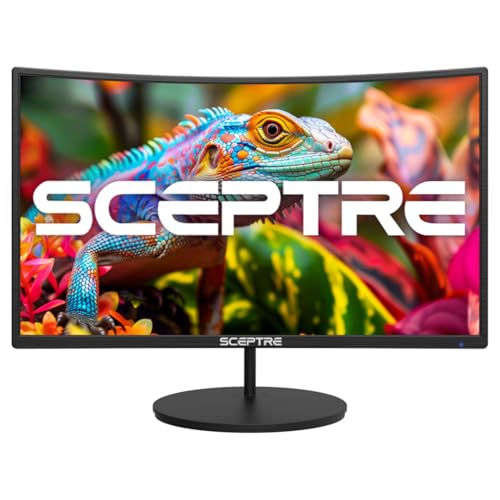
Sceptre Curved 27-inch Gaming Monitor C275W-1920RN

INNOCN 49″ Curved Gaming Monitor 49C1G
Samsung 32″ S3 (S39GD) Series FHD Curved Monitor

24 Inch Curved Monitor
More Details On Our Top Picks
This 24-inch Samsung makes sense for a compact desk, a dorm setup, or a second screen beside a laptop. The 1800R curve, which is a gentle bend measured in millimeters of radius, brings the edges a little closer to your line of sight, so the panel feels more settled during long sessions.
Its 100Hz refresh rate helps motion look smoother than a basic 60Hz panel, and Game Mode gives you a quick image preset for play or casual video work. The honest trade-off is that FHD on 24 inches is a comfort-first choice, not the sharpest route for dense spreadsheets, so office users who sit close may prefer a higher-resolution screen like the Dell 34 Monitor S3425DW.
Strong Points
- 24-inch size keeps the footprint friendly for tight desks and shared spaces.
- 100Hz refresh helps scrolling and motion feel less choppy in daily use.
- Game Mode gives you a quick picture change without digging through menus.
- Advanced Eye Comfort is useful for long work blocks, especially late in the day.
- HDMI and D-sub support makes it easier to pair with older and newer hardware.
Things To Consider
- FHD at 24 inches keeps things practical, but it won’t satisfy anyone chasing razor-sharp text.
- The curved format feels most natural from the front, so side-angle viewing is not the main strength.
- The simpler feature set leaves less room for cable-light setups than USB-C models.
Feature Snapshot
Who It Suits Best
You want a compact curved monitor for general computer use, light gaming, or a second-screen setup.
Where A Sibling Pick Shines
Dell 34 Monitor S3425DW suits you better for wider multitasking and a more spacious work layout.
After the smaller Samsung, this Dell opens the workspace up in a way that suits spreadsheets, timelines, and side-by-side apps. WQHD means 3440 x 1440 resolution on a 34-inch curved panel, so you get more room without stepping all the way up to a huge ultrawide footprint.
Its USB-C port with 65W power delivery can carry video, data, and laptop charging through one cable, which keeps a desk cleaner for hybrid work. The trade-off is that the feature mix is richer than the Samsung 24-inch pick, so you pay for convenience and screen space rather than a barebones setup, and that makes sense for commuters who dock a laptop at the same desk every day.
What We Like
- 34-inch wide format gives you breathing room for two windows at once.
- 120Hz refresh and FreeSync Premium help motion stay fluid during games and scrolling.
- USB-C with 65W power delivery simplifies a laptop-and-monitor desk.
- Anti-glare treatment helps tame bright rooms and overhead lighting.
- 2 x 10W speakers reduce the need for separate desktop audio in casual use.
- HDR10 and 95% DCI-P3 support give color work a broader, more flexible range.
Worth Noting
- The wide shape needs a deeper desk than the compact Samsung 24-inch monitor.
- Built-in speakers are handy, but separate speakers still make sense for richer sound.
- USB-C convenience is great, though laptops that do not support video over USB-C will need another route.
Core Details
Made For
You want a wide monitor for hybrid work, gaming, and cable-light desk setup.
Swap It Out When
LG 34SR60QC-W fits better for you if smart streaming features matter more than USB-C laptop docking.
Screen size matters less here than the shape of your desk, because this mount is about reclaiming surface space and lining up two monitors more cleanly. It works with 13 to 32 inch displays that weigh between 4.4 and 19.8 pounds, and the VESA pattern, which is the bolt-hole spacing on the back of the screen, must be 75 x 75 mm or 100 x 100 mm.
That makes it a strong fit for home offices with two matching panels, though the compatibility checks take a little patience before purchase. The white finish feels cleaner than the black hardware seen on many mounts, and that matters most in bright rooms or minimalist setups where cables and brackets can stand out.
Highlights
- Dual-arm design helps you place two screens at better viewing angles.
- Clamp and grommet options give you more ways to mount it to the desk.
- Supports a wide monitor-size range, which helps for matching work and gaming screens.
- White finish blends well with lighter desks and tidy office layouts.
Small Caveats
- Each screen must meet the size, weight, and VESA-hole requirements together.
- Desk thickness and edge shape can affect how comfortable the clamp feels.
- Assembly takes more care than a simple monitor stand, especially in tight spaces.
Details At A Glance
Best Suited To
You want a cleaner dual-monitor desk and already know your screens meet the mounting rules.
Another Choice May Suit
The Samsung 24″ Essential S3 works better for someone who wants a single monitor with a simpler setup and less installation work.
The LG takes a different path from the Dell 34 Monitor S3425DW, because it leans into smart features as much as it leans into screen size. webOS is LG’s built-in television-style interface, so you can stream apps without keeping a computer attached the whole time.
That makes it a natural fit for a bedroom, studio, or mixed-use desk where one panel has to play more than one role. The built-in speaker, AirPlay 2, Screen Share, Bluetooth, and ThinQ app support round it out, though the trade-off is that this kind of convenience matters more than pure cable-docking simplicity.
Bright Spots
- webOS gives you a direct route into streaming and smart functions.
- AirPlay 2 and Screen Share make it easier to mirror from phones and laptops.
- 34-inch ultrawide shape gives you a broad workspace for browsing and media.
- 100Hz refresh keeps motion smoother than a basic office display.
- Built-in speaker and Bluetooth reduce the need for extra desktop gear.
Areas To Watch
- Smart features add convenience, but they also add menu layers you may not use every day.
- The white finish stands out, which is good in bright rooms and less subtle in dark setups.
- It suits casual streaming well, though hard-core laptop docking is more the Dell 34 Monitor S3425DW’s lane.
Feature Rundown
Who Will Love This
You want a curved screen that works as a monitor and a casual streaming hub.
Look Elsewhere When
Dell 34 Monitor S3425DW fits better for a laptop-heavy workstation that benefits from USB-C charging.
This Sceptre sits in a useful middle ground, because it gives you a 27-inch curve, two HDMI ports, VGA, and built-in speakers without asking for a sprawling desk. The 1500R curve is a bit tighter than the Samsung 24-inch model above, so the image wraps more noticeably around your view.
For casual gaming, schoolwork, or a living-room PC, that combination feels easy to live with. The trade-off is familiar at this tier, since 1080p on a 27-inch screen is friendly and affordable in spirit, but text won’t look as crisp as it does on the Dell 34 Monitor S3425DW or LG 34SR60QC-W.
Positives
- 27-inch size gives you more room than a compact 24-inch screen.
- 100Hz refresh keeps everyday motion and light gaming smoother.
- HDMI x2 and VGA cover both modern and older devices.
- Built-in speakers simplify a basic desk or dorm setup.
- VESA support makes wall mounting or arm mounting possible.
Points To Note
- 1080p on 27 inches is fine for general use, though sharp-text fans may want more resolution.
- The built-in speakers are convenient, but they fit casual listening better than richer sound.
- The overall feature set is straightforward, so it is not the right match for a heavy multitasking workstation.
Quick Facts
Right Fit For
You want an easy-to-place curved monitor for school, light gaming, or a simple home setup.
Skip It When
Samsung 32″ S3 (S39GD) Series FHD Curved Monitor is the better fit for you if smart TV-style apps matter more than basic monitor features.
The INNOCN 49C1G is the dramatic option in this group, and its 32:9 shape behaves more like two monitors fused into one. That makes it especially useful for editing timelines, comparing documents, or keeping game HUD elements and side panels in view without constant window switching.
USB-C, DisplayPort, HDMI, built-in speakers, and height plus tilt adjustment give it a desktop-friendly feature set, but you do need the desk width to match the panel’s scale. It pairs best with someone who already knows a 49-inch ultrawide is the right physical fit, because this sort of screen can feel overkill in a small room.
Best Bits
- 49-inch ultrawide design creates a very broad working area.
- 144Hz refresh supports smoother motion for gaming and fast scrolling.
- 32:9 aspect ratio helps you keep multiple windows visible at once.
- USB-C, DisplayPort, and HDMI provide flexible connection choices.
- Height and tilt adjustment help you line up the screen more comfortably.
Room For Improvement
- The sheer width asks for a large desk and a clear viewing position.
- It makes sense as a centerpiece, but not as a casual spare monitor.
- Built-in speakers are useful, though many desk setups will still lean on separate audio.
Technical Sheet
Built With In Mind
You need a giant curved display for multitasking, gaming, or media work on a roomy desk.
Reach For A Different Pick When
Samsung 34 Monitor S3425DW suits you better if you want a wide screen that is easier to place and easier to manage.
This Samsung leans toward smart-screen convenience rather than plain monitor behavior, which makes it feel different from the more work-first Dell and LG models. Samsung Vision AI, Smart TV apps, Gaming Hub, USB-C, HDMI, and USB-A give you a mixed-use panel that can sit on a desk or in a room where streaming matters as much as spreadsheets.
The 32-inch curved FHD panel is large enough to feel immersive without turning into a full ultrawide wall, and that middle ground will suit a lot of casual setups. The trade-off is straightforward, because the feature stack is broader than the Essential S3 above, yet the monitor still asks you to accept FHD rather than higher resolution.
Upsides
- Smart TV apps let the screen serve as a monitor and media hub.
- Gaming Hub adds a more entertainment-focused angle than the plain office displays here.
- USB-C, HDMI, and USB-A give you several device connection paths.
- 32-inch curved design offers a roomier feel than the 24-inch Samsung.
Softer Spots
- FHD on 32 inches is practical, though it is not the sharpest setup in this roundup.
- The smart interface brings convenience, but also more menus than a basic monitor.
- It fits mixed use well, yet serious workstation users may want the Dell 34 Monitor S3425DW instead.
Feature Card
Whose Shelf It Belongs On
You want a curved Samsung that can handle entertainment, casual gaming, and desk work in one place.
Where A Sibling Pick Shines
The Samsung 24″ Essential S3 is the cleaner choice for someone who wants a simpler monitor with less menu depth.
DJiEX keeps this model straightforward, and that simplicity is part of the appeal for office desks, study corners, and home PCs. The 3000R curve is deeper than the Samsung 24-inch monitor’s 1800R shape, so the panel feels a little more wrapped around your field of view even though it stays compact.
The 100Hz refresh rate, HDR10, FreeSync, and 98% sRGB support give you a lot of useful everyday features for the size, while HDMI, VGA, and 75 x 75 mm VESA support make it flexible. The practical trade-off is that it stays in the entry-level lane, so it suits everyday computing more than a busy creative workstation.
Standout Traits
- 24-inch footprint stays friendly for dorms, studies, and compact desks.
- 100Hz refresh makes scrolling and casual media feel smoother.
- HDMI and VGA give you broad compatibility with older and newer devices.
- VESA support lets you mount it on a wall or arm if needed.
- Low Blue Light mode is useful for long stretches at the screen.
Honest Caveats
- The feature set is aimed at simple daily use, so it is not built for demanding creative work.
- VGA is handy for legacy gear, though most modern setups will lean on HDMI.
- The stand is quick-release V-shaped, which is convenient, but arm mounting may suit a cleaner desk better.
At A Glance
Who Should Grab It
You want an inexpensive curved monitor for work notes, study sessions, and general home use.
Where Another Pick Suits Better
Samsung 24″ Essential S3 suits you better if you want a more established brand feel and a cleaner all-purpose setup.
How To Choose The Right Dual Curved Monitors
Screen Size And Shape Matter First
A curved monitor only works well when the size matches the desk and the distance. A 24-inch panel suits compact setups, while 34-inch ultrawides give you room for side-by-side windows, and a 49-inch screen starts to behave like a command center. The curve itself matters too, because a tighter radius, such as 1500R, bends more noticeably than 1800R or 3000R.
Match Resolution To Viewing Distance
Resolution tells you how much detail the panel can show, and it matters more as screen size grows. FHD works fine on 24-inch models for basic office use, but at 27 inches and above, WQHD or ultrawide resolutions usually keep text and windows more usable. You’ll notice the difference most in spreadsheets, code, photo work, and long browsing sessions.
Think About Ports, Power, And Desk Layout
USB-C with power delivery is a major convenience for laptop users because one cable can carry video and charging. HDMI remains the common fallback, while VGA still helps with older hardware in school labs or legacy offices. On a crowded desk, a monitor with a cleaner cable path can matter as much as raw panel size.
Smart Features Versus Straight Monitor Use
Some curved displays stay focused on the screen itself, while others add streaming apps, wireless sharing, speakers, or gaming hubs. Those extras help in a bedroom, dorm, or casual media space, but they can be unnecessary on a work-first desk. Pick the feature mix that matches how you spend most of your screen time, not the longest spec list.
What To Weigh Before You Decide
Common Shopping Slip Ups
Shoppers often choose size before checking desk depth, then discover the panel sits too close to their face. Another easy miss is assuming all curved screens are equally suited for text, even though FHD on a larger panel can look softer than higher-resolution options. Mounting plans also get overlooked, especially with dual-arm stands that need both the right VESA pattern and the right weight range.
What The Higher Tier Buys
Higher-priced curved monitors usually put money into panel size, stronger resolution, wider color support, and more flexible input options. USB-C charging, built-in speakers, and smart platforms add convenience, but they also add complexity and cost. That upgrade makes the most sense for you when the monitor has to replace several separate devices on one desk.
Final Thoughts
Curved monitors make the most sense when you know your use case before you shop. A 24-inch screen keeps things simple, a 34-inch ultrawide opens up space for work and play, and a 49-inch panel turns your desk into a wide canvas. The best match is the one that fits your room, your cable setup, and the way you actually spend your hours.
