
Gaming on a 27-inch screen hits a sweet spot for desks that aren’t huge and play styles that range from story-heavy nights to fast, twitchy matches. You get enough screen space to feel absorbed without needing to sit far back, and the right panel can keep motion clean while still handling everyday use well. This roundup focuses on that balance, so you can match resolution, refresh rate, and stand adjustability to the way you actually play. Some picks lean into speed, others into image quality, and a few do both with less fuss.
Quick Shortlist For Faster Comparing

Dell 27 Monitor S2725QS 4K UHD IPS, 120Hz

Samsung Odyssey G5 G53F QHD Gaming Monitor 200Hz

Dell 27 240Hz Gaming Monitor SE2726HG

Samsung Odyssey G5 G51F QHD Gaming Monitor 180Hz

Samsung Odyssey OLED G6 G61SH QD-OLED Gaming Monitor
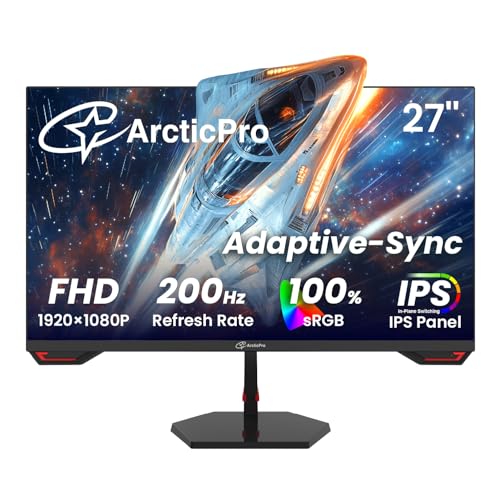
ArcticPro 27 Inch 200Hz Gaming Monitor FHD 1080p

AOC 27 Inch Gaming Monitor 27G51F FHD 144Hz

LG 27G414B-B Ultragear FHD IPS Gaming Monitor 144Hz
More Details On Our Top Picks
That 4K panel makes this Dell feel especially suited to you if sharp text, clean interface detail, and game worlds with a lot of fine texture matter just as much as speed. The 120Hz refresh rate and FreeSync Premium support give it more motion headroom than a plain office display, while the height, swivel, and pivot adjustments help it fit a proper desk setup without much fuss.
The trade-off is obvious: 4K asks more from your graphics card, so this is a stronger fit for a capable PC or a mixed-use setup than for someone chasing absolute frame-rate ceilings. Compared with the Samsung Odyssey G5 models below, you give up some raw gaming pace, but you gain a more polished everyday screen that can handle work, browsing, and play in the same afternoon.
Strong Points
- 4K resolution brings a much denser image, which helps text, maps, and detailed scenery look cleaner at a 27-inch size.
- 120Hz keeps motion smoother than standard 60Hz panels, so casual gaming and fast scrolling feel less sticky.
- FreeSync Premium helps reduce tearing, which matters during console play or PC sessions with shifting frame rates.
- Height, swivel, and pivot adjustment make it easier to line up the screen for long workdays or a shared desk.
- USB-C, HDMI, and DisplayPort give you flexible hookup options for modern laptops and gaming towers.
Things To Consider
- 4K gaming needs stronger hardware than 1080p or 1440p, so frame rates can depend heavily on your setup.
- Some desk spaces feel a little cramped with a fully adjustable stand, especially beside larger keyboards or speakers.
- The image leans more toward clarity and balance than pure competitive speed, so esports-first shoppers may want something faster.
Feature Snapshot
Who It Suits Best
You’ll get the most from this model as a mixed-use gamer who also cares about crisp desktop work and a tidy cable setup.
Where A Sibling Pick Shines
Samsung Odyssey G5 G53F makes more sense for a competitive player who wants a QHD screen with a faster 200Hz pace.
For fast shooters and responsive action games, this Samsung lands in a very practical spot: QHD gives you more detail than FHD, and 200Hz keeps motion quick enough for serious play. The IPS panel, which means in-plane switching for wide viewing angles and steadier color, also makes it easier to keep the picture consistent when you sit off-center or share the screen.
HDR10 adds extra headroom for highlights and shadows, though the real payoff depends on the game and your expectations for contrast. Compared with the Dell S2725QS, this model leans harder into gaming speed and less into all-purpose desktop polish, so it feels sharper for play than for long document sessions.
What We Like
- 200Hz refresh rate suits fast motion, so quick camera swings and action-heavy scenes look more fluid.
- QHD resolution is a strong middle ground, giving you more detail than 1080p without the load of 4K.
- IPS panel viewing angles help the picture stay more even across a shared desk or wide monitor arm setup.
- FreeSync Premium helps smooth out frame-rate swings, which is useful during busy matches or console play.
- Auto Source Switch can save a little manual input juggling if you move between devices often.
Points To Note
- QHD at 200Hz still benefits from a reasonably strong graphics card, especially in newer titles.
- The feature set is more focused on speed than extra desk comfort, so it feels less flexible than some Dell options.
- HDR10 support is welcome, but the actual impact will vary by game and content.
Core Details
Built With In Mind
You’re the best match for this monitor if you want a fast QHD screen for PC or console gaming and don’t need a lot of desk-adjustment extras.
Another Choice May Suit
Dell 27 Monitor S2725QS makes more sense for you if mixed work and gaming matter more than pushing refresh rate as high as possible.
Among the faster flat-panel options here, this Dell is built for you if the first thing you notice in a game is motion clarity and input feel. A 240Hz refresh rate paired with 0.5ms response time, which is the display’s speed in changing pixels, gives it a much snappier personality than the 120Hz Dell above.
The FHD resolution keeps the load lighter on your graphics card, so this is a sensible match for high-frame-rate play on a midrange rig. Compared with the Samsung Odyssey G5 G53F, you give up some pixel density, but you gain an easier path to very high frame rates and a simpler setup for fast competitive sessions.
Upsides
- 240Hz is the headline here, and it’s a strong fit for shooters and other reaction-heavy games.
- FHD resolution is easier to drive, so you can often reach higher frame rates with less strain on your system.
- Fast IPS keeps color and motion in a good middle ground, which helps the image avoid the washed-out feel of some speed-first panels.
- FreeSync Premium and HDMI VRR help reduce tearing across PC and compatible console play.
- Height-lightened eye strain support from the TÜV 3-star certification adds a little comfort for long desk sessions, assuming your room lighting is sensible.
Minor Gripes
- FHD on 27 inches is less dense than QHD or 4K, so text and fine detail won’t look as crisp.
- Tilt-only adjustment gives you less posture flexibility than the more fully adjustable Dell S2725QS.
- The speed focus is clear, so color-rich creative work is better handled by a different screen.
At A Glance
Who Should Grab It
You’ll appreciate this most if your priority is competitive speed on a 27-inch display and you’re comfortable with a simpler FHD panel.
Look Elsewhere When
Samsung Odyssey OLED G6 G61SH suits you better if picture quality and richer contrast matter more than pure frame-rate chasing.
This Samsung sits in a very approachable middle lane, with QHD resolution giving you clearer detail than FHD and 180Hz keeping motion quick enough for serious play. The height-adjustable stand matters more than it sounds, because a 27-inch screen feels much easier to live with when you can line it up to your chair and desk instead of working around the panel.
Virtual Aim Point and Black Equalizer make it feel tuned for gaming rather than just generic use, though the payoff will depend on the genres you play. Compared with the G53F above, it’s a little less aggressive on refresh rate, but it gives you a more balanced package that still leans strongly toward games.
Bright Spots
- 180Hz keeps fast motion smooth without asking quite as much of your system as a 240Hz screen.
- QHD resolution adds welcome sharpness for a 27-inch display, especially in open-world titles and strategy games.
- Height adjustment helps you dial in a comfortable viewing angle for longer evening sessions.
- HDR10 and AMD FreeSync give the monitor useful gaming touches without making it feel overloaded.
- Auto Source Switch+ can be handy on a desk with both a console and a PC connected.
Room For Improvement
- The extra gaming tools are useful, but they won’t matter equally in every genre.
- QHD at 180Hz still benefits from a capable graphics card, especially in newer releases.
- Compared with the OLED option later in the list, contrast and black depth are naturally more conventional.
Details At A Glance
Best Suited To
You’re a strong match for this screen if you want a practical QHD gaming monitor with useful extras and a stand that helps with daily comfort.
A Better Fit Elsewhere
Dell 27 240Hz Gaming Monitor SE2726HG makes more sense for you if your main goal is pushing frame rate as high as possible.
This is the panel to notice first if image quality is the reason you’re shopping. QD-OLED combines OLED-style contrast with quantum-dot color support, and that usually translates into very rich blacks, bright highlights, and a screen that feels especially vivid in dark or cinematic games.
The 240Hz refresh rate and 0.03ms response time put it firmly in high-speed territory too, so it isn’t only about pretty scenes. Compared with the IPS models above, it costs more in complexity and usually asks for a more careful setup, but the result makes sense for enthusiasts who care about both motion and image depth.
Best Bits
- QD-OLED gives you deep contrast and strong color presence, which stands out in dark rooms and story games.
- 240Hz and 0.03ms suit fast play, so the panel doesn’t feel like a style-first compromise.
- Pantone Validated color support adds confidence for you if accurate-looking tones matter in games and media.
- Glare-Free screening helps keep reflections from becoming distracting near windows or bright lamps.
- Height-adjustable support makes it easier to place the panel at a comfortable eye line.
Softer Spots
- OLED care deserves attention, so long desktop sessions with static elements call for a more thoughtful habit pattern.
- This is the most premium-feeling option here, so it makes the most sense for committed enthusiasts.
- The picture can be almost too tempting for basic setups, which means your GPU and desk arrangement should justify it.
Core Details
Who Will Love This
You’ll appreciate this most if you want a high-end gaming display that also looks excellent for films, dramatic story games, and rich visual worlds.
Skip It When
LG 27G414B-B is the more practical route if you want a simpler IPS monitor for everyday use and a lower-stress setup.
ArcticPro keeps things straightforward, which is part of its charm. A 200Hz refresh rate, 1ms response time, and Adaptive Sync make it a sensible route for you if you want speed without stepping into more expensive resolution territory.
The 3-sided frameless design and ultra-slim profile also help it feel neat on a desk, especially in smaller rooms where bulky bezels can make a screen feel larger than it needs to be. Compared with the Dell and Samsung QHD picks above, this one trades away some sharpness for easier system demands and a friendlier entry point into high-refresh gaming.
Reasons To Buy
- 200Hz gives you a strong motion advantage for the money, especially in shooters and racing games.
- FHD keeps the graphics burden manageable, so more systems can push high frame rates.
- IPS panel helps colors and viewing angles stay respectable for day-to-day use.
- The slim, three-sided frame gives the monitor a cleaner desk presence than thicker-bezel alternatives.
- Adaptive Sync helps reduce tearing, which makes gameplay feel steadier during variable frame rates.
Areas To Watch
- FHD on 27 inches is a clear step down in detail from the QHD and 4K picks above.
- The source spelling suggests a less polished product page, so setup details may deserve a careful look before installation.
- There’s less evidence of premium stand flexibility here, so desk ergonomics may be simpler than on the Dell models.
Feature Card
The Right Fit
You’re looking at a good match if you want a simpler high-refresh 27-inch display for gaming and don’t need a lot of extra bells and whistles.
Where Another Pick Suits Better
AOC 27 Inch Gaming Monitor 27G51F suits you better if you want a brand name with console-ready features and a more established gaming accessory mix.
The AOC 27G51F feels like the sort of monitor you’d put on a desk and stop thinking about, which is often a compliment in this category. Fast IPS, 144Hz, and 1ms response time give you a clean, responsive baseline for PC games and console play without pushing into the more demanding territory of 200Hz or 240Hz screens.
Its VESA mount support matters for anyone using an arm or wall setup, and the earphone-out jack adds a small but useful convenience next to a console or desktop tower. Compared with the ArcticPro, it gives you a more recognizable gaming model with a slightly more grounded feature mix, though it doesn’t chase the higher refresh figures of the faster picks.
Highlights
- 144Hz is a comfortable sweet spot for many gamers, especially at 1080p.
- Fast IPS keeps the image lively while staying more color-friendly than older panel types.
- Adaptive-Sync helps smooth out tearing, which is useful during mixed console and PC use.
- VESA mount support makes it easier to move the screen onto an arm for better desk space control.
- Zero-bright-dot coverage for three years adds a reassuring detail for pixel-sensitive shoppers.
Honest Caveats
- 144Hz is solid, but it won’t match the motion headroom of the 200Hz and 240Hz picks above.
- FHD remains the less detailed choice at 27 inches, so text sharpness trails QHD and 4K options.
- The feature set is practical rather than flashy, which is good for some setups and too plain for others.
Quick Facts
Who It Belongs On
You’ll like this most if you want a straightforward 27-inch gaming display that handles PC and console duty without complicating the setup.
Reach For A Different Pick When
Dell 27 240Hz Gaming Monitor SE2726HG makes more sense if your priority is very high refresh speed for competitive play.
LG’s Ultragear entry feels like a well-judged middle ground for you if you want a dependable 27-inch gaming screen without drifting into higher-priced territory. The 144Hz IPS panel gives you smooth motion and decent color handling, while G-Sync compatibility and FreeSync support cover a wider range of graphics setups than many simple FHD monitors.
Built-in speakers, HDMI, DisplayPort, and tilt-height stand adjustment make this one especially easy to slot into a starter desk or spare room. Compared with the AOC 27G51F, it offers a similarly practical path but adds a bit more ecosystem friendliness, which can matter when you want one monitor to handle both gaming and daily use.
Positives
- 144Hz keeps motion smooth enough for a wide range of games.
- IPS panel helps the screen stay readable and lively from different seating angles.
- G-Sync compatibility and FreeSync give you broader pairing flexibility across PCs and consoles.
- Built-in speakers can be useful for a basic desk setup or a spare room where separate audio isn’t essential.
- Tilt and height adjustment help you line up the panel more comfortably for long sessions.
Worth Noting
- FHD resolution is the least detailed route in this roundup, so image sharpness won’t match QHD or 4K choices.
- Built-in speakers are convenient, but many gaming setups will still sound better with separate audio gear.
- The monitor is versatile rather than flashy, which suits a lot of desks but not every high-end rig.
Core Details
Made For
You’re looking at a smart fit if you want a practical gaming monitor for a mixed PC, console, and everyday desk setup.
Swap It Out When
Samsung Odyssey OLED G6 G61SH makes more sense if you’re ready to spend more for richer contrast and a more premium display feel.
How To Choose The Right Gaming 27 Inch Monitors
Resolution Should Match Your Graphics Card
A 27-inch gaming screen can look excellent at FHD, but QHD and 4K bring noticeably more detail. FHD keeps frame rates easier to reach, which suits competitive play or older systems, while QHD lands in the sweet spot for many desks because it adds sharpness without demanding as much as 4K. 4K looks the cleanest, though it asks a lot more from your GPU, especially in modern games.
Refresh Rate And Response Time Shape Motion
Refresh rate is how many times the screen updates each second, so 144Hz feels smoother than 60Hz and 240Hz feels quicker still. Response time, often shown in milliseconds, is how fast pixels shift from one shade to another, and lower numbers usually help fast motion look cleaner. For fast shooters and racing games, you’ll feel the difference more than you will in turn-based titles or story games.
Panel Type Changes The Feel Of The Image
IPS panels are popular because they keep color and viewing angles steady, which helps in shared spaces or when you sit a little off-center. OLED and QD-OLED models go further on contrast and black depth, so dark scenes can look much richer, though they also ask for a bit more care during everyday use. If your room has lots of light, glare control and stand flexibility start to matter as much as raw panel type.
Think About Desk Fit And Device Mix
A good stand changes the whole experience, especially on a 27-inch screen that sits close to your face. Height adjustment helps line the panel up with your eyes, while tilt, swivel, or pivot can make a small desk much easier to arrange. Extra ports such as HDMI, DisplayPort, USB-C, or built-in speakers matter most when you switch between a console, a PC, and maybe a laptop during the week.
What To Weigh Before You Buy
Wrong Turns To Avoid
A common mistake is choosing a 27-inch screen with a resolution that’s too low for your taste, then noticing text and UI elements look softer than expected. Another misstep is chasing the highest refresh number without thinking about whether your graphics card can actually feed it. It also helps to check stand movement and ports early, because a fast panel feels much less friendly on an awkward desk.
The Upgrade Payoff
Higher-tier models usually cost more because they combine better contrast, faster response, more flexible stands, and stronger image processing in one panel. OLED and QD-OLED screens sit at the premium end because they produce a more striking picture, while QHD 200Hz or 240Hz monitors ask for tighter engineering than basic FHD options. The upgrade makes the most sense for you if gaming is a major hobby and your setup deserves a screen that can keep up.
Final Thoughts
A 27-inch gaming monitor works best when it matches your habits instead of chasing every spec at once. The Dell S2725QS is the calmest all-round choice here, the Samsung G53F and Dell SE2726HG push hardest on speed, and the Samsung OLED G6 is the pick that feels most elevated. For a more budget-aware setup, the ArcticPro, AOC, and LG models keep things practical without getting fussy. Pick the screen that suits your desk, your GPU, and the kind of games you actually spend time with.
