
Gaming 34 Inch Monitors make the most sense when you want more room without jumping to a massive desk footprint. A 34-inch ultrawide can hold a game, chat, and a guide side by side, and it can also help with timelines, spreadsheets, or split-screen work after hours. The trade-off is simple, you need to match panel type, refresh rate, and stand adjustability to the way you actually use the screen. This shortlist keeps the focus on real-world fit, not flashy spec sheets.
Quick Look At The Shortlist

INNOCN 34″ Ultrawide Monitor 34C1R
Gawfolk Gaming Monitor 34 inch IPS 120Hz
CRUA 34″ WQHD 165Hz IPS Ultrawide Gaming Monitor (White)

CRUA 34″ WQHD 165Hz Ultrawide Curved Gaming Monitor
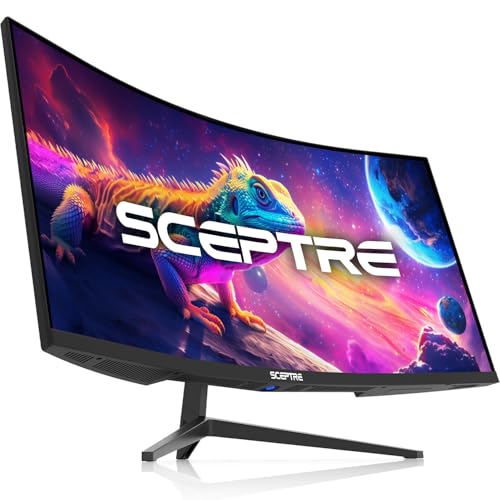
Sceptre 34-Inch Curved Ultrawide WQHD Monitor C345B-QUT168 Series

CRUA 34 Inch 165Hz UWQHD IPS Ultrawide Gaming Monitor

LG 34G630A-B 34-Inch Ultragear WQHD Curved Gaming Monitor
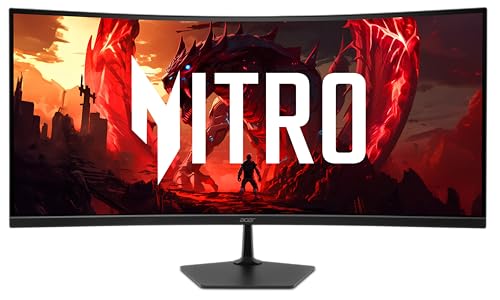
Acer Nitro 34in WQHD 3440×1440 Curved 120Hz Office Monitor EDA340CUR J0biip
More Details On Our Top Picks
The INNOCN 34C1R leans into versatility, not just speed. A 3440 x 1440 ultrawide panel gives you enough room for a game window plus overlays or a second app, and the 180Hz refresh rate keeps motion feeling responsive in fast scenes.
The adjustable stand matters more than it sounds, since 130mm of height travel and a -5° to 15° tilt range make it easier to line up with a normal desk or a standing setup. For mixed-use gaming spaces, the built-in speaker, dual HDMI 2.0 ports, DisplayPort 1.4, 3.5mm audio jack, and PIP/PBP support give you a lot of routing options without extra adapters.
Strong Points
- 3440 x 1440 resolution gives you more horizontal room for games, editing timelines, and split windows.
- 180Hz refresh suits fast shooters and racing titles better than basic 60Hz or 120Hz screens.
- PIP and PBP help you keep two devices visible at once, which is handy for a console and a PC.
- The height-adjustable stand makes desk alignment easier for long sessions.
- Dual HDMI, DisplayPort, and a 3.5mm jack make connection planning straightforward.
Things To Consider
- The built-in speaker is useful for casual use, though most desk setups still sound better with external audio.
- As with many ultrawides, the wider frame needs a little desk depth to feel comfortable.
- Owners who swap devices often may still prefer a monitor arm for even finer positioning.
Feature Snapshot
Who It Suits Best
You get the most from this pick if your setup shifts between gaming, browsing, and light creative work.
Where A Sibling Pick Shines
LG 34G630A-B 34-Inch Ultragear WQHD Curved Gaming Monitor suits you better if competitive speed matters more than extra connectivity and stand flexibility.
This Gawfolk model keeps the idea simple, a wide 34-inch screen, IPS color, and 120Hz motion without pushing into the sharper but heavier 3440 x 1440 tier. That lower-resolution approach can suit a home office desk where you want extra horizontal room and easier GPU demands.
The flat panel shape also feels more ordinary than the curved screens in this roundup, which some people prefer for spreadsheets, documents, and everyday browsing. The honest read is that it looks built for straightforward use, not showy extras, and that can be exactly right for a practical workspace.
What We Like
- 2560 x 1080 keeps system demands lighter than sharper ultrawides.
- 120Hz gives motion a smoother feel than standard office displays.
- The flat layout works well for people who spend more time in documents than in racing games.
- IPS tech usually brings steadier color and wider viewing angles for shared desks.
Room For Improvement
- The lower pixel count means text and images will not look as crisp as 3440 x 1440 models.
- Serious gaming setups may outgrow it sooner than the higher-refresh picks above.
- A flat ultrawide can feel less immersive in racing or flight sims than a curved panel.
Core Details
Built With In Mind
You suit this screen best if you want ultrawide space for work, light play, and everyday browsing without pushing your hardware too hard.
Another Choice May Suit
INNOCN 34″ Ultrawide Monitor 34C1R makes more sense for you if sharper 3440 x 1440 detail and a faster 180Hz panel matter more.
The white finish gives this CRUA a cleaner look than the darker monitors in this list, so it fits better in brighter rooms or tidy desk setups. Under the finish, you still get the familiar ultrawide mix of 3440 x 1440 resolution, 165Hz refresh, and IPS viewing angles, which keeps it useful for both games and long work sessions.
Built-in speakers and a 75 x 75 mm wall-mount pattern add a little practical flexibility, especially for compact desks where every inch matters. You may find the speakers handy for everyday use, though serious game audio still usually calls for separate sound.
Upsides
- The white shell is easier to blend into light-toned setups than a standard black gaming display.
- 3440 x 1440 resolution supports side-by-side windows and sharper game detail.
- 165Hz keeps animation smooth enough for fast action without moving into premium pricing territory.
- Wall-mount support gives you another way to free up desk space.
Points To Note
- Built-in speakers are convenient, but they tend to serve casual sound more than rich game audio.
- The white finish can show dust more readily than darker panels, so upkeep may matter more.
- Mounting on the wall adds installation planning that a basic stand does not require.
Details At A Glance
Perfect Match For
You fit this pick well if you want a brighter desk aesthetic and still need enough width for gaming plus everyday multitasking.
Swap It Out When
CRUA 34″ WQHD 165Hz Ultrawide Curved Gaming Monitor suits you better if you want a more enveloping curve for play without changing brands.
The 1500R curve is the key detail here, and it gives the screen a more wrapped-in feel than the flat Gawfolk. That shape can make racing, story games, and long browsing sessions feel more natural across a 34-inch span, especially on a desk where you sit fairly centered.
Its 3440 x 1440 resolution and 165Hz refresh rate keep it squarely in the sweet spot for many midrange gaming setups. The honest trade-off is that the feature set is more focused, so you get the core visual experience rather than a long list of extras.
Best Bits
- The 1500R curve helps fill more of your field of view.
- 3440 x 1440 gives you enough space for multitasking and high-detail games.
- 165Hz keeps fast motion smooth enough for everyday gaming.
- 120% sRGB coverage is useful for work that benefits from broader color coverage.
Minor Gripes
- The feature set is narrower than the more connection-heavy INNOCN and CRUA picks above.
- Curved panels can feel less suitable for people who mainly edit straight-line layouts all day.
- Black finishes can show fingerprints and dust, so routine cleaning helps it stay tidy.
Core Details
Whose Shelf It Belongs On
You suit this monitor best if you want a curved ultrawide for play first, with some work use on the side.
Look Elsewhere When
Sceptre 34-Inch Curved Ultrawide WQHD Monitor C345B-QUT168 Series makes more sense if you want a stronger motion-speed focus.
Sceptre’s pitch here is speed with a curved frame, and that makes it a strong fit for fast-moving game sessions. The 3440 x 1440 resolution gives you the same broad workspace as the sharper monitors above, while the quoted refresh support climbs high enough to catch the eye of motion-focused players.
Dual DisplayPort connections and built-in speakers keep the setup practical, especially for a desk that already carries a console or second PC. For most gaming rooms, the 1ms response time, which means pixels change state quickly to reduce blur in fast motion, is the detail that helps this model feel more serious than the simpler 120Hz options.
Highlights
- Up to 180Hz gives you a speed ceiling that suits twitchier play styles.
- 1ms response is aimed at keeping motion trails down in quick scenes.
- Dual DisplayPort inputs make PC setups easier to organize.
- 100% sRGB is useful for cleaner-looking everyday color work.
- The curved shell helps large game worlds feel more enveloping across the desk.
Softer Spots
- The feature mix is more gaming-centered than office-centered.
- Built-in speakers are fine for casual sound, but not a substitute for a dedicated audio setup.
- The high-motion emphasis may be more than you need for slower work tasks.
Feature Rundown
Who Will Love This
You fit this pick well if fast motion matters most and your desk setup already leans toward gaming.
Reach For A Different Pick When
LG 34G630A-B 34-Inch Ultragear WQHD Curved Gaming Monitor suits you better if you want an even faster premium panel with USB Type-C support.
This CRUA leans into multitasking more clearly than the simpler Sceptre above. PIP and PBP, which stands for Picture-in-Picture and Picture-by-Picture, let you keep two sources visible at once, so a work laptop and a game console can share the same screen without constant switching.
The tilt stand and 75 x 75 mount support make it easier to place in a proper desk layout, and the 165Hz UWQHD panel keeps gaming smooth enough for racing, FPS, and open-world use. That balance suits people who treat the monitor as a work surface during the day and a game display at night.
Reasons To Buy
- PIP and PBP are genuinely useful for console plus PC or work plus game setups.
- 3440 x 1440 gives you the wide canvas many ultrawide tasks need.
- 165Hz keeps motion comfortable in games without demanding the premium tier.
- The tilt stand helps you fine-tune sightlines without extra hardware.
- Mount support adds placement flexibility for smaller desks.
Areas To Watch
- The built-in speakers are convenient, but separate audio is still the better long-term setup for many desks.
- Because this model does a lot, cable management deserves a little extra attention.
- A wall or arm mount adds planning that a simple stand-only screen avoids.
Feature Card
Right Fit For
You suit this screen best if your desk has to handle work, streaming, and gaming in the same space.
A Better Fit Elsewhere
INNOCN 34″ Ultrawide Monitor 34C1R makes more sense if adjustable stand height matters more than split-screen tools.
The LG Ulrtragear sits at the sharper end of this roundup, and the 240Hz refresh rate is the first thing that stands out. That kind of speed makes sense for competitive gaming, where fast camera movement and quick motion changes benefit from a display that keeps pace.
USB Type-C, DisplayPort, HDMI, and the height, tilt, and swivel stand make it feel more polished than the more basic ultrawides here. The trade-off is familiar at this tier, the premium feature set is most useful when you really do care about every frame and a cleaner desktop setup.
Bright Spots
- 240Hz is a major step up for fast competitive play.
- FreeSync Premium helps reduce visible tearing when frame rates vary.
- DisplayHDR 400 gives you a stronger HDR baseline than plain SDR panels.
- USB Type-C adds a convenient modern connection for compatible laptops.
- The stand’s height, tilt, and swivel adjustments make positioning easy.
Honest Caveats
- The higher-end feature set makes the case strongest for gaming-focused setups rather than casual office use.
- USB Type-C is only as useful as the gear you connect to it.
- Like many premium panels, it makes the most sense when you can support the performance level with matching hardware.
Technical Sheet
Who Should Grab It
You suit this monitor best if gaming speed, premium connectivity, and desk flexibility matter more than keeping costs modest.
Skip It When
Sceptre 34-Inch Curved Ultrawide WQHD Monitor C345B-QUT168 Series makes more sense if you want a high-motion screen without the extra polish.
This Acer Nitro feels aimed at people who want a curved ultrawide that can sit in an office without looking overly aggressive. The 3440 x 1440 resolution, 120Hz refresh, and 99% sRGB coverage give you a clean blend of work comfort and decent gaming responsiveness.
The 1500R curve, VESA mounting support, and blue-light filtering lean into all-day desk use, especially for mixed office and entertainment routines. Compared with the LG, it gives up high-end speed, but for many people that trade buys a calmer, easier desk experience.
What We Like
- 3440 x 1440 keeps text and images sharp for work and play.
- 120Hz is enough for smooth everyday motion without chasing extreme refresh rates.
- 99% sRGB is useful for color-sensitive browsing, editing, and media work.
- VESA mounting gives you desk and arm placement flexibility.
- The blue-light filter is a sensible comfort feature for longer sessions.
Small Caveats
- 120Hz is respectable, but it trails the faster gaming-focused picks in this list.
- The office-friendly angle means pure gaming polish takes a back seat.
- Mounting hardware planning is still part of the setup story if you want to use a VESA arm.
At A Glance
The Right Fit
You fit this Acer best if your day mixes spreadsheets, remote work, and some gaming after hours.
Where Shoppers Go Wrong
LG 34G630A-B 34-Inch Ultragear WQHD Curved Gaming Monitor suits you better if you want a faster panel built around competitive motion.
How To Choose The Right Gaming 34 Inch Monitors
Start With Resolution And Motion
On a 34-inch ultrawide, 3440 x 1440 is the sweet spot for sharp text, detailed game scenes, and side-by-side windows. Lower options like 2560 x 1080 are easier on the graphics card, but you give up crispness, so the right call depends on how much you care about detail versus system load. Refresh rate matters just as much, since 120Hz feels fine for casual play while 165Hz, 180Hz, and especially 240Hz feel more responsive in fast movement.
Match The Shape To Your Desk
Flat panels suit spreadsheets, coding, and general office work because straight lines stay visually straightforward. Curved screens, especially around 1500R, wrap the image a bit more around your field of view, which can feel better in racing games and long gaming sessions. The trade-off is simple, curved monitors are usually less neutral for precise layout work, so your main use should drive the choice.
Look At Connectivity And Stand Range
Ports matter more than most shopping pages admit. HDMI, DisplayPort, and USB Type-C can decide whether your laptop, desktop, and console all connect cleanly without extra gear, and PIP or PBP can make shared-use setups far easier. Stand adjustment also deserves attention, because height, tilt, and swivel help you avoid neck strain during long desk sessions without relying on an extra arm right away.
Choose Based On Your Daily Mix
Competitive gamers tend to value the fastest refresh and the quickest response time, while hybrid work setups benefit more from color accuracy, mount support, and useful split-screen features. If your day starts with documents and ends with games, a balanced panel like the INNOCN or Acer makes sense. A more focused gaming room points you toward the LG or Sceptre instead.
Things Worth Knowing Before You Order
Mistakes Worth Dodging
Many shoppers fixate on refresh rate and forget resolution, which can leave you with a fast screen that still looks soft at 34 inches. Another common miss is ignoring desk depth, because ultrawides need room to breathe and too little space makes the setup feel cramped.
Stand adjustment gets skipped too often. A fixed-height screen can turn a good panel into a tiring one, especially on a long workday, so look for tilt and height travel before you get distracted by marketing jargon.
The Case For Spending Up
Higher-tier models usually pay for faster motion handling, better stand hardware, stronger input variety, and cleaner HDR support. That’s why the LG Ultragear sits above simpler options, it gives you more of the features that matter once you start caring about competitive play or a tidier desktop.
Spending more also makes sense when the monitor has to serve more than one job. A premium ultrawide can replace a second screen, reduce cable clutter, and make a work-to-game transition feel smoother, which matters more than a raw spec bump on paper.
Final Thoughts
The best Gaming 34 Inch Monitors for you depend on whether your desk leans more toward play, work, or both. The INNOCN and Acer models make especially strong sense for mixed use, while the LG and Sceptre choices suit faster gaming more naturally. Choose the screen that matches your space, your hardware, and the way you sit at the desk most days.
