
Friday night inzoi sessions call for more than a laptop that can open the game and leave everything else running. A discrete gaming GPU, responsive screen, and enough memory for multitasking matter more than an “AI” label, so I’ve matched each option to a practical role, from balanced everyday gaming to a higher-spec RTX 5060 setup. 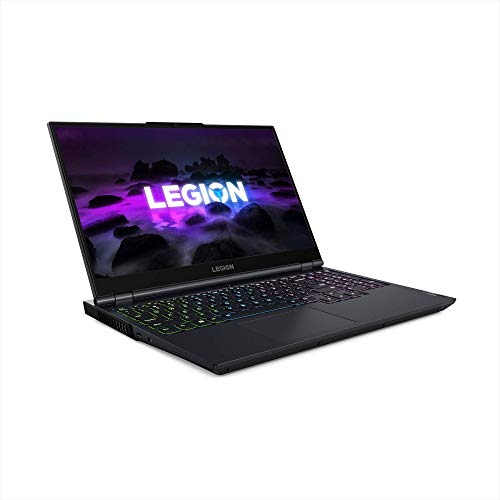


 I’ve mapped these options for real use cases, from balanced everyday gaming to a higher-spec RTX 5060 setup. I’ve also included my preferred first choice and the compromises that matter for Inzoi, other games, and daily multitasking.
The Picks In Brief
Lenovo Legion 5 15.6-Inch FHD Ryzen 7 5800H RTX 3050 Ti 16GB 512GB
ASUS TUF F16 RTX 5060 i7-14650HX 16-Inch 165Hz 32GB 1TB
NIMO 15.6 FHD 8745HS 32GB 1TB Laptop
NIMO 17.3 FHD 8745HS 32GB 1TB SSD
ASUS TUF Gaming A15 15.6-Inch 144Hz Ryzen 5 4600H GTX 1650 Wi-Fi 5
NIMO 15.6 FHD Intel N150 8GB Laptop
The Details Behind The Selections
The Legion 5 feels like the sensible first stop for a player moving beyond a basic general-purpose laptop. Its RTX 3050 Ti provides dedicated graphics, while the Ryzen 7 5800H handles eight processing cores for the game, voice chat, and a few background applications. That balance suits evening sessions more naturally than a thin laptop built mainly for document work.
The 15.6-inch full HD, or 1920 by 1080, IPS panel gives the display enough resolution for detailed game scenes without requiring an oversized screen. I would still check the game’s own graphics presets, but the combination of dedicated graphics, 16GB of memory, and a 512GB NVMe drive gives this model a more convincing gaming foundation than the compact NIMO option reviewed later.
Real Benefits
- RTX 3050 Ti supports real-time ray tracing, a rendering method that adds realistic lighting effects when supported by the game.
- Eight Ryzen 7 cores provide reasonable room for gaming alongside chat, streaming tools, and browser tabs.
- The 15.6-inch IPS display offers full HD resolution and is a practical size for both a desk and a couch.
- Four-zone RGB keyboard lighting makes the Legion-style controls easier to identify in a dim room.
Trade Offs
- The 16GB memory configuration is adequate rather than expansive, so heavy multitasking may make the 512GB storage more relevant.
- RTX 3050 Ti sits below the RTX 5060 in the ASUS TUF F16, making that model more suitable for demanding settings.
Key Specs
Who It Suits Best
I recommend the Legion 5 for mainstream players who want dedicated graphics, a familiar 15.6-inch format, and enough power for regular gaming and multitasking.
Consider Something Else When
I would choose the ASUS TUF F16 for players who prioritize the newer RTX 5060 GPU, a larger 165Hz display, and 32GB of memory.
The TUF F16 is the clear step up for a desktop-style gaming setup. Its RTX 5060 dedicated GPU and 16-core Intel processor leave more headroom for Inzoi and demanding games, especially when the display is set to a higher refresh rate. A refresh rate of 165Hz means the screen can present up to 165 frames per second, making fast movement look smoother on a compatible frame rate.
Compared with the Legion 5, this model combines newer graphics with 32GB of DDR5 memory and a roomy 1TB SSD. I can see it serving a player who also records streams, edits clips, keeps games installed, and expects the laptop to remain useful well beyond a single game. The 16-inch FHD+ anti-glare panel also gives more room for menus and social apps beside the game.
Features That Help
- The RTX 5060 offers a more capable graphics foundation than the Legion 5’s RTX 3050 Ti.
- The 16-core processor supports demanding games and heavier multitasking.
- A 165Hz FHD+ display makes this a better fit for fast-paced play.
- 32GB of DDR5 memory gives active projects and background applications more room.
- The 1TB SSD reduces the need to manage game installations on a small drive.
Points To Note
- The larger 16-inch chassis takes more desk space than the 15.6-inch Lenovo and NIMO models.
- The higher component tier makes this option less compelling for light browser-based games and routine schoolwork.
Quick Facts
Made For
I see the TUF F16 as the right match for a dedicated PC gamer with a large desk who also handles streaming, editing, or other demanding software.
Not Your Match When
I would favor the Lenovo Legion 5 for a more compact gaming laptop with dedicated graphics and a less demanding component tier.
This NIMO model is built around productivity first, with gaming treated as a secondary capability. Its Ryzen 7 8745HS provides eight cores and 16 threads, while Radeon 780M integrated graphics handle basic visuals without a separate gaming GPU. For a student juggling coursework, video calls, and a lighter game, that balance may be more useful than a larger chassis built around a dedicated graphics card.
The 32GB of 5600MHz DDR5 memory is the standout allocation, and the 1TB SSD gives project files and game installations plenty of local space. I would not treat the “AI” label as a gaming advantage; the practical benefits here are processing capacity, memory, and storage. Compared with the larger NIMO model that follows, this version takes less desk and bag space.
Everyday Wins
- Thirty-two gigabytes of DDR5 memory supports intensive multitasking and large working sets.
- The 1TB SSD provides useful room for coursework, media, and several game installations.
- The eight-core Ryzen 7 processor balances gaming with development, editing, and office tasks.
Practical Considerations
- Radeon 780M is integrated graphics, so it is less suited to demanding graphics settings than the RTX-equipped alternatives.
- The 15.6-inch screen helps portability but offers less workspace than the 17.3-inch NIMO.
- Fast memory and storage support multitasking, but neither replaces a dedicated gaming GPU.
Right Fit For
I recommend this model for a student or remote professional who needs strong multitasking hardware and plays Inzoi mainly at conservative settings.
Look Elsewhere When
I would choose the ASUS TUF A15 when a dedicated GTX 1650 GPU and 144Hz display matter more than 32GB of system memory.
The 17.3-inch NIMO makes the most sense at a desk where screen area matters more than portability. Its Ryzen 7 8745HS uses eight cores and 16 threads, and the listed 54W processor power setting points toward sustained productivity rather than a lightweight document task. I can see it handling an editing timeline, a spreadsheet, and a game session more comfortably than a compact model with less room.
That larger display distinguishes it from the 15.6-inch NIMO, although both share the same Ryzen 7 8745HS platform, 32GB memory, and 1TB storage. Radeon 780M integrated graphics remain the central compromise: useful for visual work and lighter games, but a different proposition from the dedicated RTX 3050 Ti, RTX 5060, and GTX 1650 options elsewhere in this list.
Standout Benefits
- The 17.3-inch full HD display provides more space for game windows and creative applications.
- Thirty-two gigabytes of DDR5 memory supports substantial multitasking.
- The 1TB SSD provides practical room for project media, applications, and games.
- Eight processor cores and 16 threads suit development, editing, and general computing.
Small Caveats
- The large chassis is less convenient for carrying between classes or meetings.
- Integrated Radeon 780M graphics place this model below dedicated-GPU laptops for graphics-heavy gaming.
Core Details
Best Suited To
I recommend the 17.3-inch NIMO for a home-office setup where editing, development, and lighter gaming share the same desk.
A Better Fit Elsewhere
I would select the NIMO 15.6 8745HS 32GB 1TB Laptop for people who need the same processing and memory allocation in a smaller package.
The TUF A15 brings two features that still make sense for cost-conscious gaming: a 144Hz IPS-type full HD screen and a dedicated GTX 1650 GPU. The display can show up to 144 frames per second, while the GTX 1650 separates graphics work from the Ryzen processor. Compared with the integrated NIMO models, that dedicated GPU offers a more conventional gaming foundation.
The Ryzen 5 4600H and older platform make this an entry-level choice rather than a high-settings powerhouse. Its appeal comes from assembling recognizable gaming components without paying for the RTX 5060 in the TUF F16. I would treat it as a practical option for older or less demanding games, with the display being a particularly useful feature for competitive play.
What It Does Well
- The 144Hz IPS-type display provides a higher refresh ceiling than a standard 60Hz panel.
- The dedicated GTX 1650 is more appropriate for gaming than integrated graphics.
- The 15.6-inch size balances screen space with a manageable footprint.
Less Ideal Details
- The GTX 1650 is an older graphics tier than the RTX 3050 Ti and RTX 5060 alternatives.
- Wi-Fi 5 is a step behind the TUF F16’s Wi-Fi 6E connection.
- The Ryzen 5 4600H sits below the Ryzen 7 processors used by the Lenovo and NIMO models.
Feature Snapshot
Who Will Love This
I recommend the TUF A15 for a cost-conscious player who values a dedicated GPU and 144Hz screen over the newest processor generation.
Another Choice May Suit
I would choose the Lenovo Legion 5 for a more capable RTX 3050 Ti setup and a higher-tier Ryzen 7 processor.
This NIMO is the most clearly limited gaming option, but it still has a sensible place in a school or office setup. The Intel N150 is a four-core, 15W processor intended for routine productivity, browsing, and communication rather than demanding games. Windows 11 and a full HD 15.6-inch display make it convenient for schoolwork, while the Copilot branding has little bearing on gaming capability.
The main benefit is simplicity. Eight gigabytes of memory handles ordinary tasks, and the 256GB SSD provides a compact, fast local drive for documents and applications. I would keep it away from the main inzoi recommendation list, but it can still work as a separate study machine, travel companion, or lightweight display for a more capable gaming desktop. That separation is the sensible ownership pattern.
The Good Stuff
- Windows 11 and a full HD 15.6-inch display cover everyday school and office needs.
- The compact 256GB SSD keeps files responsive and the setup uncomplicated.
Factors To Consider
- The Intel N150 is not a dedicated gaming processor, so demanding games will face firm limits.
- Eight gigabytes of memory provides limited headroom for heavy multitasking.
- The 256GB drive offers little room for a growing game library or large media files.
The Right Fit
I recommend this model for a student needing a simple laptop for classes, browsing, and documents rather than a primary inzoi machine.
Reach For A Different Pick When
I would choose the NIMO 15.6 FHD 8745HS 32GB 1TB Laptop for anyone who wants substantially more memory and processing power on the same screen size.
What Matters Most for Inzoi
Graphics Carry The Most Weight
A discrete GPU handles the game’s rendering separately from the processor, which matters when playing with other applications open. The RTX 5060 in the ASUS TUF F16 represents the strongest graphics option here, followed by the Legion 5’s RTX 3050 Ti and the TUF A15’s GTX 1650. Integrated Radeon 780M graphics in the NIMO models make more sense for light gaming and productivity.
Memory Keeps Multitasking Smooth
RAM is the short-term memory used by active applications and files. The 32GB configurations give the NIMO laptops more room for browsers, calls, editing, and games, while the Legion 5’s 16GB serves a conventional gaming setup. Storage is a separate issue, so I would favor a 1TB SSD when several games need to remain installed.
Display Size Changes the Experience
A 15.6-inch panel is easier to carry and works well in most spaces. The 16-inch TUF F16 adds room for side-by-side applications, while the 17.3-inch NIMO benefits users working at a fixed desk. Refresh rate also matters: 144Hz and 165Hz panels can look smoother during fast movement than standard 60Hz screens.
Think Beyond The Specification List
The best fit depends on where the laptop will live and what else must run. A compact study machine, a large desktop replacement, and a dedicated gaming system lead to different choices. Storage capacity, screen size, keyboard lighting, wireless standard, and portability can decide the outcome after graphics and memory are considered.
Avoiding Costly Gaming Laptop Errors
Mistakes Worth Dodging
I would avoid treating an “AI” label as a gaming specification. The graphics model, processor tier, memory, and storage have a more direct effect on the experience. I would also confirm the operating system and included accessories on the listing, since model bundles can change without altering the basic laptop category.
Where The Extra Money Goes
Higher-tier models generally place more money into discrete graphics, faster processors, larger memory allocations, and higher-refresh displays. The TUF F16 illustrates that progression through its RTX 5060, 32GB of memory, and 165Hz screen. That combination earns its place when Inzoi runs alongside demanding software or a larger display is important.
Frequently Asked Questions
Is 16GB of RAM enough for inzoi?
Yes, 16GB is a practical starting point for inzoi and everyday background applications. I would move toward 32GB for heavy multitasking, editing, or several demanding programs running alongside the game.
Does a 144Hz display make a laptop faster?
A 144Hz display can show up to 144 frames per second, but the laptop must also generate enough frames. I would consider the combination of GPU, processor, graphics settings, and network conditions rather than judging the display alone.
Is a dedicated GPU necessary for inzoi?
A dedicated GPU provides more graphics headroom than integrated graphics, particularly at higher settings. I would favor the ASUS TUF F16 for the greatest graphics capacity, the Legion 5 for a more balanced configuration, and the NIMO models for productivity-first use.
Is 512GB of storage enough for gaming?
A 512GB drive can hold the operating system, core applications, and several games, but installation management becomes necessary as the library grows. I would prefer 1TB for a gaming laptop expected to keep multiple titles installed.
Should I choose a 15.6-inch or 17.3-inch gaming laptop?
I would choose 15.6 inches for portability and 17.3 inches for a permanent desk setup. The larger NIMO screen helps with multitasking, but its integrated graphics make it less compelling as a dedicated gaming machine.
Final Verdict
The ASUS TUF F16 is my main choice for higher settings and a large 165Hz display, while the Lenovo Legion 5 offers a more balanced dedicated-GPU setup. The NIMO 15.6 model fits productivity-led use, the 17.3-inch version favors desk work, and the TUF A15 serves cost-conscious players. The compact NIMO N150 works best as a separate everyday computer rather than the primary inzoi machine.
