
A Marvel Rivals squad match can expose a laptop’s weak points quickly. Fast movement, crowded effects, and split-second decisions reward a capable graphics processor, responsive display, and enough memory to keep the game and communication apps running smoothly. I focus on those practical details, plus the trade-offs that matter for competitive play, home use, and heavy multitasking.
The range runs from a practical Lenovo IdeaPad Gaming 3 to an ASUS TUF F16 with an RTX 5060. Some systems favor straightforward value, while others reserve more performance for demanding settings, larger screens, and busy desktops.
A Snapshot Of The Selections

Lenovo IdeaPad Gaming 3 15 Laptop Ryzen 5 5600H GTX 1650
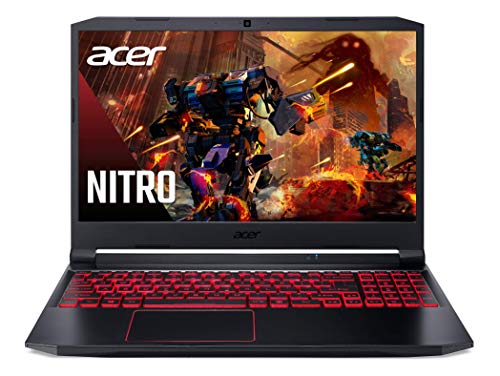
Acer Nitro 5 AN515-55-53E5 i5-10300H RTX 3050 144Hz

Acer Nitro V ANV15-52-76NK i7-13620H RTX 4050

ASUS TUF F16 i7-14650HX RTX 5060 32GB

Acer Nitro V ANV15-52-586Z i5-13420H RTX 4050

ASUS TUF Gaming A15 FA506IH Ryzen 5 4600H GTX 1650
A Breakdown Of The Leading Choices
The IdeaPad Gaming 3 brings a conventional 15.6-inch gaming format to dorm rooms, home desks, and shared study spaces. Its Ryzen 5 5600H processor supplies six CPU cores, which means the processor can divide work between the game, voice chat, and background applications more comfortably than a dual-core design.
For competitive sessions, the GTX 1650 graphics processor and 120Hz IPS display form a sensible baseline. IPS, or in-plane switching, provides wide viewing angles, although the 8GB of working memory and 256GB solid-state drive leave less room for demanding settings than the configurations further down this list.
Useful Touches
- Six-core Ryzen 5 processor handles gaming and common background tasks.
- The 120Hz display reduces visual lag during rapid aiming and movement.
- The 15.6-inch FHD screen offers a familiar size for competitive play.
Trade Offs
- Only 8GB of RAM can become restrictive with several communication apps open.
- The 256GB SSD offers limited room for a growing game library.
Quick Facts
Made For
This laptop suits budget-conscious gamers who want a conventional 15.6-inch display and a six-core processor for regular squad sessions.
A Better Fit Elsewhere
The Acer Nitro 5 AN515-55-53E5 suits gamers wanting an RTX 3050 and a 144Hz panel instead.
Compared with the IdeaPad Gaming 3, the Nitro 5 places a newer RTX 3050 graphics processor beneath a faster 144Hz panel. That combination makes more sense for quick multiplayer matches where a missed movement can change an entire encounter, particularly on a desk with room for a mouse.
The 10th-generation Core i5 and 8GB of DDR4 memory create a workable everyday system, while 256GB of NVMe SSD storage supports quick game loading. The backlit keyboard helps in dim rooms, and Wi-Fi 6 provides a newer wireless standard for busy homes or shared offices. Frame rates still depend on graphics settings, resolution, and the power mode selected.
Notable Gains
- RTX 3050 graphics provide a stronger feature set than the earlier GTX 1650.
- The 144Hz display makes cursor movement and rapid action feel more fluid.
- Wi-Fi 6 and Bluetooth suit connected play sessions.
Points To Note
- The 8GB memory capacity is modest for intensive multitasking.
- The 256GB drive may fill quickly with several large games.
At A Glance
Right Fit For
This model suits competitive gamers who value a high-refresh display and RTX graphics without moving to the largest or most powerful laptop here.
Consider Something Else When
The Acer Nitro V ANV15-52-76NK suits gamers who also need 16GB of memory and a 1TB SSD for heavy multitasking.
The Acer Nitro V ANV15-52-76NK is the most convincing all-round configuration here for a gamer who plays regularly and keeps several applications open. The Core i7-13620H processor is paired with 16GB of DDR5 memory, a configuration that gives game files, voice chat, browsers, and background software more room to operate together.
Its RTX 4050 laptop GPU and 165Hz IPS display represent a clear step beyond the Acer Nitro 5’s RTX 3050 and 144Hz combination. The 1TB Gen 4 SSD also removes much of the storage pressure felt by the earlier model, although the 15.6-inch footprint remains less expansive than the ASUS TUF F16.
A Few Highlights
- The RTX 4050 supports a higher-performance gaming configuration.
- 16GB of DDR5 memory handles gaming and multitasking with room to spare.
- The 1TB Gen 4 SSD provides substantial space for a large game library.
- Wi-Fi 6 and a backlit keyboard cover connected and low-light play.
Worth Noting
- Its 15.6-inch screen is smaller than the ASUS TUF F16 display.
Who Will Love This
This Nitro V suits dedicated gamers who want RTX 4050 graphics, 16GB of memory, and generous storage in a conventional gaming laptop.
Swap It Out When
The ASUS TUF F16 suits gamers who prioritize an RTX 5060, 32GB of RAM, and a larger 16-inch screen.
The TUF F16 brings the largest screen and most substantial graphics configuration in this group. Its 16-inch FHD+ display reaches 165Hz, giving competitive players a broad view of the battlefield while retaining the high refresh rate valued for rapid movement.
The RTX 5060 laptop GPU and 14th-generation Core i7-14650HX form the premium tier, while 32GB of DDR5 memory handles extensive multitasking with less pressure than 8GB configurations. The anti-glare finish helps in bright rooms, and Windows 11 Pro adds useful options for organizing a busy desktop. Its size, however, takes more room than a 15.6-inch model.
What Makes Sense
- RTX 5060 graphics target the strongest gaming configuration here.
- A 16-core processor supports demanding game and application workloads.
- 32GB of DDR5 memory provides generous multitasking capacity.
- The anti-glare 165Hz display balances immersion and visibility.
- Windows 11 Pro and Wi-Fi 6E support a flexible desktop setup.
Small Caveats
- The 16-inch chassis needs more desk and bag space than the 15.6-inch models.
Technical Highlights
Built With In Mind
This laptop suits performance-focused gamers with a large desk who want a powerful GPU, ample memory, and a roomy high-refresh display.
Another Choice May Suit
The Acer Nitro V ANV15-52-76NK suits gamers who prefer 16GB of memory, 1TB of storage, and a smaller 15.6-inch chassis.
This Nitro V keeps the RTX 4050 and 165Hz display found in the Acer Nitro V ANV15-52-76NK, which makes it a practical choice for competitive play. The Core i5-13420H processor should handle the game and everyday background work, though actual smoothness still depends on the selected settings.
The main reductions are memory and storage. Its 8GB of DDR5 RAM matches the capacity of several lower-tier models, while the 512GB Gen 4 SSD doubles the space of the Acer Nitro 5 but falls behind the 1TB option. A 15.6-inch IPS panel keeps the overall footprint manageable, and the backlit keyboard remains practical for evening sessions.
A Favorable Mix
- RTX 4050 graphics make it a strong step above GTX 1650 systems.
- The 165Hz IPS display supports fast competitive play.
- 512GB of Gen 4 SSD storage balances capacity and loading speed.
Less Ideal Details
- 8GB of memory is the main constraint for multitasking.
- The 512GB SSD has less room than the 1TB Acer Nitro V.
- Wi-Fi 6 is suitable, though the TUF F16 offers the newer Wi-Fi 6E standard.
The Right Fit
This model suits mainstream gamers who want RTX 4050 graphics and a 165Hz screen without moving to a larger chassis.
Look Elsewhere When
The Acer Nitro V ANV15-52-76NK suits multitasking-focused gamers who need 16GB of memory and 1TB of storage.
The ASUS TUF Gaming A15 FA506IH targets the basics of responsive PC gaming without the display size of the TUF F16. Its 144Hz FHD IPS-type panel refreshes more often than a standard 60Hz screen, which makes targets and quick camera movement appear smoother during competitive matches.
The Ryzen 5 4600H processor and GTX 1650 form a familiar entry-level gaming combination, while 512GB of PCIe SSD storage leaves more room for games than the IdeaPad Gaming 3. Windows 10 Home covers the basic software needs, but the 8GB of DDR4 memory and older Wi-Fi 5 standard make this a less future-facing configuration.
Where It Excels
- The 144Hz IPS-type display supports fluid competitive action.
- 512GB of PCIe SSD storage provides more room than most entry configurations.
Practical Considerations
- GTX 1650 graphics sit below the RTX configurations offered by the Acer models.
- 8GB of DDR4 memory offers limited multitasking headroom.
- Wi-Fi 5 lacks the newer wireless standard found on several alternatives.
- The Ryzen 5 4600H belongs to an older processor generation.
Feature Snapshot
Made For
This TUF A15 suits budget-conscious gamers who prioritize a 144Hz display and 512GB SSD over newer graphics hardware.
Skip It When
The Acer Nitro 5 AN515-55-53E5 suits gamers who want an RTX 3050 and Wi-Fi 6 instead.
What Actually Matters For Competitive Laptop Play
Graphics Before Everything Else
The graphics processor, or GPU, renders the game’s images and handles many of the visual effects that create load. RTX 30-series and RTX 40-series cards offer a stronger starting point for modern settings than the GTX 1650-equipped models, though actual frame rates vary with resolution and graphics quality. I would prioritize the RTX 4050 models for regular competitive play, while the RTX 5060 configuration makes more sense for high settings and additional visual features.
Memory And Processor Headroom
RAM is temporary working memory for active applications, and an SSD is the faster storage that holds games and system files. The jump from 8GB to 16GB of RAM matters most for gamers running voice chat, browsers, streaming utilities, and the game together. A recent Core i7 or Ryzen 7 processor also gives the system more room for background activity, although processor choice alone does not determine frame rate.
Display, Controls, And Connectivity
A high refresh rate shows more images per second, which can make movement feel more responsive. The 144Hz and 165Hz panels here provide a noticeable specification advantage over lower-refresh screens, while IPS technology improves viewing angles. A backlit keyboard helps during late sessions, and Wi-Fi 6 or 6E keeps the connection current. External mouse space and laptop dimensions also deserve attention, since competitive controls benefit from a clear surface and comfortable placement.
Avoiding Costly Gaming Laptop Missteps
Wrong Turns To Avoid
Chasing processor cores while overlooking the GPU can produce an expensive mismatch for gaming. I also compare a 256GB SSD with the space required by a large game library, rather than treating capacity as a minor detail. Checking the complete system configuration matters, since similar laptop names can conceal different memory, storage, and graphics options.
The Upgrade Payoff
Additional spending usually moves the GPU upward, adds memory and storage, or provides a larger, faster display. That upgrade pays off for higher graphics settings, demanding titles beyond Marvel Rivals, streaming, and simultaneous work applications. A basic RTX 3050 or GTX 1650 system still focuses on the core task, while the RTX 5060 configuration provides greater headroom for demanding settings and multitasking.
Frequently Asked Questions
Which laptop is best for Marvel Rivals?
The Acer Nitro V ANV15-52-76NK is the strongest balanced choice because it combines an RTX 4050, 16GB of memory, and a 165Hz display. The ASUS TUF F16 suits gamers who want even more graphics power and a larger screen.
Is 8GB of RAM enough for Marvel Rivals?
Eight gigabytes can run the game, but limited memory becomes noticeable with voice chat, browsers, and other applications open. A 16GB configuration provides more comfortable multitasking capacity.
Does an RTX 4050 improve gaming compared with a GTX 1650?
An RTX 4050 provides a stronger graphics platform and supports newer RTX features than a GTX 1650. The difference is most useful at higher graphics settings and in games with demanding visual effects.
Does a 165Hz display matter for Marvel Rivals?
A 165Hz panel refreshes more often than a 60Hz screen, which can make movement and aiming feel more responsive. The practical advantage depends on the display, settings, and hardware supplying the frames.
Is 512GB of storage enough for a gaming laptop?
A 512GB SSD provides a workable starting point for several games and essential applications. Streamed files and a large game library can fill that space quickly, so 1TB is the more comfortable choice.
Final Verdict
The Acer Nitro V ANV15-52-76NK offers the most balanced specification mix, while the ASUS TUF F16 takes the lead for high-end graphics and a large display. The Lenovo IdeaPad Gaming 3 and ASUS TUF Gaming A15 cover more restrained budgets, and the Acer Nitro 5 sits between entry-level hardware and the newer RTX 4050 machines. Matching the laptop to the graphics settings and multitasking habits matters more than chasing a single component.
