
Big touch displays change the feel of a room fast. You get a screen that can handle video calls, recipes, kiosks, classroom demos, portable entertainment, or a work setup that needs hands-on control without crowding the desk.
The right choice depends on where you plan to use it, how often you move it, and whether you want Android-style convenience, desktop monitor flexibility, or a tougher commercial build. The picks below focus on those practical differences, so you can match the screen to your space instead of guessing.
Quick Look At The Shortlist
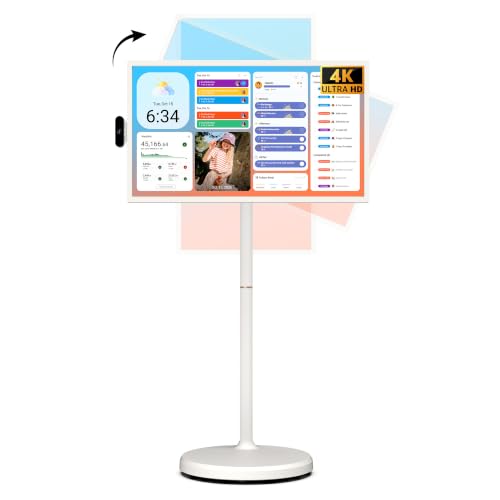
ApoloSign 32 Inch 4K UHD Smart Portable TV on Wheels

KTC MEGAPAD 27 Inch Portable TV A27Q7

Portable Monitor Touchscreen 15.6 Inch FHD IPS HDR

ViewSonic TD2455 24 Inch 1080p Touch Screen Monitor

LG Smart Monitor Swing 32U889SA-W 32-Inch 4K UHD

FYHXele 24 Inch Touchscreen Monitor 100Hz

FYHXele 27 Inch Touchscreen Monitor 75Hz

ViewSonic TD2223 22 Inch 1080p Touch Screen Monitor
More Details On Our Top Picks
ApoloSign leans hard into flexibility, with a 32-inch 4K panel, a wheeled stand, and Android 16 for a living room, office corner, or family room that needs one screen to do a lot. The built-in 15,000mAh battery matters most in rooms where an outlet isn’t always nearby, though battery runtime will still depend on brightness and what you’re doing.
You also get 256GB of storage, which gives you room for apps and downloads without feeling cramped right away. Compared with the more office-centered ViewSonic TD2455, this one is more of a lounge-and-move-around display, and that portability is the point.
Strong Points
- 4K resolution gives you crisp text and clean video on a larger panel.
- Rolling base makes room-to-room movement much easier than a fixed monitor.
- Android 16 keeps streaming apps and browsing close at hand.
- 256GB storage helps you keep apps and downloads on the device.
- The battery adds real value in spaces without a nearby outlet.
Things To Consider
- Its size and feature set make it less grab-and-go than a small portable monitor.
- A wheeled setup takes more floor space than a desk-mounted screen.
- Touch-heavy use on a large display can invite fingerprints and regular wiping.
Core Details
Who Should Grab It
You fit this best when you want one large screen that can move between rooms and serve entertainment, light work, and shared use without adding extra hardware.
Swap It Out When
KTC MEGAPAD 27 Inch Portable TV A27Q7 suits you better for video calls and tighter spaces because its built-in camera makes meetings easier to handle.
This KTC leans into communication, not just display size, and that makes it especially useful in home offices or small meeting spaces. The hidden 8MP camera and stereo speakers give you a cleaner video-call setup than the ApoloSign, while Android 14 and Google TV compatibility keep the smart side straightforward.
Its 27-inch 1080p panel is a practical middle ground, large enough to feel substantial without taking over a room. You may find that balance appealing if your screen needs to move often but still has to handle daily calls, streaming, and general browsing.
What We Like
- Built-in camera keeps meeting gear simpler and tidier.
- Stereo speakers reduce the need for extra desktop audio.
- Google TV compatibility broadens app access and streaming convenience.
- Portable wheeled design works well in shared rooms.
- 8GB of RAM and 128GB storage support smoother everyday use.
- The 9500mAh battery helps the screen live away from a socket for a while.
Small Caveats
- 1080p on 27 inches is sensible, though not as sharp as 4K at this size.
- Camera placement may matter in bright rooms, depending on your setup.
- Touchscreens on mobile stands usually need more screen cleaning than fixed monitors.
Feature Snapshot
Built With In Mind
You suit this model best if you want a portable screen that doubles as a communication tool and daily entertainment hub.
A Better Fit Elsewhere
ViewSonic TD2455 24 Inch 1080p Touch Screen Monitor fits you better for a fixed office desk where USB-C and daisy-chain support matter more than portability.
This 15.6-inch option sits at the travel-friendly end of the category, and that’s a real advantage for commuters, laptop users, and people who carry a second screen from desk to desk. The built-in stand, speakers, and VESA mounting support give you more placement choices than a bare portable panel.
Compared with the bigger wheel-based screens above, it asks for less desk space and less commitment. The trade-off is obvious: you get portability and simplicity, not the room-filling presence of the 27- and 32-inch picks.
Highlights
- 15.6-inch size slips more easily into mobile work setups.
- IPS panel helps colors stay consistent from side angles.
- HDR support can add a little more pop to compatible content.
- 10-point touch makes casual editing and navigation feel more natural.
- Built-in stand helps on a hotel desk or small home workspace.
Areas To Watch
- Smaller size means less impact for shared-room viewing.
- Travel gear takes more handling, so you’ll want to store it carefully.
- The stand is useful, though not as adjustable as a full wheeled base.
At A Glance
Who Will Love This
You fit this pick best when you want a second screen that travels well and still offers touch input for everyday tasks.
Where A Sibling Pick Shines
LG Smart Monitor Swing 32U889SA-W suits you better for a fixed room setup that needs a much larger 4K canvas and more dramatic adjustability.
The TD2455 feels built for a desk that sees daily collaboration, not casual couch use. Its 24-inch Full HD panel, USB-C connection, and daisy-chain support make it especially appealing in offices where cables and multi-monitor setups can get messy fast.
Compared with the portable ApoloSign and KTC models, this one gives up mobility in exchange for a more work-first layout. The ergonomic adjustments matter most in long sessions, especially for teams that shift between typing, tapping, and presenting.
What We Like
- USB-C simplifies single-cable laptop connection in many office setups.
- Daisy-chain support helps extend a multi-screen desk without extra clutter.
- Ergonomic adjustments make it easier to dial in a comfortable position.
- 10-point touch supports collaborative work and quick on-screen control.
- IPS panel keeps the image usable from different seating angles.
Worth Noting
- It’s a desk monitor, so you lose the room-to-room flexibility of a wheeled display.
- Touch monitors in office use often collect fingerprints quickly.
- At 24 inches, it feels more practical than cinematic.
Technical Sheet
Right Fit For
You fit this model best if you need a dependable office touch monitor that stays put and plays nicely with modern laptop connections.
Another Choice May Suit
FYHXele 24 Inch Touchscreen Monitor 100Hz is a better fit for more motion-heavy desktop use, where smoother panel response can matter a little more.
The Swing puts movement and adjustment front and center, almost like a studio monitor that decided to become furniture. With a wheeled base, 32-inch 4K IPS screen, and tilt, height, swivel, and pivot options, it suits rooms where one display has to serve several positions during the day.
That level of adjustability is useful for mixed-use spaces, though the honest read is that it makes more sense in a larger room than in a cramped apartment desk setup. Compared with the ApoloSign, this LG looks more polished and work-friendly, while keeping the same big-screen flexibility.
Reasons To Buy
- 4K resolution gives the 32-inch panel plenty of breathing room.
- Wheeled base supports easy repositioning inside the room.
- Tilt, height, swivel, and pivot adjustments help with posture and viewing angle.
- Built-in speaker keeps the setup from feeling too bare.
- webOS adds familiar smart-TV style navigation.
Points To Note
- The larger stand needs floor space, so it suits open rooms better.
- Touch use on a big glossy-style screen usually means more frequent wiping.
- It’s a statement piece, which is great in some rooms and too much in others.
Details At A Glance
Best Suited To
You suit this display best if you want a large, polished touch screen that can adapt to changing room layouts without losing visual quality.
Look Elsewhere When
ViewSonic TD2455 24 Inch 1080p Touch Screen Monitor fits you better for a permanent desk setup where space is tighter and adjustability can stay simpler.
This FYHXele makes a strong case for smoother-feeling desktop touch work, since its 100Hz panel sits above the more common 60Hz pace. That higher refresh rate matters most during scrolling, quick pointer moves, and general motion, especially in busy workspaces where the screen gets used all day.
It also keeps a useful mix of HDMI, VGA, USB, and VESA mounting support, which gives you more setup paths than the more fixed office-focused ViewSonic TD2455. The trade-off is that it’s still a conventional monitor, so mobility is limited to where your desk lives.
Upsides
- 100Hz refresh rate can make motion feel smoother than standard 60Hz options.
- 24-inch size lands in a very usable everyday sweet spot.
- VESA support makes mounting easier in wall or arm setups.
- HDMI, VGA, and USB inputs help with older and newer equipment.
- IPS panel helps keep colors steady from the side.
Areas To Watch
- It’s a desk-bound monitor, so it won’t suit room-to-room movement.
- Touch panels in workspaces often show fingerprints quickly.
- The 24-inch size is practical, though not as expansive as the 32-inch models.
Quick Facts
The Right Fit
You fit this model best if you want a straightforward desktop touch screen with a smoother feel and flexible mounting options.
Where The Extra Money Goes
LG Smart Monitor Swing 32U889SA-W justifies the higher tier for you when adjustable mobility and a bigger 4K panel matter more than keeping the setup simple.
The 27-inch FYHXele gives you more presence than the 24-inch version without jumping into oversized territory. That matters in offices, warehouse stations, or bar-side service setups where you need a larger touch area but still want a simple monitor that connects through HDMI, VGA, or USB.
Its 75Hz refresh rate is a decent middle ground for daily work and light media, though not as fluid as the 100Hz sibling above. You may prefer it when screen size matters more than squeezing out every bit of motion smoothness.
Best Bits
- 27-inch panel gives you more working room than the 24-inch model.
- 75Hz keeps everyday motion feeling a little more responsive than 60Hz.
- VESA support makes it easier to fit into mounted setups.
- HDMI, VGA, and USB inputs help with mixed hardware environments.
- IPS display holds up well from different angles.
Minor Gripes
- It still belongs on a desk or counter, not on wheels.
- Touch use in shared environments usually means extra cleaning.
- 75Hz is useful, though not a huge jump for every task.
Core Details
Whose Shelf It Belongs On
You fit this pick best if you want a larger fixed touch monitor for a work counter, service point, or general office space.
Skip It When
FYHXele 24 Inch Touchscreen Monitor 100Hz is the better match for you if smoother motion matters more than the extra screen width.
The TD2223 is the commercial-minded pick in this set, and you can tell from the 7H screen hardness and IR touch approach. That makes it a sensible choice for kiosks, POS counters, and other places where strangers, customers, or rotating staff will handle the display all day.
It’s smaller than the 24-, 27-, and 32-inch options, but that scale works in retail corners where space is tight and durability matters more than drama. Compared with the TD2455, this one is more about rugged handling and public use than office flexibility.
Positives
- 7H glass helps the screen stand up better to busy public use.
- IR touch works well for kiosk-style tapping and swiping.
- HDMI, VGA, DVI, and USB hub inputs support older and newer equipment.
- 22-inch footprint fits tighter service counters more easily.
- Eye care features can be helpful during long shifts at a stationary station.
Room For Improvement
- Smaller size gives you less screen space for multitasking.
- It’s aimed at fixed installations, so portability is off the table.
- Commercial glass helps with durability, though it still needs routine cleaning in public areas.
Feature Rundown
The Right Fit
You fit this screen best if you need a durable touch display for retail counters, kiosks, or other high-traffic stations.
Where A Sibling Pick Shines
ViewSonic TD2455 24 Inch 1080p Touch Screen Monitor is the better fit for office collaboration, since its ergonomic design and USB-C setup are friendlier for desk-based work.
How To Choose The Right Giant Touch Screen Monitors
Start With The Room, Not The Screen
Room size should shape the choice before anything else. A 32-inch wheeled display can feel natural in a lounge, classroom, or shared office, while a 15.6-inch travel screen fits a bag and a compact desk without taking over the surface.
Think about movement too. A wheeled unit works well for spaces that change layout, but a fixed monitor makes more sense for a workstation that stays in place all week.
Match The Touch Screen To Your Daily Tasks
Touch input sounds similar across models, yet the real experience changes with panel size, panel type, and the number of touch points. Ten-point touch helps with gestures and shared control, which is useful for collaboration or casual browsing.
For office work, USB-C, daisy-chain support, and VESA mounting can matter more than smart features. For family use, Android or webOS may be the more practical path because it keeps apps, streaming, and browsing closer together.
Look Closely At Resolution And Size
Resolution and size work as a pair, not as separate brag points. A 4K 32-inch screen gives you much more detail room than a 1080p panel of the same size, while 1080p still works well on 22- to 27-inch displays for everyday use.
That’s why screen sharpness should always be tied to how far you’ll sit from it. A counter-top kiosk, a desk monitor, and a portable second screen each ask for something different.
Check The Practical Extras
Battery power, built-in speakers, cameras, and stands all change how complete the setup feels. A battery helps when the screen moves around a room, and a camera can save space in a small meeting area.
Materials and mounting options matter just as much. Scratch-resistant glass, ergonomic adjustment, and VESA support usually say more about long-term ownership than any marketing phrase on the box.
Things Worth Knowing First
Common Shopping Slip Ups
Many people size up too fast and then discover the screen dominates the room. Others focus on resolution alone and forget that a 4K panel only makes sense when the stand, distance, and use case all fit together.
Another common miss is overlooking connection needs. A touch monitor for a laptop, kiosk, or older desktop can need HDMI, USB, VGA, or USB-C in very specific combinations.
What The Higher Tier Buys
Higher-tier models usually pay for larger panels, smarter operating systems, better stands, and more flexible mobility. In this category, the extra money often goes into practical details like wheeled bases, better adjustability, or stronger public-use materials.
That upgrade makes sense for shared rooms, office teams, or any setup that has to move and still look polished. For a simple desk or travel kit, a smaller and simpler monitor usually makes more sense.
Closing Thoughts
You have a real spread here, from portable 15.6-inch travel screens to 32-inch rolling displays that can carry a room on their own. The best fit comes down to where you’ll use it, how often you’ll move it, and whether you want smart-TV convenience, office connectivity, or a tougher commercial build. Choose the screen that matches the space first, and the rest becomes much easier.
