
Picking an IPS monitor can feel simple until you sit down for long email sessions, weekend gaming, or a desk shared by work and home life. You need stable color, comfortable viewing angles, and a size that fits your desk without crowding the keyboard or the second screen. This roundup focuses on eight models that make different kinds of everyday use easier, from compact 24-inch setups to a sharper 4K option and a few faster panels for motion-heavy tasks.
The Shortlist At A Glance

LG 24U411A-B 24-inch Full HD IPS Monitor

LG 27U411A-B 27-inch Full HD IPS Monitor

Amazon Basics 24-inch Full HD IPS Monitor

LG 24G411A-B 24-inch Ultragear IPS Gaming Monitor
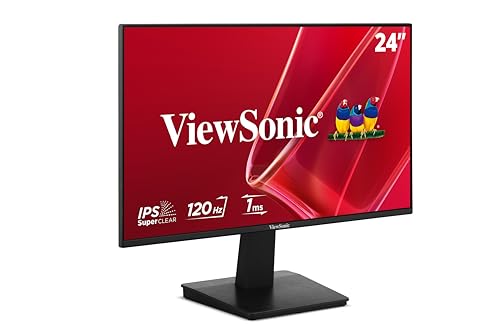
ViewSonic VA2448-MH 24 Inch 1080p IPS Monitor

LG 27UP650K-W 27-inch Ultrafine 4K UHD IPS Monitor

Amazon Basics 27-inch Computer Monitor

msi PRO MP243L E14 24-inch IPS Monitor
More Details On Our Top Picks
A 24-inch panel like this tends to suit a desk that needs clarity without swallowing space. The 120Hz refresh rate gives you a smoother feel in everyday scrolling and light gaming, while HDR10 adds a little more punch to compatible video and games. You may find the slim stand especially handy in a tighter home office, where a bulky base would get in the way.
Compared with the 27-inch LG below, this one feels easier to place on a smaller desk and a bit more compact for dual-monitor use. The IPS panel keeps color and contrast more stable from the side, which matters when your chair position shifts through the day. The honest trade-off is that Full HD on 24 inches is practical, but not especially dense for text-heavy work.
Strong Points
- 24-inch size keeps the footprint manageable on shared or smaller desks.
- 120Hz smooths cursor movement, scrolling, and casual play better than basic office panels.
- IPS viewing angles help the image stay consistent when you lean back or sit off-center.
- HDR10 support gives compatible media a wider-looking tonal range.
- Reader Mode and Flicker Safe suit long stretches of email, documents, and browsing.
Things To Consider
- Full HD at 24 inches is comfortable, though not as sharp as 4K for dense text work.
- One HDMI input keeps the setup simple, but multi-device desks may want more ports.
- The slim stand looks tidy, yet it leaves less room for serious height adjustment than premium arms.
Core Details
Who It Suits Best
You get the most from this model on a compact home office desk, especially when you want a cleaner screen than a basic work panel without moving into gaming-only territory.
Where A Sibling Pick Shines
LG 27U411A-B fits better for you if your desk has room for a larger canvas and you prefer a broader view for side-by-side windows.
That extra three inches changes the feel more than specs alone suggest. On a desk with enough depth, the 27-inch layout gives spreadsheets, browser tabs, and split-screen work more breathing room, and the 120Hz panel keeps movement smooth enough for relaxed gaming after hours. The trade-off is simple, you need more space to appreciate it fully.
Compared with LG’s 24-inch version, this one is better for multitasking because the bigger canvas makes side-by-side windows less cramped. It still stays in Full HD, so the image is clear but not ultra-dense, and that’s a fair exchange for the larger workspace. For home offices where one screen does a lot of jobs, it lands in a very sensible middle ground.
What We Like
- 27-inch size gives you more room for split windows and broader timelines.
- 120Hz refresh rate keeps everyday movement smooth and easy on the eyes.
- IPS viewing angles help the picture hold up across wider seating positions.
- Reader Mode and Flicker Safe are useful for long desk sessions.
- Slim bezels help a dual-monitor setup look tidy.
Points To Note
- Full HD on 27 inches is practical, though not as crisp as 4K at the same size.
- The larger frame needs a deeper desk to feel comfortable.
- One HDMI connection is fine for many setups, but limited for multi-source use.
Details At A Glance
Who Should Grab It
You fit this monitor best if your desk has room for a larger screen and you juggle multiple windows, documents, or dashboards through the day.
Another Choice May Suit
LG 24U411A-B makes more sense for tighter desks, where a smaller footprint matters more than extra screen width.
This one leans into flexibility rather than flash. The HDMI, DisplayPort, and VGA inputs make it easier to match older desktops, newer laptops, or a mixed office setup, and the adjustable stand helps you set the screen at a height that feels less awkward over a full workday. The 75Hz panel is modest, but it still feels smoother than the most basic 60Hz office monitors.
Compared with the LG 24U411A-B, this monitor gives you more connection options and built-in speakers, which can matter in a conference-heavy home office. The picture quality still follows the same Full HD, 24-inch formula, so you’re choosing practicality over premium polish. For most home and office tasks, that trade-off makes sense.
Highlights
- Three video inputs make it easier to connect old and new gear.
- Adjustable stand helps you line up the screen more comfortably.
- VESA compatibility gives you a path to a wall or arm mount.
- Built-in speakers simplify a desk that doesn’t need separate audio gear.
- IPS technology keeps colors steadier when you view from an angle.
Worth Noting
- 75Hz is fine for office work, though not as fluid as the 120Hz options here.
- Full HD at 24 inches is still a compromise for detail-heavy creative work.
- Built-in speakers are handy, but many desks still sound better with separate audio.
Feature Rundown
Right Fit For
You get the most value from this model if you want a straightforward office monitor that can handle a mixed bag of devices without extra adapters.
Skip It When
ViewSonic VA2448-MH fits better for you if you want a fresher 120Hz panel and a frameless look for a cleaner multi-monitor desk.
This is the pick for motion-heavy use, where fast response matters more than extra screen real estate. The 144Hz overclocked refresh rate, 1ms motion blur reduction, and support for both NVIDIA G-Sync Compatible and AMD FreeSync point to a monitor built for smoother gameplay and fewer visual tears. For most desk setups, the 24-inch size also keeps the action close without taking over the whole workspace.
Compared with the regular LG 24U411A-B, this one clearly shifts priority toward games and quick movement rather than general office balance. HDR10 and the IPS panel keep the image from feeling flat, but the real appeal is the responsiveness. The trade-off is pretty direct, you pay attention to speed here, not extra workspace.
Upsides
- 144Hz overclocked refresh rate supports smoother fast-paced movement.
- 1ms motion blur reduction helps action scenes look cleaner.
- G-Sync Compatible and FreeSync support can reduce tearing with the right GPU setup.
- IPS color and HDR10 keep the image lively for non-gaming use too.
- 24-inch size stays comfortable on smaller gaming desks.
Small Caveats
- The 24-inch frame is deliberate, but it gives you less workspace than the 27-inch models.
- 144Hz depends on the rest of your setup, including the right cable and graphics support.
- Motion blur reduction can suit some players better than others, depending on how you like the image tuned.
Technical Sheet
Built With In Mind
You should look at this one if your desk is built around gaming sessions and you want a faster panel without stepping up to a larger footprint.
Look Elsewhere When
LG 27U411A-B is the better fit for you if your day starts with spreadsheets and ends with video, because the larger panel gives more breathing room for mixed tasks.
Frameless design gives this ViewSonic a cleaner look than the thicker-bezel monitors in the group, and that matters more than people sometimes expect on a two-screen desk. The 120Hz panel and variable refresh rate, meaning the display adjusts to the output of compatible graphics hardware, help movement feel steadier during work and casual entertainment. The anti-glare finish also helps in bright rooms, especially near a window or overhead light.
Compared with the Amazon Basics 24-inch model, this one feels a little more modern in the frame and more animated in motion. The built-in 2W speakers and Eye Care positioning make it practical for a laptop setup or a shared room where you want fewer separate accessories. The trade-off is that the speaker power is modest, so you’ll still want better audio for anything beyond basic use.
Bright Spots
- Frameless styling works well in a neat dual-monitor setup.
- 120Hz and variable refresh rate support help motion stay smoother.
- Anti-glare coating is useful in bright home offices.
- HDMI and VGA keep it friendly to newer and older systems.
- Built-in speakers add convenience for simple desk setups.
Areas To Watch
- Built-in speakers are handy, though they stay fairly modest in scale.
- 24 inches is compact, so side-by-side windows feel tighter than on 27-inch panels.
- Eye Care positioning sounds helpful, but the everyday benefit depends on your lighting and posture.
Feature Snapshot
Whose Shelf It Belongs On
You’re a good match for this monitor if you want a tidy 24-inch display that stays useful for work, streaming, and the occasional game without much setup fuss.
A Better Fit Elsewhere
LG 24G411A-B suits you better if gaming speed matters more than built-in speakers and general office convenience.
This is the sharpest screen in the group, and you feel that immediately in text, photo work, and high-detail video. A 27-inch 4K panel gives you much more room to place windows with fine clarity, while DisplayHDR 400 raises the ceiling for supported content. The tilt, height, and pivot adjustments also make it easier to dial in a comfortable position for long desk sessions.
Compared with the 27-inch Full HD LG, this model costs more in the real-world sense of desk space, budget, and the graphics power needed to feed all those pixels. The upside is obvious for content work, long reading sessions, and anyone who wants a cleaner, denser image. The honest trade-off is that 60Hz feels more work-focused than fast-paced.
Reasons To Buy
- 4K resolution gives you much denser detail than Full HD.
- 27-inch size leaves enough room for serious multitasking.
- DisplayHDR 400 supports a more capable picture for compatible media.
- Height, pivot, and tilt adjustment help with posture and desk fit.
- Reader Mode and Flicker Safe suit long stretches of document work.
Room For Improvement
- 60Hz is fine for office work, but it’s not built for fast gaming first.
- 4K asks more from your graphics hardware than Full HD does.
- The sharper image is great, though some older apps may need scaling tweaks.
Core Details
Who Will Love This
You’ll appreciate this monitor most if your day revolves around documents, photos, editing timelines, or any task where fine detail matters more than high-speed motion.
Not Your Match When
LG 24G411A-B fits better for fast gaming, because its faster refresh and motion blur handling line up more closely with that use case.
The appeal here is straightforward, a bigger 27-inch screen at a practical spec mix. The 120Hz refresh rate gives your day-to-day motion a smoother feel than standard office monitors, and the IPS panel with HDMI, DisplayPort, and VESA compatibility makes it easy to fit into a home office that changes over time. It’s the kind of monitor that feels useful rather than dramatic.
Compared with the LG 27U411A-B, this model is the more pared-back choice, since it focuses on the essentials without the same list of extra image features. That can be a smart move for a desk where you want a larger canvas and less fuss. The trade-off is that you’re giving up some of the polish and convenience touches found on the more feature-rich picks above.
Best Bits
- 27-inch size gives you a roomy work surface for multitasking.
- 120Hz helps the screen feel smoother in everyday use.
- IPS panel supports broad viewing angles for shared desks.
- HDMI and DisplayPort make device switching more flexible.
- VESA compatibility gives you a mount-friendly upgrade path.
Points To Note
- Full HD on 27 inches is useful, though not especially dense.
- The feature set feels lean compared with the LG and MSI models above.
- It works best as a straightforward desk monitor, not a specialty display.
Feature Card
Built With In Mind
You’ll like this monitor most if you want a larger desk display for everyday work and you don’t need a long list of extra image features.
Where A Sibling Pick Shines
LG 27UP650K-W is the smarter choice for you if sharper 4K detail matters more than the simpler Full HD layout.
MSI splits the difference between office monitor and gaming display in a way that makes sense for shared setups. The 144Hz refresh rate, Free-Sync support, and 1ms response time lean toward smoother motion, while the IPS panel, four-side slim bezel, and tilt adjustment keep it easy to live with for long work sessions. The result feels sensible for a desk that does a little of everything.
Compared with the Amazon Basics 24-inch monitor, this one offers a sharper motion story and a more polished frame, though both still live in the practical Full HD class. The 23.8-inch size stays compact, which helps in smaller workspaces, but you still get the benefit of wide viewing angles and a VESA-friendly design. That balance suits mixed-use desks nicely.
Positives
- 144Hz refresh rate supports fast motion better than basic office panels.
- Free-Sync helps compatible systems keep motion steadier.
- 1ms response time keeps quick changes feeling more immediate.
- IPS panel and wide viewing angles work well for shared desks.
- Four-side slim bezel gives the screen a cleaner look in a multi-monitor layout.
- VESA mount support opens up more desk-placement options.
Softer Spots
- Full HD at 24 inches is still a practical step, not a sharpness leap.
- The gaming features matter most when your graphics setup can use them well.
- The slim design looks tidy, though that doesn’t replace an adjustable arm for every desk.
Key Specs
The Right Fit
You’re the right match for this one if you want a compact monitor that can handle work during the day and game time later without forcing a huge desk footprint.
Reach For A Different Pick When
ViewSonic VA2448-MH is a better fit if built-in speakers and an anti-glare finish matter more than gaming-first motion features.
How To Choose The Right Ips Computer Monitors
Screen Size Sets The Whole Feel
Size changes how you work before any other spec gets a vote. A 24-inch IPS monitor fits smaller desks, pulls the screen close for email and browsing, and usually keeps the setup feeling tidy; a 27-inch panel gives spreadsheets, editing timelines, and split windows more breathing room.
The trade-off is straightforward. Bigger screens need more desk depth, and the same Full HD resolution looks denser on 24 inches than it does on 27 inches. For text-heavy use, that difference matters more than a spec sheet might suggest.
Refresh Rate Matters More Than You Think
Refresh rate is how many times per second the display redraws, and higher numbers usually make motion feel smoother. That matters for scrolling, light gaming, and general desk use, which is why the 120Hz and 144Hz models in this roundup feel more lively than the 60Hz 4K option.
Still, speed has a job to do. If you mostly edit documents or work in static windows, 60Hz may be enough, while gamers and anyone who spends time in fast-moving scenes will notice the extra smoothness more quickly.
Connections And Mounting Shape Daily Convenience
Ports are easy to ignore until you need to switch from a laptop to a desktop or keep an older tower in service. HDMI covers most modern setups, DisplayPort often suits higher-refresh desktops, and VGA still shows up on some practical office models that need broad compatibility.
Mounting support also changes ownership. VESA compatibility gives you room to use an arm or wall bracket, while tilt, height, and pivot adjustments help you get the screen where your neck wants it. That’s the difference between a monitor that simply sits there and one that actually fits your desk.
Things Worth Knowing Before You Choose
Hidden Buying Traps
Many shoppers focus on size alone and miss the relationship between resolution and screen area. Full HD on a 24-inch panel feels easier to live with than Full HD on a 27-inch panel, where text can seem a little looser and less crisp in close work.
Another common miss is motion support. A monitor with a fast refresh rate still needs compatible hardware and the right connection path to show its full speed, so the rest of your setup matters more than a single spec line.
The Upgrade Payoff
Higher-tier IPS monitors usually spend money on sharper resolution, better ergonomics, and stronger motion handling. That’s why the LG 27UP650K-W carries more appeal for detail work, while the LG 24G411A-B and MSI PRO MP243L E14 lean into speed and smoother play.
In plain terms, the extra money buys comfort or capability, not just a fancier label. You feel that most in long workdays, shared desks, and gaming setups where the monitor has to keep up without looking dated a year later.
Closing Thoughts
You have a lot of solid IPS choices here, and the right one depends on how you use your desk more than on any single spec. The LG 24U411A-B and ViewSonic VA2448-MH make sense for compact spaces, the LG 27UP650K-W stands out for sharper detail, and the LG 24G411A-B is the clearest fit for faster play. For a straightforward home office, the middle-ground models are easy to live with and hard to regret.
