
You want more screen space without turning your setup into a tangle of cables and guesswork. These laptop screens for gaming focus on the practical stuff that matters in daily use, from fast panel response and color quality to easier travel and simple hookup.
The list below suits different kinds of setups, from a single external display for a dorm desk to multi-screen attachments for coding, trading, or long work sessions that also end with a game. You’ll also see where each pick makes sense, and where a different style from the lineup fits better.
Quick Look At The Shortlist
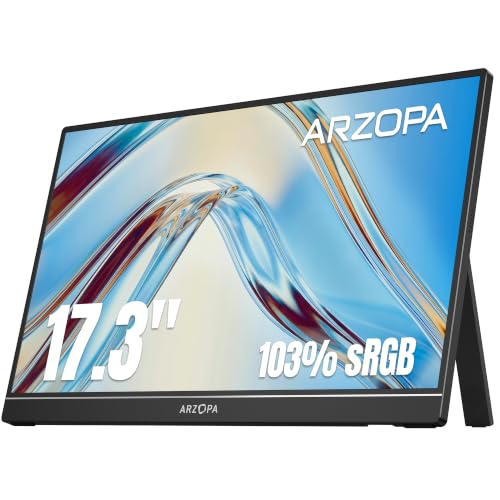
ARZOPA 17.3″ Portable Monitor A1M

Vixtan 14″ Triple Laptop Screen Extender

LUMIPIX 15.6 Inch Portable Monitor

ZSCMALLS 17.3 Inch 144Hz Portable Monitor

KYY 15.6” Quad Laptop Screen Extender

Hyangin 4K 24-inch Large Portable Monitor
Acer Nitro PG161Q P 15.6in Portable Monitor

Yodoit 144Hz 15.6Inch Portable Monitor
More Details On Our Top Picks
The ARZOPA A1M leans toward straightforward, roomier play. The 17.3-inch panel gives you more breathing space than the smaller 15.6-inch class, and the built-in kickstand makes it easier to prop up beside a laptop during couch gaming or hotel downtime.
The 1080p IPS panel, that is, an in-plane switching screen with wider viewing angles than many basic panels, should suit you well for shared viewing or desk use. The 103% sRGB claim points to broad color coverage, which matters more for vivid game art and media than for pure esports speed.
Strong Points
- The 17.3-inch size gives you a more relaxed viewing area for games, spreadsheets, and split-screen work.
- IPS panel behavior is a better fit for off-angle viewing on a side desk or a shared table.
- The kickstand helps you set up quickly without hunting for a separate stand.
- Color coverage at 103% sRGB gives the image a fuller look for games with rich scenery and strong UI contrast.
Things To Consider
- The larger panel is less pocketable than the 15.6-inch options farther down the list.
- Serious fast-twitch gamers may still prefer the 144Hz or 165Hz picks here.
- The kickstand style works well on a desk, though it can feel less rigid than a more fixed stand in some travel setups.
Feature Snapshot
Who It Suits Best
Traveling gamers and casual desk users who want a larger portable screen without moving into a full desktop monitor setup will get the most from this one.
Where A Sibling Pick Shines
Acer Nitro PG161Q P makes more sense for fast-paced play, since its 165Hz panel is better matched to twitchy action than the ARZOPA A1M.
The Vixtan stands out because it adds three-screen structure without asking for a desktop tower. At 3.0 pounds and 0.3 inches thick, it suits people who carry a laptop between home, office, and travel days, though the multi-panel format naturally asks for more setup space than a single external screen.
That kind of layout helps you keep chat, docs, and a main game or app visible at once. Remote workers, students, and traders will feel the benefit most, while a simple couch-gaming setup may find the extra wings a little much.
What We Like
- Three-screen expansion gives you a much wider working surface than the single-panel picks in this list.
- The 3.0-pound body keeps the attachment portable for business trips and desk swaps.
- USB-C plug-and-play design lowers the setup friction for supported laptops.
- It suits multitasking patterns such as meetings, notes, and reference windows side by side.
- The slim 0.3-inch profile makes storage easier than bulkier triple-monitor rigs.
Room For Improvement
- The triple layout takes more desk width, so cramped tables can feel crowded.
- People who only want one extra gaming panel may find the structure more than they need.
- Attachment systems like this tend to reward careful handling during setup and takedown.
Core Details
Who Will Love This
You’ll get the most from this extender if your day runs on multiple windows and you move between offices, classrooms, or hotel desks.
Look Elsewhere When
ARZOPA 17.3″ Portable Monitor A1M suits casual gamers better, since it gives you a single larger panel instead of the Vixtan’s more demanding triple-screen format.
This LUMIPIX model keeps things familiar in a good way. The 15.6-inch size is easy to live with on a desk, and the mix of USB-C and HDMI means it fits a broad range of laptops, game systems, and mobile devices without forcing a special workflow.
Its IPS panel and 1080p resolution make it a practical secondary screen for gaming, streaming, and everyday work. The smart cover and speakers are useful touches, though built-in sound on portable screens usually stays more about convenience than room-filling audio.
Positives
- 15.6 inches strikes a comfortable middle ground between compact travel size and usable screen area.
- USB-C and HDMI support make device matching easier for mixed households and shared setups.
- The smart cover adds simple protection during storage and transport.
- Built-in speakers help when you want quick audio without another accessory.
Minor Gripes
- The screen size is smaller than the 17.3-inch picks in this roundup.
- Built-in speakers tend to suit casual use more than richer gaming audio.
- The simpler format is fine for most desks, though power users may want a higher-refresh option.
Feature Rundown
Made For
Students, general gamers, and home-office users who want a simple second screen will find this one easy to live with.
Another Choice May Suit
ZSCMALLS 17.3 Inch 144Hz Portable Monitor fits smoother-motion gaming better, since it is tuned more directly for fast action than the LUMIPIX panel.
Motion-sensitive games are where the ZSCMALLS screen starts to earn its place. The 144Hz refresh rate, meaning the panel redraws more often each second than a basic 60Hz screen, should feel smoother in fast titles, and the 17.3-inch size gives the action more room to breathe.
It also makes sense for mixed use, since the IPS panel and HDR mode help keep general media from looking flat. The trade-off is simple, larger high-refresh portable panels usually ask for more from your laptop and take more bag space than smaller choices like the LUMIPIX.
Highlights
- 144Hz refresh rate better suits fast shooters, racing games, and other motion-heavy titles.
- The 17.3-inch panel feels generous beside a laptop on a hotel desk or at home.
- IPS and HDR support help the image hold up across gaming and media use.
- Mirroring and split-screen modes broaden the use beyond gaming alone.
Areas To Watch
- The larger body is less compact than the 15.6-inch portable monitors in this list.
- High-refresh use usually makes the most sense with compatible hardware and the right connection.
- The gaming-first focus can feel like extra screen muscle for simple office work.
Details At A Glance
Best Suited To
Competitive players and action-game fans who want a portable screen with smoother motion should feel right at home here.
A Better Fit Elsewhere
LUMIPIX 15.6 Inch Portable Monitor is easier to carry for general use, especially for people who care more about simplicity than higher refresh rates.
The KYY setup is built for people who live inside multiple windows all day. Triple-screen expansion plus a quad-screen workstation pitch gives it a clearer productivity angle than the gaming-first models above, and the one-cable connection lowers the hassle once the hardware is in place.
Auto-rotation on the top display is a nice touch for moving between portrait-style reading and landscape work, especially during travel. The honest read is that this is more of a power-user attachment than a casual add-on, so you’ll appreciate it most if your laptop already serves as a command center.
Best Bits
- The multi-screen layout supports coding, dashboards, chat, and reference tabs at the same time.
- One USB-C cable keeps the setup cleaner than older tangle-heavy docking styles.
- Auto-rotation on the top display helps the screen adapt to different content types.
- The included stand adds practical support for desk and travel use.
Points To Note
- The expanded footprint needs more space than a single portable monitor.
- People who mainly want gaming motion performance may prefer the Acer Nitro or ZSCMALLS picks.
- Because of the layered setup, careful storage helps keep the attachment in good shape over time.
Quick Facts
Built With In Mind
Programmers, analysts, and remote professionals who juggle several live windows at once will get the most from this extender.
Skip It When
Acer Nitro PG161Q P is the better gaming-first fit for you, since its 165Hz panel focuses more on motion than workstation layering.
The Hyangin feels closer to a desk monitor than a typical portable panel. The 24-inch size and 4K resolution, meaning 3840 by 2160 pixels, give you a lot of room for text-heavy work, streaming, and detailed game visuals, though that extra scale also means it takes more space than the smaller portable screens here.
The 125% sRGB figure hints at broad color coverage, which is useful for media, design tasks, and sharper-looking game art. Since it runs at 60Hz, it’s better suited to clarity and size than to twitch gaming, which makes it a strong match for creators and home desks rather than fast-motion play.
Bright Spots
- The 24-inch panel gives you a much larger working area than the travel-size options in this roundup.
- 4K resolution adds sharp text and fine detail for spreadsheets, editing, and streaming.
- IPS panel behavior helps the image remain consistent from a wider range of angles.
- The adjustable stand makes it easier to tailor the viewing angle on a fixed desk.
Softer Spots
- Its size makes it less portable than the 15.6-inch and 17.3-inch picks.
- 60Hz refresh is more about clarity than fast-motion gaming.
- The larger footprint asks for a steadier workspace, not a tiny lap-table setup.
Feature Card
Who Should Grab It
You’ll appreciate this one most if you want a portable screen that behaves more like a home monitor for editing, streaming, or long work sessions.
Where A Sibling Pick Shines
Yodoit 144Hz 15.6Inch Portable Monitor suits carry-first gaming better, since it is lighter and built around faster motion rather than sheer size.
The Acer Nitro PG161Q P is the most gaming-centered option in this group. A 165Hz refresh rate and 6ms response time, meaning the screen is built to update quickly and react with less delay, give it a clear edge for fast action compared with the 60Hz Hyangin or the more general-purpose LUMIPIX.
AMD FreeSync is another useful touch, since it helps smooth out mismatched frame pacing on compatible systems. The 15.6-inch IPS panel keeps the setup portable, while the built-in USB hub and speakers add convenience for laptop bags, dorm rooms, or travel desks.
Reasons To Buy
- 165Hz is a strong match for competitive games and quick camera movement.
- 6ms response time helps keep motion feeling snappier than slower portable screens.
- AMD FreeSync can reduce visible tearing on supported hardware.
- The USB hub adds useful plug-in flexibility for a mobile setup.
- The 15.6-inch size keeps it easy to carry with a gaming laptop.
Small Caveats
- The gaming focus means it may feel like more display muscle than casual users need.
- The speakers are handy, though dedicated audio gear still sounds fuller in most setups.
- Fast-refresh portable panels usually make the most sense with a laptop that can keep up.
Technical Sheet
Who It Belongs On
Competitive gamers and laptop users who want the strongest motion-focused portable screen in this list should start here.
Not Your Match When
Hyangin 4K 24-inch Large Portable Monitor suits detail-first desk use better, since it leans toward size and clarity instead of speed.
The Yodoit keeps the formula tight: 15.6-inch size, 144Hz refresh, IPS panel, and a thin metal build. That combination makes sense for people who want a gaming-oriented portable screen that slips into a backpack more easily than the larger 17.3-inch choices.
The smart cover helps with daily carry, and the speakers give you basic sound without extra gear. You may find the smaller footprint especially useful on trains, in dorms, or on hotel desks where every inch of space matters.
Upsides
- 144Hz refresh gives you smoother motion than standard portable screens.
- The 15.6-inch body stays friendly for travel and quick setups.
- Metal construction should feel more substantial than lighter plastic shells.
- USB Type-C support makes laptop pairing more straightforward.
- The smart cover adds simple protection during transport.
Worth Noting
- The smaller screen will feel tighter than the 17.3-inch models for split-screen work.
- Built-in speakers are useful, though many gaming setups still benefit from separate audio.
- The travel-friendly size is a strength, but it gives up some desk presence.
Core Details
Whose Shelf It Belongs On
You’ll like this one most if you want a compact gaming screen that still feels serious enough for regular laptop use.
Swap It Out When
ARZOPA 17.3″ Portable Monitor A1M is the better fit for a larger, more relaxed viewing area, especially on a home desk.
How To Choose The Right Laptop Screens For Gaming
Panel Size And Everyday Fit
Start with the space you actually use. A 15.6-inch portable screen tends to sit well beside a laptop on a small desk, while 17.3 inches gives you more room for in-game UI, maps, and side-by-side apps without feeling cramped.
Go larger only when the desk, bag, and laptop stand can support it comfortably. A 24-inch portable monitor brings desktop-like presence, but that size makes the setup feel less like travel gear and more like a home station.
Refresh Rate, Response, And Motion
For fast action, refresh rate matters a lot. A 144Hz or 165Hz panel redraws more often than a basic 60Hz screen, so movement usually looks smoother and menus feel less sticky during quick flicks.
Response time matters too, because it affects how fast pixels shift from one image to the next. The lower-latency options in this roundup suit competitive players better, while 60Hz screens lean toward clarity, media, and slower-paced play.
Connections And Setup Style
USB-C is the most convenient path for many modern laptops because it can handle video and power in one connection on supported systems. HDMI still matters, especially for older laptops, handhelds, and consoles that need a more universal hookup.
Triple-screen extenders follow a different logic. They suit multitaskers who want more windows open at once, but they also take more space and demand more patience during setup and packing.
Color, Stand, And Daily Comfort
IPS panels are a smart call for shared viewing or wider angles, since the image stays steadier when you shift position. Color coverage claims such as sRGB percentages matter most for game art, media, and creator work, less for pure twitch speed.
Kickstands, smart covers, and adjustable stands look like small details, but they shape the daily experience. A stable stand saves time every time you set up in a hotel room, dorm, or side table beside your main laptop.
What To Weigh Before You Start Shopping
Wrong Turns To Avoid
Many people focus only on screen size and miss the connection side. A monitor can look great on paper, yet still feel awkward if your laptop lacks the right USB-C support or you rely on a console that needs HDMI.
Another common miss is pairing a fast game with a slow screen. A 60Hz panel can be fine for general use, but it won’t deliver the same motion feel as 144Hz or 165Hz when you spend time in shooters or racers.
The Case For Spending Up
Higher-tier portable screens usually cost more because they pack in sharper panels, faster refresh rates, better stands, or more complex folding designs. That extra hardware can make daily use feel more polished, especially on a desk you return to often.
You notice the upgrade most in two places: motion smoothness and workspace comfort. If your screen also acts as a work tool for editing, coding, or long sessions away from home, the added cost often goes toward convenience you feel every day.
Closing Thoughts
Your best choice depends on how you actually use your laptop. Fast gamers will feel most at home with the Acer Nitro PG161Q P or ZSCMALLS 144Hz model, while the Hyangin makes more sense for desk-based clarity and the Vixtan fits people who live in multiple windows. Keep your eye on size, refresh rate, and connection style, because those three usually decide whether a portable screen feels natural or fussy. Pick the one that matches your routine, not just your game library.
