
A good screen changes the feel of your desk fast. You notice it during long spreadsheets, late-night gaming, quick video calls, and those moments when a cramped display starts feeling like a bad habit.
This roundup focuses on Led Computer Monitors that fit different setups, from small office corners to gaming spaces with a little more ambition. You’ll see where a 22-inch panel makes more sense than a 27-inch model, and where speed, panel type, or built-in speakers matter enough to justify the trade-off.
The Shortlist At A Glance

Samsung 32″ Flat Computer Monitor LS32B304NWNXGO

Acer 21.5in FHD Office Monitor KB220Q H2bi

Dell 24 Monitor SE2426H

Dell 27 Plus Monitor S2725HSM
Dell 27 Monitor SE2726H
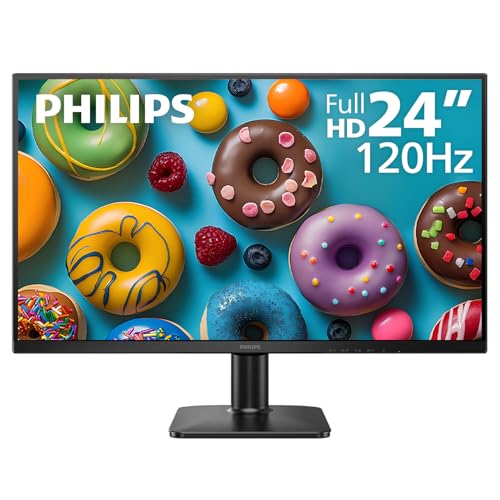
Philips 24 Inch Computer Monitor 24E2N2100

Philips 22 Inch Computer Monitor 22E2N1100

INNOCN 27″ QD-OLED 2780s
More Details On Our Top Picks
The 32-inch size gives you room to spread out without jumping straight into a premium ultrawide format. That matters for home offices that juggle email, browser windows, and a spreadsheet at the same time, and the three-sided borderless frame helps the screen feel less bulky on the desk.
AMD FreeSync, a sync feature that helps the display and graphics card stay aligned, is useful for light gaming and video playback where tearing can be distracting. The trade-off is that this model keeps things simple, so you’re buying size, clean styling, and everyday flexibility more than advanced extras.
Strong Points
- 32 inches gives you generous workspace for multitasking.
- Borderless styling keeps multi-monitor setups looking cleaner.
- FreeSync can smooth out casual gaming motion.
- Game Mode adds a useful preset for mixed use.
- HDMI and DisplayPort give you flexible hookup options.
Things To Consider
- 32 inches can feel large on a shallow desk.
- No built-in speakers are listed, so you’ll need separate audio.
- The simple feature set suits general use more than feature-hungry setups.
Core Details
Who It Suits Best
You’ll like this most if you want a large, tidy monitor for work by day and casual entertainment later.
Where A Sibling Pick Shines
Philips 24 Inch Computer Monitor 24E2N2100 suits tighter desks better, especially for dorm rooms or compact offices.
This Acer keeps the footprint modest, which is exactly why it fits so neatly on a crowded desk or in a student setup. The 21.5-inch Full HD panel gives you a straightforward workspace without swallowing the whole table, and that smaller size can make a laptop-plus-monitor setup feel less cluttered.
Its 100Hz refresh rate and 1ms response time matter most for smoother cursor movement, lighter gaming, and less drag in fast scrolling. The trade-off is simple: you get a compact monitor with useful speed, not a showpiece with extra bells and whistles.
What We Like
- Small size leaves more room for notebooks and accessories.
- 100Hz feels a touch smoother than basic office panels.
- 1ms response time helps with quicker motion handling.
- sRGB 99% is useful for color-aware everyday work.
- HDMI and VGA support older and newer gear.
Room For Improvement
- 21.5 inches can feel tight for heavy multitasking.
- It suits office use better than cinematic viewing.
- VESA mounting helps flexibility, but the smaller panel still feels basic next to the Dell 24 Monitor SE2426H.
Feature Rundown
Who Should Grab It
You’re the right fit for this one if desk space matters more than screen size and you want a neat, everyday monitor.
Look Elsewhere When
Samsung 32″ Flat Computer Monitor LS32B304NWNXGO makes more sense for you if a bigger canvas matters more than a compact footprint.
Speed is the headline here, but the 23.8-inch size keeps it grounded enough for normal desks. That balance works well for you if the screen has to pull double duty for spreadsheets in the morning and games or streams later on.
IPS, short for in-plane switching, usually means more consistent color and viewing angles than older panel types, so you can shift position without the image falling apart. The 144Hz refresh rate and 1ms MPRT make motion look cleaner, though the 24-inch format still leaves less room than the larger Dell 27-inch options.
Highlights
- 144Hz refresh rate suits fast motion and smoother scrolling.
- 1ms MPRT helps keep blur under control.
- IPS viewing angles support shared viewing and off-center seating.
- 23.8 inches fits most desks without feeling cramped.
- TÜV 3-star eye comfort adds a useful comfort cue for long sessions.
Small Caveats
- Single-size workspaces may still prefer a 27-inch screen.
- Two HDMI ports are handy, though cable management still matters on busy desks.
- The faster focus makes sense for mixed use, but not every household needs 144Hz.
Quick Facts
Built With In Mind
You’ll get the most from this if your desk handles both work tasks and casual gaming without much fuss.
Another Choice May Suit
Philips 24 Inch Computer Monitor 24E2N2100 is the safer pick for someone who wants a milder 120Hz setup and a slightly gentler office-first feel.
The built-in speakers and adjustable stand set this Dell apart from the more stripped-back models above. That makes it appealing for a desk that needs a cleaner setup, especially in apartments, shared rooms, or spaces where you’d rather not add another device.
The 27-inch screen gives you breathing room, and the height, tilt, pivot, and swivel adjustments help you match the panel to your posture instead of forcing your posture to match the panel. The honest read is that you’re paying for convenience and flexibility as much as for display speed.
Upsides
- Built-in speakers reduce the need for separate audio gear.
- Height, tilt, pivot, and swivel adjustments are genuinely useful in daily use.
- 27 inches gives you a comfortable work-and-watch surface.
- 144Hz and 1ms support smoother motion.
- AMD FreeSync helps keep motion cleaner in supported content.
Worth Noting
- Built-in speakers are convenient, though separate speakers usually sound fuller.
- The white finish may need a bit more care to stay tidy.
- It makes more sense for desk-centered use than wall-mounted minimal setups.
Feature Card
Right Fit For
You’re in the sweet spot for this model if you want a cleaner desk and don’t want to juggle external speakers.
Swap It Out When
Dell 27 Monitor SE2726H is the better call if you want the same broad 27-inch size with a more understated, speaker-free setup.
This Dell keeps the 27-inch format but stays simpler than the S2725HSM, which makes it easier to place in a clean, no-fuss desk setup. The thin bezels help the screen feel less bulky, and that matters more than people expect once you start pairing it with a laptop or a second display.
IPS gives you steadier color and viewing angles, so the picture doesn’t fall apart when you shift in your chair or share the screen across a desk. The 144Hz refresh rate and 1ms MPRT are a good fit for smooth scrolling and casual gaming, though the feature set is still geared toward practicality rather than extra hardware.
Best Bits
- 27-inch size gives you room without feeling oversized.
- IPS panel keeps color and angles consistent.
- 144Hz is a useful step up for motion clarity.
- Thin bezels help in dual-screen setups.
- AMD FreeSync adds value for supported gaming use.
Points To Note
- It skips built-in speakers, so audio needs a separate solution.
- Large desks benefit most from the 27-inch layout.
- The clean design is practical, not flashy.
Details At A Glance
Made For
You’ll appreciate this most if you want a wide, straightforward monitor for everyday work, streaming, and occasional gaming.
Where A Sibling Pick Shines
Dell 27 Plus Monitor S2725HSM suits you better if you want speakers and a more adjustable stand in the same size class.
Philips lands in that comfortable middle ground where size, speed, and desk fit stay easy to live with. The 24-inch footprint works well for you if your workspace mixes email, documents, and a second window, because it gives room without demanding a deep desk.
The 120Hz panel is a nice step above standard office screens, especially for everyday scrolling and casual video. Adaptive Sync helps the display behave more smoothly with compatible graphics hardware, while the ultra-narrow bezel makes the monitor look less heavy beside another screen.
Positives
- 24-inch size works well for most desks.
- 120Hz adds smoothness to daily use and video.
- IPS panel supports steady color and angles.
- HDMI, VGA, and VESA give you practical setup flexibility.
- Flicker-free and low blue light features support more comfortable long sessions.
Softer Spots
- It’s tuned more for everyday use than high-intensity gaming.
- The plain design is tidy, though not especially distinctive.
- Older VGA connections are useful, but many setups won’t need them anymore.
Core Details
The Right Fit
You’ll get the most value from this monitor if your desk is shared by work, streaming, and routine browsing.
Where Another Pick Fits Better
Dell 24 Monitor SE2426H is the smarter choice for you if gaming motion matters more than everyday office comfort.
This is the neatest pick in the group, and that compact shape makes it easy to fit into a bedroom desk, dorm setup, or small office nook. A 22-inch screen can feel modest, but for basic work and casual viewing it keeps the arrangement tidy and manageable.
The overclocked 120Hz mode and 1ms MPRT are helpful for motion clarity, especially compared with older 60Hz office displays. The trade-off is obvious: you’re getting compact convenience and decent speed, not the roomy feel of the 27-inch Dell models.
Reasons To Buy
- 22-inch footprint leaves plenty of desk space.
- 120Hz overclocking adds a smoother feel for daily use.
- 1ms MPRT helps with sharper motion handling.
- IPS panel supports consistent viewing angles.
- VESA support gives you flexible mounting options.
Areas To Watch
- Smaller size can feel tight for heavier multitasking.
- It’s a practical screen, not a lounge-style display.
- VESA mounting is useful, though the small panel still suits simple layouts best.
Technical Sheet
Whose Shelf It Belongs On
You’ll like this most if you need a small, simple monitor that won’t crowd a limited desk.
Where A Sibling Pick Shines
Philips 24 Inch Computer Monitor 24E2N2100 is the better call for you if you want a little more screen space without going up to 27 inches.
QD-OLED, which pairs quantum dot color enhancement with OLED-style contrast behavior, is the big draw here. That usually means stronger blacks and richer color than the more conventional IPS and LED panels elsewhere in this list, so this model speaks most clearly to gaming-focused setups.
The 280Hz refresh rate and 0.03ms response time are aimed at speed first, while the 2K QHD resolution gives you a sharper canvas than the Full HD models above. The trade-off is that you’re paying for premium motion and image quality, so this makes the most sense when your desk is built around gaming or visually demanding use.
Positives
- QD-OLED panel brings strong contrast and rich color.
- 2K QHD resolution gives you more detail than Full HD.
- 280Hz refresh rate suits fast-paced gaming.
- 0.03ms response time targets very quick motion handling.
- Height and pivot adjustment help with positioning.
Minor Gripes
- It’s a premium monitor, so the feature set is built for enthusiasts.
- Gaming-first tuning makes it less obvious for basic office use.
- The panel’s higher-end finish may call for a little more care during cleaning.
Feature Snapshot
Perfect Match For
You’re the right fit for this monitor if your desk is centered on gaming and you care about speed and image depth.
Skip It When
Dell 27 Monitor SE2726H makes more sense for everyday mixed use, especially if you want something simpler and easier to live with.
How To Choose The Right Led Computer Monitors
Match Screen Size To Your Desk
A monitor should fit your space before it does anything else. A 21.5- or 22-inch screen works well on a shallow desk, while a 27- or 32-inch model gives you more room for side-by-side windows and larger text.
You’ll feel the difference most during long workdays. A screen that’s too big can force you to turn your head more than you want, while one that’s too small makes multitasking feel cramped.
Look Past Resolution Alone
Full HD, which means 1920 x 1080, is still common because it’s easy to drive and comfortable for everyday use. That said, panel type, refresh rate, and response time matter just as much once you start gaming, streaming, or scrolling through long documents.
IPS panels usually give you steadier color and wider viewing angles than older styles. A faster refresh rate, such as 120Hz or 144Hz, often makes motion look smoother, though the real benefit depends on how much fast movement you actually see.
Choose Inputs And Adjustability With Your Setup In Mind
HDMI is the connection most people use first, but VGA still matters for older gear and VESA mounting helps if you want an arm or wall bracket. A monitor with more adjustability, such as tilt, height, or swivel, can save your neck during long sessions.
Built-in speakers sound convenient, though they rarely replace dedicated audio. For a busy desk, that convenience can still be worth it, especially when you want one less device taking up space.
Pay For The Features You’ll Notice
Higher-end panels cost more because they usually improve more than one part of the experience. You’re often paying for better motion handling, stronger color, richer contrast, sturdier stands, or extras like built-in speakers and multiple adjustments.
That upgrade makes the most sense for gaming, creative work, or a desk you use for hours at a time. For email, web work, and spreadsheets, a simpler screen often gives you all the room you need without extra complexity.
Things Worth Knowing First
Common Shopping Slip Ups
A lot of people start with size and stop there. That can lead to a screen that looks good on paper but feels awkward on a small desk, or a fast panel that makes no real difference in a mostly office-based setup.
Connection choices matter too. A monitor with the wrong mix of HDMI, VGA, or VESA support can force extra adapters or limit how you place it on the desk.
The Case For Spending Up
Higher-tier screens usually justify the extra cost through smoother motion, better panel technology, and sturdier stands. In gaming-focused models, faster response times and higher refresh rates can make movement look cleaner and feel more immediate.
That said, spending more only pays off when you’ll notice the gains every day. A premium panel can be worth it for long hours of mixed use, but not every desk needs OLED-level contrast or 280Hz speed.
Closing Thoughts
The best Led Computer Monitors for you come down to space, speed, and how much time you spend looking at the screen. A compact Philips or Acer makes sense for smaller desks, while the Dell and INNOCN models give you more room, more motion smoothness, or more image depth. The Samsung sits nicely in the middle for large-screen everyday use. Pick the one that fits your desk first, then let the features follow.
